


Accessories for MacBook Pro do different jobs, and that’s the point. Some help you move faster on the keyboard, some keep ports clean, and others make a docked setup or travel carry feel less awkward.
You get the most value from matching the accessory to the way you actually use your MacBook, whether that means commuting, editing at a desk, or living out of a bag between meetings. The seven picks below lean practical first, with trade-offs noted where they matter.
Quick Look At Our Shortlist
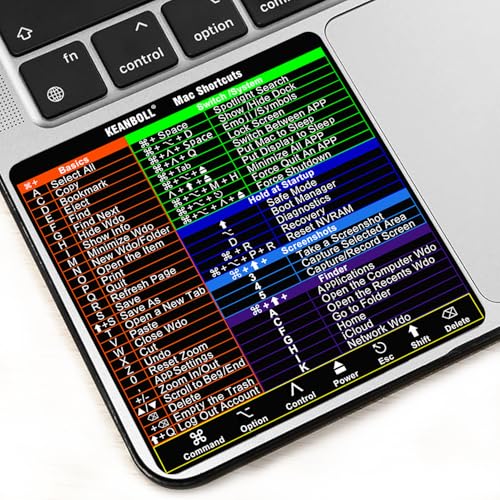
KEANBOLL Shortcuts Sticker 2-Pack

CaseBuy 14 Pack Dust Plug Covers

Soonjet Ultra Thin Keyboard Cover

Anker USB-C Hub 7-in-2 Mac Dock

SEYMAC stock Case for MacBook Pro 16 inch

USB C Hub Adapter 8 in 2 Mac Multiport
More Details On Our Top Picks
Shortcut stickers like this suit anyone still translating old Windows habits into macOS keys. The value is straightforward, you keep the command map on the keyboard instead of stopping to search for every screenshot, app switch, or Finder action.
The 2-pack format helps if you keep one machine at home and one in a bag, or if you want a spare for a second keyboard. The trade-off is obvious, it adds visual clutter, so clean desk setups may prefer a subtler accessory.
Strong Points
- Makes common macOS shortcuts easier to remember.
- Useful for new Mac users and mixed Windows-Mac workflows.
- Two stickers support a backup or second machine.
Things To Consider
- The printed layout changes the keyboard’s look.
- Sticker placement needs a careful hand for a neat finish.
Feature Rundown
Who It Suits Best
You benefit most if you are new to Mac or switch between operating systems and want a faster command reference.
Where A Sibling Pick Shines
Soonjet Ultra Thin Keyboard Cover for MacBook Pro 14 16 & MacBook Air 13 15 suits you better if you want key protection instead of a printed shortcut layer.
Port plugs make more sense for commuters and bag carriers than for desk-only setups. This CaseBuy set is aimed at recent MacBook Pro generations, including 14-inch and 16-inch models from 2021 onward, so it fits the kind of machine that gets moved around a lot.
Silicone is the key material here, which means the pieces stay flexible while adding a barrier against dust and light splashes at the port edge. The flip side is upkeep, because small plugs can be easy to misplace during cleaning or cable swaps.
What We Like
- Silicone construction gives a soft, low-risk fit.
- Covers several common ports in one set.
- Useful for daily bag travel and desk dust control.
- Includes webcam covers for extra privacy control.
Minor Gripes
- Small parts can be fiddly during frequent removal.
- Model matching matters, especially on newer MacBook Pro sizes.
Who Should Grab It
You get the most from this set if your MacBook Pro spends time in backpacks, carry-ons, or shared workspaces.
Look Elsewhere When
KEANBOLL Shortcuts Sticker 2-Pack fits you better if your main problem is learning macOS commands rather than covering ports.
A thin keyboard cover is a quiet, everyday fix for people who want a little extra key protection without turning the keyboard into a thick sleeve. Soonjet’s 0.11 mm profile is the headline here, and that matters because slimmer covers tend to feel less intrusive during long typing sessions.
It’s made for US ANSI layouts across MacBook Pro 14 and 16 inch models, plus MacBook Air 13 and 15 inch versions. The trade-off is fit discipline, since layout mismatches or a bottom case can complicate things, so this is better for owners who already know their exact machine.
Upsides
- Very thin profile keeps the keyboard feel familiar.
- Backlit keys stay visible through the cover.
- Supports several MacBook Pro and Air sizes.
- Useful for light daily protection against dust and crumbs.
Room For Improvement
- US ANSI layout fit makes compatibility checking important.
- Any bottom case can complicate the fit.
- Thin covers still need regular removal for cleaning.
Built With In Mind
You are the right fit for this cover if you type often and want the least noticeable layer between your fingers and the keys.
Swap It Out When
SEYMAC stock Case for MacBook Pro 16 inch suits you better if you need full-shell protection and a built-in stand.
Desk users usually want two things from a hub, fewer dangling adapters and cleaner access to the ports they use most. This Anker dock handles that by stretching a MacBook’s USB-C connection into HDMI, USB-A, SD, microSD, and a second USB-C path in one compact body.
The 4K at 60 Hz HDMI output is the practical anchor for external displays, especially in a home office or sidecar-style setup. The trade-off is that a hub like this makes the most sense when your desk routine is steady, because it’s less about portability and more about turning one laptop into a small command center.
Bright Spots
- Combines several common ports in one hub.
- HDMI output suits external monitor use.
- SD and microSD slots help photographers and editors.
- Compact shape keeps desk clutter down.
- Useful for docking in one fixed setup.
Points To Note
- Hub-style accessories work best in a mostly fixed workspace.
- Heavy port use can leave little room for cable slack.
- Fewer benefits if you rarely connect peripherals.
Details At A Glance
Who Will Love This
You get the most value from this hub if your MacBook often sits at a desk with a monitor, card reader, and older USB gear attached.
Reach For A Different Pick When
USB C Hub Adapter 8 in 2 Mac Multiport suits a broader hybrid setup if you need more varied port coverage across newer and older Macs.
Large MacBook Pro owners who move between coffee shop tables, meeting rooms, and home desks will notice the appeal quickly. This SEYMAC case wraps the 16-inch machine in a hard-shell format, then adds a folding stand and mouse pad area so the case does more than just shield the laptop.
The stand angle can make typing and viewing feel less flat, which helps during long sessions at a cramped table. The catch is compatibility, because this case is built for the 2021 through 2026 16-inch MacBook Pro line only, so model checking matters before anything else.
Positives
- Hard-shell body adds everyday carry protection.
- Fold-out stand improves desk posture and screen angle.
- Built-in mouse pad area adds travel convenience.
- Made for recent 16-inch MacBook Pro models.
Small Caveats
- It fits a narrow model range.
- Hard-shell cases add bulk compared with a bare laptop.
- The folding parts bring a little extra complexity.
Made For
You’re the right fit for this case if your 16-inch MacBook Pro travels often and still needs a workable desk setup at the destination.
Another Choice May Suit
Anker USB-C Hub 7-in-2 Mac Dock suits you better if your priority is desk connectivity rather than all-around shell protection.
This Melelink adapter looks built for the person who hops between newer and older MacBook generations and still needs a decent port spread. The listing calls out HDMI, Thunderbolt, USB-C and USB-A data ports, plus SD and microSD reading, so it covers a lot of the little gaps that MacBooks leave behind.
One useful note is the compatibility range, which stretches from 2018 through 2026 across MacBook Pro and Air sizes. The catch is physical fit, since the product notes that a bottom case can block proper installation, so it suits a clean, bare laptop more than a heavily cased one.
Best Bits
- Wide compatibility across many MacBook years.
- Useful mix of display, data, and card connections.
- Good for users with mixed USB-C and USB-A gear.
- Fits work and travel setups that need flexibility.
Areas To Watch
- A bottom shell can interfere with fit.
- The wider feature set makes it less minimal than a simple adapter.
Core Details
The Right Fit
You benefit most if your desk and travel routine mixes USB-C, older USB-A devices, and memory cards.
Skip It When
Anker USB-C Hub 7-in-2 Mac Dock suits you better if you want a more desk-centered dock with a simpler footprint.
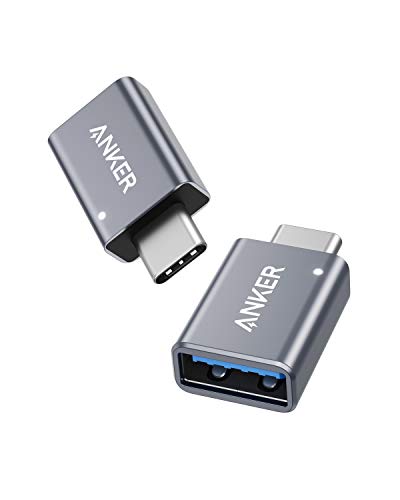
Not every MacBook accessory needs to add a new feature set. This one solves a basic problem cleanly, giving you USB-A access from a USB-C port for drives, mice, printers, phones, and other older gear that still lives in a modern setup.
The aluminum body in Space Gray helps it sit naturally beside a MacBook Pro, and the scratch-resistant finish is a smart touch for a part that gets inserted and removed a lot. The trade-off is obvious, it’s a focused adapter, so anyone needing HDMI or card slots should move up to one of the hub-style picks above.
Highlights
- Two adapters in one pack give you a spare.
- Turns USB-C into USB-A for older accessories.
- Aluminum shell feels better suited to daily carry.
- Simple design keeps use straightforward.
Worth Noting
- It only covers one port type conversion.
- Best suited to USB-A carry rather than full docking.
Whose Shelf It Belongs On
You get the most from this adapter if you still use a mix of USB-A accessories and want a compact carry solution.
Another Choice May Suit
Melelink USB C Hub Adapter 8 in 2 Mac Multiport suits you better if you want a broader dock with display output and card readers.
What Matters Most Before Choosing Accessories For Macbook Pro
Common Shopping Slip Ups
The biggest mistake is matching by MacBook name alone. You still need the exact size, year, and, for hubs or cases, enough clearance for your bottom shell or port layout.
Another common miss is buying a keyboard or port accessory for the wrong workflow. A desk-heavy setup and a bag-first setup ask for very different gear.
Where The Extra Money Goes
Higher-tier accessories usually spend more on tighter fit, better materials, and broader compatibility. That matters most with hubs, hard-shell cases, and keyboard covers where small tolerances change daily use.
Spending up makes sense when the accessory sits in your hand or on your laptop all day. For occasional use, a simpler piece often does the job without adding bulk.
Things Worth Knowing First
Mistakes Worth Dodging
Port covers, stickers, and covers need careful size matching, because a near-fit can still feel annoying in practice. A quick model check saves more hassle than any fancy feature.
The Upgrade Payoff
More expensive MacBook accessories usually buy better construction, more ports, or smarter ergonomics. That extra spend pays off when you commute often, dock daily, or want one accessory to cover several use cases.
Frequently Asked Questions
Do keyboard stickers slow down typing?
They can feel busy at first, especially on clean aluminum decks. After a short adjustment period, many users treat them like a reference sheet built into the keyboard area.
Are port plugs hard to remove?
Soft silicone plugs are usually easy to pull out, but small parts can still be fiddly. They suit people who leave them in place most of the time.
Do thin keyboard covers change the key feel much?
Ultra-thin covers aim to keep the keyboard response close to stock. Thicker covers tend to feel more noticeable and are better left to protection-focused setups.
What matters most in a USB-C hub?
Port mix matters more than raw port count. You want HDMI, card slots, and legacy USB support only if your workflow actually uses them.
Should you choose a case or a hub first?
Choose the one that fixes the bigger daily problem. A case helps with travel and protection, while a hub helps most with desk connectivity.
