


Adjustable Monitor Arms make the most sense when your desk is doing too much. A good mount lifts the screen, clears space for a keyboard or notebook, and lets you fine-tune height and angle without dragging the whole setup around.
This roundup focuses on setups that fit different screens, desk thicknesses, and work habits, from compact single-monitor desks to multi-display stations in a home office or trading setup. You’ll see where each arm earns its keep, and where the trade-offs start to matter.
Quick Look At The Shortlist
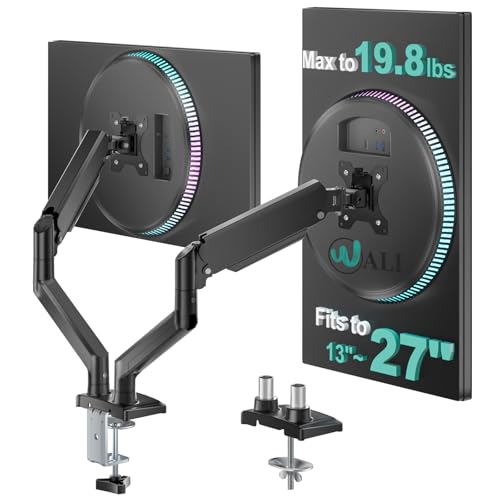
WALI Adjustable Dual Monitor Arm GSMP002
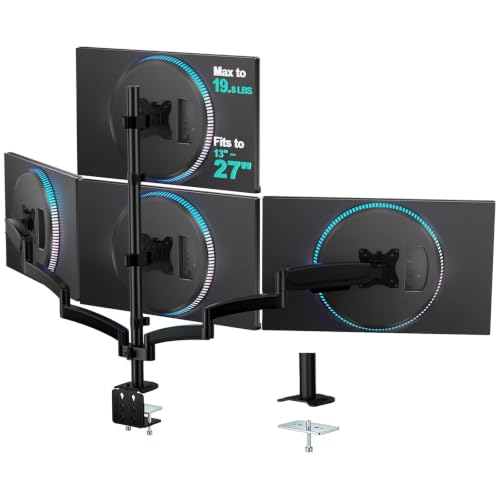
WALI Stacked 4 Monitor Mount GSDM004S

WALI Stacked Triple Monitor Mount GSDM003XL

HUANUO FlowLift™ Pro Monitor Arm

WALI Vertical Dual Monitor Mount

WALI Stacked Triple Monitor Mount 49″ Ultrawides

Acer Single Monitor Mount
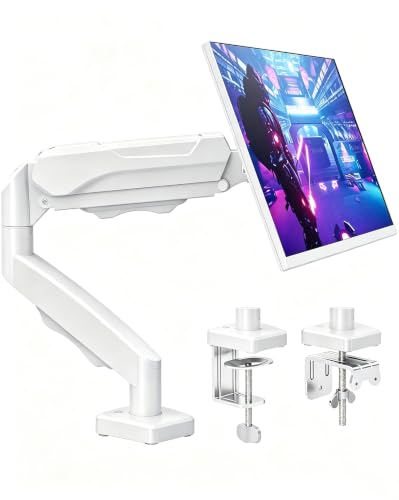
MOUNTUP Single Monitor Desk Mount
More Details On Our Top Picks
This dual-arm WALI setup fits a straightforward home office, especially where you split work between a main screen and a reference display. The C-clamp and grommet base give you two mounting paths, which matters on desks that don’t lend themselves to the same hardware.
The arm supports 13 to 27 inch screens and up to 19.8 lbs per arm, so the sweet spot is a pair of mainstream monitors rather than oversized panels. VESA means the standardized hole pattern on the back of the screen, and the 75 x 75 mm or 100 x 100 mm spacing keeps compatibility simple for common models.
Strong Points
- Dual-arm layout keeps two displays at usable height.
- C-clamp and grommet options suit different desks.
- Full-motion movement helps fine-tune posture at a seated workstation.
- Works well for coding, writing, and office multitasking.
Things To Consider
- Desk thickness still matters, so measuring first avoids frustration.
- Large, heavy panels sit outside the comfortable range.
- Dual-arm cable routing can take a little tidying after setup.
Who It Suits Best
You suit this arm best when you want a stable two-screen desk without moving into a more complex multi-display rig.
A Better Fit Elsewhere
WALI Stacked Triple Monitor Mount GSDM003XL suits analysts or stock-style desks better, since it gives you room for three screens in a vertical layout.
A stacked quad mount like this turns vertical space into desk space, which is useful in a busy trading screen, monitoring setup, or research station. The tall arrangement keeps four displays aligned without spreading them across a wide desk.
Each arm handles up to 19.8 lbs and supports 13 to 27 inch monitors, so this one suits standard panel sizes rather than heavier ultrawides. The honest read is that setup planning matters more here than on a simple single arm, because four screens magnify any desk or alignment issue.
Upsides
- Four-screen stack saves horizontal desk width.
- Useful for monitoring, dashboards, and dense multitasking.
- Standard VESA sizing keeps matching easier.
- Works with both C-clamp and grommet mounting.
- Tall arrangement can open room for papers and peripherals below.
Points To Note
- Four displays make desk depth and weight planning important.
- 27 inch screens sit near the upper size limit.
- Cleaning around four arms takes more effort than a simpler mount.
Who Will Love This
You suit this mount best when vertical stacking matters more than a wide left-to-right layout.
Where Another Pick Suits Better
HUANUO FlowLift™ Pro Monitor Arm fits a single-screen workstation better, especially for a cleaner desk and easier first setup.
Three monitors often hit the practical middle ground, and this WALI mount is built for that exact kind of desk. It handles 13 to 34 inch screens, so you get more flexibility than the quad model above without jumping into ultrawide-only territory.
Each arm supports 19.8 lbs and the mount accepts 75 x 75 mm or 100 x 100 mm VESA patterns, which keeps common office and creator panels in play. That said, the wider 34 inch ceiling means this one makes more sense than the dual-arm GSMP002 for mixed screen sizes.
Bright Spots
- Three-screen format suits editing and data-heavy work.
- Broad size range covers many common monitors.
- Full-motion movement helps line up mismatched screens.
- C-clamp and grommet bases broaden desk compatibility.
Small Caveats
- Three arms add setup time and more cable sorting.
- Desk clearance matters once all three screens are in place.
- Lighter office desks may feel crowded under the load.
The Right Fit
You suit this mount best if you want three screens without moving to a specialty ultrawide arrangement.
Another Choice May Suit
WALI Stacked 4 Monitor Mount GSDM004S suits users who need four narrow lanes of information rather than three broader panels.
The HUANUO FlowLift™ Pro leans toward a cleaner, more modern single-monitor setup, and the tool-free VESA mount helps keep the install less fussy. MechaSpring refers to its spring-based support system, which matters because it shapes how easily the arm holds and repositions the screen.
It fits 13 to 32 inch monitors, and the listed load ceiling reaches 19.8 lbs, so it lands in the same general class as the WALI single and dual picks without trying to be a bulkier desk structure. For a home office or compact studio desk, that balance is useful, though it still depends on your monitor and desk dimensions lining up well.
Highlights
- Tool-free VESA attachment keeps setup simpler.
- Fits a broad range of mainstream screen sizes.
- Tilt, swivel, and rotation support flexible positioning.
- C-clamp and grommet options suit different desks.
Honest Caveats
- Spring tension needs to match the monitor weight closely.
- Desk thickness still affects mounting comfort.
- Single-arm format leaves no room for a second display.
Feature Card
Built With In Mind
You suit this arm best if you want a tidy single-screen desk with simple mounting and adjustable positioning.
Swap It Out When
WALI Adjustable Dual Monitor Arm GSMP002 fits better for dual-display work, especially when spreadsheets and reference material need to stay open together.
This one is built for larger screens, and that changes the conversation fast. Support for 17 to 49 inch curved displays and up to 33 lbs makes it a stronger fit for heavier panels than the lighter WALI single-arm choices earlier in the list.
The vertical dual layout helps you stack two big displays in a compact footprint, which is handy in a home office where desk width is already spoken for. Aluminum construction also points to a more serious build, though heavier hardware usually means a little more care during setup.
Reasons To Buy
- Handles large curved displays with more headroom.
- Vertical layout saves desk width.
- Aluminum build suits heavier workstation use.
- Works well for side-by-side research and production tasks.
Areas To Watch
- Large-screen mounting calls for careful measuring.
- Vertical stacking may feel tall on shallow desks.
- Less suitable for people who want a simple single-monitor arm.
Best Suited To
You suit this mount best if your desk centers around large curved monitors and you want them stacked rather than spread out.
Look Elsewhere When
MOUNTUP Single Monitor Desk Mount fits smaller desks better, especially for a lighter, whiter single-screen arrangement.
Some desk setups need more than standard monitor support, and this WALI mount leans into that higher-demand lane. A top bracket for one 49 inch ultrawide plus two 34 inch screens below gives you a serious amount of display area without moving to separate stands.
The load split, 44 lbs on the top bracket and 22 lbs on each lower bracket, tells you this model is designed around substantial screen mass. That’s useful for advanced workstations, though the trade-off is obvious: you need the right desk, the right screens, and more patience during placement than with the Acer single-arm pick.
Best Bits
- Built for an ultrawide plus two standard monitors.
- High load capacities suit heavier workstation displays.
- Stacked format keeps the footprint organized.
- Good fit for simulation, editing, and monitoring walls.
Room For Improvement
- Setup planning matters more than with smaller arms.
- Desk depth and cable routing deserve extra attention.
- Only makes sense for a very specific screen mix.
Whose Shelf It Belongs On
You suit this mount best if your workstation already revolves around an ultrawide and two auxiliary screens.
A Better Fit Elsewhere
WALI Stacked Triple Monitor Mount GSDM003XL suits users who want three standard monitors rather than a mixed ultrawide setup.
For a typical home desk, this Acer arm is easy to understand and easy to place. It supports 17 to 34 inch screens and 4.4 to 19.8 lbs, so it covers a broad slice of mainstream monitors without pushing you into a heavier dual or triple layout.
The gas spring design helps the arm move with less fuss, and the C-clamp plus grommet base gives you flexibility on how it attaches. Gas spring means the arm uses internal pressure to help counterbalance the screen, which matters when you want smoother height changes throughout the day.
Positives
- Wide screen range suits many common desks.
- Good match for home office or gaming setups.
- Height, tilt, swivel, and rotation give useful control.
- C-clamp and grommet mounting broaden placement options.
Softer Spots
- Single-arm format keeps the setup to one display.
- Weight matching matters for smooth movement.
- Desk clearance still needs a quick check before mounting.
Perfect Match For
You suit this arm best if you want a dependable single-screen desk mount with broad compatibility.
Reach For A Different Pick When
WALI Adjustable Dual Monitor Arm GSMP002 fits better for side-by-side work, especially when you need two screens at once.
The white finish makes this MOUNTUP arm feel more at home on lighter desks or in rooms where black hardware would look heavy. It holds screens up to 32 inch and supports 4.4 to 17.6 lbs, so it fits the more moderate side of single-monitor setups.
That lower weight ceiling makes it a practical match for a slim office display or a smaller gaming panel, not a bulky workstation screen. The included clamp and grommet base keep installation options flexible, though the arm’s benefit shows up most clearly in tidy, modest-sized desks rather than crowded command centers.
What We Like
- White finish suits lighter workspaces.
- Height adjustability helps reclaim desk surface.
- Clamp and grommet mounting cover common desks.
- Full-motion movement supports daily screen tweaks.
Minor Gripes
- Lower load ceiling narrows monitor choices.
- Single-screen format keeps it from growing with a multi-monitor plan.
- White hardware may show dust sooner than darker finishes.
The Right Fit
You suit this mount best if your desk is compact and you want a lighter visual footprint.
Where A Sibling Pick Shines
HUANUO FlowLift™ Pro Monitor Arm suits you better when tool-free mounting and a more premium-feeling single-arm setup matter.
What Matters Most Before Choosing Adjustable Monitor Arms
Screen Size And Load Limit
Match the arm to both the monitor diagonal and the weight range on the product page. A 34 inch panel can still be a poor fit if the arm was built for smaller, lighter screens.
Desk Mounting And Space
C-clamp and grommet mounting solve different desk layouts, and desk thickness changes the equation fast. Narrow desks also make arm reach and rear clearance more important than most shoppers expect.
Single, Dual, Or Multi-Screen Layout
One display keeps setup simple, two screens suit everyday multitasking, and three or four screens make sense for dense workflows. The right layout depends less on style and more on how many windows you keep open all day.
A Quick Reality Check
Common Shopping Slip Ups
Measured weight and VESA spacing matter more than finish or brand name. Desk depth, edge thickness, and cable room can decide whether the arm feels tidy or cramped.
The Upgrade Payoff
Higher-tier arms usually spend more on stronger materials, broader reach, and smoother adjustments. That matters most for heavier monitors or workstations that get reconfigured often.
Frequently Asked Questions
What VESA size should you check first?
Start with the hole pattern on the back of your monitor, usually 75 x 75 mm or 100 x 100 mm on these picks. That fit comes before style or arm count.
Do gas spring arms need special care?
They mainly need proper balancing for the monitor weight listed by the maker. Once mounted correctly, they usually just need occasional tightening and dusting.
Is a dual arm better than two single arms?
A dual arm often keeps the desk cleaner and lines up both screens more neatly. Two separate arms can work better when you want more spacing or different heights.
Can a heavy ultrawide use the same arm as a standard monitor?
Only the models built for the bigger load range make sense there. A standard single arm usually suits mainstream panels, not large ultrawides.
Why do clamp and grommet mounts both matter?
They let you match the arm to the desk you already have. A clamp works well on many edges, while a grommet mount uses a drilled opening for a cleaner anchor.
