


Adjustable monitor stands help you set screen height, tame desk clutter, and keep a more natural posture during long work sessions. That matters in a home office, a shared workspace, or a setup that shifts from laptop work to a full monitor rig.
The right pick depends on weight, VESA support, desk style, and how much movement you want. Some models lift a screen with a gas or spring arm, while others act as a simple riser with extra storage underneath.
Quick Look At Our Top Picks

HUANUO FlowLift™ Pro Monitor Arm 13–32″ Screens

HUANUO Freestanding VESA Mount 13 to 34 Inch Screens

OPNICE Adjustable Monitor Stand Riser for Desk Black

Single VESA Monitor Stand 24-27″ Screen Weight 7.7-11 lb
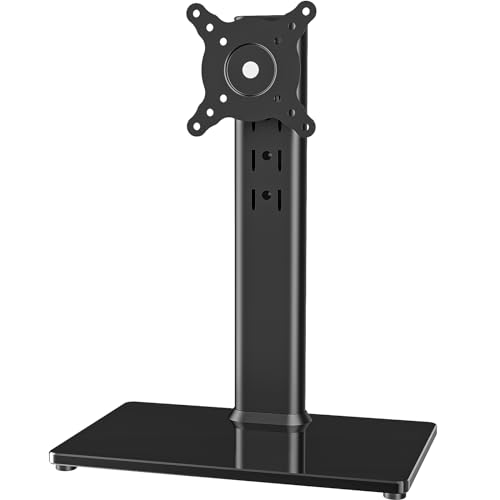
Single LCD Computer Monitor Free-Standing Desk Stand Riser HT05B-001

WALI Computer Monitor Stand for Desk Adjustable Laptop Riser

BoYata Monitor Stand Adjustable Height Metal Desktop Riser

WALI Computer Monitor Stand for Desk Adjustable Laptop Riser
More Details On Our Top Picks
This arm makes the most sense on a desk where screen height changes with the day. The clamp or grommet base gives you two mounting paths, and the tool-free VESA attachment keeps the setup cleaner than a pile of loose hardware.
Compatibility is the main filter here: 13 to 32 inch screens, VESA 75 x 75 mm or 100 x 100 mm, and a weight range that depends on flat or curved panels. That tighter fit is a strength for stable positioning, though it also means oversized monitors and very light panels fall outside the safe zone.
Strong Points
- Tilt, swivel, and rotation give you a wider range of screen angles.
- Tool-free VESA mounting saves time during setup.
- C-Clamp and grommet options suit different desks.
- MechaSpring support works well for frequent height changes.
Things To Consider
- Desk thickness still matters, so measuring first avoids headaches.
- Flat and curved screens have different weight limits.
- It fits a narrower screen range than a simple riser.
Feature Snapshot
Who It Suits Best
Desk users who want a movable single-screen setup with tidy cable routing will get the most from this arm.
Where A Sibling Pick Shines
BoYata Monitor Stand, Adjustable Height Metal Desktop Riser, Black suits anyone who wants a simpler, non-clamped base with less mounting fuss.
Freestanding support changes the feel of a monitor setup right away, especially on desks where clamps are a poor fit. This HUANUO model uses a tall 17.24 inch column, so you get more vertical reach than a low-profile riser.
The trade-off is footprint, because a stand like this takes up more of the desktop than a clamp arm. For heavier displays, though, that extra base can feel steadier, and the 360 degree rotation plus five height positions give you practical range without wall mounting.
Highlights
- Supports 13 to 34 inch screens, which is a broad span for one stand.
- Holds up to 44 lbs, useful for larger panels.
- Five height settings help you match eye level more closely.
- 360 degree rotation adds flexibility for shared desks.
Points To Note
- The base occupies desk space, so it suits wider work surfaces better.
- VESA 75 x 75 mm and 100 x 100 mm remain mandatory.
- Heavy glass-top desks or narrow corners may feel cramped.
Made For
You’ll appreciate this most in a home office where clamp hardware is awkward or impossible to use.
Another Choice May Suit
HUANUO FlowLift™ Pro Monitor Arm 13–32″ Screens is the better match for a cleaner clamp-mounted setup and more arm-like movement.
This one leans more toward desk organization than mechanical movement, and that’s exactly why it fits a tidy workspace. The wooden top gives it a warmer look than the steel-heavy options above, while the four height settings keep the screen from sitting too low.
For laptop-plus-monitor setups, the extra surface helps keep gear together without swallowing the whole desk. The honest trade-off is that it does less than an arm or VESA mount, so you’re buying a riser with style and order, not full articulation.
Upsides
- Four height levels make eye-line adjustment straightforward.
- Wood top adds a cleaner visual finish.
- Works for both monitors and laptops.
- Helps clear space underneath for notebooks or accessories.
Room For Improvement
- It won’t swivel or rotate like the arm-style picks.
- The look matters here, so cleaning fingerprints and dust becomes part of upkeep.
Best Suited To
Home-office setups that need a modest lift and a neater desktop will get the most from this stand.
Look Elsewhere When
Cadcreo Single VESA Monitor Stand 24-27″ Screen Weight 7.7-11 lb is the stronger match for anyone who wants full tilt and height control for one fixed monitor.
Cadcreo keeps this stand focused on a very specific screen class, and that narrow target can be a strength. A one-hand adjustment path is useful on shared desks, where you may want to change height without fussing with both sides of the mount.
The spring-style movement and tilt range suit a 24 to 27 inch monitor that sits in the 7.7 to 11 pound band. That narrower fit means less guesswork for the right screen, but it also rules out lighter panels and anything outside the stated weight window.
Best Bits
- One-hand height changes keep adjustments simple.
- Tilt and swivel help you fine-tune viewing angles.
- Built around common 24 to 27 inch displays.
- VESA 75 x 75 mm and 100 x 100 mm support broadens compatibility.
Small Caveats
- The weight range is tight, so compatibility checks matter.
- It is a single-monitor solution only.
Core Details
Who Should Grab It
Office setups with a single mid-size monitor and frequent screen-angle tweaks are the best match.
Swap It Out When
HUANUO Monitor Stand, Freestanding VESA Mount for 13 to 34 Inch Screens works better for larger displays or for desks that need a freestanding base instead of a spring arm.
Hemudu aims this stand at people who want a freestanding riser with serious load capacity. The wide screen span and 77 pound support figure make it feel more like a desk anchor than a light accessory, which helps in busier setups.
Compared with the lighter OPNICE riser, this one is less about style and more about holding a single display with confidence. The trade-off is bulk, and that matters on narrow desks where a large base can crowd out notebooks or a keyboard tray.
Positives
- High load capacity suits heavier monitors.
- Freestanding layout avoids clamp installation.
- Swivel, height, and rotation add useful movement.
- Works for a broad 13 to 32 inch range.
Worth Noting
- The base footprint can feel large on compact desks.
- Cleaning around the stand is easier when cables stay bundled.
- Because it supports so much weight, screen matching still matters.
Whose Shelf It Belongs On
People running a single heavier display on a sturdy desk will get the most out of this base.
Reach For A Different Pick When
WALI Computer Monitor Stand for Desk Adjustable Laptop Riser fits better for a smaller footprint and a simpler shelf-style lift.
This WALI stand is the sort of shelf that quietly earns desk space instead of demanding it. The 14.6 by 9.3 inch plastic shelf is roomy enough for many monitors, laptops, or printers, and the under-desk storage use case is a nice bonus in a cramped office.
The three height settings make it easy to raise a screen without any clamp hardware, which suits shared desks and school tables. Plastic construction keeps the weight down, though it also means the finish feels less substantial than the metal shelf on the later WALI model.
Bright Spots
- Large shelf space supports more than just monitors.
- Three height settings keep setup straightforward.
- Rubber pads help protect the work surface.
- Useful under-desk storage helps reduce clutter.
Areas To Watch
- Plastic construction is lighter, but less premium in feel.
- It is a shelf, so you won’t get swivel or tilt movement.
Details At A Glance
Right Fit For
School desks, basic offices, and anyone who wants a wide riser with storage underneath will appreciate this setup.
Where A Sibling Pick Shines
B0G4QG6C59 from OPNICE suits you better when the desk look matters as much as the lift height.
BoYata keeps the formula plain: a metal desktop riser with adjustable height and a twist knob for fine control. That simplicity is a virtue on a clean desk, because you get lift without clamp arms, VESA plates, or extra swing hardware.
For daily laptop or monitor use, the appeal is in how quietly it fits into the setup. The obvious trade-off is that you are not getting angle changes or motion, so this suits people who want a stable raised platform more than a moving mount.
Standout Traits
- Metal build feels well suited to long-term desk use.
- Twist-knob height adjustment gives you precise control.
- Low-complexity design means less to fuss over.
- Works neatly for compact workstations.
Softer Spots
- No swivel or tilt for angle changes.
- It rewards a setup that stays fairly fixed.
The Right Fit
Minimal home offices and laptop users who want steady elevation without extra parts will feel at home here.
Skip It When
HUANUO FlowLift™ Pro Monitor Arm 13–32″ Screens is the stronger choice for anyone who needs movement, reach, and clamp-mounted flexibility.
This version of the WALI shelf keeps the formula close to the metal model, but the material swap changes the feel. The 14.6 by 9.3 inch metal shelf is the obvious draw, especially for a monitor or printer that needs a sturdy perch more than a moving arm.
The three height positions are enough for most desk chairs and laptop lids, and the rubber pads help protect the surface beneath. The honest read is that it’s not flashy, yet that plain approach suits offices that want dependable lift and less clutter.
Highlights
- Metal shelf feels more solid than the plastic version.
- Works for monitors, laptops, and printers.
- Three height settings cover basic ergonomic needs.
- Rubber pads help the stand stay put.
Minor Gripes
- No swivel or rotation.
- Its value comes from simplicity, so feature seekers may want more motion.
Built With In Mind
Shared desks and home offices that need a sturdy lift with a cleaner metal finish are the best match.
Another Choice May Suit
WALI Computer Monitor Stand for Desk Adjustable Laptop Riser, up to 44 lbs, fits better for you if you prefer the plastic shelf and want a lighter visual profile.
What Matters Before You Choose Adjustable Monitor Stands
Screen Fit Comes First
Start with weight, VESA pattern, and screen size before anything else. A stand that looks right can still be wrong for a curved panel, a heavier display, or a mount hole pattern that misses the mark.
Desk Space Changes The Answer
Clamp arms free up surface area, while freestanding bases and risers occupy more desktop room. Narrow desks usually favor an arm, while wide work surfaces can handle a larger base without feeling crowded.
Motion Versus Simplicity
Arms give you tilt, swivel, and rotation, which helps in shared desks or multi-tasking setups. A riser is simpler and often cleaner to live with, especially for people who keep a screen in one position most of the day.
A Quick Reality Check
Where Shoppers Go Wrong
Many setups fail because the monitor is too heavy, the VESA holes do not line up, or the desk thickness is ignored. Measure first and you avoid most of the frustration.
The Upgrade Payoff
Higher-tier models usually spend more on stronger joints, smoother height changes, and steadier bases. That extra cost makes sense for heavy screens, frequent adjustments, or desks that need cleaner cable and arm management.
Frequently Asked Questions
What size monitor fits most adjustable monitor stands?
Many models in this roundup cover 13 to 32 inches, while some freestanding options extend to 34 inches. The exact weight limit and VESA pattern still matter more than size alone.
Do you need VESA mounting holes?
Arm-style and most VESA stands require the rear mounting pattern to match. Simple risers do not need that hole layout because the screen sits on top instead of attaching to a plate.
Is a clamp mount better than a freestanding base?
A clamp mount saves desk space and feels cleaner on crowded surfaces. A freestanding base avoids desk-edge hardware and suits glass tops or tables that should not be clamped.
What is the main benefit of a monitor riser?
A riser lifts the screen and often creates storage space underneath. That works well for notebooks, a keyboard, or a dock in a compact office.
How do you choose the right height?
Your eyes should meet the upper area of the screen without forcing your neck upward. Models with multiple height steps or adjustable arms make that easier to dial in.
