


Long typing sessions reward a keyboard that keeps your hands in a more natural line. Adjustable split layouts matter because you can open the halves, change the tilt, and reduce the cramped feel that straight boards create on a desk.
That makes this roundup useful for commuters who dock at home, office users at a fixed workstation, and anyone who spends hours writing, coding, or gaming. You’ll see wired, wireless, mechanical, and low-profile options, so you can match the board to how you actually work.
Quick Look At The Shortlist
Cloud Nine C989M Ergonomic Mechanical Keyboard for PC

Nulea Ergonomic Split Keyboard Wired with Wrist Rest
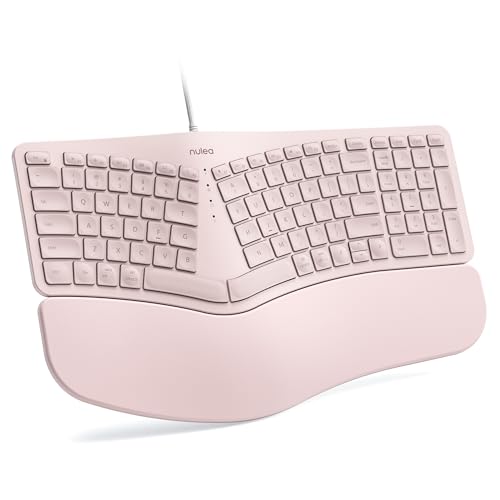
Nulea RT05C Wired Ergonomic Keyboard

Nulea Ergonomic Split Keyboard Wireless Cushioned Wrist Rest Rechargeable
Cloud Nine ErgoTKL Ergonomic Tenkeyless Mechanical Keyboard for PC
Perixx PERIBOARD-624B US Wireless Ergonomic Split Keyboard

Perixx PERIBOARD-524B US Wired Ergonomic Split Keyboard
More Details On Our Top Picks
The C989M leans hard into desktop typing comfort with a split mechanical layout and tactile brown switches, a style many long-session typists prefer because the keypress has clear feedback without the sharp snap of louder switch types. RGB backlighting and macro support round out the package, so you get a more workbench-like feel than the simpler office boards below.
That mechanical character helps most in a busy home office or a PC setup where typing speed matters and the keyboard stays put. The trade-off is plain enough, mechanical boards usually take up more desk space and can feel less understated than a low-profile membrane option.
Strong Points
- Tactile switches give you defined keystroke feedback.
- Split ergonomics help spread your hands more naturally.
- Macro support suits shortcuts, gaming, and repetitive work.
- RGB lighting makes low-light typing easier to see.
Things To Consider
- Mechanical styling takes more desk space than compact boards.
- The sharper key feel may not suit quiet shared rooms.
Feature Snapshot
Who It Suits Best
PC users who want mechanical feedback, split positioning, and shortcut-friendly controls will get the most from it.
Where A Sibling Pick Shines
Cloud Nine ErgoTKL suits you better if you want a similar mechanical feel in a smaller tenkeyless footprint.
This wired Nulea keeps the pitch simple, split layout, wrist rest, and USB-C connection, which makes it appealing for a fixed desk where you want comfort without extra setup layers. The oversized wrist support should suit heavy spreadsheet work or writing days, since your hands stay planted instead of floating over a hard front edge.
Compared with the Cloud Nine models, this one looks less focused on mechanical flair and more on all-day comfort. The honest read is that plain wired convenience can be a strength, especially in offices where charging another device feels like one task too many.
What We Like
- Split design supports a more natural hand angle.
- Wrist rest adds comfort for long desk sessions.
- USB-C keeps the connection straightforward.
- Wired operation avoids battery management.
Minor Gripes
- The wired setup limits placement freedom on a crowded desk.
- It gives you comfort first, not flashy extras.
Who Will Love This
Office workers and home typists who want a comfortable, no-nonsense board will fit this model well.
Another Choice May Suit
Nulea Ergonomic Split Keyboard Wireless Cushioned Wrist Rest Rechargeable suits you better if your desk needs a cord-free setup.
The RT05C feels like the utility-minded sibling in this group, thanks to its cushioned wrist rest and adjustable tilt legs. Tilt means the keyboard can angle upward or downward to suit your wrists, which matters on a desk where posture changes through the day.
Plug-and-play USB makes it easy for Windows or Mac setups that need a quick swap without driver drama. Compared with the more feature-heavy Cloud Nine C989M, this Nulea keeps the focus on comfort and easy installation, though its pink finish may be more style-specific than neutral-office friendly.
Upsides
- Adjustable tilt legs help tune wrist angle.
- Cushioned wrist support softens long typing stretches.
- Plug-and-play setup keeps installation simple.
- Windows and Mac compatibility broadens desk use.
Points To Note
- The pink color narrows the decor match.
- Wired connection keeps it tied to the desk.
Core Details
Built With In Mind
Desk workers who want quick setup and posture adjustment will get the clearest payoff here.
Look Elsewhere When
Cloud Nine ErgoTKL fits you better if you want mechanical switches and a more performance-focused feel.
Wireless split keyboards make more sense than they first sound, especially on a desk that also handles a laptop stand, note pad, or second screen. This Nulea adds a cushioned wrist rest and rechargeable power, so the layout aims for cleaner surfaces without giving up a comfort anchor.
That freedom matters most in compact offices or shared workspaces where cords get in the way. The trade-off is the usual wireless reality, you’ll want to keep an eye on charging habits, and the keyboard’s strengths are more about convenience than mechanical tactility.
Bright Spots
- Wireless setup keeps the desk less cluttered.
- Rechargeable power reduces routine battery swapping.
- Cushioned wrist support helps during long work blocks.
- Split design supports a more relaxed typing stance.
Areas To Watch
- Wireless use adds one more thing to charge.
- Comfort leads the design, not mechanical key feel.
Right Fit For
Minimalist desks and portable work corners suit this model best.
Swap It Out When
Perixx PERIBOARD-624B US fits you better if you want longer wireless separation across a room-like setup.
The ErgoTKL trims away the number pad, so your mouse can sit closer and your shoulders don’t need to reach as far across the desk. Cloud Nine also builds in 7-degree palm support, meaning the board arrives with a fixed inward angle that feels more thought through than a flat rectangle.
That combination suits people who spend hours in spreadsheets, code, or editing work and want a cleaner desktop footprint. The downside is obvious enough, tenkeyless layouts demand that you give up the numpad, and some bookkeeping-heavy workflows still rely on one.
Standout Traits
- Tenkeyless shape frees desk space for the mouse.
- Built-in palm support reduces the need for add-ons.
- Mechanical Kailh Brown switches give steady feedback.
- Split layout helps with shoulder alignment.
Softer Spots
- No numpad means extra steps for number-heavy tasks.
- Mechanical styling may feel larger than compact office boards.
Details At A Glance
Perfect Match For
Power typists and desk workers with limited space will get the most from this model.
Reach For A Different Pick When
Cloud Nine C989M makes more sense if you want a full-size mechanical board with macro support.
Perixx takes the freedom angle seriously here, because the halves can work at a much wider separation than the wired boards in this list. That matters in larger desks or roomier setups where you want the keyboard spread out, with adjustable tilt and low-profile membrane keys keeping the profile calmer than a loud mechanical board.
In day-to-day use, this setup suits people who value placement flexibility more than key-switch character. One thing worth considering, though, is that wireless distance sounds great until a cluttered office forces you to think about receiver placement and desk organization.
Highlights
- Wireless separation gives you more layout freedom.
- Adjustable tilt helps tune hand position.
- Low-profile keys keep finger travel modest.
- Black finish blends into most office desks.
Small Caveats
- Wireless placement takes a little planning.
- Membrane keys feel softer than mechanical switches.
Feature Rundown
Whose Shelf It Belongs On
People who want a wireless split board with flexible spacing and a restrained key feel will like this one most.
Skip It When
Perixx PERIBOARD-524B US is the better wired choice if you want a similar shape without charging concerns.
The PERIBOARD-524B sits on the simpler end of the split-keyboard range, with a wired connection, adjustable tilt, and a compact TKL shape that keeps the desk footprint under control. Perixx also notes a firmware update aimed at fixing phantom keys and repeating letters, which matters because input reliability is the quiet thing that makes a keyboard pleasant to live with.
For home offices and shared spaces, that combination can be a sensible middle ground. The key feel is low-profile membrane, so you get a softer touch than Cloud Nine’s mechanical boards, but you also give up the sharper feedback that some typists prefer.
Positives
- Compact TKL shape saves desk room.
- Adjustable tilt helps you set a comfortable angle.
- Firmware update addresses common key-repeat complaints.
- Wired operation keeps the setup simple.
Worth Noting
- Membrane keys feel softer than mechanical switches.
- Wired placement still depends on cable reach.
The Right Fit
Desk users who want a compact split keyboard with a straightforward connection will get solid value here.
Where Another Pick Fits Better
Nulea RT05C suits you better if cushioned wrist support matters more than firmware-focused refinement.
What Matters Most Before Choosing Adjustable Split Keyboards
Common Shopping Slip Ups
Many shoppers fixate on the split gap and ignore the key switch type, wrist support, or tilt range. A wide separation helps only when your desk layout and shoulder width suit it.
The Upgrade Payoff
Higher-tier boards usually cost more because they add mechanical switches, stronger palm support, wireless flexibility, or firmware fixes. That upgrade pays off when you type for hours a day and want fewer compromises in comfort or desk layout.
Things Worth Knowing First
Wrong Turns To Avoid
Don’t choose a board only for looks, since a pink finish, RGB lighting, or a compact frame can hide real trade-offs. Also pay attention to whether the keyboard is wired or wireless, because that affects placement and maintenance.
Where The Extra Money Goes
Premium models tend to spend their budget on better switch feel, built-in support, and more adjustable spacing. That makes sense for heavy typists, editors, or coders who sit at the same desk for long stretches.
Frequently Asked Questions
Do adjustable split keyboards really change comfort?
They can, because the halves let your hands sit farther apart than a standard board. The gain is most noticeable during long desk sessions.
Is a wired split keyboard better than wireless?
Wired models are simpler and never need charging. Wireless models give you more placement freedom.
Do mechanical switches matter on a split keyboard?
They matter most when you want tactile feedback and a firmer key feel. Low-profile membrane keys are quieter and usually softer.
What should you check before choosing one?
Check separation, tilt adjustment, wrist support, and whether the layout matches your desk space. Those details shape daily use more than marketing language does.
Who benefits most from this keyboard style?
People who type for hours, use a fixed workstation, or want a more open hand position tend to benefit most. The format also suits setup-conscious offices that need a cleaner typing area.
