


Affordable desktops still make sense when you want a steady work machine without paying for laptop portability you do not need. The list below focuses on compact towers and all-in-ones that fit home offices, school work, streaming, and light multitasking. You will also see the trade-offs clearly, because lower cost usually means older processors, mixed storage, or a tighter upgrade path.
Quick Look At The Shortlist
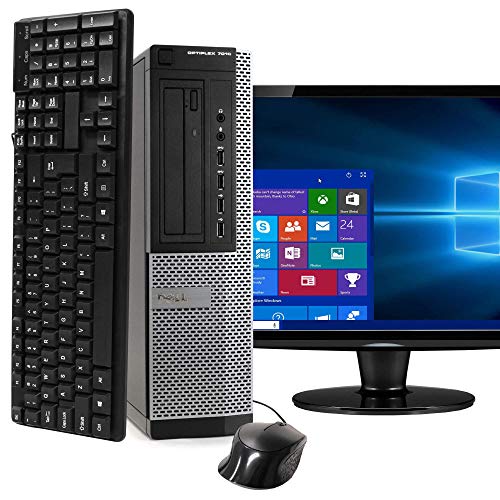
Dell Optiplex 7010 Desktop Package

Dell Optiplex 7050 SFF Desktop PC

Dell OptiPlex 5060 Desktop Computer

HP Elite Desktop Computer PC 22-Inch Monitor

Dell Optiplex 3050 SFF Desktop Computer PC

Dell OptiPlex 7050 Desktop Computer PC

HP ProDesk 600 G3 SFF Desktop Computer
Lenovo IdeaCentre All-in-One Desktop Computer
More Details On Our Top Picks
The bundled Dell Optiplex 7010 keeps things simple: tower, 19-inch LCD, keyboard, mouse, WiFi, and DVD support in one package. For a dorm room, a spare room office, or a basic family station, that takes a lot of setup friction out of the picture.
The i5 processor and 8GB of memory are aimed at browsing, documents, and light multitasking rather than heavy creative work. Compared with the stronger picks later in this list, the trade-off is clear, but so is the value of getting the whole desk built in one go.
Strong Points
- Complete bundle saves you from sourcing a monitor and peripherals separately.
- 19-inch display makes the setup usable right away in a small room.
- DVD support still helps for older discs and install media.
- 8GB RAM and WiFi cover routine household and office tasks.
Things To Consider
- 500GB HDD means slower file access than the SSD-based picks in this list.
- The compact office-class hardware feels dated next to the i7 and 32GB options.
- That included monitor is smaller than the 21.5-inch and 24-inch bundles here.
Who It Suits Best
Budget-focused households that want a complete desktop setup with minimal extra shopping will get the most from it.
A Better Fit Elsewhere
HP ProDesk 600 G3 SFF Desktop Computer is a stronger match for you if a newer monitor bundle and a tidier desk setup matter more.
Plenty of small desktops keep costs down by trimming memory or storage, but this 7050 goes the other way. With 32GB DDR4 and a 1TB SSD, it’s built for heavier tab counts, larger files, and fast app loading in a busy home office.
The i7-7700 and dual-monitor support give it a practical edge for spreadsheet work, admin tasks, or a desk where two screens save time. The honest read is that it costs that headroom with an older processor platform, yet the storage and memory still make it feel roomy.
Highlights
- 32GB memory gives you breathing room for many open apps.
- 1TB SSD offers fast startup and generous local storage.
- Dual-monitor support suits workspaces built around multitasking.
- Built-in WiFi and Bluetooth reduce cable clutter on the desk.
Worth Noting
- The stronger specs do not erase that this is still a renewed office PC.
- Small-form-factor layouts can be less forgiving for internal upgrades.
Feature Rundown
Who Will Love This
You get the most from this one in a home office, small business desk, or multi-window workflow that needs extra memory.
Look Elsewhere When
Dell OptiPlex 5060 Desktop Computer is the better match for a shopper who wants a blend of SSD speed and a second drive for storage breathing room.
This 5060 sits in the middle of the pack in a useful way, because it mixes a 500GB SSD with a 1TB hard drive. That split matters for you if quick boot times matter, but so does keeping plenty of room for documents, media, or project folders.
The six-core i5-8500 and 16GB of DDR4 memory make it more comfortable for busy home-office use than the basic 7010 bundle. Compared with the 7050 SFF above, it gives up some raw memory, yet the added hard drive makes storage management easier for everyday life.
What We Like
- SSD plus hard drive gives speed and storage in one package.
- Six-core processor handles ordinary multitasking without feeling barebones.
- WiFi and Bluetooth keep setup simple in a mixed-device desk.
Minor Gripes
- Hard-disk storage is slower than an all-SSD setup for large file moves.
- It does not include a monitor, so you need your own display.
- The storage split is sensible, but it still trails newer all-SSD options in the list.
Feature Snapshot
Made For
You’ll appreciate it most in a home office that needs both fast launch times and plenty of storage without moving to a much pricier tower.
A Better Fit Elsewhere
Dell Optiplex 7050 SFF Desktop PC suits you better if memory-heavy multitasking matters more than a mixed-storage layout.
Bundles like this make a real difference for a first desktop, because the monitor, keyboard, mouse, and speaker are already included. You are not piecing together a desk from scratch, and that matters in a home office or family room where convenience usually wins.
The 1TB hard drive gives you roomy storage, while the Intel Core i5 and 16GB memory keep daily tasks in comfortable territory. The RGB speaker adds style more than substance, so the honest read is that the value here comes from the full setup rather than flashy extras.
Upsides
- Monitor included, so the desktop can go straight to work.
- Keyboard and mouse round out the package cleanly.
- 16GB memory fits common office and school multitasking.
- 1TB hard drive leaves room for documents and media.
Areas To Watch
- Hard-drive storage is slower than the SSD-based picks here.
- The included speaker is more of a convenience add-on than a core draw.
- A full bundle takes more desk space than a compact tower alone.
Core Details
Right Fit For
You get the most from this bundle in a straightforward home office where you want one shipment to cover the core desk setup.
Swap It Out When
Lenovo IdeaCentre All-in-One Desktop Computer works better for a shopper who prefers a cleaner single-unit setup with a larger display.
The 3050 stands out for one simple reason: it keeps the footprint small without stripping away the basics. For a cramped desk, a student corner, or a shared workspace, that small-form-factor case is a useful way to reclaim room.
Its 16GB of memory and 256GB SSD make it feel brisk for everyday work, and the DisplayPort plus HDMI outputs give you display flexibility. Compared with the 7010 package, you give up the bundled monitor and extras, but you gain a cleaner tower that should fit under or beside a desk more easily.
Best Bits
- Small chassis fits neatly into narrow desk spaces.
- SSD storage keeps startup and file access responsive.
- DisplayPort and HDMI help with monitor compatibility.
- WiFi support makes placement less restrictive.
Points To Note
- 256GB storage is fine for everyday use, but it fills sooner than the larger drives here.
- No bundled monitor means you need your own screen and cables.
Who Should Grab It
This suits you well when desk space is tight and your daily workload stays centered on browsing, documents, and light admin work.
Where A Sibling Pick Shines
Dell OptiPlex 7050 Desktop Computer PC is the stronger fit for users who want a slightly newer storage setup with built-in WiFi and Bluetooth.
This 7050 leans into the convenience side of desktop ownership. Built-in WiFi and Bluetooth mean fewer adapters hanging off the rear panel, which is handy in a shared office or a living-room workspace where cable clutter gets old fast.
The 512GB SSD is a sensible middle ground for you, faster than a hard drive and big enough for everyday files without feeling cramped immediately. Compared with the 3050 above, it gives you more storage breathing room, though the monitorless setup still expects you to supply your own display.
Positives
- WiFi and Bluetooth are built in for cleaner setup.
- 512GB SSD keeps loading times brisk.
- 16GB RAM suits browsing, office apps, and streaming.
- Compact tower format leaves the desk uncluttered.
Softer Spots
- It does not include a monitor, so there is one more piece to source.
- The i5-7500 platform is capable, but it is not the newest hardware in the group.
At A Glance
The Right Fit
You’ll like this best in a compact office setup where a tidy wireless desktop matters more than an all-in-one bundle.
Another Choice May Suit
HP ProDesk 600 G3 SFF Desktop Computer is the better match for a shopper who wants a monitor included from the start.
For a setup that feels ready the moment you unpack it, this HP bundle does a lot of the heavy lifting. The 21.5-inch FHD monitor, keyboard, mouse, WiFi, Bluetooth, and DisplayPort all come together in a way that suits a spare room office or a student desk.
The 256GB SSD helps the machine stay snappy for common work, while 16GB of memory keeps the experience from feeling stripped down. It’s not the largest storage option here, so you should treat it as a working desktop rather than a file vault.
Bright Spots
- Monitor included, which saves setup time and extra shopping.
- 21.5-inch Full HD screen gives more room than the smaller bundle above.
- SSD storage keeps daily use more responsive than a hard drive.
- Keyboard and mouse make the package desk-ready.
Small Caveats
- 256GB storage fills faster than the 512GB and 1TB options here.
- The small-form-factor case leaves less room for future expansion.
Core Details
Best Suited To
You get the most value from this bundle in a small office or shared room where a ready-made setup matters more than huge storage.
Reach For A Different Pick When
Lenovo IdeaCentre All-in-One Desktop Computer is a cleaner choice for anyone who wants fewer separate pieces on the desk.
An all-in-one changes the whole desk conversation, because the screen and computer live in the same body. That makes this Lenovo a neat fit for kitchens, study corners, or any space where a tower and separate monitor would feel fussy.
The 24-inch FHD anti-glare IPS display is the main event here, and the IPS panel usually matters for wider viewing angles in shared spaces. The 8GB memory is modest next to the more muscular Dell options, so you should think of it as an everyday computing piece rather than a workload machine.
Highlights
- All-in-one design keeps the footprint tidy.
- 24-inch display gives you more visual room than the 21.5-inch bundles.
- Anti-glare IPS panel suits bright rooms and shared desks.
- Wi-Fi 6 and Bluetooth 5.2 support modern wireless gear.
Room For Improvement
- 8GB RAM is lighter than several tower options in this roundup.
- All-in-one layouts usually limit internal tinkering compared with separate towers.
Feature Rundown
Whose Shelf It Belongs On
You’ll be happiest with this one in a shared room or clean home office where space matters as much as screen size.
Skip It When
Dell Optiplex 7050 SFF Desktop PC is a stronger fit for a shopper who wants more memory and a tower that leaves upgrade room open.
What Matters Most Before Choosing Affordable Desktops
Match the machine to the room
A small SFF tower suits a cramped desk, while an all-in-one keeps cables down and leaves the surface clean. A bundle with a monitor helps you skip extra setup, which matters in a dorm, spare room, or first office.
Watch storage type closely
An SSD, or solid-state drive, loads far faster than a mechanical hard drive, so the machine feels quicker in daily use. A mixed SSD and HDD setup gives you speed plus room, but the hard drive part will still feel slower for big file moves.
Do not overbuy processor power
For email, documents, browsing, and streaming, a mid-tier Core i5 is often enough. Stronger chips and more memory pay off only when your day involves many tabs, heavier multitasking, or a second monitor.
A Quick Reality Check
Common Shopping Slip Ups
A lot of desktop regret starts with storage that looks large but feels slow, or with a tower that needs a monitor and cables you never planned for. Check the full bundle, not just the CPU name.
The Upgrade Payoff
Higher-tier desktops usually cost more because of faster storage, more memory, newer connectivity, or a larger display. That extra spend makes sense for workdays that stay busy, especially in a home office with multiple apps open.
Frequently Asked Questions
What makes a desktop affordable instead of cheap?
Affordable means you’re getting usable parts and sensible features without paying for excess. Cheap usually cuts too deep on memory, storage, or display quality.
Is 8GB memory enough for everyday use?
Yes, for browsing, documents, email, and light streaming. Heavy multitasking feels better with 16GB or more.
Should you choose a tower or an all-in-one?
A tower gives you more upgrade flexibility and easier part replacement. An all-in-one saves space and keeps the desk cleaner.
Is an SSD worth it in a budget desktop?
Yes, because it changes how fast the system feels from the first minute of use. A hard drive can still work, but it will feel slower in daily tasks.
Do renewed desktops make sense for home office use?
They can, especially when the specs are stronger than entry-level new systems at the same price tier. The key is matching storage, memory, and included accessories to your actual workflow.
