


Affordable gaming laptops have to do more than launch a game. You need enough CPU and graphics headroom for smooth play, a display that keeps motion readable, and storage that doesn’t fill up after a few installs. That balance matters even more in 2026, where some budget-minded models lean on strong processors while others spend the money on graphics first.
This roundup focuses on clear trade-offs, so you can match the machine to your routine. Daily commuters, dorm setups, home desks, and hybrid work-and-play use all need different things, and the right choice is usually the one that wastes the least on features you won’t use.
Quick Look At The Shortlist

Acer Nitro V Gaming Laptop ANV15-52-76NK

acer Nitro V 15.6” FHD IPS 165Hz Gaming Laptop

HP Victus 15.6″ Full HD 144Hz Gaming Laptop

Gaming Laptop 16 Inch Computer 2026 with Ryzen 7 5825U
Gaming Laptop with AMD Ryzen 7 H255 24GB DDR5 512GB NVMe SSD

Lenovo Gaming Laptop Ryzen 5 7535HS 8GB DDR5 256GB PCIe SSD
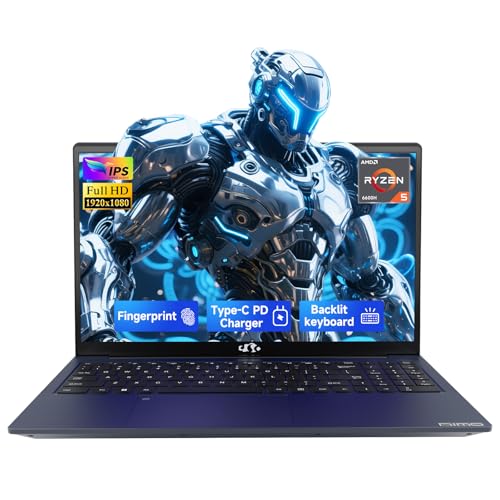
NIMO 15.6″ IPS FHD-Light Gaming-Laptop AMD Ryzen 5 6600H
Light Gaming Laptop AMD Ryzen 7 5700U 16GB RAM 512GB SSD
More Details On Our Top Picks
The Acer Nitro V sits near the top of this list because it pairs an Intel Core i7-13620H with GeForce RTX 4050 graphics, a combination that gives you more room for heavier game settings than the lower-tier picks here. The 15.6-inch Full HD IPS panel at 165Hz means motion should stay cleaner than on standard 60Hz screens, which matters in fast shooters and sports titles.
It also brings 16GB of DDR5 memory, a 1TB Gen 4 SSD, and Wi-Fi 6, so it’s built for a desk setup that has to handle games, launches, and multitasking without feeling cramped. You may find the trade-off in portability, because this level of hardware usually makes more sense as a semi-stationary machine than a tiny travel companion.
Strong Points
- RTX 4050 graphics give you more headroom for 1080p gaming than the entry-level options in this roundup.
- 16GB of DDR5 memory helps keep games, chat apps, and browser tabs open without the usual slowdown.
- 1TB Gen 4 SSD storage gives you room for a healthy game library, not just a couple of installs.
- 165Hz refresh suits fast-moving games and keeps desktop motion feeling fluid.
Things To Consider
- The stronger hardware makes it less appealing for people who only need a thin travel machine.
- Storage and airflow maintenance matter over time, especially in a setup that lives on a desk and sees daily use.
Feature Card
Who It Suits Best
Serious casual gamers who want a stronger 1080p machine for a desk-first setup will get the most out of it.
A Better Fit Elsewhere
Lenovo Gaming Laptop Ryzen 5 7535HS 8GB DDR5 256GB PCIe SSD suits lighter gaming and smaller budgets more comfortably.
Compared with the first Nitro V, this one shifts the emphasis toward newer graphics hardware rather than the higher Core i7 tier. The RTX 5050 with 8GB of GDDR7 memory gives you a more current GPU package, while the Core i5-13420H keeps the rest of the build in a practical midrange lane.
That mix works well for someone who wants a gaming laptop that still handles schoolwork, streaming, and day-to-day browsing without turning into a desktop replacement project. The included mouse pad is a small extra, nothing dramatic, but it does make first setup a little less awkward.
What We Like
- RTX 5050 graphics with 8GB of GDDR7 memory point to a newer-generation gaming focus.
- 165Hz display support helps fast games feel cleaner than standard-panel laptops.
- 16GB RAM and a 512GB SSD keep the platform balanced for everyday use.
- The Core i5 platform leaves room for solid performance without chasing a heavier premium tier.
Points To Note
- 512GB storage can fill quickly once several large games are installed.
- The lighter storage package makes it worth planning for external storage or tighter library management.
- Compared with the Acer Nitro V ANV15-52-76NK, this pick leans more on GPU generation than raw storage space.
Built With In Mind
It suits gamers who want a modern-feeling GPU setup and do not need the largest built-in drive.
Another Choice May Suit
Acer Nitro V Gaming Laptop ANV15-52-76NK works better for users who value the 1TB SSD and the stronger Core i7 processor.
The Victus lands in the middle of the pack with a familiar formula: Core i5-12450H processor, RTX 3050 graphics, 16GB of memory, and a 512GB SSD. That combination is less ambitious than the two Acer models above, but it still covers everyday gaming and general use with less strain than bare-minimum machines.
The 144Hz Full HD panel keeps motion smoother than a standard 60Hz screen, though it gives up a bit of speed to the 165Hz displays on the Nitro V models. For someone who wants a straightforward gaming laptop with Windows 11 Pro and a backlit keyboard, it’s a sensible middle ground.
Highlights
- 16GB RAM supports game plus app multitasking without feeling cramped.
- RTX 3050 graphics are enough for mainstream 1080p gaming expectations.
- 144Hz refresh is a meaningful step up from basic panels.
- Windows 11 Pro adds a more work-friendly software setup than some entry models.
Room For Improvement
- The RTX 3050 sits below the newer graphics tiers in the Acer picks.
- Storage is serviceable, but 512GB leaves less breathing room for large libraries.
- Cooling and dust care matter in long gaming sessions, especially on a midrange chassis.
At A Glance
Right Fit For
Students and home users who want a familiar gaming setup with a work-friendly finish will feel at home here.
Where A Sibling Pick Shines
acer Nitro V 15.6” FHD IPS 165Hz Gaming Laptop makes more sense for shoppers who want a newer GPU package and a more current graphics focus.
This NAIKLULU model reads more like a roomy everyday laptop that can handle light gaming than a full graphics-first machine. The Ryzen 7 5825U, 16GB of DDR4 memory, and 1TB SSD lean toward general productivity, while the 16-inch Full HD panel gives you extra screen space for spreadsheets, documents, and side-by-side windows.
That larger display can be useful in a dorm room, office corner, or home workspace where you want visibility more than portability. The trade-off is clear enough: you gain space and storage, but you don’t get the same gaming emphasis as the RTX-equipped Acer and HP picks.
Upsides
- 1TB SSD gives you room for documents, media, and a broader game library.
- 16-inch Full HD screen provides a more comfortable workspace for daily tasks.
- Ryzen 7 5825U suits mixed productivity and light gaming use.
- Windows 11 Pro is useful in office-heavy setups.
Worth Noting
- DDR4 memory is older than the DDR5 parts found in several other picks here.
- It makes more sense for work-plus-light-play than for graphics-heavy gaming.
Made For
Students, office users, and home workers who want a bigger screen and a roomy drive will appreciate this setup.
A Better Fit Elsewhere
HP Victus 15.6″ Full HD 144Hz Gaming Laptop suits you better for a more clearly gaming-focused build.
Where the NAIKLULU model leans on screen size, this MALLRACE unit leans on memory and processor headroom. The Ryzen 7 H255 reaches up to 4.9GHz, and the 24GB of DDR5 memory gives you more breathing room for gaming alongside recording, streaming, or heavier multitasking.
The 512GB NVMe SSD keeps the platform responsive, though the drive size is more conservative than the first Acer’s 1TB option. For someone who wants stronger system responsiveness than a basic budget laptop without stepping into a very expensive class, this is a convincing middle path.
Best Bits
- 24GB of DDR5 memory stands out in this group.
- Ryzen 7 H255 adds strong multitasking potential for demanding everyday use.
- NVMe storage helps startup and loading times stay quick.
- The spec mix suits heavier tab loads and creative side work.
Softer Spots
- 512GB storage can feel tight once large game installs pile up.
- The memory advantage matters most when your workload actually pushes past the basics.
Feature Rundown
Whose Shelf It Belongs On
Power users who split time between gaming, productivity, and heavier multitasking should feel most at home.
Swap It Out When
Acer Nitro V Gaming Laptop ANV15-52-76NK is the better fit when you want the larger 1TB drive and a stronger graphics-first setup.
The Lenovo takes a more restrained route than the higher-powered picks above, and that makes it easier to place on a small desk or carry between classes. A Ryzen 5 7535HS processor, 8GB of DDR5 memory, and Radeon 660M graphics suggest light gaming and regular productivity, not a heavy graphics workload.
That doesn’t make it weak, just specific. It suits someone who wants a manageable 15-inch machine for school, browsing, and lighter game sessions, and the Bluetooth 5.3 plus Wi-Fi 6 support make it easier to build a simple wireless setup.
Positives
- Small-footprint feel works well on cramped desks and shared spaces.
- DDR5 memory gives the platform a more current feel than older DDR4 systems.
- Wi-Fi 6 and Bluetooth 5.3 support make wireless accessories easier to manage.
- The Ryzen 5 7535HS is a sensible fit for lighter gaming and daily work.
Small Caveats
- 8GB RAM is the tightest memory configuration in this group.
- 256GB storage fills fast once game sizes start climbing.
- For longer-term ownership, you may want to plan storage expansion early.
Best Suited To
Students and casual gamers who value a compact setup more than raw performance should start here.
Look Elsewhere When
MALLRACE Gaming Laptop with AMD Ryzen 7 H255 24GB DDR5 512GB NVMe SSD makes more sense for heavier multitasking and more storage breathing room.
The NIMO leans into the “light gaming” label, and that honesty helps. With a Ryzen 5 6600H at the center, it should be comfortable for everyday multitasking, schoolwork, and lighter game loads, while the 15.6-inch IPS Full HD panel keeps the footprint familiar.
Compared with the Lenovo just above, this one reads as a more direct gaming-flavored option, even without the larger storage or memory figures of the upper-tier machines. It’s a sensible choice for someone who wants a straightforward laptop without a lot of extra baggage.
Reasons To Buy
- Ryzen 5 6600H gives the system a solid base for everyday use and lighter gaming.
- 15.6-inch Full HD IPS display keeps the format familiar and easy to live with.
- Useful for dorms and shared rooms where a simple setup matters more than extras.
- Its lighter positioning makes it easier to choose without overbuying power you won’t use.
Areas To Watch
- The source details are lean, so you should expect a more basic feature set than the bigger-name models above.
- Storage planning matters in long-term use, especially for anyone building a larger game library.
Who Should Grab It
Casual gamers and students who want a simple, manageable machine will find the fit most natural.
Reach For A Different Pick When
Lenovo Gaming Laptop Ryzen 5 7535HS 8GB DDR5 256GB PCIe SSD is the better choice for a similarly compact machine with clearer wireless details.
The KAIGERR closes the list with a clear value-first profile: Ryzen 7 5700U processor, 16GB of memory, and a 512GB SSD. That combination gives you enough room for everyday computing and lighter gaming, without reaching for the higher-priced GPU-focused machines above.
It feels like a practical choice for someone who wants the basics done well and doesn’t need a headline-grabbing graphics chip. In a home office, shared dorm, or casual play setup, that kind of simplicity can be exactly the point.
Best Bits
- 16GB RAM is a comfortable floor for routine multitasking.
- 512GB SSD is a workable middle ground for apps and a modest game library.
- Ryzen 7 5700U gives the system solid everyday CPU headroom.
- Good fit for shoppers who want to keep the spend focused on essentials.
Honest Caveats
- The processor is older than some of the other Ryzen options here.
- It makes more sense for lighter play than for graphics-heavy gaming.
- Long-term storage habits matter, especially with a 512GB drive.
Perfect Match For
You’ll get the most from it as a budget-aware everyday laptop with a light gaming side.
Skip It When
Acer Nitro V Gaming Laptop ANV15-52-76NK is the better fit for stronger graphics performance and a larger internal drive.
What Matters Most Before Choosing Affordable Gaming Laptops
Hidden Buying Traps
Thin memory and small SSDs create the fastest regret in this category. A 256GB drive or 8GB of RAM can feel fine on day one, then crowd out game installs and multitasking once the machine settles into daily life.
The Upgrade Payoff
Higher-tier models pay for stronger graphics, faster panels, larger drives, and more memory headroom. That extra spend makes sense for longer sessions, streaming, and heavier multitasking, but it’s less useful for light play and basic school work.
Things Worth Knowing First
Common Shopping Slip Ups
Do not treat every gaming laptop the same. A stronger CPU without better graphics, or a fast screen with too little storage, creates a mismatch that shows up quickly in regular use.
When Paying More Pays Off
Spend up when you want smoother 1080p gaming, more room for installs, or better multitasking under load. That’s where the extra money usually goes, and that’s also where the improvement is easiest to feel.
Frequently Asked Questions
What Specs Matter Most In Affordable Gaming Laptops?
Graphics, memory, and storage usually matter more than flashy extras. A capable GPU, 16GB of memory, and a solid-state drive give you the most practical day-to-day benefit.
Is 8GB Of RAM Enough For Gaming?
It works for lighter use, but it feels tight once games and background apps stack up. 16GB is the safer floor for most gaming setups.
Do You Need A 1TB SSD?
You do not need it for every setup, but it helps a lot once your game library grows. Smaller drives fill quickly, especially with modern game installs.
Is A 165Hz Screen Worth It?
Yes, especially for fast games where motion clarity matters. It also makes everyday scrolling and window movement feel smoother.
Which Pick Makes Sense For School And Gaming?
HP Victus 15.6″ Full HD 144Hz Gaming Laptop and Lenovo Gaming Laptop Ryzen 5 7535HS 8GB DDR5 256GB PCIe SSD both fit that mix well. The right one depends on whether you care more about gaming balance or a smaller, simpler build.
