


Affordable laptops for gaming and school need to do two jobs without dragging in one direction. You want enough speed for classwork, enough graphics muscle for lighter games, and enough battery, storage, and keyboard comfort to survive real daily use. The hard part is spotting where a laptop is genuinely capable versus where it only looks capable on paper.
This roundup focuses on practical fit, not flashy claims. You’ll see which models suit notebooks, labs, dorm rooms, commutes, and after-hours gaming, along with the trade-offs that matter once the box is open.
Quick Look At The Shortlist

FUNYET Laptop Computer 16GB RAM 512GB SSD

acer Nitro V Gaming Laptop ANV15-51-51H9

NIMO 15.6 FHD Light-Gaming Laptop Ryzen 7 Pro 6850U

VIGSENUP 15.6 Full HD Laptop 16GB RAM 256GB SSD
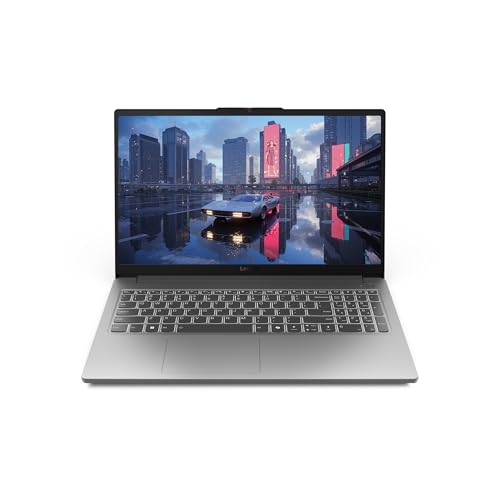
Lenovo LOQ Essential Student Gaming Laptop Luna Grey
MOONFISH 2026 Laptop Computer Window 11 Pro 15.6 Inch

NIAKUN Laptop Computer 16GB RAM 512GB SSD
KAIGERR Light Gaming Laptop Ryzen 7 5700U
More Details On Our Top Picks
The FUNYET lands in the practical middle ground: 16GB of memory and a 512GB solid-state drive give you room for school files, game installs, and everyday multitasking without constant juggling. The 16-inch display also gives you a bit more breathing room than a cramped 15.6-inch panel, which matters during long note-taking sessions.
That kind of setup suits commuters, dorm desks, and home study corners where you want one machine to cover class, browsing, and lighter gaming. The trade-off is simple, though, this is still a spec-conscious budget build, so you should expect sensible limits rather than desktop-style headroom.
Strong Points
- 16GB memory helps keep multiple school tabs and apps open at once.
- 512GB SSD gives faster start-up than older hard-drive setups and better file responsiveness.
- The 16-inch screen makes spreadsheets, slides, and split windows easier to manage.
- Backlit keys help in dim dorm rooms or evening study sessions.
Things To Consider
- Big-screen portability can feel less convenient in a crowded backpack.
- The hardware profile fits lighter gaming more naturally than demanding 3D titles.
Feature Snapshot
Who It Suits Best
Students who split time between essays, browser work, and casual gaming will get the most from it.
Where A Sibling Pick Shines
The Lenovo LOQ Essential is the better call for someone who wants more gaming-focused hardware and a 144Hz panel.
The Nitro V shifts the conversation toward graphics, not just storage and memory. An Intel Core i5-13420H paired with an RTX 4050 gives you a much stronger lane for modern games than the basic school-first machines in this list, and the 144Hz IPS panel helps motion look smoother during fast action.
You’ll notice the compromise in the 8GB DDR5 memory, which is workable for lighter multitasking but less roomy than the 16GB and 32GB options above. For a student who games most evenings and can live with a more focused setup, that trade feels understandable.
What We Like
- RTX 4050 graphics give it real gaming credibility.
- 144Hz refresh rate helps fast-moving visuals feel cleaner on screen.
- Gen 4 SSD support points to brisk loading and project access.
- WiFi 6 is a practical plus for busy dorm networks and shared home internet.
Softer Spots
- 8GB memory is the tightest fit here for heavy multitasking.
- The gaming-first profile makes it less subtle for long class days.
- Backlit keys help at night, but battery planning still matters on campus.
Who Will Love This
Gamers who also need a class machine will appreciate the stronger graphics side.
Look Elsewhere When
The NIMO 15.6 FHD Light-Gaming Laptop gives you far more memory and storage for tab-heavy school work.
The NIMO stands out on raw headroom, especially beside the FUNYET and VIGSENUP. A Ryzen 7 Pro 6850U, 32GB of LPDDR5 memory, and a 1TB SSD give you a roomy setup for research tabs, creative software, and local game installs without feeling pinched.
LPDDR5, or low-power DDR5 memory, matters because it usually balances speed and efficiency better than older memory types, which is useful in a laptop that lives on a desk and travels in a backpack. The honest read is that this kind of configuration makes the most sense for heavier multitaskers, not anyone who only opens email and a document.
Upsides
- 32GB memory is a major cushion for busy school and work sessions.
- 1TB SSD leaves room for large project folders and a broader game library.
- The Ryzen 7 Pro platform is a strong fit for sustained everyday productivity.
- 100W Type-C charging support is convenient for a shared charger setup.
- Fingerprint login adds quick, low-friction access in libraries or offices.
Points To Note
- The stronger spec mix can make this a more serious carry than the smaller work-first options.
- Light-gaming positioning suggests restraint still matters in the most demanding titles.
Core Details
Built With In Mind
Power users who bounce between coursework, media, and side projects will get the most value here.
Swap It Out When
The VIGSENUP 15.6 Full HD Laptop makes more sense for simpler school use where you do not need this much memory.
The VIGSENUP keeps things straightforward, which is often exactly what school work needs. A 16GB memory and 256GB SSD pairing gives you a decent base for documents, web research, and streaming, while the 15.6-inch display keeps the footprint manageable on a desk or kitchen table.
Compared with the NIMO and Lenovo LOQ, this one is more about essentials than room to grow. That makes it a sensible fit for someone who wants a no-fuss notebook for essays, classes, and lighter entertainment, not a machine built around graphics-heavy gaming.
Highlights
- 16GB memory keeps routine multitasking comfortable.
- 15.6-inch screen size stays easy to carry and store.
- 256GB SSD is a reasonable starting point for everyday files.
- The simpler hardware mix can feel less intimidating for first-time laptop owners.
Minor Gripes
- 256GB storage can fill quickly once games and large media files stack up.
- This setup is better for school tasks than serious gaming.
Right Fit For
Students and home-office users who want a compact everyday notebook will feel at home here.
Another Choice May Suit
The FUNYET Laptop Computer 16GB RAM 512GB SSD gives you more storage headroom for a larger game library.
The LOQ Essential is the clearest bridge between class work and gaming in this list. Its Core i5-12450HX processor, RTX 4050 graphics, and 144Hz IPS display point to a machine that can handle fast motion better than the plain office-style picks, while still feeling grounded enough for everyday study.
That balance matters in a dorm or shared room, where one laptop often has to cover notes, calls, and evening play. It doesn’t pretend to be a featherweight, but for a student who wants one setup instead of two separate devices, the trade-off feels well judged.
Best Bits
- RTX 4050 graphics support more demanding games than the entry-level options here.
- 144Hz panel keeps motion looking smoother in fast titles and scrolling work.
- The student-focused design suits all-day use without feeling overly niche.
- 512GB SSD gives a practical base for school software and a game or two.
- Luna Grey finish keeps the look restrained rather than flashy.
Room For Improvement
- 8GB memory is serviceable, but it sits below the more generous picks in this roundup.
- The gaming hardware makes it less subtle for quiet lecture halls.
Feature Card
Perfect Match For
Students who want a credible gaming laptop that still handles assignments without fuss will get the most from it.
Reach For A Different Pick When
The NIMO 15.6 FHD Light-Gaming Laptop makes more sense for heavier multitasking and larger local storage.
MOONFISH is built around ordinary daily use, and that clarity helps. The 15.6-inch screen, 16GB of memory, and 256GB SSD make it a straightforward notebook for documents, browsing, streaming, and school portals without a lot of setup drama.
Compared with the gaming-leaning Lenovo LOQ and acer Nitro V, this one is much more about stable basics than frame rates. The included support and return policy details are reassuring for a household that wants less hassle around setup, though the smaller SSD means you’ll want to manage storage carefully.
Positives
- 16GB memory keeps everyday multitasking smooth enough for school and office work.
- 15.6-inch size is practical for desks, kitchen counters, and shared spaces.
- 256GB SSD supports quicker boot-up and file access than older spinning drives.
- Office-focused positioning suits homework, forms, and web-based productivity.
Small Caveats
- 256GB storage is the main pinch point once media and apps accumulate.
- It’s a better daily notebook than a gaming-first machine.
Made For
Households, students, and work-from-home setups that want a simple everyday laptop will find the fit natural.
Skip It When
The KAIGERR Light Gaming Laptop gives you more raw gaming-oriented hardware for the same general use case.
The NIAKUN feels like a straightforward workhorse with a few useful extras. Its 16GB memory and 512GB SSD give you the same sensible storage and multitasking base as the FUNYET, while the backlit keyboard helps in low-light dorm rooms or late-night writing sessions.
The Core i7-7600U is older silicon, so the appeal here sits more in the feature mix than in outright muscle. For school documents, video calls, and lighter gaming, that may still be enough, but anyone chasing newer-game performance will want to look higher in the list.
Bright Spots
- 16GB memory is comfortable for general study and office workloads.
- 512GB SSD gives you decent room for course files and essential apps.
- Backlit keyboard improves usability in dim rooms and shared spaces.
- Windows 11 Pro fits a more business-like setup than the bare-minimum options.
Areas To Watch
- The older processor platform is the main reason to keep expectations grounded.
- Gaming aspirations should stay in the lighter lane.
Who Should Grab It
Students and office users who care more about storage, typing comfort, and simple day-to-day reliability will find it sensible.
Where Another Pick Suits Better
The acer Nitro V is the better match for someone who wants modern gaming graphics first.
The KAIGERR lands as a sensible upgrade path for someone who wants a stronger multitasking base without stepping into a full gaming-laptop price tier. A Ryzen 7 5700U, 16GB of memory, and 512GB of storage give it familiar balance, while the 8-core, 16-thread design should suit busy school days and light gaming sessions.
It sits closer to the FUNYET than the Lenovo LOQ in spirit, though the Ryzen platform gives it a different performance profile. For note-heavy classes, browser work, and casual play, that mix makes sense, but demanding graphics work still belongs with the NVIDIA-based options above.
Reasons To Buy
- Ryzen 7 5700U gives you a stronger CPU base than the most basic school laptops.
- 16GB memory keeps multitasking practical for coursework and entertainment.
- 512GB SSD gives enough room for files, apps, and several games.
- The 8-core, 16-thread layout suits busy everyday computing.
Honest Caveats
- Its appeal depends on older-platform value rather than the newest hardware trends.
- Graphics-heavy gaming still belongs to the RTX-based models in this roundup.
Feature Rundown
Whose Shelf It Belongs On
Budget-conscious multitaskers who want a bit more CPU headroom than the entry picks will appreciate it.
Another Choice May Suit
The Lenovo LOQ Essential is the stronger fit for a student who wants a more gaming-focused screen and graphics package.
What Matters Most Before You Choose
Storage, Memory, And Your Actual School Load
For classwork, 16GB of memory is a comfortable floor because browser tabs, note apps, and video calls stack up quickly. A 512GB SSD is also the safer starting point, especially once you mix assignments with a few installed games.
Graphics Hardware Changes The Game
Integrated graphics can handle light play and regular coursework, but an RTX 4050 class chip moves you into a far better lane for modern games. That extra graphics budget also helps the laptop feel less boxed in over time.
Screen Size And Keyboard Comfort Matter More Than Hype
A 15.6-inch panel is easier to carry, while a 16-inch screen gives you more room for split windows and spreadsheets. A backlit keyboard matters more than it sounds, especially in dorms, shared rooms, and evening study setups.
Before You Click Amazon
Wrong Turns To Avoid
Do not treat storage and memory as the same thing, because they solve different problems. A fast SSD does little for too many open apps, and too little RAM makes multitasking feel cramped.
The Case For Spending Up
Higher-tier models cost more because they usually bring stronger processors, better graphics, and smoother displays. That extra spend makes sense for students who game often, edit media, or keep many apps open at once.
Frequently Asked Questions
What spec matters most for school and gaming together?
Memory and graphics deserve the most attention because they shape multitasking and game performance. A 16GB laptop with stronger graphics usually feels more balanced than a tiny-SSD machine with a fast badge.
Is 8GB enough for this category?
Eight gigabytes works for basic school tasks and lighter gaming. It feels tighter once you start keeping many browser tabs and apps open together.
How much storage should you aim for?
512GB is the safer target for school plus games. Smaller drives can fill quickly once you install course software, updates, and a couple of larger titles.
Do you need a gaming laptop for classwork?
No, but it helps when you want one machine for both study and play. A gaming-leaning laptop usually brings better graphics and a higher-refresh display.
Which pick is the most balanced for most households?
The FUNYET and Lenovo LOQ Essential sit near the center for different reasons. FUNYET favors a simpler mixed-use setup, while the LOQ leans harder into gaming without losing class usefulness.
