


Affordable Pcs make sense when you want a dependable desktop without paying for extra flash you won’t use. These eight picks cover office work, homework, light creative tasks, and casual gaming in home setups, small offices, and shared spaces. You’ll see how far compact towers and mini PCs can go before stepping up to a gaming-focused machine or a newer mini system. The real question is fit, not hype.
The Shortlist At A Glance
HP EliteDesk 800 G2 Desktop Mini

Dell Optiplex 3050 SFF Desktop Computer PC

Dell OptiPlex 7050 Desktop Computer PC

STGAubron Gaming PC Desktop

YAWYORE Gaming PC Desktop Computer AMD R5 5600GT
GEEKOM A5 2027 Edition Mini PC

Dell Optiplex 3040 SFF Business Desktop PC
Lenovo ThinkCentre M710q Tiny Desktop
More Details On Our Top Picks
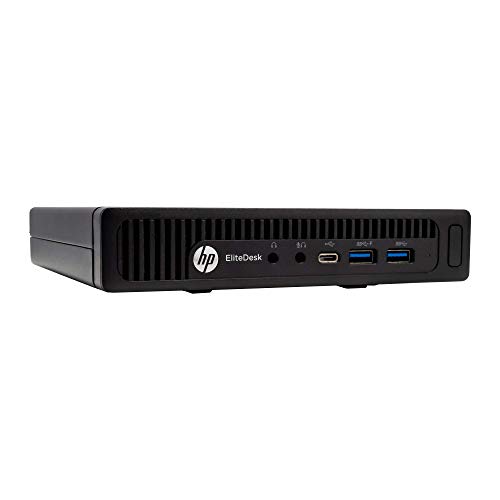
The HP EliteDesk 800 G2 fits neatly into a desk that already feels crowded. Its mini chassis, 16GB of DDR4 memory, and 240GB SSD make it a sensible office companion for email, documents, and web-heavy work. The display mix is straightforward too, with VGA and DisplayPort covering older and newer monitors.
You may find the 240GB drive tight once you start storing media libraries or larger project files. Still, for a quiet home office, front-desk station, or student setup, the small footprint does more than the spec sheet suggests, and that matters more than raw speed here.
Strong Points
- Mini form factor saves surface space beside a monitor and notebook stand.
- 16GB memory gives you room for several browser tabs and office apps.
- SSD storage helps startup and everyday loading feel more responsive.
- VGA and DisplayPort make monitor matching easier in older offices.
Things To Consider
- 240GB leaves less breathing room for large game installs or video work.
- The small chassis means upgrades and cable access can feel a little tighter.
- Best suited to light-to-moderate workloads, not demanding creative suites.
Feature Card
Who It Suits Best
Office workers, students, and home users with a tight desk space will get the most from this compact tower.
Where A Sibling Pick Shines
Dell OptiPlex 7050 Desktop Computer PC suits you better if you want more storage headroom and built-in wireless extras.
Right after the EliteDesk, this Dell shifts the balance toward a more flexible home-office setup. The small form factor keeps the footprint restrained, while WiFi and HDMI make placement easier in a room that doesn’t have a wired network drop. The 256GB SSD also gives you a little more room before storage management starts to matter.
The honest read is that this model sits in the practical middle of the group. It’s strong enough for everyday productivity, but it doesn’t pretend to be a workstation, and that restraint is part of its value. For most mixed-use desks, that’s exactly the right attitude.
Highlights
- WiFi reduces cable clutter for apartments and shared rooms.
- HDMI and DisplayPort make dual-display or monitor swaps simpler.
- 16GB RAM keeps browser-based work and office apps comfortable.
- 256GB SSD offers a bit more breathing room than the smallest drives.
Worth Noting
- The SFF case is compact, so internal expansion is not the main draw.
- It stays squarely in productivity territory rather than heavy creative use.
- Wireless convenience helps, though some desks still benefit from wired Ethernet for stability.
Details At A Glance
Who Will Love This
You’ll like this most for a tidy home office, remote work station, or study desk that needs wireless convenience.
Skip It When
HP EliteDesk 800 G2 Desktop Mini Business PC suits you better when the smallest possible case matters more than wireless extras.
This 7050 is the step up that makes sense once the smaller drives start feeling cramped. Its 512GB SSD gives you more space for large app installs, project folders, and a modest media collection, while built-in WiFi and Bluetooth reduce the need for extra adapters. Compared with the 3050, it feels more prepared for a busier desk.
In a shared office or a home setup that doubles as a work station, that extra storage and wireless flexibility carry real weight. The HD Graphics 630 and 4K support also make it easier to pair with a sharper monitor, though you still want to keep expectations grounded. It’s not trying to be a gaming tower, and that honesty helps.
Upsides
- 512GB SSD gives you far more room for files and software.
- Built-in WiFi and Bluetooth cut down on accessory clutter.
- 16GB memory supports smooth everyday multitasking.
- 4K support helps if you use a higher-resolution display.
- The 7050 platform sits a bit higher than the older 3040 class.
Softer Spots
- It still lives in office-computer territory, not performance-PC territory.
- One thing worth considering is airflow and dust cleanup in a used desktop case.
Core Details
Perfect Match For
This suits you best for a home office or small business desk that needs more storage and wireless convenience.
A Better Fit Elsewhere
YAWYORE Gaming PC Desktop Computer AMD R5 5600GT fits better for you if occasional gaming matters more than office-first practicality.
Compared with the office desktops above, this STGAubron shifts the conversation toward graphics. The RX 550 4G is an entry-level graphics card, which means it’s aimed at lighter gaming, older titles, and casual creative work rather than high-end frame chasing. That matches the rest of the build: 16GB of memory and a 512GB SSD keep the system practical.
For a dorm room, game room, or first gaming desk, that balance has appeal. You may find the older Xeon platform perfectly serviceable for mixed tasks, though the honest read is that the GPU sets the ceiling. It’s a sensible bridge machine, not a brute.
Best Bits
- RX 550 graphics opens the door to casual gaming use.
- 512GB SSD leaves room for a healthier game library.
- 16GB memory supports gaming launchers and everyday multitasking.
- Also fits study, streaming, and office tasks without feeling misplaced.
Areas To Watch
- Graphics headroom stays modest, so demanding modern titles are a stretch.
- Older platform parts can matter more for long-term upgrade planning.
- Dust management and cable routing are worth keeping tidy in gaming desks.
Built With In Mind
You’ll get the most from this for entry-level gaming, streaming, or a school desk that also handles entertainment.
Look Elsewhere When
Dell OptiPlex 7050 Desktop Computer PC makes more sense for you if office work and storage matter more than any gaming use.
The YAWYORE takes a more modern route than the STGAubron, and that shows up immediately in the Ryzen 5 5600GT platform and 1TB NVMe storage. NVMe, short for non-volatile memory express, is a fast SSD interface, so the result is quicker loading than older storage setups. For game libraries, large school projects, and all-purpose family use, that extra capacity is hard to ignore.
The 550W power supply and WiFi support make the machine feel ready for a normal desk build rather than a bare-bones tower. It’s a strong middle ground for you if you want some gaming headroom without giving up office practicality. The trade-off is simple, though: you’re paying for a broader feature set, not just raw speed.
Reasons To Buy
- 1TB NVMe storage gives you much more room for software and media.
- Ryzen 5 5600GT handles everyday work and lighter gaming comfortably.
- 16GB DDR4 at 3200MHz supports responsive multitasking.
- WiFi and Bluetooth keep the desktop setup cleaner.
- 550W power supply leaves sensible space for the stated build.
Points To Note
- The tower format takes more room than the mini desktops in this list.
- For quiet office-only use, some of its gaming-focused extras go unused.
Whose Shelf It Belongs On
This suits you best for a mixed gaming and productivity desk where storage and newer connectivity matter.
Another Choice May Suit
GEEKOM A5 2027 Edition Mini PC fits better for you if desk space matters more than tower-style expansion room.
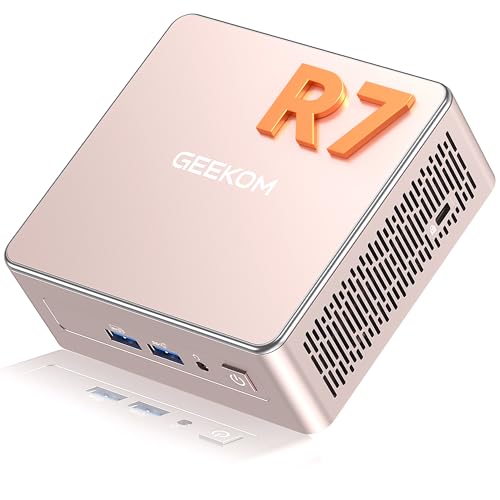
This GEEKOM mini PC is the cleanest fit for a modern desk that needs power without bulk. The Ryzen 7 7730U sits above the older office chips in this list, and the 16GB memory plus 512GB SSD combination keeps it useful for work, streaming, and everyday multitasking. For a living-room setup or a tidy home office, the tiny chassis matters as much as the internals.
Depending on how much you like to expand later, the compact format can feel limiting compared with a tower such as the YAWYORE. Still, many setups never need that extra room, and the trade-off is a smaller footprint that disappears behind a monitor. It’s a neat little rectangle, almost like a desktop that learned to keep quiet.
Positives
- Mini size keeps the desk visually uncluttered.
- Ryzen 7 7730U gives you a stronger modern base for daily tasks.
- 512GB SSD handles apps and files without feeling cramped quickly.
- 16GB RAM supports smooth multitasking in common home-office use.
Small Caveats
- Compact cases usually trade away easy internal expansion.
- Heat and cable placement deserve attention in very enclosed shelves.
Right Fit For
You’ll like this most for a minimalist workspace, media nook, or apartment desk with limited space.
Reach For A Different Pick When
Dell OptiPlex 7050 Desktop Computer PC is the better match for you if you want more of a traditional business desktop shape.
The 3040 is the plain-spoken option in this group, and that can be exactly what you want for email, web browsing, and document work. An i3-6100, 8GB of memory, and 256GB SSD storage form a modest but workable base for a simple office or homework desk. HDMI and RJ45 keep the essentials in place without extra fuss.
You may find the 8GB memory ceiling noticeable sooner than on the 16GB models above, especially with several browser tabs open. Even so, for basic daily duties it stays sensible, and the small form factor makes it easier to slot into a cabinet or tight desk cubby.
Bright Spots
- Simple parts list keeps setup easy to understand.
- HDMI supports modern monitor hookup without fuss.
- RJ45 gives you a wired network path for stable office use.
- Small form factor suits tight workstations and shared rooms.
Room For Improvement
- 8GB RAM is enough for basics, but not generous.
- It is better suited to lighter jobs than multitask-heavy routines.
- Older office desktops can call for a little extra dust care over time.
Best Suited To
This fits you best for a starter office, student homework station, or backup desktop.
Where A Sibling Pick Shines
Dell Optiplex 3050 SFF Desktop Computer PC is a better fit for you if WiFi and 4K support matter more than keeping costs lean.
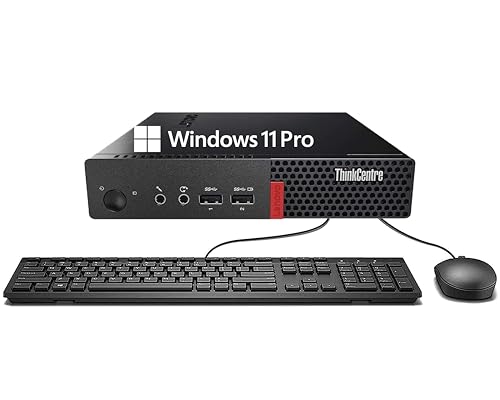
The Lenovo ThinkCentre M710q Tiny lands in the same space-saving lane as the HP EliteDesk, but it adds a practical touch by including a keyboard and mouse. That makes it easier for a spare room desk, a study nook, or a simple family computer station where you want fewer separate purchases to sort out. WiFi, Bluetooth, DisplayPort, and 256GB SSD storage round out the basics cleanly.
Because the package leans toward convenience, it suits you well when you want a desktop that feels ready to place and use. The 8GB memory is fine for ordinary work, though heavy multitasking or media editing will push it faster than the 16GB options above. The trade-off is straightforward, and for many light-duty setups, it’s a fair one.
Standout Traits
- Keyboard and mouse are included, which simplifies first-time setup.
- Tiny chassis frees up room for paperwork and accessories.
- WiFi and Bluetooth help cut cable clutter.
- DisplayPort keeps display pairing flexible for modern monitors.
Honest Caveats
- 8GB RAM keeps this in everyday-task territory.
- The tiny case leaves less room for internal upgrades.
- Because the bundle is compact, cable routing matters in tight desks.
Who Should Grab It
This suits you best for a light-duty home desk, secondary workstation, or first desktop purchase.
Another Choice May Suit
GEEKOM A5 2027 Edition Mini PC is the better fit for you if you want a newer mini system with a stronger processor class.
What Matters Most Before Choosing Affordable Pcs
Match The Case To Your Desk
Mini PCs and small form factor towers solve different space problems. A tiny chassis disappears under a monitor, while a slim tower gives you a little more room for ports and service access.
Treat Storage As A Real Limit
Solid state drives feel fast, but capacity still matters. A 240GB drive suits office files and browser work; 512GB or 1TB works better for large app installs, media, and local project folders.
Don’t Overbuy For Basic Work
For email, spreadsheets, and school tasks, an older i3 or i5 system can be enough. Paying more makes sense once you need WiFi, Bluetooth, heavier multitasking, or casual gaming.
Before You Click Buy
Hidden Buying Traps
A low-cost desktop can look fine on paper and still feel cramped in practice. Pay attention to memory, storage size, and monitor outputs, because those three shape daily use more than a bold processor label.
The Upgrade Payoff
Higher-tier models usually buy you more breathing room, not magic. Extra RAM, newer storage, and stronger graphics help most when you split your time between work, tabs, streaming, and light creative projects.
Frequently Asked Questions
Are Affordable Pcs Good For Work From Home?
Yes, many are built for email, documents, video calls, and browser-based tools. A 16GB mini or SFF desktop usually feels more comfortable than an 8GB entry model.
Which Size Works Best In Small Rooms?
Mini PCs and compact SFF desktops fit best in tight rooms. Towers make more sense only when you want a roomier case or more upgrade room.
Is A Renewed Desktop A Reasonable Choice?
It can be, especially for office use and budget-conscious setups. The trade-off is that you should value the listed specs and seller condition more than cosmetics.
How Much RAM Should You Aim For?
16GB is the sweet spot for most everyday desktops in this group. 8GB works for basic tasks, but it fills up faster with many browser tabs or heavier apps.
Do You Need A Gaming Desktop For Casual Games?
Not always, because some office desktops handle older or lighter titles just fine. For newer games or smoother 1080p play, a desktop with a real graphics card makes more sense.
