


Cutting desk clutter matters more than it sounds, especially for daily work, shared family computers, and laptops that move from room to room. A wireless keyboard and mouse combo saves a USB port, trims cable mess, and keeps your setup easier to pack or store. You still need the right mix of layout, comfort, receiver style, and compatibility, though. That’s where these eight picks separate themselves.
Quick Look At The Shortlist

Reccazr 2.4G Full-Sized Keyboard and Mouse Combo
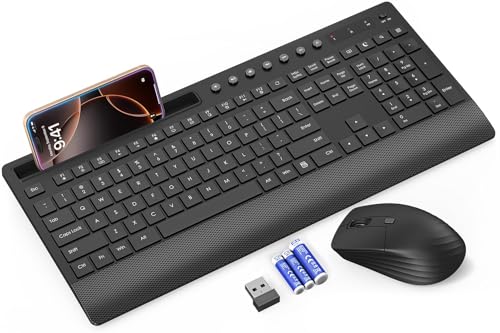
Trueque Wireless Keyboard and Mouse Combo
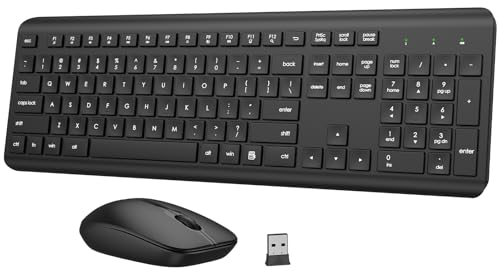
QUASIO Full-Size Silent Ergonomic Keyboard and Optical Mouse

TECKNET Wireless Keyboard and Mouse Combo

Lenovo 100 Wireless Compact Keyboard

OMOTON Purple Wireless Keyboard and Mouse Combo

MOFII Compact Small Keyboard with Large Print

Logitech MK270 Full Size Wireless Keyboard and Mouse Combo
More Details On Our Top Picks
The Reccazr combo leans into color first, function second, which makes sense for a shared desk or a laptop setup that needs a little personality. A 2.4G wireless connection keeps the keyboard and mouse on one nano receiver, so you’re not giving up extra USB space just to stay cordless.
The mouse adds three DPI steps, and DPI, or dots per inch, is the sensitivity setting that changes how far the pointer moves. That matters most for mixed work, where a quiet office session can turn into quick file sorting or casual browsing without reaching for another device. The trade-off is simple, this is more about convenience and style than heavy-duty specialization.
Strong Points
- Single-receiver setup keeps your laptop port count under control.
- Three mouse sensitivity levels help you match pointer speed to the task.
- Full-size layout works well for spreadsheets and general admin work.
- Pink and white finish gives a desk a cleaner, more personal look.
Small Caveats
- Style is part of the appeal, so it won’t suit every office aesthetic.
- Most value here comes from the bundle format, not from advanced extras.
- Light upkeep around the keys and mouse shell helps the finish stay neat.
Feature Card
Who It Suits Best
Style-conscious home users and dorm setups benefit most from this one.
A Better Fit Elsewhere
Trueque Wireless Keyboard and Mouse Combo suits desk workers who care more about palm support than color accents.
Trueque takes the comfort route, and the palm rest is the detail that changes the feel of a long workday most. The full-size layout keeps the number pad close, while the 7-degree tilt legs give your hands a more natural angle on a regular desk.
The keyboard also has spill-resistant construction and media keys, so it fits kitchens, office corners, and family computers better than stripped-down minimalist boards. The mouse is shaped for a calmer hand position, though the bundle still lives in the practical lane rather than the premium one. For spreadsheet work or evening admin, that’s a sensible trade.
What We Like
- The 1.57-inch palm rest helps reduce wrist strain during long sessions.
- Full-size layout keeps typing and number entry familiar.
- Spill-resistant build adds a useful layer of everyday protection.
- Media shortcuts make routine control faster without leaving the home row.
- Tilt legs give you a small but noticeable setup adjustment.
Things To Consider
- The comfort focus adds bulk compared with more compact options like Lenovo 100.
- Extra surfaces around the palm rest mean a little more cleaning over time.
- The design is practical first, so it may feel plain beside MOFII.
Technical Sheet
Made For
Desk workers and home office users who type for stretches at a time will get the most out of this set.
Another Choice May Suit
Lenovo 100 Wireless Compact Keyboard is a better fit for smaller desks and a simpler keyboard-only setup.
QUASIO sits close to the middle of the pack in spirit, but its feature mix is broader than the first two. An ergonomic keyboard with adjustable height tilt legs is a sensible setup for long email sessions, and the full-size layout keeps the number pad and 12 media shortcuts within easy reach.
The cordless optical mouse rounds out the bundle for laptop and desktop use, and optical tracking usually feels straightforward for office tasks and general browsing. Silent keys are the real draw here, though the bundle still stays focused on everyday work rather than fancy extras. That makes it a steady option for a shared room or a busy home office.
Upsides
- Silent typing helps keep the desk area calmer.
- Adjustable height legs support a better hand angle on a standard desk.
- Numeric keypad helps with budgeting sheets and data entry.
- 12 media keys shorten simple control tasks during work breaks.
Areas To Watch
- The comfort features are useful, but they add size compared with Lenovo 100.
- The mouse is practical rather than specialized for design work.
- Quiet keys still benefit from occasional dusting, especially in shared spaces.
Feature Rundown
Right Fit For
Home-office multitaskers and laptop users who want a quieter desk setup will appreciate this bundle.
Where A Sibling Pick Shines
TECKNET Wireless Keyboard and Mouse Combo is the cleaner choice for anyone who wants a simpler, less feature-heavy pair.
TECKNET keeps the pitch straightforward, and that honesty works in its favor. The keyboard and mouse share one USB receiver stored inside the mouse, so setup stays tidy for a laptop bag, a work desk, or a room that gets rearranged often.
Its 2.4G link is built for everyday responsiveness, and the full-size keyboard suits people who still rely on a number pad. Compared with QUASIO, this one feels leaner on extras and easier to explain to someone who just wants a dependable cordless pair. The honest read is that it trades flair for simplicity.
Highlights
- Single receiver storage inside the mouse keeps the bundle portable.
- Plug-and-play setup avoids extra software steps.
- Full-size layout suits office tasks and spreadsheet work.
- Low-latency wireless behavior is a good fit for routine daily use.
Softer Spots
- The design is plain beside Reccazr or MOFII.
- You won’t get a comfort add-on like a palm rest.
- Moving the receiver between devices can add one more small step.
Core Details
The Right Fit
Laptop users and shared-office setups benefit most from this tidy, no-fuss bundle.
Skip It When
Trueque Wireless Keyboard and Mouse Combo suits you better if palm support matters more than a plain, portable layout.
The Lenovo 100 is the cleanest fit in this group for anyone who values desk space more than accessory count. It’s a wireless keyboard rather than a full combo, but the full-size layout and numeric keypad keep it useful for work, school, and general home use.
Silent keys are the major everyday advantage, especially in apartments or shared rooms where constant clatter gets old fast. Its compact shape also makes storage easier, though the trade-off is obvious, you’re giving up the mouse that comes bundled with the other picks. That’s fine for people who already have a preferred pointer.
Best Bits
- Compact body keeps the desk looking open and organized.
- Silent keys suit shared spaces and late-night typing.
- Numeric keypad remains available despite the smaller footprint.
- USB receiver support keeps setup simple for PC and laptop use.
Points To Note
- This is keyboard-only, so you still need a separate mouse.
- Compact design can feel less roomy than a larger board like Trueque.
- Storage is easy, but the smaller shape can shift around more on slick desks.
Perfect Match For
Minimalist desk setups and laptop users who already have a mouse will get the most from this board.
Look Elsewhere When
Logitech MK270 Full Size Wireless Keyboard and Mouse Combo is the better choice when you want the whole pair in one box.
OMOTON takes a more organized approach than the rest, thanks to the built-in phone holder slot. That detail matters in a real desk setup, because your phone stays upright for alerts instead of sliding under papers or sitting face-down beside the mouse.
The 2.4G USB receiver handles both pieces, and the combo is positioned for Windows-based computers, laptops, and desktop work. It feels especially useful on a study desk or a work station that doubles as a charging and message-checking spot. The limitation is compatibility focus, so mixed-device homes should pay close attention.
Positives
- Phone slot helps keep notifications visible without adding clutter.
- One receiver for both devices keeps the setup neat.
- Purple finish gives the desk a more personal look.
- Works well for study spaces where a phone and computer sit side by side.
Honest Caveats
- Compatibility focus makes it more of a Windows-centered option.
- The phone holder adds utility, but also another surface to keep clean.
- Style and desk function carry more weight here than raw versatility.
Whose Shelf It Belongs On
Students and home-office users who keep a phone beside the keyboard will appreciate this layout most.
Reach For A Different Pick When
TECKNET Wireless Keyboard and Mouse Combo is the simpler option for a broader, less specialized setup.
MOFII leans into personality without losing the basics, and the retro typewriter look is the first thing you notice. Round keycaps and large-print legends make it easier to read at a glance, which helps in a home office or a study corner where style still needs to be practical.
The mouse offers three sensitivity levels, and the 800, 1200, and 1600 settings give you a usable spread for browsing, document work, and lighter pointer control. Add the anti-slip pad and tilt angle, and the whole set feels more deliberate than decorative. The trade-off is that this look won’t suit a plain corporate desk.
Bright Spots
- Large-print keys help the legends stand out quickly.
- Round keycaps and the retro shape make the desk feel more personal.
- Three mouse sensitivity settings give you practical flexibility.
- Anti-slip base and tilt angle support a steadier typing position.
Room For Improvement
- The look is bold, so it suits some spaces better than others.
- Round keycaps can take a little getting used to.
- Decorative finishes often need regular dusting to stay sharp.
Who Should Grab It
Style-focused desk owners who still want large, readable keys will get the most value here.
Swap It Out When
Lenovo 100 Wireless Compact Keyboard is the cleaner choice for someone who wants a plainer, more restrained desktop look.
MK270 is the safest all-around call in this group because it keeps the formula simple and familiar. Logitech’s tiny plug-and-forget receiver helps reduce clutter, and the full-size keyboard plus mouse pairing is easy to understand on day one.
Its wireless range is set up for ordinary room-to-room use rather than specialty scenarios, so it fits home offices, student desks, and casual workstations well. Compared with the more stylized Reccazr and MOFII sets, this one feels calmer and more conventional, which is exactly why many people will prefer it. Nothing flashy, just a straightforward cordless pair that stays out of the way.
Positives
- The tiny receiver keeps the USB footprint minimal.
- Keyboard and mouse together make the setup complete right away.
- Full-size design works comfortably for daily office routines.
- The familiar layout makes the learning curve very short.
Worth Noting
- The design is conservative, so it won’t stand out on a desk.
- It’s more about dependable basics than feature-heavy extras.
- Regular dusting around the receiver and keys helps keep it tidy.
Best Suited To
Anyone who wants a plain, dependable keyboard-and-mouse set for everyday computer work will feel at home here.
Where Shoppers Go Wrong
MOFII Wireless Keyboard and Mouse Combo is the better fit for someone who wants personality and large-print legends instead of a restrained look.
What Matters Before You Choose
Wrong Turns To Avoid
Layout gets overlooked fast, yet a full-size board with a number pad saves time for spreadsheets and data entry. Comfort details matter too, because a palm rest or tilt leg can change how a long session feels at home or at work.
The Upgrade Payoff
More expensive sets usually bring quieter keys, extra shortcuts, better shaping, or more polished receiver handling. That extra spend makes sense when your desk sees daily use, but a simpler bundle is enough for basic browsing and email.
Frequently Asked Questions
Are wireless keyboard and mouse combos good for daily office work?
Yes, a full-size combo handles typing, navigation, and number entry without much fuss. The best fit depends on whether you value comfort, compact storage, or a cleaner desk.
Does 2.4G wireless matter more than Bluetooth for these sets?
For most simple desk setups, 2.4G keeps things easy because you usually get one receiver and quick pairing. It’s often the more straightforward choice for laptops and shared computers.
Is a palm rest worth the extra size?
It helps most during long typing sessions, especially on a fixed desk. Smaller desks may do better with a tighter layout like Lenovo 100.
Which combo suits a colorful workspace?
Reccazr and MOFII lean the most into visual personality. Reccazr feels cleaner and brighter, while MOFII goes heavier on retro styling.
What’s the safest all-around choice here?
Logitech MK270 is the most straightforward everyday option in this list. It keeps the setup familiar and avoids extra features that many people won’t need.
