


Arcade Controllers For Pc suit you best when regular pads feel cramped, vague, or simply too slow for fighting games and arcade-style motion inputs. The right pick depends on your desk space, the kind of inputs you prefer, and how much setup work you want to take on.
Some of these are complete controllers, others are parts for a custom cabinet or stick build. You’ll see a clear split between compact sticks, leverless layouts, and DIY kits, so you can match the hardware to your play style instead of forcing a compromise.
The Shortlist At A Glance

HORI Fighting Stick Mini for PS5, PS4, and PC
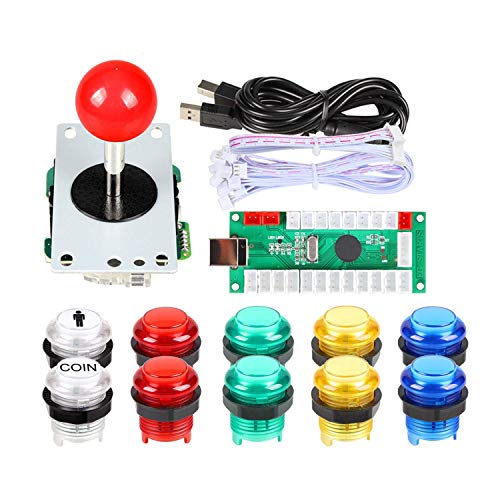
EG STARTS 1 Player DIY Kit Joystick LED Arcade Buttons

EG STARTS 2 Player Arcade Games DIY Kit Parts

Hyperkin Trooper 2 Premium USB Game Controller

8Bitdo Retro Arcade Fight Stick 8 Way Joystick

8BitDo All-Button Arcade Controller

Haute42 Leverless Arcade Stick (Black)

ONEED Haute42 Leverless Controller Arcade Stick R16
More Details On Our Top Picks
Space matters with a stick this size, and HORI keeps the footprint tight without abandoning the familiar eight-button arcade layout. The short cable reach and portable body suit a desk, a shared living room, or a bag you bring to local sessions.
Compared with the more modular DIY kits below, this one asks far less of you. The trade-off is simple, there’s less room for customization, so it fits best for players who want a ready-made controller rather than a build project.
Strong Points
- Small body leaves more room around your keyboard and mouse.
- The eight-button layout keeps classic arcade rhythm intact.
- Lightweight form makes carrying it between setups easier.
- Works well for casual fights and older arcade-style games.
Things To Consider
- The compact shell can feel cramped for larger hands.
- Customization is limited compared with a DIY parts kit.
- The short-form design gives up some desk stability.
Feature Snapshot
Who Should Grab It
You’re a good match for this stick if you want a compact, ready-to-use controller for fighting games and don’t want to spend time on assembly.
Another Choice May Suit
8Bitdo Retro Arcade Fight Stick 8 Way Joystick fits you better when you want wireless options, macro buttons, and wider feature control.
This is a parts-first choice, not a finished stick, so it makes sense for cabinet builders and tinkerers who already know where everything should go. The LED buttons and 8-way joystick give your build an arcade look without forcing you into a full enclosure package.
Compared with HORI’s compact ready-made unit, this kit demands more planning but gives you more control over the final layout. The honest read is that it’s better suited to someone comfortable with mounting holes, wiring, and a bit of patience.
Upsides
- LED buttons add visible feedback in dim rooms.
- The 8-way joystick suits arcade and MAME-style play.
- Separate packaging makes parts easier to sort during assembly.
- One-year coverage adds a little peace of mind.
Small Caveats
- You need to match the 24 mm and 30 mm hole sizes carefully.
- Assembly work is part of the appeal, and part of the effort.
- The kit is best for a fixed build, not quick setup changes.
Made For
You’re the right fit for this kit if you’re building a one-player arcade panel or replacing worn controls in a project cabinet.
Skip It When
HORI Fighting Stick Mini for PS5, PS4, and PC makes more sense for you when you want a finished controller with no installation work.
Two-player cabinet plans need a different kind of parts bundle, and this one lines up with that use case cleanly. The 20-button set and paired joystick handles make it easier to plan a shared panel without hunting down every piece one by one.
Relative to the one-player EG STARTS kit, this version is the better fit for couch co-op or a head-to-head build. The catch is the same, you still need to handle installation, so it rewards organized builders more than casual setup.
Best Bits
- Two-player layout supports shared arcade builds.
- LED-lit buttons help the panel stand out visually.
- Zero-delay USB encoder suits Windows-based arcade projects.
- High-temperature plastic is a useful durability cue for busy setups.
Areas To Watch
- Installation still takes time and careful panel planning.
- The bundle is useful only when you want a full two-player build.
- Sorting all the parts takes a little bench space.
Core Details
Best Suited To
You’re the right match for this kit if you’re planning a two-seat arcade cabinet or a shared fighting setup for PC games.
Where A Sibling Pick Shines
EG STARTS 1 Player DIY Kit Joystick LED Arcade Buttons works better for solo projects that need fewer parts and less panel space.
Not every Pc arcade-style setup needs a fight stick, and this controller keeps that idea practical. Its ergonomic body, chamfered grips, and quiet-moving controls make it a sensible fit for long emulation sessions on a desk or in a living room.
Compared with the more specialized arcade layouts in this list, it feels closer to a familiar gamepad with a stronger comfort focus. That makes it friendly for mixed-use play, though it won’t scratch the same arcade-stick itch as the HORI or the leverless models.
What We Like
- Comfort-oriented shape works well over long sessions.
- Cross-platform support fits mixed desktop setups.
- Quiet joystick movement is useful in shared spaces.
- Solid cord and base point to dependable everyday handling.
Points To Note
- It is less arcade-authentic than a true stick layout.
- The form is better for emulation than for cabinet-style builds.
- Special input techniques may feel different from an actual fight stick.
Who Will Love This
You’re a strong match for this controller if you want comfortable PC play across Windows, macOS, Linux, or Raspberry Pi setups.
Look Elsewhere When
8BitDo All-Button Arcade Controller for Xbox Series X|S, Xbox One & PC is the better fit if you want a leverless layout for faster fighting-game inputs.
This one leans into customization harder than the simpler sticks above. You get Bluetooth, 2.4G, and wired USB-C connectivity, plus button mapping software, macro buttons, and a faceplate that feels more polished than plain plastic.
For multi-device households, that mix is hard to ignore, especially with the hidden receiver storage and mode-aware button layout. The trade-off is a busier feature set, so you’ll like it more than the HORI Mini only when you actually plan to use those controls.
Highlights
- Three connection methods cover different desk and couch setups.
- Macro buttons help with repeated inputs and shortcuts.
- Custom profiles make it easier to swap play styles.
- Tempered glass faceplate gives the shell a cleaner finish.
- Battery life figures suit long wireless sessions.
Worth Noting
- The extra features add complexity for basic users.
- Wireless convenience still means you’ll manage charging.
- Layout changes between modes can take a little getting used to.
Who Should Grab It
You’re the right fit for this stick if you play on Switch and PC and want remapping, macros, and multiple connection options in one unit.
Where Another Pick Suits Better
Hyperkin Trooper 2 Premium USB Game Controller fits you better when you want a simpler, comfort-first controller for emulation instead of a feature-heavy fight stick.
Leverless play changes the feel completely, and this 8BitDo build is aimed at that exact style. An all-button layout replaces the stick with direct directional inputs, which suits fast fighting-game motion and compact desk spaces.
Relative to the traditional sticks in this list, the learning curve is the main trade-off. For players already comfortable with button-based movement, though, the slim body and wireless PC support make it a serious setup tool rather than a novelty.
Bright Spots
- All-button layout supports very direct directional control.
- Thin body is easy to store or carry.
- Works across Xbox and PC use cases.
- Wireless support adds flexibility on crowded desks.
Minor Gripes
- Leverless input takes practice for stick users.
- The low-profile layout may feel unfamiliar at first.
- Not the right fit for anyone who wants a joystick gate.
At A Glance
The Right Fit
You’re a strong match for this controller if you already prefer leverless inputs and want a thin, PC-ready fighting setup.
A Better Fit Elsewhere
Hyperkin Trooper 2 Premium USB Game Controller suits you better if your focus is general emulation comfort instead of a fast arcade layout.
Haute42 pushes further into slim leverless design than the 8BitDo all-button option, and the result is a controller that feels purpose-built for tight fighting-game inputs. The crystal low-profile switches, transparent black acrylic shell, and RGB lighting give it a clean, modern look without drifting into excess.
For players who travel with their gear or clear desk space between sessions, the thinner frame matters more than it sounds. The built-in web configuration and hot-swap design also make it friendlier for long-term ownership than a fixed-layout board, though the leverless learning curve still applies.
Reasons To Buy
- Very slim body is easy to pack and store.
- Hot-swap support helps with switch changes later on.
- Web-based setup keeps remapping within reach.
- RGB modes add visual variety without changing function.
- Low-profile switches suit quick button presses.
Honest Caveats
- Leverless controls still take time to learn.
- The acrylic shell may show fingerprints with regular handling.
- Button-heavy layouts are not for every fighting-game style.
Technical Sheet
Perfect Match For
You’re the best fit for this stick if you want a thin leverless controller for serious PC fighting-game use and don’t mind a learning period.
Where Shoppers Go Wrong
HORI Fighting Stick Mini for PS5, PS4, and PC fits better when you want a traditional joystick layout with less adjustment time.
The ONEED R16 keeps the leverless format but widens its compatibility angle, which matters if your setup jumps between PC, PS4, and Switch. The low-profile Crystal switches and button rims give it a distinct feel, while the M2 pinky placement hints at a layout built for remapping and finger discipline.
Compared with Haute42’s black model, this one feels like a more platform-flexible route into the same control style. The trade-off is the same as with any leverless board, you’ll want time to adapt, especially coming from a traditional stick.
Positives
- Cross-platform support helps it fit mixed gaming setups.
- Rimmed buttons give the face a more defined feel.
- Hot-swap support keeps maintenance more approachable.
- SOCD support is useful for modern leverless play habits.
Softer Spots
- Leverless layouts reward practice more than instinct.
- The button-dense face can feel unfamiliar at first.
- Platform switching may require setup attention on your end.
Whose Shelf It Belongs On
You’re the right match for this controller if you want a leverless board that can move between PC and console-style setups more easily.
Reach For A Different Pick When
8Bitdo Retro Arcade Fight Stick 8 Way Joystick makes more sense if you want a classic levered stick with wireless modes and macro support.
What Matters Most Before Choosing Arcade Controllers For Pc
Input Style Comes First
Traditional sticks suit you when motion inputs feel more natural on a lever. Leverless boards suit you when direct button movement, tighter desk space, or faster repeated inputs matter more than the classic arcade feel.
Build Work Versus Ready-To-Play
DIY kits fit cabinet builders and tinkerers, while finished controllers suit anyone who wants to start playing right away. The wrong match usually comes from mixing those two goals.
Compatibility Should Match Your Setup
Check the systems you actually use, especially PC, console, or emulation hardware. A broad compatibility list saves hassle later, but only when the connection mode fits the way you play.
A Quick Reality Check
Mistakes Worth Dodging
Shoppers often focus on button count and forget the layout style. Storage space, cable reach, and hand comfort matter just as much for real use.
What The Higher Tier Buys
More expensive controllers usually pay for smarter materials, hotter customization, and extra connection options. That upgrade makes sense when you change setups often or want long-term adjustability.
Frequently Asked Questions
Are Arcade Controllers For Pc Good For Beginners?
Yes, ready-made sticks and comfort-focused controllers are beginner-friendly. Leverless models usually need more practice before they feel natural.
Do You Need A Fight Stick For Every Pc Fighting Game?
No, a standard controller still works well for many games. A fight stick makes more sense when you want arcade-style inputs and a wider control surface.
What Is A Leverless Controller?
A leverless controller replaces the joystick with buttons for movement. That design changes how you learn inputs, and it often suits players who value precision over tradition.
Are Diy Arcade Parts Hard To Install?
They take more planning than a finished controller. Panel cutouts, wiring, and mounting holes need attention before the parts make sense in a build.
Which Option Makes Sense For A Small Desk?
Compact sticks and slim leverless boards fit best on tight surfaces. Large two-player kits are better saved for cabinet projects or wider setups.
