


Arm-mounted setups solve a simple problem: the screen is in the wrong place. You get better desk clearance, easier height changes, and a cleaner layout for work, gaming, or a shared home office.
The eight picks below cover compact single-screen arms, heavier ultrawide options, and a dual-arm model for multi-monitor desks. The real difference is fit, adjustability, and how much weight each mount can handle without feeling fussy.
Quick Look At Our Shortlist

HUANUO Single Monitor Mount 13 to 32 Inch Gas Spring Monitor Arm

HUANUO FlowLift Pro Monitor Arm 13 32 Screens MechaSpring Mount

Acer Single Monitor Mount Fully Adjustable Monitor Arm Fits 17 34 Screens

HUANUO TitanLift Heavy Duty Monitor Arm Screens up to 49 Inches

monTEK Dual Monitor Arm Stand 17 32 Full Motion Adjustment
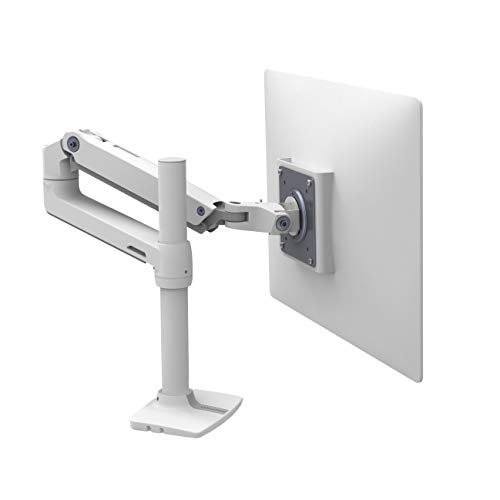
Ergotron LX Monitor Arm Single Monitor Desk Mount Tall Pole White

ErGear Single Monitor Arm Fully Adjustable Monitor Mount for 13 34 Inch Screens

HUANUO FlowLift Single Monitor Mount 13 to 32 Inch Monitor Arm
More Details On Our Top Picks
For a typical home office, this HUANUO arm lands in the useful middle ground. It supports 13 to 32 inch screens and uses a gas spring, which means the arm is meant to hold position smoothly while you adjust height or angle.
The clamp and grommet base give you two desk-mount routes, so it suits more desk layouts than a clamp-only arm. You still need to stay inside the weight range and VESA 75x75mm or 100x100mm pattern, but that trade-off keeps the setup straightforward for most standard monitors.
What We Like
- Fits a common monitor size range, which makes it a practical match for many desk setups.
- Gas spring support helps the arm move with less fuss during daily height changes.
- Clamp and grommet mounting broadens compatibility with different desk edges and cutouts.
- The weight window covers many work monitors without pushing you into heavier hardware.
Things To Consider
- It still depends on matching VESA holes, so ultra-thin or unusual backs need extra checking.
- Very heavy panels sit outside the range, which rules out some ultrawide displays.
- The moving joints will reward occasional tightening and a bit of desk upkeep.
Who It Suits Best
You benefit most from this pick if you want a single-screen arm for an everyday desk and prefer a setup that stays familiar rather than overly specialized.
Where A Sibling Pick Shines
HUANUO TitanLift Heavy Duty Monitor Arm fits better for ultrawide or larger-screen setups that need much more load support.
This FlowLift Pro version leans into adjustability. Tilt, swivel, and rotation give you several ways to align the screen, and the tool-free VESA mount cuts down on setup friction for people who swap monitors or fine-tune their desk often.
The weight limits split by screen shape, which is the detail worth noticing here. Flat screens have more headroom than curved ones, so you may find the fit better suited to conventional panels than to a curved display sitting near the upper end of the range.
Positives
- Tool-free VESA mounting makes installation feel less fussy than a more parts-heavy arm.
- Tilt, swivel, and rotation cover the angles that matter on a busy desk.
- The dual mounting style suits both clamp and grommet desk layouts.
- Flat-screen compatibility reaches a familiar 32 inch class, which fits many office displays.
Room For Improvement
- Curved screens have a lower weight ceiling, so the margin gets tighter near the top end.
- The fit rules are specific enough that a quick check of screen weight is still necessary.
- Desk material matters, especially for anyone using thinner or less standard surfaces.
Best Suited To
This makes sense for someone who rearranges the screen often and wants fast, tool-light mounting without giving up a full-motion arm.
A Better Fit Elsewhere
Ergotron LX Monitor Arm suits you better when desk finish, long-term movement feel, and a more premium mounting layout matter more than tool-free setup.
The Acer arm covers a broader screen span than the first HUANUO pick, which makes it more flexible for a mixed home-and-office setup. A 17 to 34 inch range gives you room for standard work monitors and some larger panels, while the gas spring build keeps movement feeling controlled rather than loose.
Tilt, swivel, and rotation matter here because they let you tune the screen to your chair height and desk depth. The honest read is that this kind of arm works best on a desk you expect to use every day, because the benefit shows up in small posture adjustments rather than in one dramatic change.
Highlights
- The 17 to 34 inch range gives you more room to match a larger daily-use display.
- Full motion support makes it easier to share the screen or change viewing angles.
- The gas spring design helps the arm feel steady during repeated repositioning.
- It fits home office use well, especially on desks that serve more than one task.
Points To Note
- Heavier screens still need careful weight matching, so the fit check stays important.
- A wider range can be helpful, but it also means more attention to VESA and mass limits.
The Right Fit
You should like this model most if you want one arm that can handle a larger single monitor and stay useful through different desk setups.
Swap It Out When
HUANUO FlowLift Single Monitor Mount suits a simpler, smaller-screen setup where 13 to 32 inch coverage is enough.
Feature Card
The TitanLift is the heavyweight in this list, and that shows in its screen support. A 49 inch ceiling and 44 pound capacity put it in a different lane from the smaller HUANUO and Acer models, so this is the one for ultrawides and other large panels that need more structure.
Dual C-clamps are a useful touch for stability on a serious desk, especially in a gaming or editing setup where a large screen stays in one place for long stretches. You do give up the lighter feel of smaller arms, but that trade-off makes sense when the monitor itself is closer to a centerpiece than an accessory.
Standout Traits
- Supports much larger displays than the compact single-arm options in this roundup.
- 44 pound capacity opens the door to heavier ultrawide panels.
- Aluminum construction should suit a desk that sees steady, long-term use.
- Dual C-clamps add confidence for bigger monitor setups.
Honest Caveats
- This is more arm than many desks need, so smaller monitors may feel underserved by it.
- Large-screen installations take more planning, especially around desk thickness and wall clearance.
- The VESA limit stays at 100x100mm, so compatibility still needs a quick check.
Who Will Love This
You get the most from this arm when your desk carries a large ultrawide or gaming display and you want a mount built around scale.
Another Choice May Suit
monTEK Dual Monitor Arm Stand fits better for two separate screens, especially in a split-work or multitask setup.
Core Details
This monTEK mount is built for a two-screen desk, and that alone changes the conversation. Each arm supports up to 20 pounds and spans 17 to 32 inch monitors, so it fits many productive dual-monitor layouts without feeling oversized for the average office.
The steel frame and reinforced mechanical spring arms point toward steadier positioning, which matters when you move one display more often than the other. Compared with the single-arm picks above, this one makes more sense for spread-out workspaces, though it also adds more hardware to manage and clean.
Best Bits
- Dual arms keep two monitors aligned without needing a separate second mount.
- Steel construction supports a sturdier feel on busy work desks.
- Mechanical spring adjustment is useful for frequent repositioning.
- Each arm reaches a familiar screen size range for office displays.
Small Caveats
- Two arms take up more visual space, so cable cleanup matters more.
- The fit range is good, though larger ultrawides belong elsewhere in this list.
- Mechanical springs can benefit from occasional adjustment as the desk changes.
Made For
You should gravitate here if your desk runs two screens side by side and you want one mount system to handle both.
Look Elsewhere When
ErGear Single Monitor Arm works better for a cleaner one-screen desk with built-in cable routing.
Details At A Glance
The LX stands out because the mounting setup feels more complete than the bare-bones arms in this roundup. You get the arm, extension, base, a 13 inch pole, and a two-piece desk clamp, so the package is aimed at a cleaner long-term desk build rather than a quick fix.
Its 7 to 25 pound range is narrower than some of the lighter arms, but that extra ceiling helps it work with sturdier monitors while still fitting flat, curved, and ultrawide screens up to 34 inches. In a shared office or a desk you plan to keep for years, that kind of consistency can matter more than flashy adjustability.
Positives
- The included pole and clamp pieces give you a more complete mounting package.
- Fits a solid range of screen shapes, including curved and ultrawide panels.
- The 25 pound upper limit suits heavier single-monitor setups.
- White finish works well in lighter desk environments and modern workspaces.
Areas To Watch
- The weight floor is higher than some other picks, so lighter screens are out.
- A separate grommet mount accessory is noted, which adds planning for some desks.
- The taller pole can be great for reach, though it also asks for more vertical room.
Who Should Grab It
This is the sensible choice for you when the desk stays in place and you want a more substantial arm with a cleaner hardware package.
Where A Sibling Pick Shines
HUANUO FlowLift Pro Monitor Arm makes more sense for anyone who wants tool-free VESA setup and faster adjustment.
ErGear keeps the focus on a tidy desk. The tool-free VESA mount trims setup friction, and the cable management path helps keep wires from spilling across the work surface, which is useful on smaller desks or in a shared room.
Its 13 to 34 inch size range and 19.8 pound ceiling make it flexible enough for many common single-monitor setups, flat or curved. That said, the appeal here is less about heavy-duty reach and more about keeping the desk calm and uncluttered, like a seatbelt for your cables.
Upsides
- Tool-free mounting helps speed up installation.
- Cable management keeps the back of the desk easier to live with.
- Works with both flat and curved monitors in a useful size span.
- The weight limit covers many standard office displays.
Worth Noting
- It is still a single-arm design, so it won’t replace a dual-monitor setup.
- The clean look depends on how carefully you route the cables.
- As with any arm, matching size, weight, and VESA pattern stays essential.
Built With In Mind
This suits someone who wants a neat, efficient one-monitor desk and values cable control as much as screen positioning.
Reach For A Different Pick When
monTEK Dual Monitor Arm Stand fits better for side-by-side work with two displays.
Feature Rundown
This FlowLift version keeps the formula straightforward. It fits 13 to 32 inch monitors, supports common VESA patterns, and uses both clamp and grommet mounting, so it covers the essentials without trying to be the most elaborate arm in the group.
The weight range lines up with many everyday LCD monitors, which makes it a sensible choice for a first arm or a secondary desk. It does not bring the more specialized hardware of the TitanLift or the tool-free setup of the FlowLift Pro, but that restraint is part of the appeal.
Best Bits
- Simple compatibility range covers many standard desk monitors.
- Clamp and grommet bases give you mounting flexibility.
- The adjustable arm supports better screen placement than a fixed stand.
- Good fit for a first monitor arm on a normal work desk.
Minor Gripes
- It stays focused on core function, so you do not get the extra flourishes of higher-tier models.
- The fit still depends on checking monitor weight and VESA spacing.
Who Will Love This
You should consider this if you want a clean, affordable-feeling path into arm mounting without extra complexity.
Where Another Pick Suits Better
HUANUO FlowLift Pro Monitor Arm fits better for someone who wants more angle control and tool-free mounting.
Core Details
What Matters Most Before Choosing Arm Mounted Monitors
Common Shopping Slip Ups
Screen size alone is not enough, because weight and VESA spacing decide whether the arm actually fits. Desk thickness matters too, especially for clamp mounts on thinner surfaces.
Where The Extra Money Goes
Higher-tier arms usually pay for smoother motion, sturdier joints, and more complete mounting hardware. That matters most for heavier screens, frequent repositioning, or a desk you plan to keep organized for years.
Fit First, Features Second
The safest path is to match the monitor’s weight, hole pattern, and desk setup before you compare finishes or motion range. That order keeps the choice practical instead of decorative.
A Quick Reality Check
Hidden Buying Traps
Dual-screen desks and ultrawides need different support than a basic single arm, so do not force a compact model into a large-display job. Cable routing also deserves attention, because a tidy arm can still look messy with poor wire management.
The Upgrade Payoff
Paying more often gets you a steadier lift feel, more precise movement, and a mount that stays pleasant to use every day. That upgrade is most worth it for bigger monitors and shared workspaces.
Frequently Asked Questions
What size monitor works with most arm mounts?
Most arms here cover common 13 to 34 inch screens, with one larger model reaching 49 inches. The exact fit still depends on weight and VESA spacing.
Do you need VESA holes for these mounts?
Yes, the monitor needs a matching VESA pattern for the arm to attach properly. The most common layouts in this roundup are 75x75mm and 100x100mm.
Clamp or grommet, which mount style is better?
Clamp mounts suit standard desk edges, while grommet mounts work through a desk opening. Your desk material and edge thickness usually decide the better route.
Are dual arms worth it for home offices?
They make sense when you use two screens side by side and want more usable desk space. A single arm is easier to place when you only need one monitor.
What matters more, screen size or weight?
Weight matters just as much as size, and sometimes more. A monitor can be the right diagonal size yet still exceed the arm’s load limit.
