


Three-screen setups make sense for coding, trading, design, and busy home offices, but the wrong mount turns that setup into a neck-turning chore. You need reach, load support, and enough adjustment to keep three displays level without crowding the desk. The picks below focus on real spacing limits, VESA compatibility, and how each arm fits different monitor sizes. That mix matters more than glossy marketing, especially once cables and clamps enter the picture.
The Shortlist At A Glance

MOUNT PRO Triple Monitor Mount 32″ 19.8lbs

MOUNTUP Triple Monitor Mount 27-inch 4.4-19.8 lbs

BONTEC Triple Monitor Desk Mount 13-32 Inch

HUANUO Triple Monitor Mount 13-27 Inch 19.8lbs

MOUNT PRO Triple Monitor Mount 32″ 19.8lbs

MOUNT PRO Triple Monitor Mount 27″ 17.6lbs
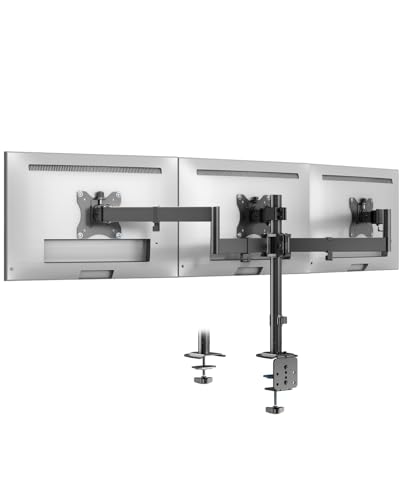
PUTORSEN Triple Monitor Mount 27 Inch
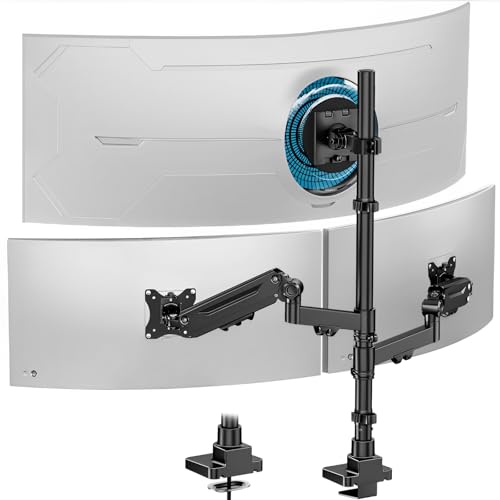
PUTORSEN Triple Monitor Mount 49 Inches 44 lbs
More Details On Our Top Picks
Wide-range adjustment is the story here. The MOUNT PRO arm supports 32-inch screens and up to 19.8 pounds per display, so it suits a work desk that shifts between spreadsheets, reference material, and video calls without locking you into one layout.
The gas spring design helps the arms move with less fuss than a fixed bracket, and the 75 x 75 mm and 100 x 100 mm VESA patterns cover many common monitors. That said, three larger panels can still demand careful spacing on smaller desks, and the finish matters because cable clutter shows fast in a setup like this.
Strong Points
- 32-inch support gives you room for larger office screens.
- 19.8-pound arm rating helps with heavier modern displays.
- Gas spring movement makes height changes less awkward.
- Swivel, tilt, and rotation help you line up mixed tasks.
Things To Consider
- Large panels can crowd a compact desk.
- Fine tuning three screens usually takes patience at first setup.
Feature Card
Who It Suits Best
Office users who want a broad, adjustable three-screen setup get the most from it.
A Better Fit Elsewhere
PUTORSEN Triple Monitor Mount up to 49 inches suits you better for a center ultrawide and a heavier workstation layout.
This one feels tuned for standard office monitors, not oversized panels. Each arm handles 4.4 to 19.8 pounds, and the 27-inch ceiling keeps the focus on common desk displays that need simple swivel, tilt, and rotation rather than a heavyweight chassis.
Desk fit is a practical strength too, since the clamp and grommet options cover a wide range of table styles. The trade-off shows up with bigger or unusually shaped screens, because the whole setup is happiest when your monitors stay within the stated size band and VESA pattern.
What We Like
- 27-inch limit lines up well with standard office monitors.
- Clamp and grommet mounting broaden desk compatibility.
- Motion joints help reduce screen mismatch across three displays.
- 4.4-pound lower end supports lighter panels cleanly.
Minor Gripes
- Big displays are outside its comfort zone.
- Three-arm setup can take time to level precisely.
- Desk thickness and hole fit still need a quick check before installation.
At A Glance
Made For
Office desks with three standard monitors and limited tabletop clutter benefit most.
Where A Sibling Pick Shines
BONTEC Triple Monitor Desk Mount is the better fit for you when one screen can stretch to 32 inches.
BONTEC stretches farther than the previous two picks on screen size, and that extra range is useful in mixed setups. Two arms handle 13 to 27-inch displays while the center pole supports a 13 to 32-inch screen, so a larger main monitor can sit above or beside lighter side panels.
That makes sense for home offices where one display handles the primary workload and the others carry chat, docs, or timelines. The honest read is that the setup rewards careful planning, because three different screen sizes can look messy until you align height and depth properly.
Highlights
- 32-inch center support adds layout flexibility.
- 13-inch entry point helps with smaller side monitors.
- VESA 75 x 75 mm and 100 x 100 mm support is widely useful.
- Good fit for mixed-size desk arrangements.
Areas To Watch
- Mixed screen sizes can take more setup time.
- Three displays still need enough desk depth to look balanced.
Who Should Grab It
You get the most from this mount when one monitor is larger and the side displays stay compact.
Look Elsewhere When
HUANUO Triple Monitor Mount 13-27 Inch is the cleaner fit for a matched trio of same-size screens.
HUANUO leans toward a more serious desk build, and that shows in the aerospace-grade aluminum frame plus the 19.8-pound-per-arm support. For gaming rigs, editing stations, or a home office that runs long hours, that kind of structure matters because screen sag gets old fast.
The 13 to 27-inch range keeps it in a practical zone for matched displays, not oversized panels. Compared with BONTEC’s broader center-screen reach, this one is more about stable, repeatable movement than letting one screen dominate the arrangement.
Upsides
- Aerospace-grade aluminum gives the frame a firm feel on paper.
- 20,000 lift-cycle rating points to long-cycle durability.
- Swivel, tilt, and rotation help you set a clean viewing arc.
- Good match for gaming desks with three similar monitors.
Small Caveats
- Best fit stays within the 13 to 27-inch band.
- Heavier arms can still ask for careful balancing during setup.
Core Details
Best Suited To
Gamers and power users with three same-size monitors will appreciate the stable, tidy layout.
Another Choice May Suit
PUTORSEN Triple Monitor Mount up to 49 inches makes more sense for ultrawide center screens and taller workstation builds.
This MOUNT PRO version is the more versatile sibling to the earlier 32-inch pick, mainly because it spells out a sturdier base and broader compatibility with both flat and curved screens. That matters in a real office, since the center display often carries the most visual weight and needs the calmest hold.
Each arm supports 4.4 to 19.8 pounds, and the mount uses the familiar 75 x 75 mm and 100 x 100 mm VESA patterns. One thing worth considering, though, is the note about 1000R curves, because some ultrawide panels sit outside the comfortable fit range.
Bright Spots
- Sturdy base design should help a heavier three-monitor arrangement feel steadier.
- Works with many flat and curved screens in the stated size band.
- Full-motion movement supports better side-to-side alignment.
- Good match for desks that need a firmer center anchor.
Points To Note
- 1000R curved displays are outside the stated fit.
- Three larger screens still need thoughtful desk spacing.
- Setup and cable routing are easier with some planning.
Who Will Love This
You benefit most here when your desk holds three everyday monitors and you want the base to feel especially settled.
Where A Sibling Pick Shines
MOUNT PRO Triple Monitor Mount 32″ 19.8lbs is the simpler fit for a lighter, less demanding three-screen desk.
This MOUNT PRO model trims the load rating a bit, and that trade-off makes sense for lighter office screens. With 27-inch support and 17.6 pounds per arm, it fits a simpler trio of displays where you care more about clean positioning than heavy-panel handling.
Compared with the 19.8-pound MOUNT PRO versions, the lower ceiling gives you less headroom but still covers many everyday monitors. The upside is a more focused fit for workstations that don’t need to carry oversized or unusually deep displays.
Best Bits
- 27-inch support matches plenty of common office monitors.
- 17.6-pound limit still covers many lighter displays.
- Good choice for keeping a three-monitor desk restrained and tidy.
- Shared VESA compatibility keeps setup familiar.
Room For Improvement
- Lower load rating leaves less room for heavier monitors.
- Not the strongest match for larger, denser panels.
Built With In Mind
This suits you best when your three monitors are standard office models and you want a straightforward desk upgrade.
Skip It When
HUANUO Triple Monitor Mount 13-27 Inch is the stronger choice for a more demanding gaming setup.
PUTORSEN takes a more material-focused path with iron and aluminum in the frame, which should appeal to desks that see long work sessions. The 27-inch limit keeps it in the same general class as the lighter MOUNT PRO option, but the metal mix gives it a more substantial profile on paper.
Its 22-pound-per-screen rating also stands out in this group, and that extra margin helps when your monitors are a little heavier than average. The catch is that the brand information is sparse, so you’re judging mostly by the frame spec and load support rather than a long feature list.
Reasons To Buy
- Iron and aluminum construction suggests a solid desk presence.
- 22-pound arm support gives more headroom than several rivals.
- 27-inch compatibility fits standard monitor rows well.
- Simple full-motion design keeps the layout easy to understand.
Honest Caveats
- Feature details are lean compared with some other picks.
- Heavier builds still benefit from careful desk setup.
Whose Shelf It Belongs On
You’ll get the most from it in a standard office or studio where a sturdier frame matters more than extra extras.
Reach For A Different Pick When
BONTEC Triple Monitor Desk Mount is the better route for mixed-size screens and a larger center display.
This is the most ambitious layout in the group, built around an ultrawide center screen that can reach 49 inches and 44 pounds. The side arms still support up to 35-inch monitors at 26.4 pounds each, so the whole frame makes sense for a serious workstation rather than a casual desk.
The C-clamp and grommet base options help it fit different tabletops, which matters once a mount this large enters the picture. Just keep the VESA pattern and monitor weight in view, because this setup is designed for specific screen dimensions, not guesswork.
Standout Traits
- 49-inch center support opens the door to ultrawide work.
- 44-pound center rating is strong for a three-arm design.
- Gas spring motion helps balance large screen movement.
- C-clamp and grommet options broaden desk compatibility.
Worth Noting
- Large-screen compatibility demands careful monitor checks.
- Best suited to deeper, sturdier desks.
The Right Fit
You benefit most here when an ultrawide center monitor anchors the setup and the side screens support focused work.
Swap It Out When
MOUNTUP Triple Monitor Mount 27-inch 4.4-19.8 lbs is the easier fit for a smaller, more standard desk.
What Matters Before You Choose
Mistakes Worth Dodging
Screen size and load rating need to match all three monitors, not just the middle one. Desk depth matters too, because a triple arm can look cramped long before it becomes physically unstable.
Why Top Tier Costs More
Higher-end mounts usually spend money on heavier metals, smoother joints, and broader motion range. That extra cost pays off when you run larger panels, a heavier center screen, or long work sessions that make sag and drift annoying.
How To Match The Mount To Your Setup
Start with VESA spacing, then check weight, then look at desk mounting style. Triple setups reward careful matching more than a simple single-arm mount does.
Things Worth Knowing First
Common Shopping Slip Ups
Many setups fail at the fit stage, not the movement stage. A mount can look capable and still be wrong for your desk depth, monitor curve, or VESA pattern.
What The Higher Tier Buys
Extra money often buys stronger arms, wider compatibility, and better balance across uneven loads. That matters most for larger screens, heavier panels, or desks that see daily changes in position.
Frequently Asked Questions
Do Arms For 3 Monitors Fit Curved Screens?
Many do, but the curve radius matters just as much as the size label. Check the product’s stated monitor shape limits before you commit.
How Much Desk Space Do You Need?
A wider desk and enough depth make alignment much easier. Tight surfaces can still work, but the three screens will feel crowded fast.
What VESA Size Is Most Common?
75 x 75 mm and 100 x 100 mm show up often in this category. Those patterns cover many mainstream monitors.
Are Gas Spring Arms Better?
Gas spring arms usually make height changes feel smoother and less abrupt. They also help when you tweak screen position often during the day.
Should All Three Monitors Match?
Matching screens make alignment easier and the desk looks cleaner. Mixed sizes can work too, but setup takes more care.
