


You need the right capture card when old tapes need digital care, a console feed needs recording, or a camera needs a cleaner path into a PC. The difference usually comes down to input type, output resolution, latency, and how much setup friction you can tolerate. Some picks are built for legacy RCA gear, while others are made for HDMI streaming and game capture.
This roundup keeps the focus on practical fit. You’ll see where each card belongs, where it falls short, and which model makes the most sense for your setup.
The Shortlist At A Glance
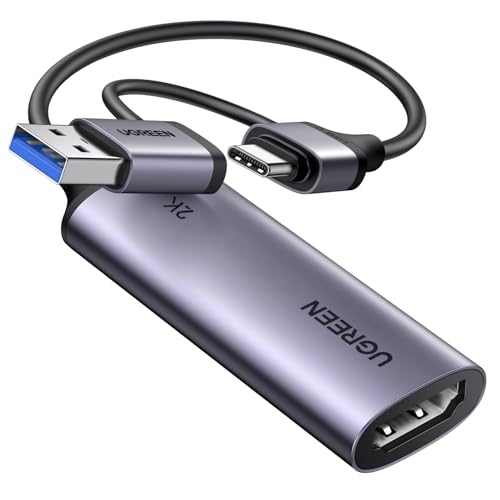
UGREEN 2K@30Hz 1080P 60FPS Video Capture Card 4K Input HDMI to USB 3.0

Video Capture Card, USB Video Capture Device RCA to USB Audio Video Converter VHS Mini DV VCR Hi8 DVD to Digital Converter
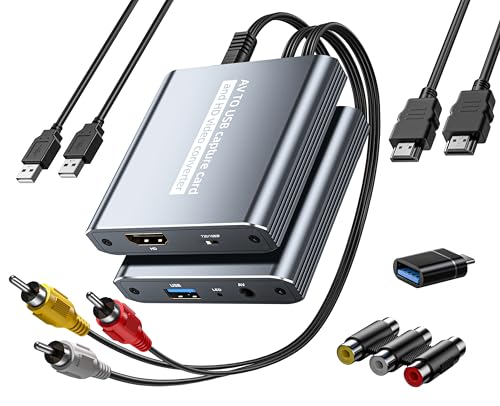
VHS to Digital Capture Card USB Video Capture Card with HDMI Loop Out RCA AV to USB 1080P 30fps

BENFEI Video/Audio Capture Card Full HD 1080P 60FPS
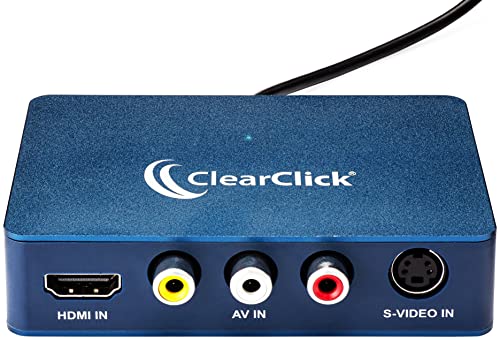
ClearClick Video to USB 1080P Audio Video Capture Live Streaming Device USB-C Plug & Play

4K HDMI Capture Card for Streaming Full HD 1080P 60FPS USB 3.0 Cam Link Game Audio Video Capture Card

Portta HDMI Video Capture Card Stream and Record in 1080P60 with Ultra-Low Latency
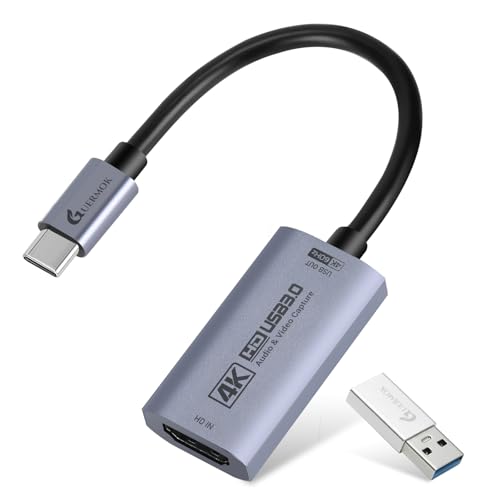
Guermok HDMI Capture Card USB 3.0 HDMI to USBC Video Capture Card 4K60FPS
More Details On Our Top Picks
UGREEN leans toward a clean HDMI workflow rather than legacy video rescue. Its stated 4K input support, 2K output path, and 1080p 60fps compatibility give you some room to match the card to your source and your editing setup.
That makes it a sensible fit for streamers, camera users, and anyone who wants a straightforward bridge into USB 3.0. The trade-off is simple, it looks less useful for older RCA gear than the analog-focused picks later in the list.
Strong Points
- 4K input keeps source material more flexible for editing.
- 1080p 60fps support suits smoother motion on a budget-conscious setup.
- USB 3.0 fits modern PCs without extra hardware clutter.
- Useful for daily streaming desks, not just one-off transfers.
Things To Consider
- It leans HDMI first, so older tape decks need another model.
- You may need to check host software compatibility for your workflow.
Feature Card
Who It Suits Best
Streamers and camera users who want a simple HDMI-to-USB bridge will get the most from it.
A Better Fit Elsewhere
Fulfalic VHS to Digital Capture Card suits you better for VHS, DVD, and other RCA-based sources.
This VIXLW card is aimed at the kind of shelf most homes forget about, the one with VHS, Mini DV, or Hi8 boxes waiting for a conversion pass. Its RCA-to-USB approach keeps the setup centered on analog sources rather than modern HDMI gear.
That focus matters for archive work, especially in a family room or study where old tapes need a path into a computer. The honest read is that it’s specialized, so it makes sense for tape libraries and less sense for current consoles.
What We Like
- RCA input support fits older camcorders and VCR decks.
- USB output keeps digital transfer straightforward on a PC.
- PAL and NTSC support broadens use across older media collections.
- Good fit for home archives that need organized digitizing.
Minor Gripes
- Its analog focus gives you little value for HDMI sources.
- Legacy gear can take some cable sorting before the first capture.
Who Will Love This
You get the most value here when your job is moving old tape media into files on a computer.
Where A Sibling Pick Shines
ClearClick Video to USB 1080P Audio Video Capture & Live Streaming Device is the broader choice for mixed HDMI and analog setups.
The HDMI loop-out gives this Fulfalic card a useful edge over the simpler analog converters above it. You can keep an eye on the source through a TV or monitor while the USB side handles capture, which is handy in a living room or a workbench setup.
That split workflow makes old-video cleanup feel less cramped, and it suits people who prefer a larger preview during transfers. The trade-off is that this kind of flexibility only matters when you actually use both display and capture paths.
Highlights
- HDMI loop-out supports live viewing during capture.
- RCA AV input keeps it useful for tape and disc sources.
- 1080p 30fps output is enough for home archive projects.
- Works well for a TV-plus-PC desk arrangement.
- Useful for retro console capture beside video conversion.
Worth Noting
- 30fps output is less fluid than the 60fps options in this list.
- Two-screen use adds a little cable management.
The Right Fit
You’ll get the most from it during home tape transfers where previewing on a larger screen makes the process easier.
Not Your Match When
BENFEI Video/Audio Capture Card is the stronger fit for console streaming that leans on 1080p 60fps.
BENFEI sits in the sweet spot for console capture, because 1080p 60fps support is the kind of spec that matters once motion starts moving quickly. That helps with Switch, PlayStation, Xbox, and similar HDMI sources, especially in a streaming corner that already runs on a PC or Mac.
Compared with the tape-focused cards, this one is much more at home beside a desk and microphone. It is a straightforward choice for people who want a practical game-capture bridge without extra fuss.
Upsides
- 1080p 60fps keeps gameplay capture visibly smoother.
- Broad console compatibility fits mixed gaming setups.
- USB capture works well with Windows and Mac desktops.
- Good middle ground for streaming and recording in one device.
Areas To Watch
- It is geared more toward HDMI consoles than legacy analog gear.
- You may want a tidy cable path around a crowded desk.
Best Suited To
Gamers and streamers who want smoother 60fps capture from current consoles will find the fit most natural here.
Another Choice May Suit
Portta HDMI Video Capture Card is the better match for users who want ultra-low latency and HDMI loop-out in the same package.
ClearClick is the broadest all-rounder in this group, because it spans HDMI, AV, RCA, and S-Video. That mix is useful in homes where a VCR, a camcorder, and a game system live in the same closet, and the move to USB-C keeps it aligned with newer computers.
The appeal is obvious for mixed-source cleanup, though the setup can take more attention than a single-input HDMI card. You gain flexibility, but you also inherit more cable matching and source selection.
Best Bits
- Wide input support suits mixed media collections.
- USB-C plug-and-play design feels current on modern desks.
- Handles both capture and live streaming use cases.
- Good choice for homes with older and newer devices together.
Softer Spots
- More input options can mean more setup decisions.
- Analog source matching takes some organization before transfer.
Who Should Grab It
You benefit most when your shelf holds several source types and you want one card to handle the mix.
Look Elsewhere When
UGREEN 2K@30Hz 1080P 60FPS Video Capture Card is the cleaner match for HDMI-only recording desks.
This VIXLW card speaks directly to camera workflows, which makes sense for anyone turning a DSLR or compact camera into a cleaner USB source. Its HDMI framing also keeps it useful for game consoles, so it doesn’t feel boxed into a single role.
The shape of the use case matters here, because a camera desk or streaming setup usually values a tidy bridge more than raw input variety. Compared with the analog-heavy picks, this one feels more modern and more centered on live content.
Reason To Buy
- Good match for camera-to-PC capture.
- 1080p 60fps supports smoother live output.
- USB 3.0 keeps the data path aligned with current desktops.
- Also works for console and PC streaming rigs.
Points To Note
- It fits HDMI ecosystems better than older analog archives.
- Camera users may want to plan lens and cable placement carefully.
Made For
You should focus on this one when a camera, console, or similar HDMI source needs a simple capture bridge.
Swap It Out When
Fulfalic VHS to Digital Capture Card makes more sense for VHS and RCA conversion work.
Portta is the most gaming-oriented card in this lineup, especially for setups where low delay matters during play and monitoring. The HDMI loop-out and 1080p60 capture combination helps keep the source visible while the USB feed heads to a PC.
That is the kind of arrangement many streamers build around a desk or capture station, and the 4K HDMI input gives the source side some breathing room. The honest read is that this card earns its keep when you care about responsiveness more than tape conversion.
Reasons To Buy
- Ultra-low latency suits fast gameplay and live monitoring.
- HDMI loop-out keeps a second display in play.
- 1080p60 capture works well for streaming motion-rich content.
- USB 3.0 makes the PC connection feel current.
Small Caveats
- It is a stronger match for HDMI gaming than for old analog decks.
- Loop-out setups usually take a little more desk space.
Perfect Match For
Competitive or fast-paced stream setups benefit most from the low-delay HDMI path.
Consider Something Else When
ClearClick Video to USB 1080P Audio Video Capture & Live Streaming Device makes more sense for mixed legacy inputs.
Guermok is the most travel-friendly shape in the group, thanks to the compact HDMI-to-USB-C approach and the included USB-A to USB-C adapter. That kind of small hardware matters on a laptop desk, a portable console station, or a minimalist streaming bag.
Its 4K60 capability makes it feel more future-minded than the basic adapters in the analog corner of the roundup. The trade-off is that its strength sits in clean HDMI workflows, not in old tape rescue.
Positives
- Small footprint suits portable kits and tight desks.
- USB-C focus works neatly with newer laptops and tablets.
- 4K60 support gives the source side plenty of headroom.
- Adapter inclusion reduces one extra purchase step.
Honest Caveats
- It is not built for RCA or S-Video legacy sources.
- Portability helps most when your cable bundle stays simple.
Core Details
Whose Shelf It Belongs On
Laptop streamers and mobile creators will appreciate the small size and USB-C style connection.
Reach For A Different Pick When
VIXLW Video Capture Card, USB Video Capture Device RCA to USB Audio Video Converter is the better fit for analog tape transfers.
What Matters Most Before You Choose
Where Shoppers Go Wrong
The common miss is buying for the wrong source type, then discovering the card speaks HDMI while your gear still uses RCA or S-Video. Match the input to the device first, then look at frame rate and software support. A card that fits the connector and the workflow saves more frustration than a longer spec line.
The Upgrade Payoff
Higher-tier cards usually cost more because they handle smoother motion, cleaner pass-through, broader input support, or lower delay. That extra spend makes sense for live gameplay, camera desks, and mixed-source rooms where the setup needs fewer compromises.
Frequently Asked Questions
What does 1080p60 mean in a capture card?
It means the card can work with 1080p video at 60 frames per second. That usually helps motion look smoother in game capture and live video.
Do you need HDMI for every capture setup?
No, because older decks and camcorders often use RCA or S-Video. Your source connection decides which card fits.
Why do some cards include loop-out?
Loop-out lets the signal pass to a TV or monitor while the PC captures it. That helps when you want a larger preview beside the computer screen.
Is USB 3.0 worth prioritizing?
Yes, especially for higher-motion capture and modern desktop setups. It gives the card a faster connection path than older USB standards.
Which card suits old tapes best?
The analog-focused VIXLW and Fulfalic options are the closest match for VHS, Hi8, and similar sources. They suit tape conversion work better than HDMI-only cards.
