


Auto-leveling can save you from the dull part of 3D printing, the repeated bed checks that eat time before the first layer even starts. That matters whether you print desk parts, cosplay pieces, prototypes, or multi-color models in a home workshop. The right pick depends on whether you want a full printer, a sensor upgrade, or a leveling aid that helps you tune an existing machine. A few models in this list lean toward speed, while others are built for simpler setup or finer control.
The Shortlist At A Glance
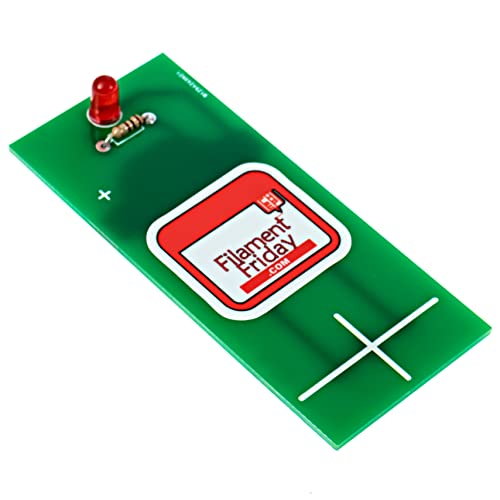
E-Leveler 3D Printer Electronic Bed Leveling Tool

Bambu Lab P1S Combo, P1S 3D Printer and AMS

Creality Official CR Touch Auto Leveling Kit

FLASHFORGE Adventurer 5M 3D Printer
Creality K1C 3D Printer

E-Leveler 2 – The Original 3D Printer Electronic Bed Leveling Tool

FLASHFORGE AD5M 3D Printer

FLASHFORGE AD5X Multi-Color 3D Printer
More Details On Our Top Picks
A tool like this makes sense for you more than a full printer upgrade. It gives visual feedback while you tune a bed by hand, which suits older machines, budget rigs, and anyone who still likes direct control over first-layer setup.
The trade-off is obvious, it helps you adjust leveling rather than doing the whole job for you. For a garage printer that gets moved around or a machine that drifts between jobs, that kind of simple feedback can be enough to keep setup from turning into guesswork.
Strong Points
- Gives you a clearer leveling reference.
- Fits a hands-on tuning routine.
- Helps reduce first-layer uncertainty.
- Compact enough to store with parts.
Things To Consider
- It still relies on your manual adjustment.
- Best used as a helper, not a shortcut.
Who It Suits Best
You get the most from it when you already own a printer and want a straightforward leveling aid for periodic setup work.
Where A Sibling Pick Shines
FLASHFORGE Adventurer 5M 3D Printer fits you better when you want the printer to handle leveling on its own.
This combo stands apart because it pairs a fully enclosed printer with the AMS, the automatic material system that feeds multiple filaments for multi-color or multi-material work. That setup suits you best when visual output matters as much as speed, especially on desk displays, character models, and showcase pieces.
The enclosed body adds a more controlled print environment than open-frame options like the Creality CR Touch kit, which is only an upgrade part. The trade-off is cost and complexity, since the AMS setup asks for more planning, but the payoff is a cleaner route into multi-color work without juggling swaps by hand.
What We Like
- AMS support opens multi-color printing.
- Enclosed body helps steady the print environment.
- Fast motion profile suits long print queues.
- Good fit for detailed display pieces.
Minor Gripes
- The system is more involved than a basic printer.
- Multi-color work needs planning and extra material handling.
Made For
You benefit most here when you want a capable enclosed printer for creative work, not just a simple machine for plain single-color parts.
Another Choice May Suit
FLASHFORGE AD5M 3D Printer suits you better for simpler setup and a less layered feature set.
For Ender owners, this is the most targeted path in the group. The CR Touch is a probing sensor, meaning it reads the bed at multiple points and helps the printer build a compensation map, which matters a lot on machines that see frequent manual tweaks.
It differs from the E-Leveler tool because the sensor becomes part of the printer rather than a temporary aid. That makes it a smart path for you if your Ender 3, Ender 3 V2, Ender 3 Pro, Ender 3 Max, Ender 5, or CR-10 is already part of your setup and you want a steadier leveling routine.
Upsides
- Built for several Creality platform families.
- Handles multi-point bed detection.
- Helps automate a tedious setup step.
Areas To Watch
- Installation takes more patience than a stand-alone tool.
- Best suited to compatible printers, not every machine.
The Right Fit
You get the strongest match here when your printer already sits in the supported Creality lineup and you want a leveling sensor rather than a new machine.
Skip It When
Filament Friday E-Leveler 3D Printer Electronic Bed Leveling Tool suits you better when you want a simpler, removable aid instead of a mounted sensor.
Core Details
Speed is the headline here, but the auto-leveling system is what makes that speed usable for everyday printing. The core layout is aimed at beginners and experienced hobbyists alike, and that broad fit matters when you want fewer setup interruptions and a machine that can move from idea to part quickly.
Compared with the Bambu Lab P1S Combo, this model keeps the story more direct, with no AMS layer to manage. The honest read is that you give up some color flexibility, yet you gain a printer that feels easier to understand at a glance, especially in a busy home shop.
Bright Spots
- Fully automatic leveling cuts setup friction.
- High-speed motion suits frequent print jobs.
- Quick-detach nozzle helps with maintenance.
- CoreXY layout keeps the frame efficient.
Small Caveats
- Fast printers still ask for sensible slicing settings.
- It focuses on speed over multi-color breadth.
Feature Rundown
Best Suited To
You fit this machine best when you want a fast, straightforward printer for regular home use and don’t want extra color hardware in the way.
Where Another Pick Fits Better
FLASHFORGE AD5X Multi-Color 3D Printer suits you better for color-heavy work and more presentation-focused models.
This one pushes harder toward advanced use, with high speed, a direct extruder, AI camera support, silent mode, and carbon-fiber filament compatibility in the feature mix. A direct extruder feeds filament with less distance between drive gears and nozzle, which helps when you care about strong material control and fewer feed complications.
That makes it a stronger match than the simpler AD5M for you if material range matters and you want more room to grow. The catch is that more capability usually brings more settings to learn, so it suits a tinkerer who wants serious output more than a plug-and-forget box.
Best Bits
- High-speed CoreXY motion keeps jobs moving.
- Direct extrusion supports tougher material use.
- AI camera adds useful monitoring.
- Silent mode helps in shared spaces.
- Carbon-fiber filament support widens material choice.
Honest Caveats
- More capability means more setup literacy.
- Advanced material work usually takes cleaner handling.
Who Should Grab It
You suit this printer best when you want speed, monitoring, and broader filament options in a machine that still stays compact on the bench.
A Better Fit Elsewhere
FLASHFORGE Adventurer 5M 3D Printer fits you better when you want a simpler speed-first setup without the extra material focus.
Technical Sheet
This version keeps the same basic purpose as the first E-Leveler, but the revised design matters for long-term use. It still serves the person who likes a visible, hands-on leveling routine, yet the updated build gives it a more polished feel for frequent bench work.
Compared with the original E-Leveler, this one sounds better suited to repeated use around a workshop where tools get picked up, set down, and stored often. For you, the appeal is not flash, just a cleaner path to bed setup on printers that need regular attention.
Positives
- Updated design feels more refined.
- Useful for repeat leveling sessions.
- Fits neatly into a maintenance kit.
- Still simple enough for routine checks.
Points To Note
- It still stays in the helper-tool category.
- Storage and battery care still matter over time.
Perfect Match For
You suit this tool best when you want a reusable leveling aid for a printer that stays in regular service.
Look Elsewhere When
Creality K1C 3D Printer fits you better when you want auto leveling built into the machine itself.
The AD5M lands in the middle of the pack in a useful way, because it combines one-click calibration, a CoreXY frame, and a quick-swap nozzle without piling on extra complexity. That makes it a sensible starting point for beginners who want guidance, and for hobbyists who prefer a machine that stays approachable after the first setup.
Its 220 x 220 x 220 mm build volume is a practical everyday size for brackets, small props, and classroom-style projects. The trade-off is straightforward: you get broad usability, but not the multi-color reach of the AD5X or the advanced material focus of the K1C.
Highlights
- One-click calibration keeps setup quick.
- CoreXY layout supports efficient motion.
- Quick-swap nozzle helps with upkeep.
- Mid-size build volume suits daily projects.
Worth Noting
- It stays more general-purpose than specialized.
- Color work sits outside its main focus.
Built With In Mind
You fit this printer best when you want a low-friction route into auto-calibrated printing for general home use.
Where The Extra Money Goes
FLASHFORGE AD5X Multi-Color 3D Printer is the better step up when you want color complexity and a more presentation-ready result.
Feature Snapshot
This one exists for color-first printing, and the four-color setup makes that clear from the start. Auto leveling keeps the base machine easier to live with, while the 300°C nozzle broadens filament choice for more ambitious projects, especially for display pieces that need visual depth.
It is not the simplest pick in the roundup, and that’s fine, because its job is different from the AD5M and the more basic E-Leveler tools. You get the strongest value here when your prints need to look layered and intentional, not just functional.
Reasons To Buy
- Four-color printing expands creative options.
- Auto leveling cuts part of the setup load.
- 300°C nozzle supports broader filament use.
- Large 220 mm cube suits common project sizes.
Softer Spots
- Multi-color work adds planning overhead.
- It makes more sense for visual projects than plain utility parts.
Whose Shelf It Belongs On
You suit this printer best when your work leans toward color-rich models, character parts, or anything that benefits from visual layering.
A Better Fit Elsewhere
FLASHFORGE AD5M 3D Printer fits you better if you want a simpler single-material machine with less color management.
Details At A Glance
What Matters Most Before You Choose Auto Leveling 3d Printers
Mistakes Worth Dodging
Don’t treat auto leveling as the same thing as perfect first layers. A sensor or calibration routine still depends on bed condition, firmware setup, and the rest of the machine.
Also match the level of automation to your workflow. A compact leveling tool suits hands-on tuning, while a fully enclosed printer suits a busier print station.
The Upgrade Payoff
Higher-tier machines usually cost more because they fold in faster motion systems, enclosed frames, multi-material support, or better maintenance access. Those features matter most when you print often, want fewer interruptions, or need cleaner results across different filament types.
For occasional use, a sensor kit or leveling helper can make more sense. For heavy use, the extra spend often buys convenience, consistency, and less tinkering between jobs.
A Quick Reality Check
Wrong Turns To Avoid
Skipping compatibility checks is the fastest way to miss the mark, especially with sensor kits like the CR Touch. Match the printer model, mainboard, and mounting plan before you commit.
Where Shoppers Go Wrong
Some options solve leveling, while others solve leveling plus speed or color. The better question is what kind of print routine you want to live with, not just what feature sounds useful.
Frequently Asked Questions
What does auto leveling actually do?
Auto leveling helps the printer account for small bed height differences across the build surface. It reduces manual adjustment work, but it does not replace basic setup.
Do you still need to level the bed by hand?
Often, yes, at least for the first setup and occasional maintenance. Auto leveling helps refine the process rather than remove it entirely.
Are sensor kits the same as auto-leveling printers?
No, a sensor kit upgrades an existing printer, while an auto-leveling printer includes the function in the machine. The right choice depends on whether you want to modify what you own or start with a new setup.
What matters most for a first-time 3D printer setup?
Look for clear compatibility, simple calibration steps, and enough build space for the parts you plan to print. A machine that is easier to understand usually saves time during the first few jobs.
Do multi-color printers suit everyday utility parts?
They can, but the added color hardware makes more sense for display work and detailed models. Simple utility parts often fit better on a single-material machine.
