


Backup servers now cover more ground than simple file storage. You’re usually weighing shared folders, phone backups, remote access, and the steady hum of a system that sits in the background without fuss.
This roundup focuses on two-bay and four-bay NAS units plus UPS battery backups that protect them from outages. That mix fits home labs, remote work setups, and small offices that want a cleaner fallback than juggling external drives.
The Shortlist At A Glance

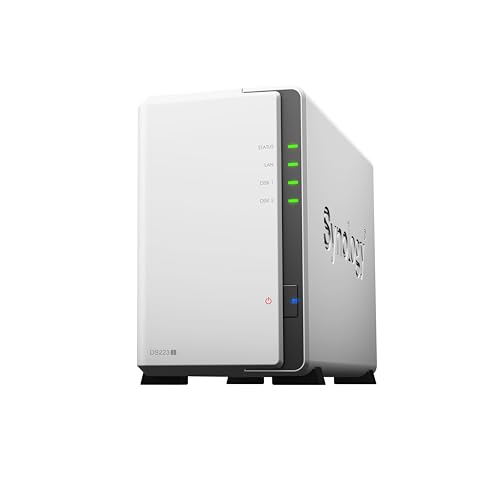
Synology 2-Bay DiskStation DS223j

UGREEN NAS DH2300 2-Bay

UGREEN NAS DXP4800 Plus 4-Bay

Synology DS223 Home & Office Backup Hub

CyberPower CP1500PFCRM2U PFC Sinewave UPS
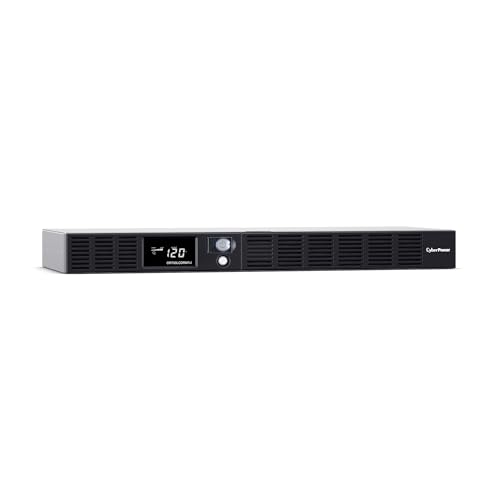
CyberPower OR700LCDRM1U Smart App LCD UPS
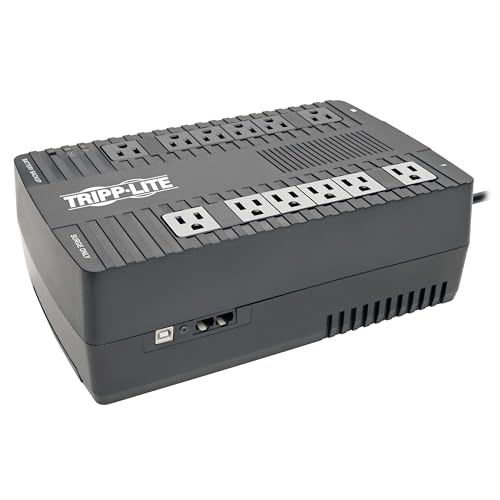
Eaton Tripp Lite AVR900U 900VA UPS
More Details On Our Top Picks
For a home office that keeps growing, this DXP2800 has the kind of hardware that makes sense on paper. The Intel N100 quad-core chip, 8GB of DDR5 memory, 2.5GbE networking, and dual M.2 NVMe slots give you room for media, backups, and app use without starting from a bare-bones build.
That matters most when you move files between a laptop, phone, and TV every day, or keep work data separate from family storage. It’s still a two-bay unit, so capacity planning matters, but that smaller footprint also keeps the setup more manageable than the larger four-bay DXP4800 Plus.
Strong Points
- 2.5GbE helps large file transfers feel less cramped than basic gigabit setups.
- Dual M.2 NVMe slots give you extra flexibility for caching or fast storage layout.
- 8GB DDR5 memory supports a busier app mix than entry-level hardware usually allows.
- 4K HDMI output suits a desk setup that also serves media duties.
Things To Consider
- Diskless design means your storage budget doesn’t stop at the enclosure.
- Two bays limit expansion compared with the DXP4800 Plus.
- Advanced features are useful, but first-time NAS setup still takes a little learning.
Feature Rundown
Who It Suits Best
Advanced home users and remote workers who want a compact NAS with room to grow will get the most out of it.
Where A Sibling Pick Shines
The UGREEN NAS DXP4800 Plus 4-Bay fits small offices better, because its extra bays and faster networking suit heavier shared use.
The DS223j leans toward a calmer, simpler NAS experience. Its compact two-bay format suits a desk shelf, closet, or media corner where you want shared storage without a bulky chassis taking over the room.
For households that mainly need file sharing and backup routines, that restraint is a strength. It won’t chase the raw pace of the UGREEN DXP2800, but it makes a good case for people who value a quieter, more straightforward setup.
What We Like
- Two-bay layout keeps the system easy to place and easier to understand.
- Compact size fits small rooms and tight equipment shelves.
- Synology’s DSM software ecosystem is a practical fit for organized file sharing.
- Quiet, efficient behavior suits spaces where noise stands out quickly.
Worth Noting
- Entry-level hardware feels better for light duty than for heavier app loads.
- Two bays mean limited expansion compared with four-bay alternatives.
- Diskless setup means you still need to plan drive pairing carefully.
Who Will Love This
You get the most value here as a home user who wants a tidy first NAS for documents, photos, and device backups.
Another Choice May Suit
The Synology DS223 Home & Office Backup Hub is the better fit for mixed home and work use, especially where file sharing and monitoring matter together.
This is the most approachable UGREEN pick in the group. The DH2300 is aimed at beginners and personal storage, so the pitch is less about advanced extras and more about giving your photos, videos, and files one private place to live.
That simplicity matters if you’re moving away from scattered cloud folders or a tangle of external drives. The trade-off is plain enough: you give up the flexibility of the DXP2800 and the power headroom of the DXP4800 Plus, but you get a cleaner first step into NAS ownership.
Highlights
- Beginner-focused design lowers the friction of a first NAS setup.
- Two-bay format keeps the enclosure small and easy to place.
- Private storage is a cleaner fit for personal photos and phone backups.
- Works well as a first move away from scattered cloud accounts.
Minor Gripes
- Less suited to heavy multitasking than the DXP2800 or DXP4800 Plus.
- Two bays limit long-term expansion.
- Disk management still takes some planning, even in a beginner-friendly setup.
Built With In Mind
New NAS users and personal storage shoppers will appreciate the low-stress layout and the private-home feel.
Swap It Out When
The Synology DS223j makes more sense for households that want a quieter, more established file-sharing platform.
The DXP4800 Plus is the obvious step up once your storage stops feeling casual. A Pentium Gold 8505 five-core processor, 8GB of DDR5 memory, built-in 128GB SSD storage, 10GbE plus 2.5GbE networking, and dual M.2 slots create a much stronger base for shared use.
That mix fits small offices, content-heavy homes, or anyone juggling backups across several devices at once. It also stands apart from the two-bay models above, since the extra drive bays give you more room to grow without replacing the whole unit too soon.
Reasons To Buy
- Four bays provide more room for growth and storage planning.
- 10GbE raises wired transfer potential for demanding workloads.
- Built-in SSD storage helps the system feel more responsive out of the box.
- Docker and virtual machine support widen its usefulness in a small office.
- Cross-device compatibility covers common desktop and mobile platforms.
Areas To Watch
- More capability also means more setup decisions and a higher learning curve.
- Diskless design means you still need to budget for drives separately.
- Its stronger feature set makes it more than most households need.
Details At A Glance
Who Should Grab It
Small offices and power users who want room for growth, faster networking, and app flexibility will get the most from it.
Look Elsewhere When
The UGREEN NAS DXP2800 2-Bay suits advanced home setups better when you want a smaller chassis and simpler scaling.
The DS223 lands in the middle of the pack in a useful way. It’s built for centralizing files, protecting data, and even monitoring property, so it suits households that want one machine to cover work folders, personal storage, and light home oversight.
Synology’s DSM platform gives it a more polished feel than a plain storage box, especially for people who want access from several devices. Compared with the DS223j, this model feels like the more practical all-rounder for mixed home and office use.
Positives
- Two-bay layout keeps the footprint small enough for a desk or shelf.
- Mixes file organization and monitoring in one enclosure.
- DSM software helps remote access feel more organized for daily use.
- Good fit for households that split storage between work and personal files.
Small Caveats
- Two bays cap expansion sooner than a four-bay system.
- Diskless packaging means your drive choice matters from the start.
- Heavier app users may outgrow it faster than they expect.
Perfect Match For
Home offices and mixed-use households that want a tidy central hub without moving into pro-level hardware will feel right at home here.
A Better Fit Elsewhere
The UGREEN NAS DXP4800 Plus 4-Bay suits heavier collaboration, especially where 10GbE and extra bays matter more than simplicity.
Once your storage gear moves into a rack, the power backup has to keep pace. This rackmount CyberPower unit uses a sine wave output, which is the cleaner, more stable AC waveform many active PFC power supplies expect, and that makes it a sensible match for stricter server equipment.
It’s built for installations where the load includes security hardware, AV gear, or networking kit that lives in a rack rather than under a desk. Compared with the smaller desktop UPS units in this roundup, it feels much more purpose-built, though that also means you need the right mounting space.
Upsides
- Rackmount format fits structured server or networking installs.
- Sine wave output suits hardware that expects cleaner power.
- Useful for mixed rack loads, not just one machine.
- Good match for systems that need orderly cabling and shelf planning.
Trade Offs
- Rackmount design is less convenient for a simple desktop setup.
- More specialized than the Eaton Tripp Lite AVR900U.
- Best value shows up only in a rack-based environment.
Whose Shelf It Belongs On
Rack users, network closets, and small server rooms are the strongest fit for this model.
Where Another Pick Suits Better
The CyberPower OR700LCDRM1U works better for smaller department servers and workstations that don’t need the same level of output compatibility.
This rackmount UPS is the more restrained CyberPower option, and that’s the point. Its simulated sine wave output and line-interactive design suit department servers, network devices, and telecom gear that don’t need the cleaner waveform of the CP1500PFCRM2U.
The LCD front panel is the practical touch here, especially in a closet or rack where quick status checks matter. It’s a straightforward backup choice for workgroup environments, though the simpler output profile makes it less attractive for sensitive active PFC loads.
Best Bits
- Rackmount format keeps it aligned with server closets and telecom setups.
- LCD front panel helps with quick on-site status checks.
- Line-interactive design suits everyday business power conditioning.
- Works well for smaller network groups that need orderly backup.
Points To Note
- Simulated sine wave output is more limited than true sine wave units.
- Less suitable for gear that prefers cleaner output.
- Rack installation is still a better fit than casual desk use.
Who It Suits Best
Small server rooms and network closets that need a practical rack UPS will get the most from it.
Reach For A Different Pick When
The CyberPower CP1500PFCRM2U is the better fit for active PFC hardware and more exacting power needs.
The AVR900U takes a very practical route. You get 12 outlets total, with six handling battery backup plus surge protection and six providing surge-only coverage, which makes it easy to split critical gear from lower-priority accessories.
That layout is useful for a desktop office, a small media corner, or a simple home server setup where you want protection without overcomplicating the wiring. It’s less specialized than the rackmount CyberPower units, but it’s easier to live with in a mixed-use room.
Positives
- 12 outlets give you more connection options than many compact UPS units.
- Six battery-backed outlets let you reserve backup power for key devices.
- Six surge-only outlets help keep accessories organized.
- Desktop-friendly size suits a small office or media table.
Areas To Watch
- Less rack-oriented than the CyberPower models.
- Not as specialized for active PFC server gear.
- Works best when you keep the load sensible and organized.
The Right Fit
Shoppers who want a straightforward UPS for a PC, router, or compact backup setup will appreciate the clean outlet split.
Skip It When
The CyberPower CP1500PFCRM2U is a stronger choice for rack-based systems that need sine wave output.
What Matters Most Before Choosing Backup Servers
Common Shopping Slip Ups
People often match the enclosure to the room and forget the drives, network speed, or rack space that make it usable. A two-bay NAS suits lighter growth, while a UPS has to fit the gear it protects, not just the shelf it sits on.
The Upgrade Payoff
Higher-tier models usually cost more because they add faster networking, extra bays, stronger processors, or cleaner power output. That upgrade makes sense once you handle large shared files, multiple users, or gear that needs steadier electricity.
Things Worth Knowing First
Mistakes Worth Dodging
Don’t oversize a system for casual storage, and don’t undersize it for shared work. A compact NAS can feel cramped fast in a busy home, while a rack UPS is awkward outside a rack.
When Paying More Pays Off
Spend up when you need faster transfers, more expansion room, or more stable protection for equipment that stays on all day. The extra cost is easier to justify in home offices, network closets, and small teams than in a light personal setup.
Frequently Asked Questions
What makes a NAS a better backup server than an external drive?
A NAS centralizes files for several devices at once, which keeps backups and shared storage in one place. It also stays connected to the network, so remote access and scheduled routines are easier to manage.
Do you need more than two bays?
Two bays work well for lighter storage needs and smaller budgets. Four bays make more sense once you want room for growth, redundancy planning, or heavier shared use.
Why choose a rackmount UPS over a desktop UPS?
A rackmount UPS fits cleaner into server racks and network closets. It also makes sense when your equipment is already mounted that way.
What is sine wave output, in simple terms?
Sine wave output is a smoother AC power shape that suits many sensitive devices. It matters most for gear that expects cleaner input from backup power.
How do you keep a backup server setup manageable?
Start with the storage you actually need, then add network speed or rack gear only when your workload grows. That keeps the system easier to maintain and cheaper to live with.
