


Stretching your budget on a 3D printer is less about chasing raw speed and more about avoiding expensive compromises. A good bang-for-buck machine gives you solid calibration, sensible build volume, and a setup path that doesn’t eat your whole evening. That matters whether you’re printing replacement parts in a garage, teaching a teen at the kitchen table, or turning out prototypes after work.
The eight picks below lean on real feature differences, not marketing gloss. You’ll see where enclosed frames help, where multicolor support earns its keep, and where a simple enclosure or faster nozzle swap makes daily use easier.
The Shortlist At A Glance
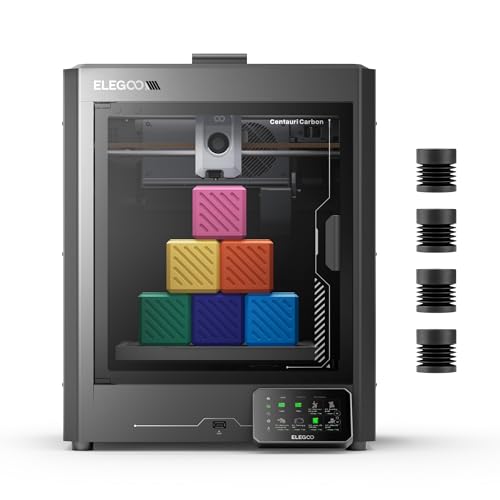
ELEGOO Centauri Carbon 3D Printer, CoreXY 500mm/s

FLASHFORGE AD5M 3D Printer Fully Auto Calibration 600mm/s

YOOPAI Multifunctional Resin 3D Printer Enclosure

Bambu Lab P1S 3D Printer

FLASHFORGE AD5M Pro 3D Printer 600mm/s

Anycubic Kobra X Multicolor 3D Printer

Anycubic Kobra X Multicolor 3D Printer

ANYCUBIC Kobra X Fast 3D Printer
More Details On Our Top Picks
The Centauri Carbon makes sense for you if you want a printer that arrives ready instead of asking for a weekend of assembly. Its 256 x 256 x 256 mm build space gives enough room for practical parts, cosplay pieces, and multi-piece hobby work without pushing into a huge footprint.
CoreXY means the motion system keeps the motor mass off the moving toolhead, which helps the machine stay nimble at speed. The 320°C nozzle opens the door to higher-temp filament choices, while the built-in camera suits a desk setup where you want to check progress without hovering nearby.
Strong Points
- Fully assembled setup cuts the start-up hassle.
- Auto calibration helps daily use stay predictable.
- CoreXY layout supports brisk motion on the bed.
- Built-in camera is handy for remote checks.
Things To Consider
- The 256 mm class build volume suits most desk projects, not oversized parts.
- High-temperature printing still depends on matching filament and settings well.
- The compact frame asks for a stable surface with room for airflow.
Feature Card
Who It Suits Best
You’ll get the most from this pick as a hobbyist or first-time owner who wants speed without a fussy setup routine.
A Better Fit Elsewhere
FLASHFORGE AD5M Pro 3D Printer 600mm/s is the stronger match for a garage or workshop where quiet operation and nozzle flexibility matter more than built-in camera convenience.
Speed matters less than consistency once a printer becomes part of your routine, and this AD5M leans hard into making repeat jobs simpler. The full-auto calibration setup and quick-swap nozzle point to the sort of machine you want in a busy room where you don’t want to babysit every start.
Its all-metal CoreXY structure gives it a more substantial feel than the lighter, more starter-oriented Centauri Carbon. That trade-off usually suits you well when you care about fewer interruptions and easier upkeep, especially for a workshop that sees frequent material changes.
Upsides
- One-click calibration lowers the setup burden.
- Quick-swap nozzle keeps maintenance more manageable.
- All-metal CoreXY frame is built for steady motion.
- 600mm/s speed spec suits rapid turnaround work.
- People juggling repeated prints benefit from the streamlined routine.
Worth Noting
- The compact 220 x 220 x 220 mm build area is practical, not oversized.
- Fast hardware still rewards careful slicer settings and filament matching.
- Owners with large props or tall enclosures may want more volume.
Core Details
Who Will Love This
You’re the right fit for this machine if you print often and want fewer pauses between jobs.
Where A Sibling Pick Shines
ELEGOO Centauri Carbon 3D Printer, CoreXY 500mm/s makes more sense for someone who wants a built-in camera and a slightly more approachable out-of-box feel.
Resin printing changes the whole room around the machine, so an enclosure like this matters more than it first looks. The carbon filter sheet, exhaust fans, and expandable pipe setup are aimed at keeping the workspace more controlled, which helps in apartments, spare rooms, and shared benches.
Compared with the printers above, this is less about speed and more about making resin ownership feel manageable. You’ll appreciate it most when your printer sits near everyday life, not tucked away in a separate workshop.
Highlights
- Carbon filtration adds another layer of workspace control.
- Exhaust fans help move air more deliberately.
- Expandable ducting gives you routing flexibility.
- Useful for resin setups in tight indoor spaces.
Softer Spots
- It adds another piece of gear to store and keep clean.
- Vent routing takes a little planning around the room layout.
- The enclosure helps the setup, but it does not replace good workflow habits.
The Right Fit
You’re a strong match for this enclosure if resin printing already lives on your desk or workbench and you want the environment to feel less exposed.
Another Choice May Suit
FLASHFORGE AD5M 3D Printer Fully Auto Calibration 600mm/s is the better fit for someone who wants an all-in-one FDM printer rather than a separate enclosure accessory.
The P1S sits in the part of the list where speed, enclosure design, and multicolor potential start to matter more than raw entry-level simplicity. Its enclosed body suits filaments that prefer a steadier interior environment, and the AMS connection for up to 16 colors gives you room to build more visual range into a project.
That said, this is the sort of machine that makes most sense once your printing habits are already settled. You’ll get the best return from it in a home studio or maker corner where the enclosure and color system are useful every week, not once in a while.
Best Bits
- Enclosed design helps stabilize the print environment.
- AMS support expands into multi-color work.
- 500mm/s speed spec keeps turnaround quick.
- Well suited to more polished hobby projects.
Points To Note
- Multi-color printing depends on the separate AMS path.
- The system asks for more planning than a basic single-color machine.
- It fits best once you know you’ll use the extra capability.
Quick Facts
Built With In Mind
You’re the strongest match for this printer if your projects already lean toward multi-material detail and you want a more enclosed machine.
Swap It Out When
Anycubic Kobra X Fast 3D Printer works better for a household that wants a simpler color-capable setup with a shorter learning curve.
The AD5M Pro reads like the more mature sibling of the standard AD5M, with the extras aimed squarely at day-to-day usability. A 0.4 mm and 0.6 mm nozzle bundle gives you more control over fine detail versus faster throughput, and auxiliary chamber cooling helps the enclosed body stay more useful across different jobs.
The quieter 50 dB standard mode matters in a shared room, especially for people who print near a desk or family space. In most homes, that kind of detail ends up mattering more than another headline speed number.
Reasons To Buy
- Dual nozzle sizes give you more job flexibility.
- Enclosed CoreXY layout supports cleaner motion control.
- Auxiliary chamber cooling helps broaden practical use.
- Lower noise mode suits shared spaces.
- Built-in camera helps keep an eye on longer runs.
Areas To Watch
- The extra features make sense only when you’ll use them regularly.
- Noise control helps, but placement still affects how it feels in a room.
- The machine rewards a tidy setup area and regular nozzle care.
Perfect Match For
You’re the best fit for this printer if you want a quieter enclosed machine for mixed home and hobby work.
Look Elsewhere When
FLASHFORGE AD5M 3D Printer Fully Auto Calibration 600mm/s suits you better if you want a simpler path into the same family of machines.
Multicolor printing is where this model starts to separate itself from the simpler machines above. Native 4-color support is a big step up from a single-extrusion beginner setup, and the promise of expansion to 19 colors puts it in a more ambitious category for display pieces and creative work.
It also has a material-handling angle that matters, because the stated extrusion system is meant to handle everything from TPU to PLA with fewer manual adjustments. That makes it appealing for a hobby room where you switch between flexible and standard prints more often than you’d like to admit.
Plus Points
- Native 4-color printing broadens creative output.
- Expansion path to 19 colors is unusually flexible.
- Material handling supports both TPU and PLA use.
- Less manual fiddling helps routine projects stay moving.
Small Caveats
- Color systems add setup complexity compared with basic single-color printers.
- Expanded multicolor use asks for more filament organization.
- The most ambitious color projects will reward careful file prep.
Who Should Grab It
You’re the right match if you want creative color work without jumping straight to the most complex enclosure-heavy platform.
Reach For A Different Pick When
Bambu Lab P1S 3D Printer is the better route for a more enclosed, higher-tier multicolor workflow.
The One-Click version is aimed at you if easy starts matter more than chasing every advanced setting. Its pitch is straightforward, and that’s a strength in a category that can otherwise feel like a wiring exercise before the first print.
For homes that want a multicolor printer without turning setup into a second hobby, this is a calmer fit than the more feature-loaded picks above. It’s also the kind of machine that can work well for shared family use, assuming the goal is simple creative printing rather than complex material experimentation.
Bright Spots
- One-click workflow reduces first-print friction.
- Multicolor support keeps projects visually interesting.
- Good match for casual, repeatable use.
- Fits family or beginner-friendly setups neatly.
Room For Improvement
- Simple operation means less depth for advanced tinkering.
- Color printing still asks for organized filament management.
- It suits everyday hobby work more than heavy production use.
Made For
You’ll like this one most if you want a friendly multicolor printer for home projects and low-stress setup.
Where Another Pick Suits Better
Anycubic Kobra X Fast 3D Printer gives you a better fit for classrooms or younger makers who need quick setup plus auto leveling.
This Kobra X version is the clearest fit for families, schools, or first-time setups where speed has to coexist with simplicity. The pre-assembled format and auto leveling take some friction out of the start, and the 260 x 260 x 260 mm build volume leaves room for a decent range of teaching models and hobby projects.
Compared with the One-Click model, this one leans harder into fast onboarding and a larger work area. That makes it a sensible choice for shared spaces where the machine may move from one project to another without much handholding.
Standout Traits
- Pre-assembled format saves setup time.
- Auto leveling supports more consistent first layers.
- 260 mm cube build volume is easy to work with.
- Native 4-color support keeps class projects lively.
Honest Caveats
- The larger footprint needs a stable tabletop or cart.
- Color features add filament management overhead.
- Fast onboarding helps, but organized storage still matters for accessories and spools.
Whose Shelf It Belongs On
You’re the strongest match if you want a family-friendly printer that gets moving quickly and keeps learning time low.
Skip It When
FLASHFORGE AD5M Pro 3D Printer 600mm/s is the better route for a quieter workshop machine with more hardware refinement.
What Matters Before You Choose A Bangs For Buck 3d Printer
Build Volume Versus Desk Space
A 220 mm class printer is easier to place, but a 256 mm or 260 mm cube gives you more freedom for helmets, brackets, and larger school models. Measure the machine’s footprint and leave room for spool access, cable bend, and airflow.
Calibration And Startup Effort
Auto leveling and full-auto calibration matter because they remove one of the slowest parts of ownership. That’s especially helpful for home users who want to print after work instead of tuning a bed for half the evening.
Speed Only Helps When The Rest Holds Up
A high speed rating matters most when the frame, nozzle, and slicer settings can keep pace. A fast machine that needs constant rework stops feeling like a bargain very quickly.
A Quick Reality Check
Common Shopping Slip Ups
People often chase speed and forget the enclosure, nozzle range, or workspace fit. A printer that suits your room and materials usually feels like a smarter spend than a flashier spec sheet.
The Upgrade Payoff
Higher-tier models usually pay for better motion control, quieter operation, stronger enclosures, and easier multicolor workflows. That extra spend makes sense once you print often enough that time saved becomes part of the value.
Frequently Asked Questions
What makes a 3D printer good value?
You want solid calibration, a sensible build area, and features you’ll use often. Fancy extras only help when they match your real projects.
Is multicolor printing worth it?
It is worth it for display models, school projects, and branded parts. For plain functional prints, single-color machines usually keep things simpler.
Do enclosed printers suit beginners?
They can, especially when the printer arrives assembled or auto-calibrated. The trade-off is a little more machine depth and a less open work area.
How much build volume do you need?
Small parts fit comfortably on 220 mm class machines. Larger props, helmets, and grouped batches benefit from 256 mm or 260 mm class space.
Should you prioritize speed or ease of use?
Ease of use matters more for most home setups. Speed becomes valuable once the printer is already reliable and part of a regular workflow.
