


Gaming laptop value is about more than raw speed. You need a machine that keeps frame rates steady, handles long sessions without turning into a space heater on your desk, and fits the way you actually use it, whether that’s commuting, studying, or settling into a gaming chair after work.
The eight picks below lean into different kinds of value, from higher-refresh displays and stronger GPUs to slimmer builds and a budget-friendly speaker pair for a cleaner desk setup. You’ll also see where each one cuts back, so you can match the hardware to your games, your space, and your upgrade plan.
Quick Shortlist For Value-Focused Gaming

ASUS ROG Strix G16 (2025) RTX 5060

ASUS ROG Strix G16 (2025) RTX 5050

ASUS TUF Gaming F16 (2025) RTX 5050

MSI Katana 15 HX RTX 5070

Acer Nitro V 16S AI RTX 5060
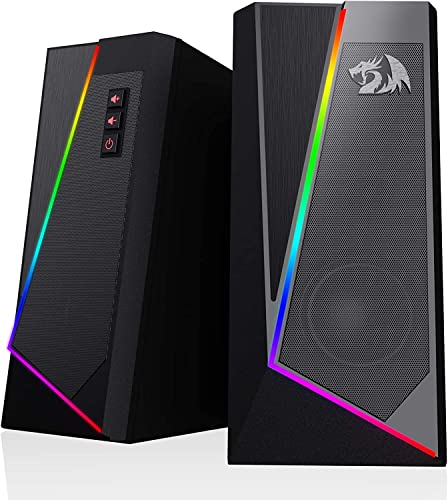
Redragon GS520 Wired RGB Speakers

Redragon GS520 Wired RGB Speakers

Acer Nitro V 15.6 RTX 5050
More Details On Our Top Picks
The 16-inch 16:10 panel gives you a little more vertical room than a basic 16:9 screen, which helps in shooters, strategy titles, and everyday multitasking. Pair that with an Intel Core i7-14650HX, RTX 5060, 16GB DDR5, and a 1TB Gen 4 SSD, and you get a very capable setup for someone who wants one laptop to cover games and heavier school or work loads.
Compared with the lower-tier Strix below it, this one makes more sense for you if you plan to keep the machine longer and care about extra headroom. The trade-off is simple, it’s still a chunky gaming chassis, so desk use feels natural while lap use feels less inviting.
Strong Points
- RTX 5060 and Core i7 hardware suit demanding games and heavier multitasking.
- 165Hz refresh rate with 3ms response helps motion look cleaner in fast play.
- 1TB SSD gives room for a larger game library before you need external storage.
- Wi-Fi 7 is a useful fit for faster home networks and less congested online play.
Things To Consider
- The larger gaming layout is better on a desk than in a cramped bag.
- 16GB memory is workable, though heavy creators may want more headroom later.
- The serious spec set makes this more machine than casual all-purpose laptop.
Feature Card
Who It Suits Best
Gamers who want a strong all-rounder for modern titles, school tasks, and a long upgrade runway fit this machine well.
A Better Fit Elsewhere
The Acer Nitro V 16S AI Gaming Laptop suits you better for lighter carry needs, especially around campus or on frequent travel.
This Strix keeps the same 16-inch, 165Hz formula as the model above, so the day-to-day feel should still be smooth and sharp. The shift to a Core i5-13450HX and RTX 5050 makes it easier to justify for you if the goal is modern gaming without paying for more GPU than your play style needs.
It’s the kind of pick that makes sense for a dorm desk or a family room setup, especially when you want one machine for games, homework, and general use. The honest read is that it gives up some headroom versus the RTX 5060 version, so long-term max settings are less comfortable territory.
What We Like
- 165Hz display keeps motion responsive for fast-paced games.
- 1TB SSD is roomy enough for several large installs.
- Wi-Fi 7 supports newer home networks without needing an adapter.
- Core i5 HX-class processing still gives a strong everyday gaming base.
Room For Improvement
- RTX 5050 sits below the stronger RTX 5060 model in the same family.
- It still carries the same larger Strix footprint, so portability stays modest.
- Hardcore settings chasers will likely want a stronger GPU tier.
Feature Rundown
Who Will Love This
Midrange gamers who want a strong desktop replacement without chasing the most expensive GPU tier fit this well.
Where A Sibling Pick Shines
The ASUS ROG Strix G16 (2025) RTX 5060 is the better route for you if more frame-rate headroom matters more than initial value.
The TUF line usually makes sense for you when a sturdier-feeling chassis matters as much as the frame rate target. Here, the Core i5-13450HX, RTX 5050, 16GB DDR5, and 512GB PCIe Gen4 SSD keep the spec sheet focused, while the 16-inch 165Hz 16:10 display gives you the same useful screen shape as the Strix pair above.
The smaller SSD is the main restraint, and that matters in real use because modern games can swallow storage fast. On the flip side, that leaner setup fits students or casual gamers who want a straightforward machine without paying for extra space they won’t fill right away.
Upsides
- 16:10 165Hz display gives a good mix of motion and workspace.
- RTX 5050 keeps current games within a sensible performance tier.
- 512GB SSD is enough for a lighter library and everyday apps.
- TUF styling is a calmer fit than flashier gaming shells.
Points To Note
- 512GB storage fills sooner than the 1TB options in this roundup.
- The i5 and RTX 5050 combo is fine for value, not excess.
- You may want external storage sooner than on the larger drives.
Made For
Students and casual gamers who want a practical 16-inch setup with a cleaner style and a restrained storage load fit this best.
A Better Fit Elsewhere
The ASUS ROG Strix G16 (2025) RTX 5050 suits you better if you want the same general tier with a larger 1TB drive.
This is the loudest spec sheet in the group, and it shows. A Core i9-14900HX, RTX 5070, 32GB of DDR5 memory, and a 1TB NVMe SSD give you a broad ceiling for AAA gaming, streaming, and heavier multitasking, while the 15.6-inch QHD+ 165Hz panel brings sharper image density than the FHD+ laptops around it.
That sharper panel is the real separator from the ASUS picks, because text and textures carry more detail at the same size. The catch is that the Katana’s strong parts also make it the least subtle choice here, so you’re paying for headroom rather than simplicity.
Best Bits
- Core i9 and RTX 5070 create substantial performance headroom.
- 32GB memory suits gaming plus streaming or large multitasking loads.
- QHD+ display adds a sharper look than the FHD+ models.
- 1TB NVMe SSD is a comfortable size for a large library.
Small Caveats
- The stronger hardware pushes it beyond casual-use value territory.
- QHD+ can demand more from the GPU than FHD+ screens do.
- Its high-spec focus makes it less understated than the TUF or Nitro picks.
Core Details
The Right Fit
Enthusiasts who want stronger parts for gaming, recording, and heavier desktop-style use fit this machine well.
Look Elsewhere When
The ASUS TUF Gaming F16 (2025) RTX 5050 is the calmer choice for you if simple value matters more than maximum hardware.
The Nitro V 16S AI leans into a more travel-friendly shape than the larger ASUS models, which matters when you actually carry a laptop between classes, rooms, or work spots. Ryzen 7 260, RTX 5060, 32GB DDR5, a 1TB Gen 4 SSD, and a 16-inch WUXGA IPS 180Hz panel make it feel like a portable rig rather than a trimmed-down starter.
That 180Hz refresh rate is useful for fast motion, and the 32GB memory gives it breathing room that the RTX 5050 machines below it do not match. The trade-off is the smaller WUXGA panel format, which feels a bit more work-focused than flashy, but that’s part of the appeal for practical use.
Reasons To Buy
- 32GB DDR5 gives generous breathing room for gaming and multitasking.
- 180Hz display supports very fluid motion in fast games.
- 1TB SSD is a comfortable match for larger installs and media.
- The slimmer design suits backpacks and frequent room-to-room carrying.
Areas To Watch
- The WUXGA panel is practical, though less cinematic than QHD+.
- Wi-Fi 6 is a step behind the Wi-Fi 7 laptops above.
- The more portable shape may still feel warm during long sessions.
Built With In Mind
Students, commuters, and anyone who moves a gaming laptop often should find the mix of portability and power appealing.
Another Choice May Suit
The MSI Katana 15 HX RTX 5070 fits you better if you want more outright horsepower and a sharper QHD+ display.
These are a straightforward desk upgrade for anyone who’s tired of thin laptop audio. A wired 2.0 channel layout means two separate speakers handling left and right sound, and the USB power setup keeps the desk simple, which is handy beside a gaming laptop or a compact monitor stand.
The RGB lighting gives the setup a little personality, but the real appeal is practical: plug it in, place it, and move on. Compared with the more expensive laptops above, this is the inexpensive way to make games, streams, and everyday videos feel less cramped.
Highlights
- USB power keeps setup easy on a crowded desk.
- Two-channel stereo separation is better than built-in laptop speakers.
- Touch-controlled lighting adds a simple visual accent.
- Easy-access volume control is useful during games and calls.
Honest Caveats
- Wired desktop placement works best, so this is not a carry-around option.
- RGB is cosmetic, not a substitute for stronger audio hardware.
- Smaller speaker enclosures naturally limit depth versus larger desktop audio setups.
Whose Shelf It Belongs On
Gamers with small desks, dorm setups, or basic laptop audio need a simple sound upgrade will get the most from this pair.
Skip It When
The Acer Nitro V 16S AI Gaming Laptop makes more sense if you want the laptop itself to carry the whole portable setup.
This version lands in the same lane as the other Redragon pair, so the decision is less about raw specs and more about the exact desk layout you’re building around. For small rooms, the compact form is easy to place beside a keyboard, and the six lighting modes give you a little room to match the rest of your setup.
The practical edge here is how little space it asks for, which makes sense next to the Acer Nitro V 15.6 or any of the slimmer gaming laptops in this list. The limitation is also clear, you’re still buying a basic desktop audio pair, so larger rooms will want more physical speaker size.
Bright Spots
- Compact footprint fits tight desks cleanly.
- Plug-and-play USB power keeps installation simple.
- Six backlight modes let you match different setups.
- Works well as a basic sound step up from laptop audio.
Minor Gripes
- The small cabinet size limits how full it can sound.
- It makes the most sense on a stationary desk, not a mobile rig.
Perfect Match For
Dorm rooms, home desks, and compact gaming corners suit this speaker set well.
A Better Fit Elsewhere
The Redragon GS520 Wired RGB Speakers on the previous entry suit you just as well, so the choice comes down to stock and desk color preference.
The 15.6-inch Nitro V is the easiest laptop here to picture in a backpack, and that matters more than it sounds. You still get an FHD IPS 165Hz panel, Core i5-13420H, RTX 5050 with 8GB GDDR7 VRAM, 16GB RAM, and a 512GB PCIe SSD, so the parts are sensible without turning the machine into a brick.
For you, the main draw is portability with enough gaming muscle for modern titles at a reasonable settings target. The included mouse pad is a small bonus, though the limited storage means large libraries will need discipline or an external drive sooner rather than later.
Standout Traits
- 15.6-inch size keeps the footprint more portable than the 16-inch models.
- 165Hz IPS panel suits fast games and everyday scrolling.
- RTX 5050 with GDDR7 memory gives current-gen graphics support.
- Mouse pad in the box is a small but useful practical extra.
Softer Spots
- 512GB storage fills faster than the 1TB laptops in this roundup.
- The i5 platform is sensible, though not the strongest here.
- You may want to manage installed games carefully for long-term comfort.
The Right Fit
Portable-minded gamers and students who want a smaller carry size without giving up a real GPU should look closely.
Reach For A Different Pick When
The ASUS ROG Strix G16 (2025) RTX 5050 suits you better if a larger 16-inch screen and 1TB storage matter more than portability.
What Matters Most Before Choosing Bangs For Your Buck Gaming Laptop
Hidden Buying Traps
Don’t fixate on the GPU name alone. A strong chip paired with only 512GB storage or a cramped chassis can feel less balanced than a milder setup with more room and a screen that suits long sessions.
The Upgrade Payoff
Spending more usually buys better graphics headroom, faster processors, larger memory pools, or sharper panels. That matters most for heavy AAA games, streaming, and anyone keeping the laptop for several years.
A Quick Reality Check
Common Shopping Slip Ups
Many shoppers overlook port pressure, storage size, and the weight of a larger 16-inch body. Match the machine to your desk, bag, and game library before you get drawn in by a single headline spec.
Where The Extra Money Goes
Higher-tier models often pay for faster refresh displays, stronger cooling paths, and more capable chips. That extra spend makes sense when you play demanding titles often or use the laptop as your main PC.
Frequently Asked Questions
What specs matter most for value in a gaming laptop?
A balanced GPU, enough RAM, and usable storage matter most. A fast screen helps too, because strong hardware feels wasted behind a sluggish panel.
Is 16GB memory enough for gaming?
For many games, yes. Heavier multitasking, recording, and long-term comfort are better served by 32GB.
Does a 165Hz screen matter for everyday use?
It helps motion feel smoother in games and even on the desktop. You notice it most in fast action titles and quick scrolling.
Why choose a 15.6-inch model over a 16-inch one?
A 15.6-inch laptop is easier to carry and fits smaller bags more easily. A 16-inch machine usually gives you a roomier workspace and a less cramped feel.
Are desktop speakers worth adding to a gaming setup?
Yes, especially when built-in laptop audio sounds thin. A simple 2.0 speaker pair can make games and video more comfortable on a desk.
