


You want a desktop that handles everyday work without soaking up desk space or budget. That usually means looking past glossy marketing and focusing on processors, memory, storage, ports, and how much room the tower actually takes up.
This roundup leans on compact Dell and HP renewals plus one small mini PC from GEEKOM, so you can match the machine to office work, home use, dual monitors, or a tighter setup. The trade-off is simple, older business hardware can be a sharp value, but the right choice depends on how much speed, expansion, and screen support you need.
Quick Shortlist for Busy Setups
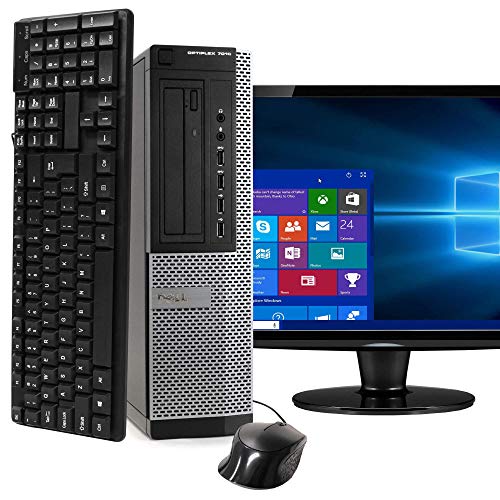
Dell Optiplex 7010 Desktop Package

Dell Optiplex 7050 SFF Desktop PC

Dell OptiPlex 5060 Windows 11 Desktop

Dell Optiplex 3050 SFF Desktop PC

GEEKOM IT12 Mini PC

HP ProDesk 600 G3 SFF Computer

Dell OptiPlex 5040 SFF Desktop PC

Dell Optiplex 3040 SFF Business Desktop PC
More Details On Our Top Picks
The 7010 package is the cleanest plug-in-and-work option in the group, because it ships with the basics already lined up: tower, 19-inch LCD, keyboard, mouse, WiFi, and DVD drive. For a spare bedroom office or a family homework station, that saves you from hunting down peripherals one by one.
The Core i5 at 3.2GHz, 8GB of memory, and 500GB hard drive make this a sensible fit for browsing, documents, and streaming. The honest trade-off is that the hard drive will feel slower than the SSD-based picks later in the list, so you should treat this as a value setup rather than a speed build.
Strong Points
- Includes a monitor and input gear, so your desk setup starts with fewer separate purchases.
- The 19-inch screen suits compact work corners and simple day-to-day tasks.
- WiFi support helps in rooms where Ethernet runs are awkward.
- The bundled DVD drive still matters for older media or archive discs.
Small Caveats
- Hard-drive storage is slower than the SSD picks in this roundup.
- The 8GB memory ceiling is fine for basic multitasking, but not roomy for heavier tabs.
Who It Suits Best
Home users who want a ready-to-go desktop for documents, web use, and light media should feel right at home here.
A Better Fit Elsewhere
Dell Optiplex 7050 SFF Desktop PC suits you better for heavier multitasking, thanks to its 32GB memory and 1TB SSD.
This one feels built for people who keep many tabs open, juggle office apps, and want extra headroom for the long haul. The i7-7700, 32GB DDR4 memory, and 1TB SSD create a much roomier setup than the first Dell package, especially for busy workdays.
Dual-monitor support, HDMI, WiFi, and Bluetooth make it easy to drop into a modern desk without a pile of adapters. The trade-off is size and cost commitment, because this level of memory and storage is more than casual users usually need.
What We Like
- 32GB RAM gives you more breathing room for multitasking.
- The 1TB SSD keeps storage spacious and far quicker than a hard drive.
- Dual-monitor support suits spreadsheet work, trading desks, and content editing.
- WiFi and Bluetooth reduce cable clutter around the tower.
Points To Note
- It’s more machine than most casual home tasks require.
- The small-form-factor case can be less forgiving for later internal expansion than larger towers.
Built With In Mind
Professionals who run multiple apps at once and want a compact office desktop should look here first.
Where A Sibling Pick Shines
HP ProDesk 600 G3 SFF Computer makes more sense for a simpler office desk, especially when you don’t need as much storage muscle.
The 5060 lands in a useful middle ground, with a six-core i5-8500, 16GB DDR4, a 500GB SSD, and a 1TB hard drive. That split storage setup is handy for you if you want the quick feel of solid-state storage plus extra room for files and archives.
Compared with the 7050, it gives up raw memory headroom, but it still feels more versatile than the leaner 8GB options below. For a home office that handles work docs, video calls, and streaming, it’s a steady fit without getting overcomplicated.
Highlights
- The six-core processor gives you more room for multitasking than older dual-core basics.
- SSD plus hard drive storage balances speed and capacity.
- 16GB RAM lands in the sweet spot for everyday office use.
- WiFi and Bluetooth support help it fit modern desk setups cleanly.
Honest Caveats
- The hybrid storage layout is practical, though it adds another drive to manage.
- It’s a sensible middle pick, not a specialized machine for heavy creative work.
Right Fit For
Home and office users who want one machine for documents, browsing, and light media should find this model easy to live with.
Another Choice May Suit
Dell Optiplex 7050 SFF Desktop PC is the stronger move for you if 32GB memory is worth the jump.
The 3050 is a tidy small-form-factor desktop with 16GB RAM, a 256GB SSD, WiFi, HDMI, and DisplayPort output. That makes it appealing for a desk that needs to stay uncluttered, while still handling everyday office work and a 4K monitor.
Compared with the 5060, you give up the extra hard drive and the newer six-core processor, so it is less roomy for bulk storage. Still, for light office duty and a monitor-driven setup, it’s a clean fit that doesn’t feel fussy.
Upsides
- The SFF case keeps the footprint small on crowded desks.
- DisplayPort and HDMI make dual-display setups straightforward.
- 16GB memory is enough for common office multitasking.
- The SSD gives the system a snappier feel than older hard-drive builds.
Room For Improvement
- 256GB storage can fill up quickly with large project files.
- The older i5 generation suits routine work better than demanding creative tasks.
Made For
You get the most from this one in a compact office or shared desk where space matters more than raw expansion.
Where Shoppers Go Wrong
Dell OptiPlex 5040 SFF Desktop PC makes more sense if you want Bluetooth alongside the same basic desktop layout.
This mini PC is the most modern-feeling pick in the group, with a metal chassis, USB4, 8K UHD support, 16GB RAM, and a 512GB SSD. You may find it especially useful on a small desk, because the box itself stays out of the way while the feature set stays current.
It also stands apart from the older business towers by leaning into newer connectivity and a lighter footprint. The catch is that a tiny case often trades away the roomy internal expansion you get from a fuller SFF desktop, so the appeal is compact practicality rather than endless upgrades.
What We Like
- The metal shell feels suited to shared work areas and daily handling.
- USB4 gives you a more flexible connection point for modern accessories.
- 8K UHD support leaves room for very high-resolution display setups.
- 512GB SSD and 16GB RAM make it easy to cover normal office work.
- Its tiny size helps clear space for paperwork or a second monitor.
Points To Note
- The small enclosure limits how much room you have for later hardware changes.
- The mini format can feel less forgiving if you prefer easy part access.
Who Should Grab It
You’ll appreciate this most in a compact office, kiosk-style setup, or any desk where footprint matters as much as speed.
Skip It When
HP ProDesk 600 G3 SFF Computer is the calmer choice for someone who wants a more traditional business tower.
The HP ProDesk 600 G3 keeps things straightforward, with an i5-6500, 16GB RAM, and a 512GB SSD. That combination suits a standard office desk nicely, especially when you want enough storage for files without stepping up to a more complex tower.
It also includes USB-C and dual DisplayPort outputs, which helps more than people expect in modern workspace setups. Compared with the Dell 3050, it offers a little more storage room, but it still stays in the same practical lane rather than chasing showy specs.
Best Bits
- 16GB memory keeps common office multitasking comfortable.
- The 512GB SSD gives you a balanced amount of fast storage.
- USB-C adds a useful modern port for newer accessories.
- Dual DisplayPort support works well for two-monitor desks.
Areas To Watch
- The processor is solid for daily use, but it isn’t a high-end multitasker.
- There’s no optical drive, so disc users will need an external option.
The Right Fit
Office users who value balanced storage, everyday speed, and simple monitor support should find this model easy to slot in.
Look Elsewhere When
Dell Optiplex 7050 SFF Desktop PC is the better match for you if your workload runs hotter and needs more memory.
The 5040 is the leanest Dell in this roundup, and that’s exactly the point. With an i5-6500T, 8GB RAM, a 256GB SSD, WiFi, Bluetooth, and HDMI, it gives you a compact office desktop that covers the basics without crowding your desk.
The lower-power T-series processor usually suits lighter daily work, so this is less about muscle and more about tidy efficiency. Compared with the 3050, you lose the extra memory and DisplayPort support, but Bluetooth is a nice convenience for a smaller home setup.
Positives
- Small-form-factor sizing makes cable management easier on tight desks.
- Bluetooth helps with wireless peripherals and audio gear.
- The SSD keeps boot and load times brisk for common tasks.
Minor Gripes
- 8GB memory is serviceable, though it leaves less room for many browser tabs.
- The 256GB drive suits basics, but it can feel tight for large local libraries.
Whose Shelf It Belongs On
This fits best in a simple home office where you want a compact machine for email, documents, and streaming.
Reach For A Different Pick When
Dell OptiPlex 3050 SFF Desktop PC is the better route if you want 16GB RAM and DisplayPort output.
The 3040 is the most stripped-back option here, but it still keeps the useful pieces in place: Core i3-6100, 8GB RAM, 256GB SSD, HDMI, and RJ45 Ethernet. That makes it a fair match for basic office duty, point-of-sale use, or a second computer that stays out of the spotlight.
Unlike the more upgraded Dell models above it, this one is about keeping the cost and complexity down. You’ll notice the limit sooner in heavier multitasking, though the SSD helps it feel quicker than its lean spec sheet suggests.
Bright Spots
- The SSD gives basic tasks a more responsive feel than older spinning drives.
- RJ45 makes a steady wired connection easy to use.
- The compact case works well in office corners and small counters.
Softer Spots
- 8GB RAM keeps it in basic-task territory.
- The Core i3 platform is fine for light work, not heavy multitasking.
- It leaves less room for future expansion than the stronger picks above.
Who Will Love This
Entry-level office users and secondary-workstation shoppers should find this model easy to justify.
Where A Sibling Pick Shines
HP ProDesk 600 G3 SFF Computer is the smarter step up if you want more memory and a larger SSD.
What Matters Most Before You Choose Bargain Desktop Computers
Core Specs That Deserve Attention
Processor generation, memory, and storage shape the real experience more than brand logos do. A newer multi-core chip with an SSD will usually feel livelier than an older unit with a large hard drive.
Space And Port Layout
Small-form-factor towers and mini PCs save desk room, but they usually trade away expansion room. Check for HDMI, DisplayPort, USB-C, WiFi, and Bluetooth before you commit, especially for dual-monitor work.
Use Case Over Hype
Basic home use, office apps, and web work do not need the same machine as heavy multitasking or wide monitor setups. Match the desktop to the jobs you actually run, and you avoid paying for unused capacity.
A Quick Reality Check
Common Shopping Slip Ups
Many shoppers focus on storage size and ignore whether it’s a fast SSD or a slower hard drive. Others forget to check monitor outputs, which can turn a good desktop into a messy setup.
What The Higher Tier Buys
More memory, newer processors, and larger SSDs cost more because they handle more apps with less hesitation. That upgrade makes sense for full workdays, dual monitors, or any desk that stays busy.
Frequently Asked Questions
What makes a bargain desktop worth buying?
A sensible bargain desktop gives you the ports, memory, and storage you actually use. You save money by skipping flashy extras you won’t notice day to day.
Is a refurbished desktop a smart move?
Refurbished business desktops can be a strong value because they often start from sturdy office hardware. The trade-off is that you need to read the listed parts closely and accept older platform limits.
How much RAM should you look for?
8GB works for basic browsing, documents, and email. 16GB or more feels better once you keep many tabs open or use several office apps at once.
Why does SSD storage matter so much?
An SSD makes the system feel quicker during startup and app loading. Hard drives still offer capacity, but they usually lag behind in everyday responsiveness.
Which form factor suits a cramped desk?
A small-form-factor tower or mini PC saves the most space. A package with a monitor can also simplify setup when you want fewer separate parts.
