


These bargain desktops fit you best when a laptop feels cramped, a full tower feels excessive, and the task list stays practical: email, browsing, documents, light media work, and the usual office stack. The group below favors compact cases, familiar Dell and HP business platforms, and renewed hardware that stretches value without pretending to be flashy.
You’ll see where each one fits, where it runs lean, and which model makes sense for a home desk, a front office, or a tight workspace. The trade-offs matter here, because bargain desktops reward clear priorities more than spec-sheet bragging.
The Shortlist At A Glance
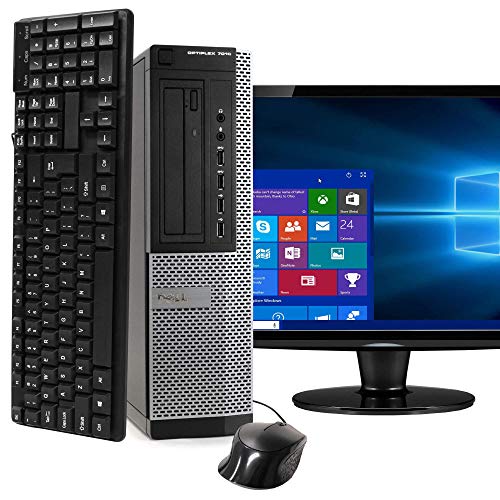
Dell Optiplex 7010 Desktop Package
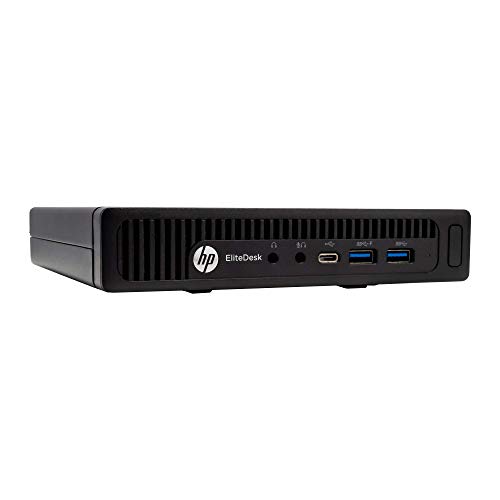
HP EliteDesk 800 G2 Mini Business PC

Dell Optiplex 7050 SFF Desktop PC

Dell OptiPlex 5060 Windows 11 Desktop


Dell Optiplex 3050 SFF Desktop PC

Dell OptiPlex 5040 SFF Desktop PC

Dell Optiplex 3040 SFF Business Desktop PC
More Details On Our Top Picks
This package reads like a desk-in-a-box setup, with the tower, 19-inch LCD, keyboard, mouse, WiFi, and DVD drive all bundled together. That makes it a sensible fit for a spare room, front counter, or a first office PC where you want less assembly and fewer extra purchases.
The Core i5 at 3.2GHz, 8GB of RAM, and 500GB hard drive point toward basic multitasking rather than heavy creative work. Compared with the mini HP below, this Dell takes more space but gives you a more complete starter bundle.
What We Like
- The included monitor and peripherals reduce setup friction.
- 8GB of memory handles everyday office tabs and documents without feeling bare.
- The 500GB HDD gives room for general files, archives, and simple media storage.
- WiFi support helps in rooms where wired networking is awkward.
Things To Consider
- A hard drive is slower than an SSD, so large app launches can feel less brisk.
- The 19-inch screen keeps the footprint manageable, but it is still a modest workspace.
Who It Suits Best
New home-office setups and basic workstation users get the most from this bundled approach.
A Better Fit Elsewhere
HP EliteDesk 800 G2 Desktop Mini Business PC suits you better when desk space is tight and you already own a monitor, keyboard, and mouse.
The Mini form factor is the whole point here, and it matters in cramped offices, reception areas, or a home desk that already feels crowded. With 16GB of DDR4 memory and a 240GB solid-state drive, this HP is built to feel quicker in daily use than the first Dell package.
VGA and DisplayPort connections give you useful monitor flexibility, which helps in older office setups and dual-display workspaces. The trade-off is simple: you get a tiny chassis and tidy cable management, but you also give up the expandability of larger small-form-factor desktops.
Positives
- The mini chassis saves desk surface without sacrificing business-class basics.
- DDR4 memory supports smoother switching between browser tabs and office apps.
- The SSD improves boot and load times for everyday work.
- VGA and DisplayPort keep older and newer monitors in play.
Softer Spots
- The tiny case leaves less room for future upgrades.
- You may want a docking plan if you use several accessories.
Made For
Desk-constrained office users who want a tidy, low-profile machine will like this most.
Where Another Pick Suits Better
Dell Optiplex 7010 Desktop Package fits better when you need a bundled monitor and input devices in one purchase.
Among these bargain desktops, this 7050 stands out for plain processing headroom. The Core i7-7700, 32GB of DDR4 memory, and 1TB SSD make it a strong match for heavy browser use, office suites, bookkeeping, and the kind of multitasking that can bog down lighter machines.
WiFi, Bluetooth, HDMI, and dual-monitor support round out a setup that feels ready for a serious desk. Compared with the HP mini, this Dell is less about saving inches and more about giving you space to keep several jobs open at once.
Upsides
- The 32GB memory pool gives you plenty of breathing room for open apps.
- The 1TB SSD offers generous space for files and faster access than a hard drive.
- Dual-monitor support suits spreadsheet work and side-by-side workflows.
- Built-in wireless features reduce accessory clutter.
Room For Improvement
- The extra power usually comes with a larger footprint than mini systems.
- For plain email and browsing, the spec level may be more than you need.
The Right Fit
Power users and multitaskers who want a compact desktop without feeling constrained will benefit most.
Swap It Out When
HP EliteDesk 800 G2 Desktop Mini Business PC makes more sense for very tight desks and lighter office use.
This OptiPlex sits in the middle of the lineup in a useful way, with a six-core i5-8500, 16GB of DDR4 memory, and a 500GB SSD paired with a 1TB hard drive. That split storage layout works well for people who want quick boot speed and still need room for documents, downloads, and media files.
WiFi and Bluetooth help it feel current at the desk, while the small-form-factor chassis keeps it from dominating the space. The honest read is that it suits home or office use better than the more bare-bones 3040, especially for people who keep several projects open.
Best Bits
- The SSD and hard drive combination balances speed with storage room.
- Six-core processing helps more demanding day-to-day workflows feel steadier.
- Wireless connectivity keeps setup cleaner and more flexible.
- 16GB memory supports smoother multitasking for office use and media tasks.
Points To Note
- Dual storage is useful, but it also means more to keep track of.
- The renewed format still favors practical use over cosmetic perfection.
Whose Shelf It Belongs On
Home-office workers and general multitaskers get the best balance here.
Look Elsewhere When
DELL Optiplex 7060 SFF Desktop Computer PC is a better fit when you want a faster NVMe drive and more memory headroom.
The 7060 feels like the step-up choice in this group, mainly because the i7-8700, 32GB of memory, and 512GB NVMe M.2 SSD give it a noticeably sharper profile for active workdays. NVMe means a solid-state drive that uses a faster connection than older SATA drives, and that matters when you want quicker launches and less waiting between tasks.
Wireless keyboard and mouse support also make the setup more complete out of the box. Compared with the 7050, this one leans newer in storage design and a little more polished for people who dislike little slowdowns.
Highlights
- The NVMe drive helps the system feel brisk during startup and app loading.
- 32GB of DDR4 memory supports heavier multitasking and larger browser sessions.
- The 6-core i7-8700 suits demanding office and admin work.
- Wireless keyboard and mouse inclusion reduces accessory shopping.
Small Caveats
- That stronger spec mix makes more sense for busy desks than light chores.
- The renewed finish may be practical rather than pristine.
Built With In Mind
You get the most from this model in a busy home office or a small business setup with several open tasks.
Another Choice May Suit
Dell Optiplex 7050 SFF Desktop PC is a better fit when you want similar multitasking strength without stepping as far up the storage ladder.
This 3050 keeps the formula lean: a quad-core i5-6500, 16GB of DDR4 memory, and a 256GB SSD in a small-form-factor case. For a home office or a side desk in a shared room, that combination gives you enough room to work without paying for hardware you may never use.
4K support, DisplayPort, HDMI, and WiFi add useful flexibility for monitors and modern displays. The practical trade-off is storage, since 256GB fills faster than the larger SSD-and-hard-drive mix on the 5060, so file habits matter a bit more here.
Reasons To Buy
- The SSD keeps the desktop feeling more responsive than a hard-drive-only setup.
- 16GB memory is a strong baseline for email, web apps, and office work.
- 4K support makes it easier to match higher-resolution displays.
Areas To Watch
- 256GB storage is fine for basics, but large media libraries will crowd it quickly.
- The older processor generation is adequate, though not especially roomy for growth.
Perfect Match For
Practical office users who want a small, capable desktop with a restrained footprint will appreciate it.
Skip It When
Dell OptiPlex 5060 Windows 11 Desktop is the better route if you want more storage flexibility in the same general family.
The 5040 is the kind of desktop that slips into daily life without drama. An i5-6500T, 8GB of RAM, and a 256GB SSD are enough for browsing, documents, video calls, and the sort of steady office use that fills most weekdays.
WiFi, Bluetooth, and HDMI keep setup simple, which helps in a spare room or shared work area where cable sprawl gets old fast. Compared with the 3050, this one gives you a similar storage and memory footprint, but with a slightly more complete connection set for peripherals.
Best Bits
- Bluetooth and WiFi make it easy to place and connect.
- The SSD gives a quicker feel than older hard-drive systems.
- HDMI suits common monitor setups in homes and offices.
Points To Note
- 8GB of memory is fine for basics, but it can feel tight with heavier multitasking.
- The 256GB drive asks for tidy file habits and regular cleanup.
Who Will Love This
You’ll like this best for standard home-office duty and light multitasking.
Where A Sibling Pick Shines
Dell Optiplex 3050 SFF Desktop PC is the stronger fit if you want 16GB memory and 4K support for a more flexible workspace.
This 3040 is the most modest machine in the group, and that makes its role clear from the start. The Core i3-6100, 8GB of RAM, and 256GB SSD are enough for web work, document editing, and basic office routines, especially in a classroom, front desk, or secondary home station.
HDMI and RJ45 give you a straightforward path to a monitor and wired network, which keeps installation simple. The catch is that this model sits below the i5 and i7 options in headroom, so it suits lighter workloads rather than a busy multi-app day.
Strong Points
- The SSD keeps startup and file access snappier than older mechanical storage.
- RJ45 gives you dependable wired networking for office environments.
- The small chassis helps it fit neatly on compact desks.
Honest Caveats
- Core i3 performance is fine for basics, but it is the least forceful spec here.
- 8GB memory and 256GB storage can feel limited for heavier everyday use.
The Right Fit
Light-duty users who need a simple, dependable desktop for routine tasks will find the best fit here.
Reach For A Different Pick When
Dell Optiplex 7050 SFF Desktop PC works better for you once multitasking and storage demands grow.
What Matters Most Before Choosing Bargain Desktops
Storage And Memory First
Start with RAM and storage before you get distracted by processor names. In bargain desktops, 16GB of memory and an SSD often matter more to daily comfort than an older chip with a bigger model number.
Case Size Shapes The Desk
Mini PCs save space, but they leave less room for future changes. Small-form-factor towers are usually the middle path, since they still fit a modest desk while offering a friendlier layout for ports and cabling.
Match The Ports To Your Setup
HDMI, DisplayPort, VGA, Bluetooth, and WiFi change how easy the system is to place and connect. A desktop that matches your monitor and network setup saves time and avoids awkward adapters.
A Quick Reality Check Before You Click
Common Shopping Slip Ups
Shoppers often focus on processor speed and ignore storage type, then end up with a hard drive that feels slow in daily use. Another easy miss is buying a tiny PC without checking monitor connections or keyboard and mouse needs.
What The Higher Tier Buys
More money usually goes into faster SSDs, newer processor generations, larger memory pools, and better port flexibility. That upgrade pays off most for multitaskers, office power users, and anyone who keeps several programs open for long stretches.
Frequently Asked Questions
Are bargain desktops good for office work?
Yes, they handle email, documents, browser tabs, and video calls without much fuss. A model with 16GB RAM and an SSD usually feels more comfortable for daily work.
What matters more, processor or SSD?
For most basic setups, the SSD changes the feel of the machine more than people expect. Processor strength matters more once you add heavier multitasking or more demanding applications.
Is a mini desktop hard to live with?
Not usually, as long as your monitor and accessories are already sorted out. The main trade-off is fewer upgrade options and less internal space.
Can a renewed desktop make sense for home use?
Yes, especially for browsing, documents, and streaming in a spare room or home office. The key is checking the listed parts so the machine matches your workload.
Which desktop size works best on a small desk?
A mini PC or small-form-factor tower usually fits easiest. A bundle with a monitor takes more room, but it can simplify the first setup.
