


You want a gaming laptop that won’t swallow your budget, yet still keeps pace with classwork, travel, streaming, and lighter play. That means looking past flashy model names and checking the parts that actually shape daily use: RAM, SSD size, display quality, keyboard layout, and how much machine you get for the footprint.
This roundup leans toward practical choices for students, commuters, home offices, and anyone who wants a capable notebook without paying for excess. The spread runs from modest starter systems to a full-size desktop replacement, so you can match the machine to your routine instead of forcing your routine around the machine.
Quick Look At The Eight Picks

FUNYET Laptop Computer, 16GB RAM 512GB SSD

NIMO 15.6″ FHD Light-Gaming-Laptop, Ryzen 7 Pro 6850U
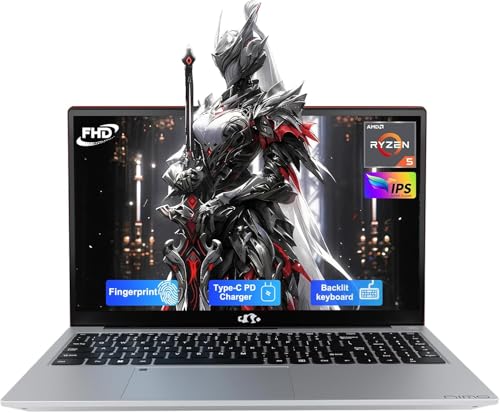
NIMO 15.6″ IPS FHD-Laptop, Ryzen 5 Student Computer
Light Gaming Laptop, AMD Ryzen 7 5700U

NIMO 15.6″ IPS FHD-Light Gaming-Laptop, Ryzen 5 6600H

KAIGERR Gaming Laptop, Ryzen 4300U, 16GB DDR4

Gaming laptop Core processor, 16GB RAM 512GB SSD

msi Titan 18 HX AI 18″ 120Hz MiniLED UHD+ Gaming Laptop
More Details On Our Top Picks
FUNYET sits in the useful middle ground, with 16GB of memory and a 512GB SSD giving you enough room for school files, game installs, and routine multitasking. The 16-inch FHD panel should suit desk use better than cramped travel screens, and the fingerprint unlock plus backlit keyboard make daily logins and late evenings feel a bit less fussy.
The trade-off is that this is still a straightforward value build, not a machine aimed at heavy creative work or high-end play. The included support coverage also matters here, because new laptop owners often care more about help and protection than extra flair.
Strong Points
- 16GB RAM helps keep browser tabs, office work, and lighter gaming moving without constant app shuffling.
- 512GB SSD gives you faster boot times and more practical storage than tiny starter drives.
- 16-inch screen size works well on a desk for homework, streaming, and side-by-side windows.
- Fingerprint unlock and a backlit keyboard add everyday convenience in shared spaces and low light.
Things To Consider
- Full-size portability is limited, so backpack carry feels less effortless than with smaller 15.6-inch options.
- Specs point toward entry to midrange use, not sustained high-end gaming or demanding editing.
Feature Card
Who It Suits Best
Students and casual gamers who want a roomy display with simple daily convenience will get the most from this one.
A Better Fit Elsewhere
NIMO 15.6″ FHD Light-Gaming-Laptop, Ryzen 7 Pro 6850U suits you better for heavier multitasking and larger storage needs.
This NIMO leans hard into capacity, and that shows in the 32GB LPDDR5 memory and 1TB SSD combo. LPDDR5, or low-power DDR5 memory, helps the system stay responsive while keeping power use in check, which is a useful pairing for long study sessions, office work, and lots of browser tabs.
Compared with the FUNYET above, this one gives you a lot more headroom for multitasking and storage-heavy routines. The 15.6-inch size also makes it easier to carry, though the stronger spec mix is the real reason it stands out.
Upsides
- 32GB RAM gives you a wide margin for multitasking, large spreadsheets, and heavier app switching.
- 1TB SSD leaves room for a bigger game library, media files, and project folders.
- Ryzen 7 Pro 6850U is a serious step up for everyday responsiveness and sustained work.
- Fingerprint login, backlit keys, and 100W Type-C charging add useful day-to-day convenience.
- 15.6-inch format stays easier to stow than the larger 16-inch choices in this list.
Worth Noting
- The stronger parts are great for multitasking, but they do not turn it into a full-size gaming rig.
- That much memory and storage makes sense for serious use, though simple browsing would not need all of it.
Core Details
Made For
Power users who want a thin laptop with extra memory and storage will find the best fit here.
Swap It Out When
FUNYET Laptop Computer, 16GB RAM 512GB SSD makes more sense for you if your use stays lighter and you do not need the larger storage cushion.
This is the leanest option in the group, and that’s the point. With 8GB RAM, a 256GB SSD, and a 15.6-inch IPS FHD panel, it targets basic schoolwork, web use, and lighter entertainment rather than big installs or heavy multitasking.
The 180-degree hinge gives you extra viewing flexibility on a desk or shared table, which can be handy for note-taking or quick collaboration. Compared with the bigger-memory NIMO above, you give up breathing room, but you also keep the setup straightforward.
Bright Spots
- 8GB RAM and 256GB SSD cover the basics without overcomplicating the purchase.
- IPS FHD display should give you cleaner viewing angles than plain budget TN panels.
- 180-degree opening range helps in shared spaces and compact desk setups.
- Fingerprint unlock and backlit keys add convenience that many entry models skip.
Areas To Watch
- 256GB fills quickly once you add games, downloads, and media libraries.
- The smaller memory pool can feel tight with many tabs or apps open together.
- For long-term storage habits, you’ll want to stay disciplined about file cleanup.
Whose Shelf It Belongs On
Students who need a straightforward laptop for class notes, browsing, and light entertainment will get the most value here.
Reach For A Different Pick When
NIMO 15.6″ FHD Light-Gaming-Laptop, Ryzen 7 Pro 6850U suits you better once multitasking and storage space start to matter more.
The 5700U-based KAIGERR lands in a familiar sweet spot, with 16GB RAM and a 512GB SSD giving it enough room for everyday work and a modest game library. For most desk setups, that mix feels more balanced than the smaller NIMO student model, especially once you keep several apps open at once.
You also get the kind of hardware profile that suits a shared household machine or a no-drama work-and-play notebook. The honest read is that it looks more practical than flashy, which is often exactly what a bargain laptop should do.
Highlights
- 16GB RAM supports smooth switching between documents, browsers, and music or chat apps.
- 512GB SSD gives you a sensible amount of room without pushing the footprint into heavier territory.
- Ryzen 7 5700U offers a stronger everyday base than smaller entry chips in this roundup.
- Simple hardware balance makes it easier to live with in a home office or dorm room.
Small Caveats
- The 5700U platform is capable, though newer chips in the list bring more modern efficiency.
- No standout portability extras appear in the source, so you are mostly choosing on core hardware value.
Best Suited To
You should look here for a dependable all-round notebook that can handle everyday routines without much fuss.
Another Choice May Suit
NIMO 15.6″ IPS FHD-Laptop, Ryzen 5 Student Computer makes more sense for lighter school use and a tighter budget.
Ryzen 5 6600H and DDR5 memory make this NIMO feel like the point where bargain stops meaning bare minimum. DDR5, a newer memory standard, typically supports quicker responsiveness than older DDR4 systems, and that matters when you jump between gaming launchers, school work, and background apps.
Compared with the 5700U model, this one reads as the sharper performance-first choice for a light gaming notebook. Storage stays modest at 256GB, so it rewards tidy file habits, but the overall spec mix is more forward-looking.
Positives
- Ryzen 5 6600H gives you a stronger performance class than many basic thin-and-light chips.
- 16GB DDR5 helps the system feel quicker in everyday multitasking.
- AMD Radeon 660M graphics are a practical step for light gaming and media use.
- 100W Type-C charging, fingerprint unlock, and backlit keys improve daily convenience.
- 15.6-inch FHD IPS panel keeps the format compact enough for common carry routines.
Points To Note
- 256GB storage can fill up fast once games and large project files stack together.
- Strong daily speed does not replace a dedicated gaming machine for heavier titles.
Who Should Grab It
This suits you best when you want a lighter laptop with fresher memory and a more assertive processor profile.
Look Elsewhere When
NIMO 15.6″ FHD Light-Gaming-Laptop, Ryzen 7 Pro 6850U is the better fit for you if storage size matters more than newer memory.
This KAIGERR is built around familiar, useful parts: Ryzen 4300U, 16GB DDR4, and a 512GB SSD. That mix is good enough for web work, office tasks, and lighter play, especially on a desk where the 16-inch FHD display gives you a broader view than smaller travel machines.
The inclusion of Wi‑Fi 6, USB 3.2, and Type‑C makes it easier to slot into a modern workspace without adding adapters everywhere. It isn’t the flashiest notebook here, but it does cover the basics in a tidy package.
Best Bits
- 16GB RAM and 512GB SSD give you sensible everyday headroom.
- 16-inch Full HD screen helps with split windows and media viewing.
- Wi‑Fi 6 improves network readiness for home, dorm, or office setups.
- USB 3.2 and Type‑C add useful connection flexibility.
Honest Caveats
- DDR4 is older than DDR5, so newer picks in this list feel more current.
- The core spec set is practical, though not especially ambitious for heavier gaming.
The Right Fit
Desk users who want dependable basics and modern ports without paying for extra polish should take a close look.
Where A Sibling Pick Shines
NIMO 15.6″ IPS FHD-Light Gaming-Laptop, Ryzen 5 6600H is the stronger move for you if you want newer DDR5 memory and a quicker-feeling platform.
Among the more travel-friendly entries here, this YOZISUAN keeps the formula simple: 16GB RAM, 512GB SSD, and a 15.6-inch FHD display. That’s enough capacity for notes, coursework, business documents, and casual play without pushing you into a bulky machine.
Bluetooth 5.0 and Wi‑Fi support matter more than they sound, because commuters usually feel the pain of weak connections and too many dongles. The compromise is obvious, though, it is a straightforward notebook rather than a machine loaded with premium extras.
Standout Traits
- 15.6-inch size is easier to pack than the larger 16-inch and 18-inch choices.
- 16GB RAM and 512GB SSD cover a wide range of common daily tasks.
- Core processor rated up to 3.40GHz gives you a workable base for routine use.
- Wi‑Fi and Bluetooth 5.0 help keep wireless accessories and hotspots simple.
Minor Gripes
- The name is generic, so the spec sheet does more of the talking than the branding.
- It suits portable routine work better than heavier creative or gaming loads.
Made For
Students, commuters, and office users who carry a laptop often will appreciate the compact format and plain setup.
Skip It When
msi Titan 18 HX AI 18″ 120Hz MiniLED UHD+ Gaming Laptop is the better fit for you if you want a no-compromise desktop replacement.
The Titan 18 HX AI plays in a different lane from the bargain machines above. With an Ultra 9-285HX processor, RTX 5090 graphics, 64GB DDR5 memory, and a 6TB NVMe SSD, it targets users who want extreme headroom for gaming, creation, and large local libraries.
The 18-inch MiniLED UHD+ panel at 120Hz is the kind of display that makes desktop replacement sense, not backpack convenience. MiniLED uses many small backlight zones, which typically helps contrast control, and that matters most for people who spend long hours in one place.
Reasons To Buy
- Ultra 9-285HX and RTX 5090 point to serious performance headroom.
- 64GB DDR5 suits heavy multitasking and demanding software stacks.
- 6TB NVMe SSD leaves an enormous amount of local space.
- Thunderbolt 5 and Wi‑Fi 7 support high-end accessory and network setups.
- 18-inch 120Hz MiniLED UHD+ panel gives you a very large workspace.
Softer Spots
- The size and hardware level make portability a secondary concern.
- This is far beyond a basic budget notebook, so the fit is specialized.
Built With In Mind
Creators and hard-core gamers who want a desk-first powerhouse will get the most from this machine.
Look Elsewhere When
YOZISUAN Gaming laptop Core processor, 16GB RAM 512GB SSD makes more sense for everyday carry and a much lighter commitment.
What Matters Most Before Choosing Bargain Gaming Laptops
Common Shopping Slip Ups
Do not let a big screen distract you from weak memory or tiny storage. In this category, 16GB RAM and a sensible SSD usually matter more to daily comfort than a glossy model name.
The Case For Spending Up
Higher-tier machines cost more because they pair faster processors with stronger graphics, larger displays, and roomier memory and storage. That extra spend makes sense for long gaming sessions, creative work, or anyone who keeps a laptop on the desk as a main computer.
A Quick Reality Check
Where Shoppers Go Wrong
Some listings look polished but hide modest specs that age quickly. Match the chip, memory, and storage to your actual routine, then ignore the rest.
What Separates Premium From Basic
Premium models bring more screen space, faster parts, and more expansion room. They matter most once your files, games, and multitasking needs start feeling cramped.
Frequently Asked Questions
How much RAM suits a bargain gaming laptop?
16GB is the practical floor for smooth everyday use and light gaming. 8GB still works for simpler school or office tasks, but it leaves less breathing room.
Is a 256GB SSD enough?
It works for light use, especially on a laptop that stays tidy. You will feel the limit quickly once game installs and media files start stacking up.
Do you need a dedicated graphics card?
Not for casual play or basic use. Integrated graphics can cover lighter titles, while a stronger GPU matters more for heavier gaming and visual work.
Is a 15.6-inch laptop easier to live with?
Yes, for commuting and packing, it usually is. A 16-inch or 18-inch screen gives you more workspace, though it asks for more bag room.
What matters more, CPU or storage?
Both matter, but the CPU shapes speed while storage shapes how much you can keep installed. For bargain gaming laptops, the best value usually comes from keeping both at a sensible level.
