


Basic computers for home use do the quiet jobs that matter: email, schoolwork, streaming, web browsing, light photo sorting, and the occasional spreadsheet. You want a machine that starts cleanly, fits the room you have, and doesn’t make simple tasks feel crowded or slow.
This roundup leans on compact desktops and all-in-ones, with a few mini PCs for small desks and tighter setups. The trade-off is straightforward, too, since some picks save space while others give you a fuller package with a monitor, keyboard, and mouse already included.
The Shortlist At A Glance
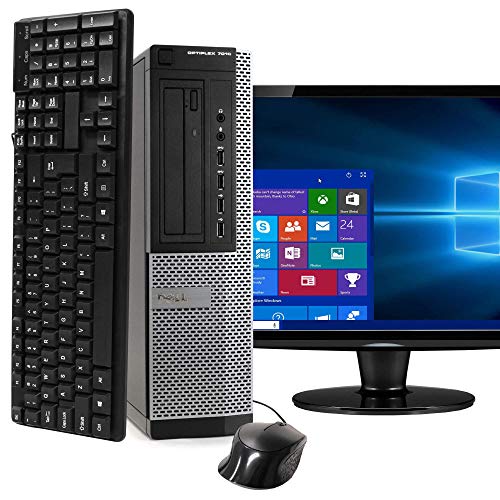
Dell Optiplex 7010 Desktop Package

Dell Optiplex 3050 SFF Desktop PC

HP ProDesk 600 G3 SFF Desktop with 21.5-inch Monitor

Beelink SER5 Mini PC

HP 2025 22-inch FHD All-in-One Desktop
Lenovo IdeaCentre All-in-One Desktop 24-inch
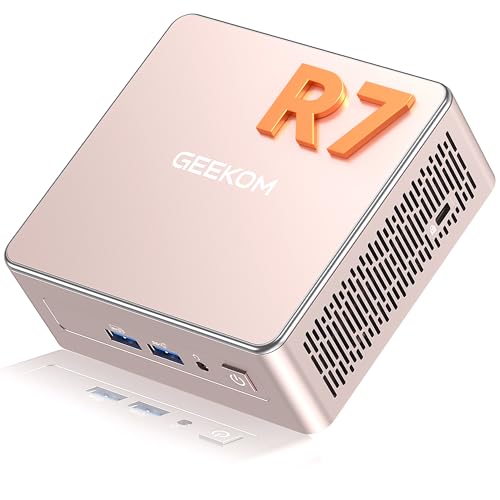
GEEKOM A5 2027 Edition Mini PC
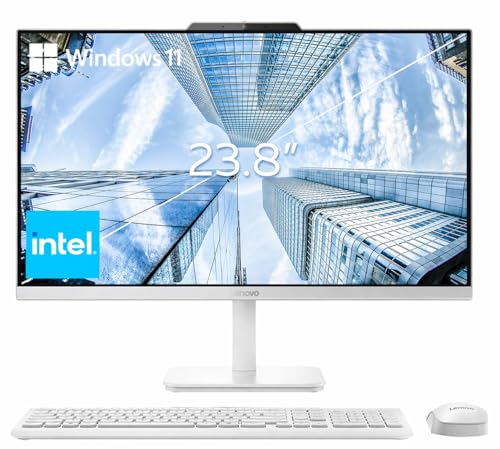
Lenovo 24-inch FHD All-in-One Desktop
More Details On Our Top Picks
This package makes sense for a home desk that needs the basics without extra shopping. You get a full set, including a 19-inch LCD, keyboard, and mouse, so setup feels straightforward rather than pieced together.
The 500GB hard drive is slower than the SSD-based picks farther down the list, but it gives you room for documents, downloads, and family files. For day-to-day email, browsing, and video streaming, that trade-off is easy to understand.
Strong Points
- Complete bundle cuts down on setup decisions.
- 19-inch screen keeps the footprint modest.
- Keyboard and mouse are already included.
- Windows 11 Pro suits general home tasks.
Things To Consider
- HDD storage feels less brisk than SSD options.
- The 19-inch panel is functional, not roomy.
- Renewed gear is worth checking for cosmetic wear.
Feature Card
Who It Suits Best
It suits you best as a simple household desktop for browsing, documents, and light media use.
Where A Sibling Pick Shines
Dell Optiplex 3050 SFF Desktop PC fits you better if you want faster SSD storage in a smaller case.
Compared with the first Dell package, this small-form-factor unit puts speed and desk space first. The 256GB SSD boots faster than a hard drive, and 16GB of DDR4 memory gives you more breathing room for tabs, documents, and streaming at the same time.
DP and HDMI outputs make it easier to match a modern monitor, including a 4K screen, without extra fuss. In a compact home office, that matters because the tower disappears into the background while the display does the work.
What We Like
- SSD storage supports quicker startup and app loading.
- 16GB RAM is a strong fit for multitasking.
- Small form factor helps on tight desks.
- DP and HDMI broaden monitor compatibility.
- WiFi keeps cabling simple in most rooms.
Areas To Watch
- You still need a separate monitor and peripherals.
- Compact cases can be less flexible for upgrades.
- The renewed finish may show small cosmetic marks.
Who Will Love This
It suits you best when you want a tidy desktop for school, invoices, browsing, and light multitasking.
Look Elsewhere When
HP ProDesk 600 G3 SFF Desktop with 21.5-inch Monitor fits you better if you want an all-in-one bundle from the start.
That bundled monitor changes the conversation, because you do not need to source a screen separately. The 21.5-inch FHD panel gives you a ready-made workstation for a kitchen counter, dorm desk, or spare room office.
It also includes keyboard and mouse, which makes it easier for someone replacing an older machine. The trade-off is that the screen size sits between the Dell package and the larger Lenovo all-in-ones, so it feels practical rather than expansive.
Highlights
- Monitor, keyboard, and mouse are already in the box.
- 16GB RAM gives the system solid everyday breathing room.
- 256GB SSD supports quicker boot times.
- DisplayPort helps with monitor pairing flexibility.
Softer Spots
- The 21.5-inch screen is useful, but not large.
- Refurbished hardware may need a quick cosmetic check.
- Separate speakers may still be useful for fuller sound.
Core Details
Made For
It suits you best as a ready-to-go home computer for daily admin work and casual media use.
Skip It When
Lenovo IdeaCentre All-in-One Desktop 24-inch fits you better if a larger display matters more than a bundled monitor.
This mini PC is the first pick here that feels aimed at users who want a little more muscle without giving up desk space. The Ryzen 5 5500U is a 6-core, 12-thread chip, which means it can keep more background work moving than the leaner office boxes above it.
Its 480GB NVMe SSD is also a meaningful step up, since NVMe storage uses a faster connection than a basic hard drive and usually feels snappier in everyday use. For a living room media desk or compact home office, that balance lands well.
Bright Spots
- Ryzen 5 processor brings stronger multitasking headroom.
- NVMe storage supports faster app and file access.
- Very small chassis works well beside a monitor arm.
- Triple-display support suits a multi-screen desk setup.
- WiFi 6 and Bluetooth 5.2 add modern connectivity.
Room For Improvement
- You need to add your own monitor and input devices.
- Mini PCs can feel less straightforward for casual installers.
- Heat and cable routing deserve a little attention in tight spots.
Feature Rundown
Best Suited To
It suits you best if you want a compact desktop for multitasking, streaming, and a cleaner cable setup.
Another Choice May Suit
GEEKOM A5 2027 Edition Mini PC fits you better when you want more processor headroom in a similarly small footprint.
This HP all-in-one keeps the desk visually calm, since the screen and computer live in the same housing. The 22-inch FHD panel is smaller than the Lenovo 24-inch options, which makes it a neat fit for a desk that also needs notebooks, a lamp, or a printer.
The N100 processor, 8GB of DDR5 memory, and 128GB SSD point it toward email, web work, school portals, and streaming rather than heavier lifting. That’s enough for many households, though the storage size means you’ll want to keep large media libraries elsewhere.
Best Bits
- All-in-one design reduces cable clutter.
- DDR5 memory gives the system a newer memory type.
- HD webcam helps with routine video calls.
- USB-C and HDMI add useful connection options.
Points To Note
- 128GB storage fills faster than larger SSDs.
- The 22-inch screen is tidy, not roomy.
- Works best for everyday tasks rather than heavy workloads.
Right Fit For
It suits you best for a modest home setup where space, neat wiring, and simple daily tasks matter more than raw capacity.
Reach For A Different Pick When
Lenovo IdeaCentre All-in-One Desktop 24-inch fits you better if you want a larger display for side-by-side work.
Compared with the smaller HP all-in-one, this Lenovo gives you more screen to work with and more storage headroom. A 24-inch anti-glare IPS display is easier on the eyes in a bright room, and IPS, or in-plane switching, usually means better viewing angles for shared use.
The 512GB SSD also stands out in this group, since it gives you more room for documents, photos, and software without reaching for external storage right away. For a family computer or a home office that sees regular use, that extra space has real value.
Upsides
- 24-inch screen feels more comfortable for long sessions.
- Anti-glare panel helps in bright indoor light.
- 512GB SSD gives you stronger everyday storage room.
- Wi-Fi 6 and Bluetooth 5.2 keep it current.
- All-in-one design keeps the desk neat.
Minor Gripes
- 8GB RAM is fine, though not generous.
- All-in-ones are less modular than separate tower setups.
- Shared-family use can still benefit from an external backup plan.
Best Suited To
It suits you best as a central household computer for browsing, forms, school tasks, and everyday office work.
Swap It Out When
Lenovo 24-inch FHD All-in-One Desktop with Windows 11 Pro fits you better if you want a package that includes wireless keyboard and mouse.
This GEEKOM unit sits at the stronger end of the mini PC group, with a Ryzen 7 7730U and 16GB of RAM giving you more room to stretch. For a home office that includes heavier browser use, spreadsheets, or side-by-side apps, that extra processor class can matter.
The 512GB SSD is also helpful, because it gives you sensible storage without making the box physically larger. The honest read is that this one makes more sense for a power user than for someone who only checks mail and watches videos.
Reasons To Buy
- Ryzen 7 chip brings stronger everyday responsiveness.
- 16GB RAM supports broader multitasking.
- 512GB SSD gives comfortable storage room.
- Mini size helps keep the desk open.
Small Caveats
- You still need to supply your own display and peripherals.
- More capable hardware can bring a higher learning curve for casual users.
- Mini cases benefit from clean airflow around them.
Details At A Glance
Whose Shelf It Belongs On
It suits you best if you want a compact desktop with more performance margin than a plain office box.
Another Choice May Suit
Beelink SER5 Mini PC fits you better if you want a similar footprint with a Ryzen 5 setup that is easier to justify for basic use.
This Lenovo feels like the most complete family-room style option in the list, especially because it pairs a 24-inch FHD display with wireless keyboard and mouse. Compared with the HP 22-inch all-in-one, the larger screen gives you a bit more breathing room for school forms, recipes, or two windows side by side.
Its 16GB of RAM is a comfort point, and the 256GB PCIe SSD should feel quicker than older hard-drive setups. PCIe is the storage connection path, and it matters because faster access usually makes the whole machine feel more responsive during normal use.
Positives
- 24-inch display gives you more working room.
- Wireless keyboard and mouse reduce desk clutter.
- 16GB RAM fits busy home use well.
- PCIe SSD supports brisk startup and file access.
- Windows 11 Pro suits shared household environments.
Honest Caveats
- All-in-one designs are less flexible than tower setups.
- 256GB storage is fine, though not expansive.
- Pairing external drives may help for photo or video archives.
Built With In Mind
It suits you best if the computer will sit in a shared space and serve school, household admin, and everyday office work.
Where Another Pick Suits Better
Lenovo IdeaCentre All-in-One Desktop 24-inch fits you better if you want a similar display size with more built-in storage.
What Matters Before You Choose A Home Desktop
Size, Layout, And Desk Space
Compact towers and mini PCs keep the footprint small, while all-in-ones reduce cable clutter. For a shared desk or apartment nook, that difference changes the whole feel of the room.
Memory And Storage Balance
8GB RAM works for light browsing and documents, but 16GB gives you more breathing room for tabs and multitasking. SSD storage is the cleaner choice for responsiveness, while HDD capacity helps when you only need room for files.
What Comes In The Box
Some of these picks include a monitor, keyboard, and mouse, and that saves setup time. Separate desktop towers can be smarter for upgrades, but they ask more from you on day one.
A Quick Reality Check
Hidden Buying Traps
The most common slip is matching the wrong form factor to the room. A tower sounds flexible until it crowds a small desk, while an all-in-one can feel too fixed for someone who likes to swap parts later.
What The Higher Tier Buys
More money usually goes toward faster storage, stronger processors, larger displays, and better wireless hardware. That upgrade makes sense for heavier multitaskers, family setups, or anyone who wants a machine to stay comfortable for longer sessions.
Frequently Asked Questions
What makes a basic home computer different from a work desktop?
A basic home computer usually focuses on everyday tasks, not heavy creative work. You still want enough memory and SSD storage to keep it feeling responsive.
Is an all-in-one better than a tower?
An all-in-one saves space and cuts cable clutter. A tower usually gives you more flexibility for changes later.
How much RAM is comfortable for home use?
8GB works for lighter use, especially with one or two tasks open at a time. 16GB is the safer choice for busier multitasking habits.
Do mini PCs need special monitors?
No, most pair with standard displays through common video ports. You still need to match the monitor input to the desktop output.
Why choose an SSD over a hard drive?
An SSD usually makes startup and file access feel quicker. A hard drive mainly helps when you want more storage capacity at the expense of speed.
