


Basic computers earn their keep in schoolwork, office tasks, web browsing, and home admin, where you want steady performance without a lot of fuss. The eight options below split cleanly between light laptops, compact desktops, and all-in-one setups, so you can match the shape of the machine to the way you actually work. The trade-offs are straightforward, too: smaller systems save space, but faster chips, more memory, and more storage usually cost more.
Quick Look At The Shortlist

Samsung Galaxy Chromebook Go 14″ XE340XDA-KA2US

Dell Latitude 3190 11.6″ 2-in-1 Touchscreen Laptop

Dell OptiPlex 5040 SFF Desktop PC

HP 2025 22″ FHD All-in-One Desktop
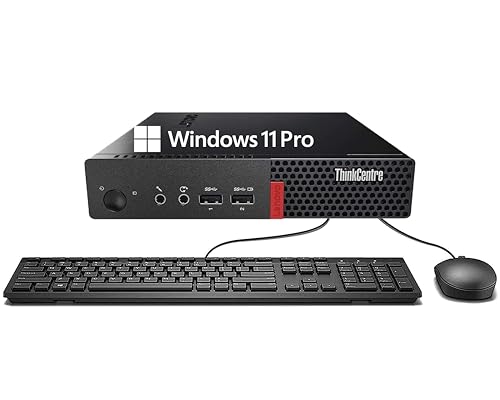
Lenovo ThinkCentre M710q Tiny Desktop
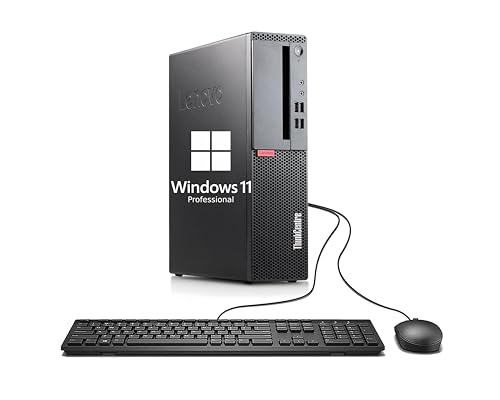
Lenovo ThinkCentre M710 SFF Desktop PC

HP EliteDesk 800 G3 SFF Desktop Bundle
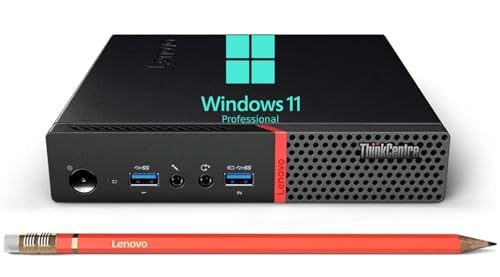
Lenovo ThinkCentre M700 Tiny Desktop PC
More Details On Our Top Picks
That slim 14-inch frame makes sense for school bags, coffee shops, and shared tables where space disappears fast. ChromeOS keeps the setup light, so you’re looking at a machine that fits web work, class portals, and streaming without asking much from you.
The 4GB memory and 64GB storage point to a basic workload profile, not a heavy multitasking one. Compared with the Dell Latitude 3190, this Samsung feels simpler and more travel-minded, while the trade-off is that local storage stays tight.
Strong Points
- 14-inch size stays easy to carry in a backpack.
- ChromeOS keeps everyday tasks straightforward for first-time laptop users.
- Low-spec hardware suits browser-based schoolwork and mail.
- Silver finish gives it a clean, no-fuss look.
Things To Consider
- 4GB RAM leaves little room for many heavy tabs.
- 64GB storage works best when you lean on cloud storage.
- It fits simpler computing, not bulky local software setups.
Feature Rundown
Who It Suits Best
Students and casual users who live in the browser will get the most from it.
Where A Sibling Pick Shines
The Dell Latitude 3190 11.6″ 2-in-1 Touchscreen Laptop suits note-takers who want a folding touchscreen and Windows apps.
The 2-in-1 hinge changes the way you use a small laptop, especially for forms, quick sketches, and note taking in tight spaces. The 11.6-inch HD touchscreen keeps the footprint trim, and the Windows 11 Pro setup gives it a more traditional desktop-style feel than the Samsung Chromebook Go.
Its 128GB SSD, or solid-state drive, is the practical upgrade here, because it boots quickly and gives you more breathing room for local files than the Chromebook above. The honest read is that 4GB RAM still sets a ceiling, so it’s best for light multitasking rather than a dozen open apps.
What We Like
- Convertible design supports laptop and tablet-style use.
- Touchscreen input helps with sign-ins and quick annotations.
- 128GB SSD gives you more room than the Chromebook in this list.
- Windows 11 Pro fits common office software and school tools.
Room For Improvement
- 11.6-inch screen feels small for long work sessions.
- 4GB RAM keeps the multitasking load modest.
- The compact chassis may ask for careful handling in a backpack.
Who Will Love This
Notebook-style users who want a small Windows machine with touch support will feel at home here.
Look Elsewhere When
The HP EliteDesk 800 G3 SFF Desktop Bundle suits anyone who wants a ready-made desk setup with a monitor, keyboard, and mouse.
This OptiPlex moves away from portable-first design and puts the focus on desk stability. The Core i5-6500T, 8GB RAM, and 256GB SSD make a more comfortable fit for spreadsheets, browser tabs, and office apps than the lighter laptop picks above.
WiFi, Bluetooth, and HDMI add the sort of convenience that matters once the machine lands beside a monitor and stays there. You may find the small form factor, or SFF, body especially helpful in a home office where tower cases feel like overkill.
Upsides
- 8GB RAM suits routine multitasking more comfortably.
- 256GB SSD offers sensible room for documents and apps.
- WiFi and Bluetooth reduce desk clutter.
- HDMI makes monitor pairing straightforward.
- SFF case saves space under a desk.
Points To Note
- It stays a desk machine, not a carry-everywhere option.
- The renewed format calls for a little more attention to condition details.
Core Details
Built With In Mind
Home-office users and small-business setups will get the clearest benefit from this compact desktop.
A Better Fit Elsewhere
The Lenovo ThinkCentre M700 Tiny Desktop PC suits you better if the desk is even tighter and you want a smaller chassis.
The all-in-one layout keeps the computer and display in one body, so you spend less time sorting cables and more time using the desk. With a 22-inch Full HD screen, 8GB DDR5 memory, and 128GB SSD storage, it’s aimed at everyday work that needs a tidy footprint more than raw muscle.
Compared with the OptiPlex 5040, this HP trades upgrade flexibility for cleaner setup and a more built-in feel. The 13th Gen Intel quad-core chip and USB-C port give it a newer edge, though the smaller SSD means you’ll want to keep expectations grounded on local storage.
Highlights
- All-in-one design keeps the desk uncluttered.
- 22-inch Full HD panel gives you comfortable viewing space.
- DDR5 memory supports responsive everyday use.
- HD webcam and Wi-Fi suit video calls and home admin.
Minor Gripes
- 128GB storage can fill quickly with large media folders.
- All-in-one systems leave less room for easy part swaps later.
- The display-and-PC combined body needs a stable desk spot.
Feature Card
The Right Fit
Home users who want a neat, all-in-one desk setup will get the best match here.
Swap It Out When
The Dell OptiPlex 5040 SFF Desktop PC suits you better if you prefer a separate monitor and more traditional desktop flexibility.
The tiny chassis is the whole point here, because it lets you tuck the machine behind a monitor or into a crowded nook without much drama. 8GB DDR4 RAM and a 256GB SSD keep it in the same practical lane as the Dell OptiPlex, while the included keyboard and mouse reduce the number of extras you need to source.
DisplayPort gives you a useful monitor connection, and the WiFi plus Bluetooth pairing helps the setup stay uncluttered. In a small office, that combination feels neat and efficient, though the very compact build does leave less room for future hardware changes.
Best Bits
- Very small footprint suits cramped desks.
- Keyboard and mouse included, so setup starts simpler.
- 256GB SSD gives you decent room for ordinary work files.
- DisplayPort supports easy monitor connection.
Areas To Watch
- The tiny case is less flexible for expansion.
- It is built for desk use, not portability.
- Compact placement can make cable routing a little tighter.
Perfect Match For
Space-conscious home offices and reception desks fit this model well.
Another Choice May Suit
The HP EliteDesk 800 G3 SFF Desktop Bundle fits you better if you want a monitor in the box from the start.
This Lenovo keeps the familiar small-form-factor layout, but the VGA port makes it stand out for older monitors and mixed office hardware. The 3.70GHz 6th Gen Core base, 8GB RAM, and 256GB SSD point to a machine that is comfortable with day-to-day office work without trying to be flashy.
It sits between the ultra-tiny ThinkCentre M710q and the larger HP EliteDesk bundle, so you get a bit more traditional desktop room without giving up a compact case. The included keyboard and mouse help, though the renewed format means you’ll want to look closely at the condition details before choosing it.
Standout Traits
- VGA support helps with older display gear.
- 8GB RAM and 256GB SSD suit common work tasks.
- Compact tower shape fits under most desks.
- Keyboard and mouse are included.
Softer Spots
- VGA is useful, but newer display standards may still be preferable.
- Renewed equipment deserves a careful condition check.
Who Should Grab It
Office users with older monitors or mixed peripherals will get the best fit here.
Reach For A Different Pick When
The Dell OptiPlex 5040 SFF Desktop PC fits you better if HDMI and Bluetooth matter more than VGA.
Bundles make life easier, and this HP leans into that by pairing the desktop with a 21.5-inch Full HD monitor, keyboard, and mouse. For a starter office, student desk, or spare-room setup, that removes several separate purchase decisions at once.
The Core i5-6500, 8GB RAM, and 256GB SSD give you a familiar workstation feel, while the included display makes the package feel more complete than the standalone SFF boxes above. One thing worth considering is desk width, since the monitor naturally asks for more room than a tiny desktop alone.
Positives
- Monitor, keyboard, and mouse are already in the box.
- 21.5-inch Full HD screen gives you a usable work area.
- 8GB RAM and 256GB SSD fit routine office needs.
- Simple package reduces setup friction.
Honest Caveats
- The bundle needs more desk space than a tiny desktop.
- Shared-package convenience leaves less room for part-by-part customization.
- Renewed gear still calls for a careful look at condition notes.
Whose Shelf It Belongs On
Anyone building a basic desktop setup from scratch will appreciate the completeness here.
Where Shoppers Go Wrong
The Lenovo ThinkCentre M700 Tiny Desktop PC is better if you need the smallest possible footprint.
The M700 Tiny is built for places where every inch matters, and its 3.53-pound weight makes it easy to tuck in beside a monitor or under a shelf. The i3-6100T, 8GB DDR4, and 256GB SSD line up with common office and home tasks, so the size reduction does not come at the cost of basic usefulness.
Two DisplayPort outputs are handy for dual-monitor work, which gives this little box an edge over the more bare-bones Lenovo M710q in this list. The catch is simple: tiny desktops stay tidy, but they also leave less breathing room for hardware changes later.
Best Bits
- Very small body fits tight shelving and desks.
- 3.53-pound weight keeps placement easy.
- Dual DisplayPort support helps multi-monitor setups.
- Keyboard and mouse are included for faster setup.
- 256GB SSD gives reasonable space for everyday files.
Worth Noting
- The tiny format is less forgiving for future upgrades.
- It is aimed at desk work, not mobile use.
Who Will Love This
Space-strapped work areas and simple office setups suit this model best.
Skip It When
The HP EliteDesk 800 G3 SFF Desktop Bundle makes more sense if you want a monitor included from day one.
What Matters Most Before Choosing Basic Computers
Wrong Turns To Avoid
A small storage number can feel fine on paper, then fill fast once you add browsers, downloads, and offline files. Screen size matters too, because an 11.6-inch laptop and a 22-inch all-in-one solve very different desk problems.
Where The Extra Money Goes
Higher-tier models usually spend more on faster processors, more memory, and better displays. You also pay for convenience items like bundled monitors, touch panels, or a cleaner all-in-one layout that saves setup time.
Things Worth Knowing First
Common Shopping Slip Ups
A tiny desktop sounds flexible until you need room for ports, cables, and monitor placement. Match the machine to the space first, then the spec sheet.
The Upgrade Payoff
Spending up helps most when you keep many tabs open, run office apps all day, or want a setup that feels smoother under load. That extra headroom matters more than flashy extras for most basic work.
Frequently Asked Questions
Are basic computers good for schoolwork?
Yes, the laptop picks here fit web-based classes, writing, and video calls well. More demanding creative work needs a stronger machine.
Is a tiny desktop hard to set up?
No, tiny desktops are often simple to place and connect. The real question is whether your monitor and ports match the layout you already use.
How much memory is enough for basic use?
8GB is the safer baseline for day-to-day multitasking. 4GB works only for very light browser-focused use.
Should you choose a laptop or a desktop?
Choose a laptop for movement and shared spaces. Choose a desktop for steadier desk work and easier monitor use.
What matters more, storage or processor?
For basic use, both matter, but storage often feels tight sooner. A faster processor helps responsiveness, while a larger SSD gives you more room to breathe.
