


You want a gaming laptop that runs current games without turning every session into a compromise. The sweet spot for most first-time gaming shoppers sits around a 15.6-inch screen, a capable entry GPU, and enough memory to keep Discord, browsers, and a launcher’s background tasks from feeling heavy.
The seven models below cover that range from different angles. Some lean toward stronger graphics, others give you more screen space, lighter workday use, or better storage balance, so you can match the machine to your habits instead of guessing from a spec sheet.
Quick Look At The Shortlist

ASUS TUF Gaming F15 (2022)


HP Victus 15 Gaming Laptop

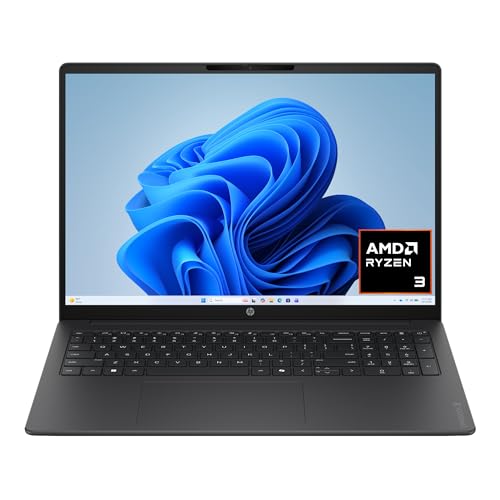
HP OmniBook 3 16 inch Laptop PC

Lenovo Gaming Laptop Ryzen 5 7535HS

NIMO 15.6″ IPS FHD-Light Gaming-Laptop
More Details On The Shortlist
Compared with the rest of this list, the ASUS TUF feels like the plainest route into PC gaming, and that’s a strength. The 12th Gen Core i5-12500H pairs with an RTX 3050 running at 95W max TGP, so you get a spec mix that makes sense for entry-level play without drifting into flashy excess.
The 15.6-inch 144Hz display helps fast-motion games look smoother, while 16GB of DDR4 memory and a 512GB PCIe SSD give you room for the usual starter library plus everyday apps. In a dorm room or shared desk setup, the Mecha Gray finish stays restrained, though the trade-off is that this model is more about dependable basics than luxury touches.
Strong Points
- RTX 3050 graphics give you a sensible start for modern games.
- 16GB memory helps browsers, launchers, and chat apps stay open together.
- 144Hz panel suits fast movement better than a standard 60Hz screen.
- 512GB SSD gives you useful room before storage gets tight.
Things To Consider
- DDR4 memory is older than the DDR5 platform used in some newer picks here.
- The design stays functional, so you do not get much visual flair.
- Storage can fill quickly once you install larger games.
Feature Card
Who It Suits Best
First-time gaming shoppers who want a mainstream 15.6-inch laptop with a clear spec balance benefit most here.
Where A Sibling Pick Shines
The Lenovo Gaming Laptop Ryzen 5 7535HS suits you better if you want a newer DDR5 platform with more forward-looking parts.
The Acer Nitro 5 follows the same RTX 3050 lane as the ASUS TUF, but it reads a little more serviceable than rugged. You get the same Core i5-12500H class CPU, then 8GB of DDR4 and a 512GB PCIe Gen 4 SSD, which is fine for a lighter game library or a machine that spends part of the day on schoolwork.
The 15.6-inch 144Hz IPS display is the part that keeps it in gaming territory, especially for action titles where motion clarity matters. In a busy bedroom desk setup, the backlit keyboard and Killer Wi-Fi 6 are handy touches, though the 8GB memory ceiling means you may feel the need to expand sooner than you would on the ASUS TUF Gaming F15.
Highlights
- 144Hz IPS panel fits fast-moving games well.
- Core i5-12500H keeps the platform current enough for starter gaming.
- PCIe Gen 4 SSD supports quick loading for everyday use.
- Backlit keyboard helps in low-light rooms.
Areas To Watch
- 8GB RAM is the tightest memory setup in this group.
- The spec mix suits lighter multitasking better than heavy creative work.
- Once your library grows, 512GB can feel small fast.
Who Will Love This
Students and casual gamers who want a familiar gaming-laptop layout with straightforward parts fit best.
Skip It When
The ASUS TUF Gaming F15 makes more sense for you if you want 16GB memory straight away and a roomier first setup.
The Victus 15 is the least dramatic-looking gaming machine in this set, and that makes it easy to live with on a kitchen table or campus desk. Its RTX 3050 graphics, 12th Gen Core i5-12500H, 8GB of RAM, and 512GB SSD form a starter setup that is familiar rather than bold.
Enhanced thermals suggest the chassis is meant to stay composed under longer sessions, which matters more than glossy styling once you start spending evenings in a game lobby. Compared with the Acer Nitro 5, this one trades some spec flexibility for a cleaner everyday profile, though 8GB memory still leaves less breathing room than the ASUS TUF Gaming F15.
Best Bits
- Simple design blends into work and school spaces.
- RTX 3050 keeps it in the entry gaming lane.
- 512GB SSD gives you a fair starting point for installs.
- Enhanced thermals point toward steadier long-session behavior.
Softer Spots
- 8GB RAM is modest for newer games plus background apps.
- The plain look will feel understated beside the more aggressive Nitro 5.
- Storage still needs careful management once larger titles pile up.
Details At A Glance
Built With In Mind
Beginners who want a plain-looking laptop that can move between gaming and class notes without much fuss fit it well.
A Better Fit Elsewhere
The ASUS TUF Gaming F15 suits you better if you want more memory headroom and a slightly stronger sense of long-term balance.
The NIAKUN stands out for memory and storage rather than raw gaming ambition. You get 16GB RAM, a 512GB SSD, Windows 11 Pro, and a backlit keyboard, which gives it a more office-friendly shape than the sharper gaming-first machines above.
The catch is the Core i7-7600U, a 7th Gen dual-core chip with a 3.9GHz boost, so you should treat this as a general-use laptop that can handle light games rather than a serious gaming upgrade. For business work, classes, and everyday tabs, it has a practical feel, but the processor age is a real trade-off beside the newer Intel and AMD parts in this roundup.
Positives
- 16GB RAM gives you decent multitasking room.
- 512GB SSD keeps startup and file access tidy.
- Windows 11 Pro suits work-focused setups better than Home editions.
- Backlit keys help in dim study spaces.
Minor Gripes
- The Core i7-7600U is older than the processors in the gaming-focused picks.
- Light gaming is the realistic expectation here.
- Office 365 activation depends on the seller flow, so setup may take a little more attention.
Right Fit For
School, office, and everyday web use suit this model better than long gaming sessions.
Another Choice May Suit
The Lenovo Gaming Laptop Ryzen 5 7535HS fits you better if you want a newer processor and a more gaming-ready foundation.
The OmniBook 3 looks more like a large everyday laptop than a gaming rig, and that’s exactly the point. A 16-inch 16:10 touchscreen gives you more vertical room for browsing, documents, and streaming, while the Ryzen 3 processor and Radeon 610M graphics keep the configuration firmly in the modest-performance lane.
Compared with the 15.6-inch gaming picks, the bigger display is easier on the eyes for long homework sessions or video watching. The trade-off is obvious: 256GB of storage and 8GB RAM are enough for light use, but not the setup you want for a growing game library.
Bright Spots
- 16-inch 16:10 display gives you more usable screen space.
- Touch input adds convenience for browsing and note-taking.
- Compact enough for a general-purpose home desk.
- Windows 11 Home keeps the software side familiar.
Points To Note
- 256GB storage fills quickly once games enter the picture.
- The Ryzen 3 and Radeon 610M pair is better for light workloads.
- It suits media and schoolwork more than serious gaming sessions.
Core Details
Whose Shelf It Belongs On
Students and home users who want a large screen for everyday tasks without chasing gaming speed will get the most from it.
Swap It Out When
The ASUS TUF Gaming F15 fits you better once gaming frame rate and storage space matter more than touch convenience.
This Lenovo feels more current than the older Intel-based picks, and that matters for a starter gaming laptop that also has to stay useful for a couple of years. The Ryzen 5 7535HS uses six cores, while the 8GB DDR5 memory and 256GB PCIe SSD keep the platform newer than the DDR4 systems above.
For someone who streams, edits clips, or hops between multiple browser tabs, the mix is sensible even though storage is modest. The Radeon 660M graphics are a step away from the RTX 3050 machines, so you’re buying platform freshness and convenience features like Wi-Fi 6, Bluetooth 5.3, and the Copilot label, not a jump in graphics muscle.
What We Like
- DDR5 memory gives the system a newer foundation.
- Ryzen 5 7535HS brings six cores into the mix.
- Wi-Fi 6 and Bluetooth 5.3 help modernize connectivity.
- 15-inch IPS screen fits a classic gaming-laptop footprint.
Room For Improvement
- 256GB storage leaves less room for a growing library.
- Radeon 660M graphics sit below the RTX 3050 options here.
- The 8GB memory setup is usable, but not roomy.
Feature Rundown
Perfect Match For
Shoppers who want a newer AMD base for lighter gaming and everyday multitasking fit this model well.
Look Elsewhere When
The ASUS TUF Gaming F15 suits you better if RTX 3050 graphics matter more than connectivity extras.
The NIMO is aimed at the shopper who wants a lighter, more budget-aware gaming setup without moving into bulky hardware. Ryzen 5 6600H gives you six cores, 16GB of DDR5 memory adds welcome breathing room, and the 256GB SSD keeps the package lean rather than expansive.
That mix makes sense for school nights, casual sessions, and a desk that doesn’t have room for a large chassis. The 100W Type-C charging support and fingerprint reader are practical touches, while the Radeon 660M graphics and smaller storage pool keep expectations closer to light gaming than heavy-duty play.
Positives
- 16GB DDR5 gives you the most comfortable memory setup in this smaller group.
- 100W Type-C charging adds convenience for travel and desk swaps.
- Fingerprint reader offers quick sign-in for daily use.
- 15.6-inch size stays easy to fit on compact desks.
Small Caveats
- 256GB storage runs tight once a few larger titles are installed.
- Radeon 660M graphics suit lighter gaming better than demanding releases.
- The light-gaming focus is clearer here than on the RTX 3050 machines.
At A Glance
Who Should Grab It
Casual gamers and portability-focused shoppers who want a compact, modern-feeling laptop fit it well.
Reach For A Different Pick
The Acer Nitro 5 AN515-58-525P suits you better if you want an RTX 3050 setup with stronger gaming intent.
What Matters Before You Choose A Starter Gaming Laptop
Mistakes Worth Dodging
Do not focus only on the graphics chip. A starter machine with 8GB memory and a small SSD can feel cramped fast, even beside a decent GPU.
When Paying More Pays Off
Higher-tier models usually spend that extra cost on faster processors, stronger graphics, more memory, and larger SSDs. That upgrade matters most for gamers who keep several large titles installed or want smoother multitasking with streaming, chat, and schoolwork open together.
Frequently Asked Questions
What Graphics Level Makes Sense For A First Gaming Laptop?
RTX 3050 systems set a sensible floor for this category. Radeon 660M and Radeon 610M picks work better for lighter gaming and everyday use.
How Much Memory Is Comfortable?
16GB feels more forgiving for gaming plus background apps. 8GB works, but you notice the limit sooner once browser tabs and launchers pile up.
Is A 144Hz Screen Worth It?
Yes, for fast-motion games and smoother on-screen movement. It helps most when the rest of the hardware can keep up.
Should You Prefer A Larger SSD?
Larger storage helps a lot in gaming, because modern installs get big quickly. A 512GB drive is a better starting point than 256GB for most starter setups.
What Size Screen Fits Best For Beginners?
A 15.6-inch display is the safest middle ground for most people. It balances desk fit, portability, and gaming comfort without becoming unwieldy.
