


Beginner PCs need to do three things well: start quickly, stay stable under normal workload, and leave enough room for growth without forcing a full rebuild. That matters most for home offices, first-time desktop setups, schoolwork, light gaming, and shared family spaces where the machine has to feel straightforward from day one.
Below, you’ll find eight desktop bundles and towers that cover different desk sizes, performance levels, and upgrade paths. Some lean toward office work, some are better for casual gaming, and a few make sense as a complete starter setup with a monitor, keyboard, and mouse already included.
The Shortlist At A Glance
Dell Optiplex 7010 Desktop Package

Dell Optiplex 3050 SFF Desktop PC

YAWYORE Gaming PC Desktop Computer AMD R5 5600GT 16GB 1TB NVMe Towers WiFi

HP ProDesk Desktop RGB Lights Computer

Dell OptiPlex 5040 SFF Desktop PC Bundle with 23.8″ Monitor
Lenovo ThinkCentre M700 Tiny Desktop PC with 24″ FHD Monitor

LXZ Gaming PC Desktop Computer AMD Ryzen 5 5600GT 16GB 1TB NVMe SSD

Pre-Built PC i5 CPU Up to 3.6GHz Integrated Graphics Only 256 GB M.2 8 GB RAM
More Details On Our Top Picks
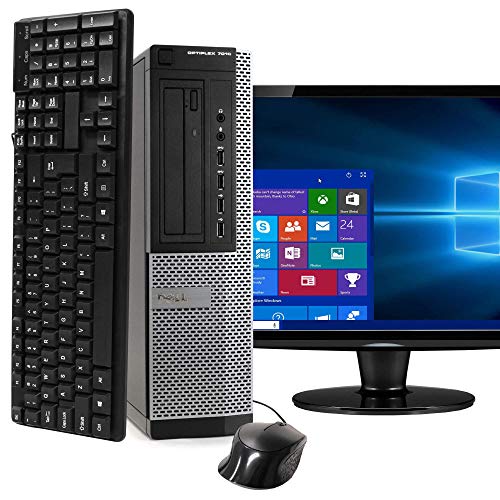
For a first desktop, this bundle keeps the moving parts simple: a tower, a 19-inch LCD, keyboard, mouse, WiFi, DVD, and Windows 11 Pro. The 500GB hard drive gives you room for documents and basic media, though it won’t feel as quick as the SSD-based options later in this list.
The value here is completeness, not flash. In a spare room, dorm corner, or front-desk station, that matters more than style, and the Quad Core i5 gives it enough muscle for browsing, spreadsheets, and everyday admin work. The trade-off is clear enough, the HDD is the slower storage choice and the display size feels modest on a busy desk.
Strong Points
- Includes the monitor and core peripherals, so you start with less separate setup.
- Windows 11 Pro suits office routines and file handling at home or work.
- 500GB storage gives you practical room for school files, photos, and apps.
- WiFi and DVD support cover a wider range of older and current workflows.
Things To Consider
- Hard-disk storage will feel slower than an SSD during boot and loading.
- The 19-inch screen is fine for basics, but multitaskers may outgrow it quickly.
- Renewed hardware usually benefits from a careful dust check before placement.
Feature Card
Who It Suits Best
Students, remote admin work, and family utility stations fit this package well.
Where A Sibling Pick Shines
Dell OptiPlex 5040 SFF Desktop PC Bundle with 23.8″ Monitor suits you better for a larger screen and a more modern all-in-one desk layout.
This small-form-factor Dell feels better suited to a crowded desk than the bulkier bundle above. The 256GB SSD brings quicker start-up and app loading, while 16GB of DDR4 memory gives you more breathing room for browser tabs, office files, and lightweight creative work.
That combination lands in a useful middle ground for daily office life. HDMI and DisplayPort broaden monitor choices, and the WiFi support keeps cable clutter down, though you still need to stay realistic about storage size and all-day media editing.
Highlights
- 16GB RAM gives you a stronger multitasking margin than the first Dell package.
- SSD storage helps the machine feel more responsive in everyday use.
- HDMI and DisplayPort make monitor matching easier in mixed setups.
- The small chassis leaves more room for papers, speakers, or a second display.
Worth Noting
- 256GB fills faster than larger drives once photos, apps, and downloads pile up.
- The compact shell is practical, though cable access can feel tighter behind a desk.
- 4K support helps with display compatibility, not with demanding graphics work.
At A Glance
Made For
Home office users and desk workers with limited space get the most from this setup.
Skip It When
YAWYORE Gaming PC Desktop Computer AMD R5 5600GT 16GB 1TB NVMe Towers WiFi fits better for you if you want more storage and a newer path for gaming use.
This is the first pick here that clearly leans toward gaming and heavier multitasking. The Ryzen 5 5600GT, 16GB of DDR4 at 3200MHz, and 1TB NVMe storage give it a stronger spec story than the office-first Dell options, especially for fast loading and keeping multiple apps open.
It fits neatly into a dorm setup or a shared family desk where you want gaming without jumping straight into a more expensive custom tower. The integrated Radeon graphics make the entry point simpler, though you should keep expectations grounded for demanding titles and future graphics upgrades.
Upsides
- 1TB NVMe storage gives you generous room for games, media, and school files.
- Six-core, 12-thread CPU design supports smoother multitasking than basic office desktops.
- 550W power supply leaves some breathing room for later component changes.
- WiFi and Bluetooth make it easier to place the tower where the desk allows.
- The tower layout feels more upgrade-friendly than the small Dell boxes above.
Areas To Watch
- Integrated graphics keep the system simple, but they set a ceiling for heavier gaming.
- The gaming label can raise expectations, so the entry-level nature of the graphics matters.
- Large game libraries still take time to organize, even with the roomy SSD.
Feature Rundown
Best Suited To
New gamers and home users who want a stronger all-round tower will get the most from this setup.
A Better Fit Elsewhere
OKAMUS Pre-Built PC i5 CPU Up to 3.6GHz Integrated Graphics Only 256 GB M.2 8 GB RAM fits better for a tighter budget and lighter gaming goals.
The RGB front panel gives this HP a more playful look than the plain Dell mini towers, and that matters in a bedroom desk or a shared game corner. Under the styling, though, you still get a familiar Core i5-6500, 8GB of RAM, and a 256GB SSD, which keeps the focus on light daily use rather than heavy workloads.
The included keyboard and mouse make the package easier to drop into service. For someone who wants a compact desktop with a little personality, this lands well, though the base memory and storage numbers still set a sensible ceiling on how far you push multitasking.
Positives
- Keyboard and mouse are included, which simplifies a first-time setup.
- SSD storage helps the machine feel quicker than the HDD-based Dell package.
- The RGB front panel gives the desk a more modern visual accent.
Small Caveats
- 8GB RAM is enough for basics, though heavier tab stacks will feel tighter.
- The styling does not change the desktop’s mid-range internals.
- Bright front lighting may be more than you want in a quiet office space.
Who Will Love This
Casual home users and younger gamers who want a neat-looking starter tower will appreciate this one.
Another Choice May Suit
Dell Optiplex 3050 SFF Desktop PC suits you better for a quieter, more understated look and a stronger memory configuration.
This bundle stands out because it solves the setup problem in one shot. You get the desktop, a 23.8-inch full-HD monitor, keyboard, mouse, WiFi, Bluetooth, and Windows 11 Pro, so a first-time desk builder has fewer separate pieces to source and connect.
The larger monitor makes it easier to live with than the 19-inch Dell package earlier in the list. For email, split-screen work, and everyday home admin, that extra screen room matters, though the 8GB RAM and 256GB SSD still place it firmly in the practical starter tier rather than the heavy-duty class.
Best Bits
- The 23.8-inch FHD monitor adds a more comfortable viewing area.
- Bluetooth and WiFi keep the desk cleaner than cable-heavy setups.
- The bundle format reduces the number of separate purchases you need to make.
- The Intel Core i5-6600 is enough for browsing, office apps, and video calls.
Points To Note
- 8GB RAM is serviceable, though multitaskers may want more headroom later.
- The included monitor improves usability, but it also adds desk width.
- Storage is modest for large photo folders or many installed programs.
Details At A Glance
Perfect Match For
New home-office setups and first desks benefit most from this all-in-one bundle.
Look Elsewhere When
Lenovo ThinkCentre M700 Tiny Desktop PC with 24″ FHD Monitor is the neater fit for you if desk space matters more than a bundled keyboard and mouse.
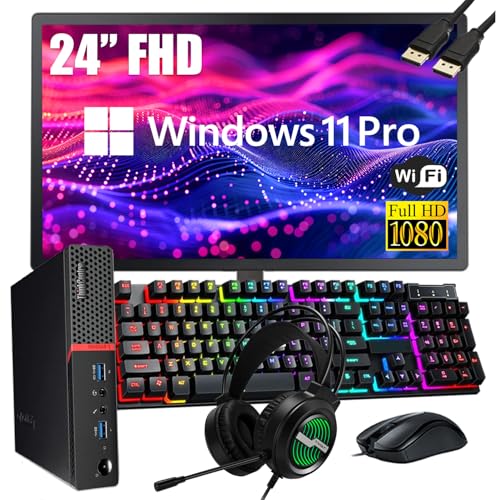
The tiny Lenovo chassis is the cleanest fit in this roundup for a tight desk or a shelving nook. Paired with a 24-inch monitor, 16GB of DDR4 RAM, and a 256GB SSD, it gives you a tidy starter setup that feels more modern than the older HDD-based option from Dell.
The included monitor, keyboard, mouse, WiFi, and dual DisplayPort outputs make the package practical right out of the box. That said, the compact box is built for neatness and office work first, so the appeal comes from space savings rather than graphics ambition.
What We Like
- The tiny system unit leaves far more room than a standard tower.
- 16GB RAM is strong for a beginner desktop in this class.
- Two DisplayPort connections help with multi-monitor planning.
- The bundled monitor creates a complete workspace without extra part hunting.
Softer Spots
- The compact body can be less forgiving during cable routing.
- Storage is adequate, though large game libraries will outgrow it quickly.
- DisplayPort support is handy, but you may still need adapters for some monitors.
Whose Shelf It Belongs On
Minimalist home offices, study corners, and front-desk stations suit this Lenovo especially well.
Where Another Pick Fits Better
YAWYORE Gaming PC Desktop Computer AMD R5 5600GT 16GB 1TB NVMe Towers WiFi fits better for you if you want a fuller gaming path and more storage headroom.
The white tempered-glass case and RGB cooling fans give this tower a more dressed-up feel than the plain business boxes in the list. Inside, the Ryzen 5 5600GT, 16GB of DDR4, and 1TB NVMe SSD point to a system built for everyday responsiveness and a bit of visual flair on the desk.
It works well in a student room or a shared home office where a tower has to handle documents, video calls, and some entertainment without looking too utilitarian. The integrated graphics keep the build simpler, though that also means you should treat it as a sensible starter gaming desktop rather than a graphics-heavy rig.
Reasons To Buy
- 1TB NVMe storage gives you room for work files, apps, and media.
- The tempered-glass side creates a cleaner showcase look than office towers.
- WiFi keeps placement flexible in rooms where Ethernet is awkward.
- Six cores and 12 threads suit busy multitasking better than older i5 desktops.
Room For Improvement
- Integrated graphics keep the tower approachable, but they cap gaming ambition.
- The styling is eye-catching, though it may not suit a plain office.
- Glass panels tend to show fingerprints, so cleaning habits matter a bit more.
Built With In Mind
Students and home-office users who want a polished tower with solid storage will like this one most.
Swap It Out When
Dell Optiplex 3050 SFF Desktop PC makes more sense if you want a quieter, smaller system with a more office-first profile.
This is the most stripped-back gaming-style tower in the group, and that’s also its point. An i5 up to 3.6GHz, 8GB of RAM, 256GB M.2 storage, WiFi 6, and Bluetooth 5.3 create a basic platform for everyday computing with some light gaming on the side.
The three RGB fans add visual energy without changing the core performance story. For a first desktop in a bedroom, starter setup, or casual gaming corner, the honest read is that it makes sense only when you want entry-level parts and don’t plan to push far beyond them.
Bright Spots
- WiFi 6 and Bluetooth 5.3 bring modern wireless convenience.
- M.2 storage helps the system feel more responsive than older hard-drive builds.
- The included RGB fans give the tower a more finished look.
Minor Gripes
- 8GB RAM is the tightest multitasking limit in this roundup.
- Integrated graphics keep the price position simple, but they also narrow game settings.
- The 256GB drive fills quickly once software and game installs start stacking up.
Who Should Grab It
Entry-level gamers and first-time desktop owners who want the basics without extras will fit this tower well.
Reach For A Different Pick When
YAWYORE Gaming PC Desktop Computer AMD R5 5600GT 16GB 1TB NVMe Towers WiFi is a better fit for you if stronger storage and memory matter more than a starter budget.
What Matters Most Before Choosing Beginner Pcs
Everyday Speed Comes First
Memory and storage shape how smooth a desktop feels more than flashy case styling. A solid-state drive starts faster than a hard drive, and 16GB of RAM gives you more breathing room than 8GB in a browser-heavy routine.
Size Needs To Match The Desk
A tiny system works well in a bedroom corner or shared office, while a bundle with a monitor needs more width. A small form factor can feel neat and efficient, but cable access is usually tighter behind it.
Match The Tower To The Task
Office work, school projects, and light media need far less hardware than gaming or photo editing. Integrated graphics keep things simple, while a stronger tower with more memory and storage makes sense for longer sessions and more open tabs.
A Quick Reality Check
Wrong Turns To Avoid
Avoid choosing by case lighting alone. A colorful chassis can be fun, but the processor, memory, and storage decide how the machine behaves day to day.
The Upgrade Payoff
Higher-tier models cost more because they usually bring faster storage, larger memory pools, and more capable processors. That extra spend makes sense for heavier multitasking, more demanding games, or a setup you expect to keep for a longer stretch.
Frequently Asked Questions
What makes a desktop good for a first-time setup?
You want a machine that starts quickly, runs common apps smoothly, and comes with the right ports for your monitor. A bundle with keyboard, mouse, and display also reduces setup friction.
Is 8GB of RAM enough for basic use?
For web browsing, school work, and email, 8GB can be enough. More tabs, heavier programs, and longer work sessions benefit from 16GB.
Does storage type matter that much?
Yes, because SSD and NVMe storage load files and software faster than a hard drive. That difference is easy to notice during boot-up and app launches.
Should you choose a tiny desktop or a tower?
A tiny desktop saves space and fits cleanly into tight rooms. A tower usually gives you more room for future parts and easier cable access.
Do bundled monitor setups make sense?
They do for a first desktop or a spare-room station because the pieces arrive as one system. The trade-off is that the desk needs enough space for the display and the box.
