


Black desktop computers still make sense when you want a setup that looks tidy, sits quietly in a room, and handles real work without spreading clutter everywhere. For home offices, front desks, school work, and media-heavy family spaces, the main trade-off is simple: more compact designs usually give up expansion, while larger towers and bundles give you more headroom. This roundup keeps the focus on black-finished systems that fit different routines, from basic browsing to heavier multitasking.
The Shortlist At A Glance

HP OmniStudio 27 inch All-in-One Desktop Next Gen AI PC 27-cw0102

Dell Optiplex 7050 SFF Desktop PC Intel i7-7700 32GB DDR4 1TB SSD

GEEKOM IT15 AI Mini PC Intel Ultra 9 285H 32GB DDR5 1TB SSD

Dell OptiPlex Desktop Computer 24 inch Monitor Bundle i7-6700 16GB RAM 512GB SSD

Dell 23.8 inch All-in-One Desktop FHD Intel Core 3 100U

HP 2025 22 inch FHD All-in-One Desktop Computer 13th Gen Intel Quad-Core CPU
Lenovo IdeaCentre All-in-One Desktop Computer 8GB RAM 512GB SSD 24 inch FHD IPS Display
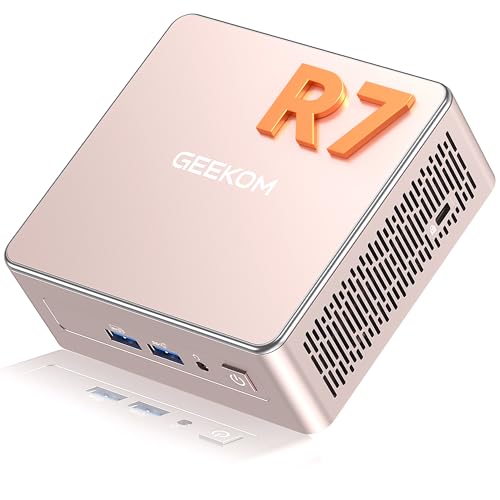
GEEKOM A5 2027 Edition Mini PC Ryzen 7 7730U 16GB RAM 512GB SSD
More Details On Our Top Picks
A 27-inch all-in-one makes the strongest case when you want a cleaner desk and a wider screen in the same footprint. The Ryzen AI 7 chip, 16 GB of memory, and 512 GB solid-state drive give you the kind of setup that handles work apps, streaming, and regular tab hopping without feeling stripped down.
The black finish keeps it visually restrained, which helps in a living room or shared office where a tower would feel heavier. You may find the all-in-one format less flexible for future upgrades, but that trade-off is part of the neat, low-clutter design.
Strong Points
- Large 27-inch screen helps reduce split-window crowding.
- Fast memory and SSD storage support smoother daily use.
- Jet black styling suits a professional workspace.
- All-in-one layout cuts down on cable clutter.
Points To Note
- All-in-one designs are less flexible for later expansion.
- A single chassis can be less forgiving if one part needs service.
Feature Card
Who It Suits Best
Home office users who want one tidy machine for work, streaming, and daily organization.
Where A Sibling Pick Shines
GEEKOM IT15 AI Mini PC suits you better when desk space matters more than having a built-in display.
The small-form-factor case is the point here, and it matters in cramped desks or back-office setups where a full tower feels excessive. With an Intel Core i7-7700, 32 GB of DDR4 memory, and a 1 TB SSD, this refurb leans into practical multitasking and plenty of local storage.
Dual-monitor support and built-in wireless connections make it easier to plug into an existing workstation without extra fuss. The honest read is that older-core hardware is not as future-facing as newer chips, but for routine office work it still has a straightforward, dependable shape.
What We Like
- Small footprint leaves more room for paperwork and peripherals.
- 32 GB memory helps heavy browser and office workloads.
- 1 TB SSD gives you generous local storage.
- Dual-monitor support suits spread-out workspaces.
Minor Gripes
- Older processor generation limits long-term headroom.
- Refurbished units can vary in cosmetic condition.
- SFF cases are less friendly to future part swaps.
At A Glance
Made For
Office workers who want a compact desktop that can sit beside two screens without taking over the desk.
Another Choice May Suit
Dell OptiPlex Desktop Computer 24 inch Monitor Bundle fits you better when you want a ready-made package with a screen included.
This mini PC is built for desks that need serious output without the bulk of a tower. The Intel Ultra 9 285H, 32 GB of DDR5 memory, 1 TB SSD, Arc 140T graphics, and WiFi 7 give it a distinctly higher-spec profile than the Dell Optiplex refurb above.
That makes sense in business spaces, meeting rooms, or retail setups that may need multiple displays and fast response. You may find the tiny chassis more demanding on cable planning, yet the payoff is a lot of capability in a very small footprint.
Highlights
- High-end processor suits demanding multitasking.
- DDR5 memory brings newer platform speed.
- WiFi 7 is well suited to modern networks.
- Mini format leaves room for clean installs.
- Arc graphics add more muscle than basic integrated output.
Softer Spots
- Small cases can be tighter for cable management.
- Mini PCs depend on your own monitor and peripherals.
Feature Rundown
Best Suited To
Professionals who want a compact workstation for desks, counters, or multi-screen business use.
Look Elsewhere When
HP OmniStudio 27 inch All-in-One Desktop Next Gen AI PC makes more sense when you want the display included in one black unit.
A bundle changes the equation for a first desk setup, and this one keeps the decision simple by pairing the desktop with a 24-inch monitor. The i7-6700, 16 GB of RAM, and 512 GB SSD offer enough room for office apps, document work, and everyday browsing without the separate shopping chase.
That said, the monitor bundle format is more about convenience than cutting-edge speed, especially beside the GEEKOM IT15. For a home office, student room, or spare-room workstation, the black finish and ready-made package carry real practical value.
Upsides
- Monitor included, so setup is simpler.
- 16 GB RAM is workable for daily tasks.
- 512 GB SSD supports faster boot times.
- Built-in wireless and HDMI add easier connecting.
Areas To Watch
- Older processor is better for basics than heavy workloads.
- Refurbished bundle condition can vary by unit.
- Separate components may mean more desk cabling.
Perfect Match For
Anyone setting up a home office who wants the monitor and desktop handled in one order.
Swap It Out When
Lenovo IdeaCentre All-in-One Desktop Computer suits you better if you prefer a cleaner all-in-one footprint.
This Dell keeps the footprint tight and the setup straightforward, which is exactly what many shared rooms or compact home offices need. The 23.8-inch FHD panel gives you a comfortable viewing size, while the Intel Core 3 100U is a sensible fit for browsing, documents, and routine app work.
Compared with the larger HP OmniStudio, this model feels more modest and easier to place on a smaller desk. The trade-off is that it’s aimed at lighter workloads, so multitask-heavy use belongs higher up the list.
Bright Spots
- Compact all-in-one design saves desk space.
- 23.8-inch screen is an easy everyday size.
- Black finish keeps the look restrained.
- Good fit for simple, low-clutter layouts.
Things To Consider
- Best suited to lighter computing tasks.
- All-in-one builds leave fewer upgrade paths.
Right Fit For
Home users who want a tidy all-in-one for email, browsing, and basic productivity.
Another Choice May Suit
HP 2025 22 inch FHD All-in-One Desktop Computer fits better when you want a smaller, simpler everyday system.
Small-space computing is the obvious story here. The 22-inch FHD display, 13th Gen Intel quad-core processor, 8 GB of DDR5 memory, and 128 GB SSD keep the machine aimed at everyday tasks rather than heavier workloads.
The included HDMI, USB-C, Wi-Fi, and HD webcam make it easier to slot into a home setup without extra accessories piling up. For most kitchens, bedrooms, or student desks, that plain, compact layout is enough, though the storage size asks you to stay organized.
Best Bits
- Compact screen size suits tighter desks.
- DDR5 memory is a newer platform touch.
- HD webcam helps with calls and classes.
- HDMI and USB-C broaden connection options.
Room For Improvement
- 128 GB storage fills faster than larger drives.
- Best for light-to-moderate use, not heavy multitasking.
- Small all-in-one chassis can be harder to expand later.
Core Details
Built With In Mind
Students and light home users who want a compact black all-in-one for routine computing.
Reach For A Different Pick When
Dell 23.8 inch All-in-One Desktop FHD Intel Core 3 100U gives you a little more screen space for everyday work.
Lenovo takes a balanced route here, pairing an Intel 4-core processor with 8 GB of RAM and a 512 GB SSD in a black all-in-one shell. The 24-inch FHD IPS panel adds better side-angle viewing than a plain basic screen, which matters in a shared room or a desk with more than one person glancing over.
Wi-Fi 6 and Bluetooth 5.2 make modern wireless pairing easier, so you spend less time juggling adapters. It sits in the middle of the pack in a sensible way, especially for home office work, browsing, school tasks, and light business use.
Positives
- 24-inch IPS panel offers a comfortable everyday view.
- 512 GB SSD gives you practical storage room.
- Wi-Fi 6 and Bluetooth 5.2 support current accessories.
- All-in-one design keeps the desk cleaner.
Softer Spots
- 8 GB memory is fine for modest multitasking, not heavy loads.
- Integrated design limits later hardware changes.
The Right Fit
Households and home offices that want a balanced all-in-one for everyday work and browsing.
Skip It When
GEEKOM IT15 AI Mini PC makes more sense for power-heavy tasks in a smaller chassis.
This one is for desks where space matters as much as speed. A Ryzen 7 7730U, 16 GB of memory, and a 512 GB SSD give the mini PC enough strength for everyday work, lighter creative tasks, and general multitasking without asking for much room.
Because you supply the monitor, keyboard, and mouse, the setup stays flexible, almost like a modular desk anchor. That arrangement works well in minimalist offices or secondary workspaces, though the separate accessory list means a little more planning upfront.
Reasons To Buy
- Very small footprint helps preserve desk space.
- Ryzen 7 chip gives stronger everyday headroom.
- 16 GB RAM supports comfortable multitasking.
- 512 GB SSD provides a useful storage baseline.
Small Caveats
- You need your own monitor and input gear.
- Mini PCs can take more planning for cable routing.
Whose Shelf It Belongs On
Minimalist users who want a black mini PC that can hide neatly behind a monitor or sit unobtrusively on the desk.
A Better Fit Elsewhere
HP OmniStudio 27 inch All-in-One Desktop Next Gen AI PC suits you better when you want the screen and computer in one unit.
What To Weigh Before Choosing Black Desktop Computers
Mistakes Worth Dodging
Screen size, storage, and form factor can trip you up fast. A compact all-in-one looks neat, but it leaves less room for future upgrades, while a mini PC needs separate display and input gear.
What The Higher Tier Buys
More expensive black desktops usually pay for faster processors, newer memory, better graphics, or a cleaner all-in-one chassis. That upgrade matters most in busy offices, multi-display work, or homes where the machine handles several jobs at once.
Frequently Asked Questions
Are all-in-one black desktops good for small desks?
They usually are, because the computer lives inside the display chassis. That keeps cables down and saves room for the rest of your setup.
Do mini PCs need extra equipment?
Yes, you need your own monitor, keyboard, and mouse. That extra flexibility also lets you shape the desk around your exact needs.
Is refurbished hardware worth considering?
It can be, especially for office tasks and light multitasking. The trade-off is that cosmetic condition and part age can vary by unit.
How much memory feels comfortable for daily use?
8 GB handles basic browsing and document work, while 16 GB or more feels calmer with many tabs open. Heavy multitaskers usually benefit from the higher amounts.
What matters more, processor speed or storage size?
Both matter, but they solve different problems. A faster processor helps with responsiveness, while a larger SSD gives you more room for files and programs.
