


Bluetooth Computer Keyboard And Mouses matter most when you want a desk that stays tidy and a setup that moves easily between laptop, desktop, and tablet. The strongest options in this group lean on better layout, quieter keys, and simpler device switching, which matters in a home office, shared workspace, or travel bag. The trade-off is that each combo makes a different compromise, from size and feel to connection style and lighting.
This roundup focuses on those practical differences, so you can match the combo to the way you actually work. Some picks suit a crowded office desk, while others make more sense for hybrid work, long typing sessions, or a room where noise carries.
Quick Look At The Shortlist

seenda COE200 Wireless Bluetooth Keyboard and Mouse Combo
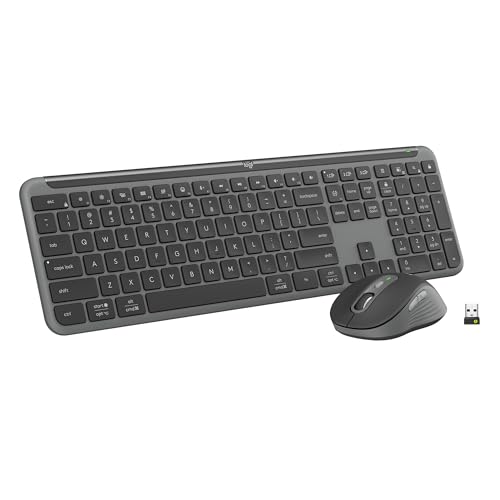
Logitech MK955 Signature Slim Wireless Keyboard Mouse Combo

seenda COE401 3-Device Bluetooth Keyboard Mouse Combo

Wireless Keyboard and Mouse Combo, RGB Backlit Rechargeable 2000 mAh Battery, Wireless Computer Keyboards

seenda Wireless Bluetooth Ergonomic Keyboard Mouse Combo

MEETION Wireless Bluetooth Keyboard and Mouse

Logitech MK250 Wireless Bluetooth Keyboard and Mouse Combo

Logitech MK270 Full Size Wireless Keyboard and Mouse Combo
More Details On Our Top Picks
That wrist rest gives the COE200 a clear desk-side advantage, especially for long typing sessions at a kitchen table or a compact home office. The combo also fits mixed-device use, so you can move between a Windows laptop and a second screen without adding clutter.
The honest read is that this style suits practical use more than flashy styling. Your main trade-off is that the strongest case here is comfort and flexibility, not a premium metal finish.
Strong Points
- Wrist rest helps reduce strain during longer work blocks.
- Bluetooth and USB-A receiver support flexible setups.
- Multi-device switching suits a desk with more than one computer.
- Broad OS support helps mixed Windows, tablet, and mobile use.
Things To Consider
- 2.4G mode is limited to Windows, so cross-platform use leans on Bluetooth.
- That softer comfort-first design can feel less crisp than slimmer office sets.
- Wireless gear still needs battery awareness, which matters on travel-heavy weeks.
Feature Snapshot
Who It Suits Best
You get the most value from this set in a hybrid work routine where comfort and easy switching matter more than a slim profile.
A Better Fit Elsewhere
Logitech MK955 Signature Slim Wireless Keyboard Mouse Combo suits you better for a more polished office desk and a lower-profile typing feel.
The MK955 leans into a slimmer, more office-ready profile than the softer COE200. That makes it a tidy fit for a permanent desk, where a familiar laptop-style feel and cleaner visual lines matter as much as raw function.
Its recycled-plastic build detail gives it a more modern story, and the customization angle fits power users who like shortcuts. You may find it especially sensible in a shared workspace, though the more focused design leaves less room for oversized hand support.
What We Like
- Slim keyboard styling keeps the desk visually clean.
- Laptop-like key feel suits people who move between devices all day.
- Customization support helps tailor shortcuts to your routine.
- Fast, precise scrolling works well for spreadsheet and document work.
Worth Noting
- The thinner profile may feel less cushioned than bulkier combos.
- Advanced software features matter most once you spend time setting them up.
- It fits a static desk better than a grab-and-go bag.
Who Should Grab It
You should look here first for a tidy home office or a shared desk where a slim layout feels more natural than a bulky one.
Where A Sibling Pick Shines
seenda COE200 Wireless Bluetooth Keyboard and Mouse Combo with Wrist Rest works better for long sessions that call for more palm support.
This COE401 is built for a desk that rarely stays tied to one device. Switching across three devices works well for someone moving between a laptop, tablet, and desktop without wanting a separate keyboard for each screen.
The silent angle matters more than it sounds, especially in a dorm room, a late-night office, or any place where loud keys become distracting. Compared with the MK955, it puts more weight on device count than on a polished premium feel.
Upsides
- Three-device switching fits a busy multi-screen routine.
- Silent typing helps keep shared spaces calmer.
- Bluetooth and 2.4G options add flexibility at the desk.
- Works across common Windows, macOS, iPadOS, iOS, and Android setups.
Softer Spots
- The added flexibility can make setup feel more involved than a basic single-device combo.
- Windows-only 2.4G use narrows the receiver route for non-Windows systems.
- Silent keys are a plus, though some typists prefer a firmer mechanical response.
Core Details
Made For
You fit this best when your workday jumps between laptop, tablet, and desktop and you want one combo to keep up.
A Better Fit Elsewhere
Logitech MK250 Wireless Bluetooth Keyboard and Mouse Combo suits a simpler setup better when you want fewer modes to manage.
This XISOGUU combo is the visual outlier in the group, with RGB backlighting, a media knob, and a full-size 104-key layout. That combination makes sense for a desk where you type at night, keep a number pad in regular use, and want direct control without reaching for software.
The tri-mode setup, meaning Bluetooth, 2.4G, and wired USB-C, gives you real flexibility for different machines. The trade-off is that a feature-heavy board can feel busier on the desk than the cleaner Logitech sets, so it suits styled spaces more than minimal ones.
Bright Spots
- RGB backlighting helps in dim rooms.
- 104-key full-size layout keeps the number pad handy.
- Tri-mode connection supports more desk and travel scenarios.
- USB-C charging keeps the setup modern and easier to top up.
- Media knob gives quicker control over volume and playback.
Points To Note
- The feature set adds visual and physical bulk.
- Backlighting and extra controls can be more than you need for plain office work.
- Rechargeable gear adds another habit, keeping charging in your routine.
Feature Card
Perfect Match For
You fit this best when your desk does double duty for work and a bit of style, especially in lower light.
Swap It Out When
Logitech MK955 Signature Slim Wireless Keyboard Mouse Combo suits a calmer office setup better when you want a slimmer profile.
The ergonomic angle is the main reason this seenda set stands out, especially for home-office typing that runs for hours. Its full-size layout keeps the number pad available, which matters for spreadsheet work and routine admin tasks.
The pink finish gives it a softer visual profile than the black and graphite picks, so it works well in a space that feels less corporate. The trade-off is simple, it is more about comfort and style than about compactness or high-end desktop polish.
Best Bits
- Ergonomic shape suits longer typing stretches.
- Full-size layout keeps everyday work efficient.
- Pink finish adds a more personal desk look.
- Bluetooth support keeps the setup cord-light.
Areas To Watch
- The fuller shape takes up more desk room than a slim set.
- Style-forward finishes are more personal, so they fit some rooms better than others.
- Wireless use means you still need to stay aware of battery upkeep.
Who Will Love This
You fit this best in a home office or study where ergonomic comfort matters more than a minimal footprint.
Another Choice May Suit
Logitech MK250 Wireless Bluetooth Keyboard and Mouse Combo suits a tighter desk better when you want a simpler, smaller-profile setup.
MEETION keeps the focus on quiet, low-disruption typing, which is useful in an office corner, a shared apartment, or a study session after hours. Dual-mode wireless and three-device switching make it more flexible than a basic single-receiver set, though it still reads as a work-first combo rather than a style piece.
Compared with the COE401, this one aims for silence without leaning too hard into extra visual flair. That makes it a sensible middle ground for someone who wants calm key action and a full-size board without adding RGB or more elaborate controls.
Positives
- Quiet typing suits shared rooms and late work blocks.
- Bluetooth plus 2.4G gives you practical connection flexibility.
- Three-device switching helps reduce desk clutter.
- Full-size layout supports general office and home tasks.
Minor Gripes
- Quiet-first design can feel less tactile to some typists.
- Full-size hardware asks for more desk space.
- Multi-device features make the setup a little less basic.
Details At A Glance
The Right Fit
You fit this best in a shared workspace where quiet key action and simple multi-device handling both matter.
Reach For A Different Pick When
Wireless Keyboard and Mouse Combo, RGB Backlit Rechargeable 2000 mAh Battery, Wireless Computer Keyboards suits you better for a more expressive desk setup with backlighting.
The MK250 is the cleanest expression of a simple desk-friendly combo in this list. It skips the extra bulk of the COE200 and the feature stack of the XISOGUU board, which makes it a useful match for a smaller setup or a work corner with limited ports.
That no-dongle Bluetooth approach keeps things tidy, and the graphite finish leans understated rather than decorative. The honest trade-off is that this model serves straightforward typing and clicking better than creative extras or ergonomic flourishes.
Highlights
- Bluetooth connection keeps a USB port open.
- Compact layout suits tighter desks and mobile workspaces.
- Graphite color looks restrained and professional.
- Simple pairing works well for everyday computer use.
Small Caveats
- Smaller footprint usually means less room for extra controls.
- Minimal design is better for function than for comfort extras.
- Plain styling may feel too restrained for a decorative desk.
Who Should Grab It
You fit this best when you want a no-fuss Bluetooth combo for an apartment desk, dorm, or spare workstation.
Look Elsewhere When
seenda COE200 Wireless Bluetooth Keyboard and Mouse Combo with Wrist Rest suits you better for longer sessions that call for a softer typing position.
The MK270 is the familiar, practical end of the lineup, with a full-size layout and Logitech’s tiny receiver for a setup that stays out of the way. It fits a busy home office well, especially where you want dependable wireless convenience without moving into a more feature-heavy board.
Its long-range wireless spec gives it more room to breathe than the MK250, which makes it handy for desks that sit farther from the screen. The trade-off is that it is less about style and more about steady, everyday function, so it suits plain utility best.
Reasons To Buy
- Full-size layout keeps the number pad available.
- Tiny receiver helps keep the setup unobtrusive.
- Long wireless reach supports roomier desk arrangements.
- Reliable everyday format suits general home use.
Room For Improvement
- It leans practical rather than premium.
- The design is straightforward, so style seekers may want more flair.
- A classic wireless kit can feel basic next to tri-mode sets.
Whose Shelf It Belongs On
You fit this best if you want a dependable full-size combo for a family desk or a simple work-from-home station.
Consider Something Else When
Logitech MK955 Signature Slim Wireless Keyboard Mouse Combo suits you better for a slimmer, more polished office presence.
What Matters Before You Choose
Where Shoppers Go Wrong
Many sets look similar until you check device switching, connection mode, and layout size. A full-size board helps with numbers and shortcuts, while a compact set saves space on crowded desks.
The Upgrade Payoff
Higher-tier combos usually spend more on slimmer construction, better shortcut control, quieter typing, or broader device switching. That extra cost makes sense for daily office use, mixed-device homes, or anyone who wants a cleaner desk with fewer compromises.
Frequently Asked Questions
What makes Bluetooth combos useful for work?
They cut down on cable clutter and make it easier to move between devices. That matters most on shared desks and in small rooms.
Do full-size keyboards still matter?
Yes, especially for spreadsheet work, data entry, and shortcut-heavy routines. The number pad can save time in those settings.
Is a silent keyboard worth it?
Quiet keys help in shared spaces, late-night work, and video calls. They are less important in a private room where sound is not a concern.
Why do some combos support more than one device?
Multi-device support lets you keep one keyboard and mouse across a laptop, tablet, and desktop. That reduces desk clutter and saves setup time.
Which pick suits a small desk best?
Logitech MK250 Wireless Bluetooth Keyboard and Mouse Combo is the cleanest space-saving option here. It stays simple without giving up the basics.
