


A cluttered desk or an older PC can make simple wireless input feel more complicated than it should. These Bluetooth Keyboard And Mouse Adapters are built for that gap, whether you need a compact USB dongle for a Windows tower, a combo that travels between rooms, or a converter that keeps an Android gaming setup tidy.
The right choice depends less on marketing labels and more on compatibility, Bluetooth version, and how many devices you plan to juggle. You’ll see straightforward adapters here, plus a few more specialized picks for hybrid work, laptop use, and mobile control.
Quick Look At Our Shortlist

seenda COE200 Wireless Bluetooth Keyboard and Mouse Combo
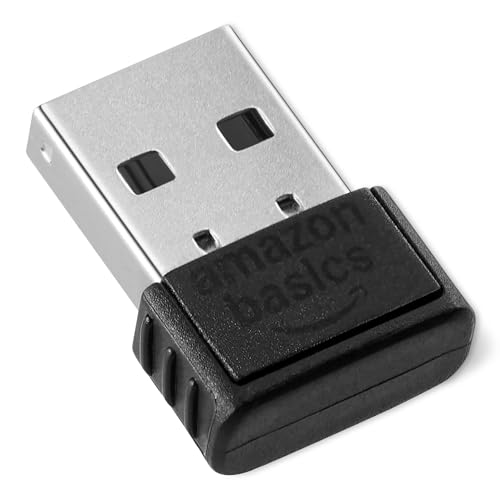
Amazon Basics Bluetooth 5.4 USB Adapter Dongle for PC

Wansurs 2 Pack Bluetooth Adapter for PC 5.1 EDR
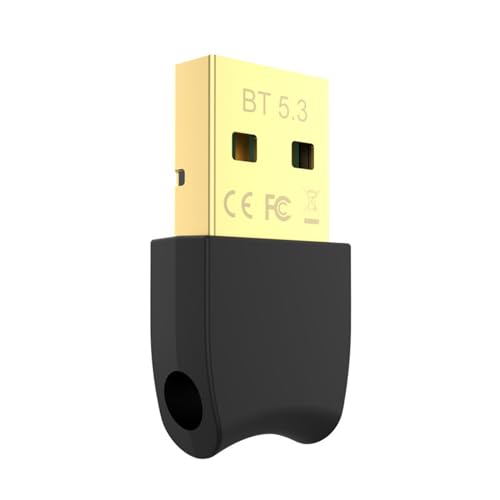
Bluetooth 5.3 USB Adapter for Desktop PC

USB Bluetooth 5.4 Adapter for PC Laptop Long Range

Mini USB Bluetooth 5.4 Adapter for Laptop PC

Gaming Keyboard Mouse Converter USB 2.0 Bluetooth 4.0

cablecc 2.4G Bluetooth Converter with Receiver Type-C Power
More Details On Our Top Picks
The seenda COE200 makes sense for you the moment a single keyboard and mouse need to move between a work laptop and a home desktop. Its wrist rest gives the keyboard a more settled feel on a long desk session, while the wireless setup keeps the surface cleaner than a wired pair.
It stands out most in mixed-device homes, because the combo is built for switching between two devices rather than living in one fixed spot. The honest trade-off is that a combo only helps when you want both input devices together, so it’s less compelling than a bare adapter for someone who already owns a favorite keyboard or mouse.
Strong Points
- Bluetooth combo format keeps your desk aligned around one matching set.
- Wrist support helps during longer typing stretches.
- Two-device switching suits a laptop plus desktop routine.
- Less cable clutter matters in a compact home office.
Things To Consider
- You’re committing to both keyboard and mouse at once, not just an adapter.
- The setup is less flexible than a standalone USB dongle.
- Shared peripherals still need regular cleaning around the wrist area.
Feature Snapshot
Who It Suits Best
Home office users who want a tidy, paired keyboard and mouse setup will get the most from it.
A Better Fit Elsewhere
Amazon Basics Bluetooth 5.4 USB Adapter Dongle for PC suits you better when you already like your current keyboard and mouse and just need Bluetooth added to a Windows machine.
This one is the cleanest way to give a non-Bluetooth Windows PC a wireless bridge for keyboards and mice. Because it plugs straight into USB, it suits older desktops and simple office towers that just need a dependable receiver without extra fuss.
Compared with the seenda combo, this is the more surgical option, since it upgrades the computer instead of replacing your peripherals. The catch is its Windows-only focus, so mixed-platform households should look elsewhere before assuming it covers a Mac or mobile setup.
Upsides
- USB-dongle format keeps setup straightforward.
- Bluetooth 5.4 supports current accessory pairing needs.
- Backward compatibility broadens use with older Bluetooth gear.
- Works well for a desk that needs one compact receiver.
Worth Noting
- Windows-only support narrows the audience.
- A tiny dongle can be easy to misplace during cable swaps.
Who Should Grab It
Windows 11, 10, and 8.1 desktop users who want a simple Bluetooth bridge will find the fit most natural here.
Skip It When
Wansurs 2 Pack Bluetooth Adapter for PC 5.1 EDR makes more sense for a second workstation, since you get a spare adapter in the box.
The 2-pack setup makes this Wansurs adapter appealing in a home office with more than one PC, because you can leave one plugged in and keep another as a spare. Bluetooth 5.1 with EDR, or Enhanced Data Rate, aims at steadier transfers and less wasted signal in busy 2.4 GHz environments.
That matters most in apartments and shared desks where wireless clutter is normal, not rare. Compared with Amazon Basics, this one leans into quantity and flexibility instead of a single tidy office unit, though the trade-off is that you’re still limited to Windows compatibility based on the source details.
Best Bits
- Two adapters in one package help cover multiple PCs.
- Bluetooth 5.1 plus EDR is aimed at steadier wireless behavior.
- The dongle format keeps each machine easy to outfit.
- Useful for keyboards, mice, speakers, and headsets.
Areas To Watch
- Windows-only support limits platform flexibility.
- Small receivers are easiest to manage when you assign a storage spot.
Core Details
Built With In Mind
Dual-desk households and shared workstations get the most value from the two-unit format.
Where A Sibling Pick Shines
seenda COE200 Wireless Bluetooth Keyboard and Mouse Combo is the cleaner call for someone who wants a matched keyboard and mouse instead of a standalone adapter.
This Eiszuso dongle is built for the kind of desk where every port matters. The mini body and plug-and-play setup make it a neat fit for a tower tucked under a monitor arm, and it also reads as friendlier than bulkier receivers when you’re swapping accessories often.
Because it supports both receiver and transmitter roles, it has more range as a category piece than a simple mouse-and-keyboard dongle. The honest read is that this extra flexibility helps more tech-heavy setups, while basic office users may not need the transmitter side at all.
Highlights
- Mini form factor stays out of the way.
- Plug-and-play design reduces setup friction.
- Receiver and transmitter roles expand use cases.
- Works across several common desktop accessories.
Small Caveats
- The wider feature set can be more than a simple office setup needs.
- Small adapters are easiest to store in the same USB port or case pocket.
Right Fit For
Desktop users who want a compact adapter with a little more functional range will appreciate it most.
Another Choice May Suit
Amazon Basics Bluetooth 5.4 USB Adapter Dongle for PC is the more direct route for a Windows machine that only needs a standard Bluetooth bridge.
This hakimonoe adapter is aimed at you when the computer sits farther from the keyboard, mouse, or speaker than a normal desk setup would suggest. Its Windows-only compatibility is narrow, but the Bluetooth 5.4 spec and long-range positioning make it easy to understand who it is meant for.
Compared with the smaller Amazon Basics dongle, this one is more about reach than simplicity. The trade-off is obvious: a setup built around distance can be useful in a living-room PC or larger office, yet it’s overkill for a basic monitor-and-keyboard workstation.
Reasons To Buy
- Long-range positioning suits rooms with more separation between devices.
- Bluetooth 5.4 keeps it current on the version side.
- Works with keyboards, mice, speakers, and controllers.
- Useful for larger desks and deeper PC placements.
Points To Note
- Windows-only support leaves out Mac and Linux use.
- Distance-focused gear makes cable routing and placement more important.
- Best results usually start with a sensible USB port location.
Core Details
Best Suited To
Windows users with bigger rooms or a farther PC placement will get the most practical use from it.
Look Elsewhere When
Bluetooth 5.3 USB Adapter for Desktop PC is the tidier choice for a small desk where short-range convenience matters more than reach.
The mini body makes this hakimonoe adapter easy to live with on a laptop, especially when you move between a desk, a meeting room, and a carry bag. It also keeps the footprint low enough that nearby ports and other USB gear don’t feel crowded.
That lean profile is the main draw compared with the fuller long-range model above. One thing worth considering is placement on a desktop tower, because a back-panel USB port often gives a cleaner result than a front-facing hub in a busy setup.
Positives
- Mini size works well for portable machines.
- Bluetooth 5.4 keeps it current for common accessories.
- Plug-and-play design keeps the setup simple.
- Handles everyday devices like keyboards, mice, and speakers.
Softer Spots
- Desktop placement can matter more than on a laptop.
- Very small adapters are easy to overlook when you pack up.
Who Will Love This
Laptop users who want a low-profile adapter for routine travel and desk hopping will appreciate it most.
Where A Sibling Pick Shines
USB Bluetooth 5.4 Adapter for PC Laptop Long Range is the stronger call when distance matters more than a tiny footprint.
Heayzoki’s converter is for Android gaming setups that need a keyboard and mouse rather than touch-only control. The adjustable stand is the detail that matters most in daily use, because it helps keep the phone or tablet at a viewing angle that feels less awkward during longer sessions.
Bluetooth 4.0 is older than the version numbers on the PC dongles above, so this is not the flexible all-rounder in the group. Still, for a mobile game station or a compact desk tucked around an Android device, it has a clear and narrow purpose.
Standout Traits
- Built around Android gaming control.
- Adjustable stand helps with viewing angle.
- USB 2.0 connection keeps the form simple.
- Keyboard and mouse support gives more direct control than touch input.
Room For Improvement
- Bluetooth 4.0 trails the newer dongles in this list.
- Android focus makes it less useful for general PC work.
- The stand adds a part that needs careful storage.
Whose Shelf It Belongs On
Android gamers who want physical keyboard and mouse control will get the clearest benefit here.
A Better Fit Elsewhere
cablecc 2.4G Bluetooth Converter with Receiver Type-C Power is better for multi-device switching on mixed laptop and tablet setups.
This cablecc converter is the most systems-minded option in the group, because it is built to turn wired keyboards and mice into wireless gear across a larger device mix. The ability to switch between multiple computers and phones is a serious advantage in a desk that hops between work, tablets, and a secondary machine.
Compared with the gaming-focused Heayzoki model, this one serves a broader productivity role rather than a single Android use case. The trade-off is that a multi-device bridge can feel more complex than a plain dongle, so it suits organized desks better than a grab-and-go bag.
Best Bits
- Switching across several devices helps in shared work setups.
- Type-C power support fits newer desk hardware.
- Useful for converting wired keyboards and mice into wireless use.
- Works well where tablets, phones, and computers all matter.
Honest Caveats
- Multi-device features add setup steps.
- Desks with loose cable habits may find the switching tools easy to misplace.
The Right Fit
People who move the same keyboard and mouse across several devices will get the most from it.
Reach For A Different Pick When
Amazon Basics Bluetooth 5.4 USB Adapter Dongle for PC is simpler for one Windows desktop that only needs a direct Bluetooth link.
What Matters Before You Choose
Bluetooth Version And System Fit
Bluetooth version matters, but compatibility matters more. A newer dongle such as a 5.4 model can support modern peripherals, yet a Windows-only adapter is still the wrong choice for a mixed Mac or Android household.
Form Factor And Desk Layout
Mini adapters are easier to leave in a laptop, while larger converters can suit a permanent workstation better. In a crowded port layout, a low-profile body usually feels less fussy.
Single-Use Versus Multi-Device Use
A straight USB receiver is enough for one PC and a keyboard-mouse pair. A multi-device converter earns its keep only when you’re actually moving inputs between computers, tablets, or phones.
A Quick Reality Check
Common Shopping Slip Ups
The biggest mistake is treating every Bluetooth accessory as interchangeable. Compatibility windows, device counts, and platform limits shape the result far more than packaging language.
The Upgrade Payoff
Higher-tier models cost more because they usually bring newer Bluetooth versions, extra device switching, or dual-purpose hardware. That upgrade starts to matter in busy offices, shared desks, and living-room PCs where convenience is worth more than bare minimum function.
Frequently Asked Questions
Do Bluetooth Keyboard And Mouse Adapters Work With Any Computer?
No, compatibility is still the deciding factor. Several of the picks here are Windows-only, while others are aimed at Android or broader device-switching use.
What Is EDR?
EDR means Enhanced Data Rate, a Bluetooth feature that targets better transfer efficiency. It matters most in setups where the wireless environment is busy.
Is A Mini Dongle Better Than A Larger Adapter?
A mini dongle is easier to keep out of the way. A larger adapter can make more sense when you need extra switching controls or broader device handling.
Can One Adapter Handle Both A Keyboard And Mouse?
Yes, many of these adapters are built for both at once. That said, some are tied to specific platforms or setup styles.
Why Do Some Options Mention Transmitter And Receiver?
Those models can work in both directions, rather than only receiving a Bluetooth signal. That added flexibility helps in more complex desk or media setups.
