


Bluetooth keyboard mouse comboes make sense when you want a cleaner desk, fewer dongles, and a setup that moves with you from laptop to tablet to desktop. For daily work, the real difference shows up in key feel, device switching, and whether the mouse stays comfortable after a full day of use.
The eight picks below cover office layouts, Mac desks, travel-friendly setups, and more demanding multi-device routines. Some lean quiet and slim, others lean feature-rich or battery-light, so you can match the combo to how you actually work.
The Shortlist At A Glance

seenda COE200 Wireless Bluetooth Keyboard and Mouse Combo
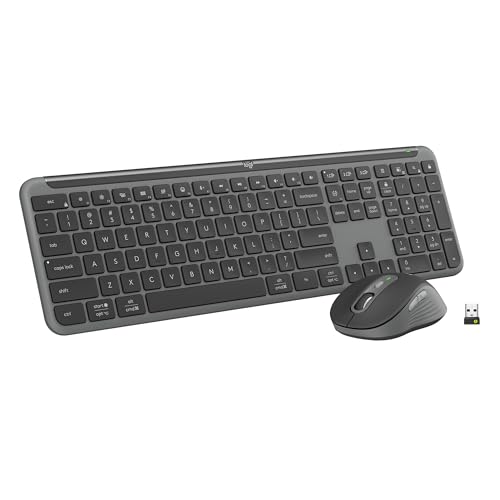
Logitech MK955 Signature Slim Wireless Keyboard Mouse Combo

Logitech Signature MK650 Combo for Business Keyboard and Mouse Graphite

seenda COE401 3-Device Bluetooth Keyboard Mouse Combo Silent Black Gray

Logitech MX Keys S Combo Mac Wireless Keyboard and Mouse Space Grey

Wireless Keyboard and Mouse Combo RGB Backlit Rechargeable 2000 mAh Battery Tri-Mode Blue

Lenovo 800 Self-Charging Bluetooth Keyboard Battery-Free Wireless Keyboard Multi-Device BT White

MEETION Wireless Bluetooth Keyboard and Mouse Silent Full Size Keyboard
More Details On Our Top Picks
seenda’s COE200 makes sense for a desk that shifts between a Windows laptop and a tablet, because it covers both Bluetooth and 2.4G USB use. The wrist rest matters more than it sounds, since long email sessions and spreadsheet work punish a flat keyboard fast.
The trade-off is simple, 2.4G USB mode is aimed at Windows use, so mixed-platform homes will lean more on Bluetooth. That still leaves you with a flexible, low-clutter setup that fits daily office work without looking bulky.
Strong Points
- Wrist support reduces strain during long typing blocks.
- Bluetooth and USB receiver options cover more desk setups.
- Good fit for a shared home office with different devices.
- Cleaner desk layout than a wired combo.
Points To Note
- Windows use is where the USB receiver matters most.
- Bluetooth 4.0 or newer is required for pairing.
Who It Suits Best
You fit this pick best when you want a comfortable everyday combo for mixed laptop use and prefer a wrist rest in a compact office setup.
Where A Sibling Pick Shines
Logitech MK955 Signature Slim Wireless Keyboard Mouse Combo suits you better when you want a slimmer, more polished typing feel for a more refined desk.
The MK955 leans into a slim, laptop-like feel that suits a work desk with a clean, understated look. Logitech also gives you customization through its software layer, which matters more than flashy styling for people who live inside shortcuts and repeated tasks.
You also get the value of having a mouse and keyboard that feel designed as a pair, not two loose parts. The honest read is that this one makes the most sense for daily office use, though you may not care for the slimmer profile as much if you prefer deeper key travel.
What We Like
- Slim keyboard shape keeps the desk footprint controlled.
- Shortcut customization can speed up routine work.
- Works well for a laptop-style typing transition.
- Recycled plastic construction adds a practical material story.
Areas To Watch
- Slim styling may feel less substantial than larger office boards.
- Customization depends on using the companion software.
Built With In Mind
You suit this combo best when your desk work is mostly typing, shortcuts, and quiet navigation in a tidy workspace.
Another Choice May Suit
Lenovo 800 Self-Charging Bluetooth Keyboard fits you better when battery-light convenience matters more than mouse-and-keyboard styling.
The MK650 for Business is built around a small mouse and a deployment-friendly wireless setup, which makes it feel aimed at real office routines rather than showpieces. Logi Bolt matters here, because secure wireless pairing is a stronger fit for workplaces that want simple rollout and fewer connection headaches.
Compared with the slimmer MK955, this one leans more clearly toward IT-managed environments and long sessions at a desk. You may find it less stylish than the Mac-focused MX Keys S, but it is easier to justify for shared work fleets where consistency matters.
Upsides
- Logi Bolt support fits office security needs.
- Small mouse keeps the setup compact.
- Good match for long workdays at a desk.
- Two connection paths help with deployment flexibility.
Things To Consider
- Business-first design may feel plain at home.
- The small mouse may not suit larger hands.
Who Will Love This
You fit this combo best when you manage office desks, shared workstations, or a long-hours home office with a focus on dependable wireless pairing.
Skip It When
seenda COE401 3-Device Bluetooth Keyboard Mouse Combo suits you better when you switch between more personal devices and want quieter multi-device hopping.
Feature Rundown
The COE401 is the multi-device pick in the group, and that alone makes it useful for a desk that shifts between a laptop, tablet, and second computer. Silent operation matters in shared spaces, where keyboard noise can wear thin during evening work or study sessions.
Compared with the COE200, this one pushes the switching story further by handling three devices instead of a simpler two-device routine. The trade-off is that you’re choosing it for flexibility first, not for a plush wrist-rest feel or a premium finish.
Bright Spots
- Three-device switching suits busy mixed-device routines.
- Silent design works well in shared rooms.
- Bluetooth support keeps the setup cable-free.
Small Caveats
- It’s more utilitarian than luxurious in hand.
- Multi-device setup takes a little initial sorting.
- Keyboard cleaning matters more with frequent desk travel.
Right Fit For
You fit this combo best when you move between several screens during the day and want a quieter setup for home or shared office use.
Look Elsewhere When
Logitech MX Keys S Combo Mac Wireless Keyboard and Mouse suits you better when macOS polish and Apple-aligned styling matter more than device count.
The Mac version of MX Keys S is tailored for desks that live inside macOS and iPadOS, so the layout and function key behavior feel more intentional than a generic combo. Space Grey also helps it blend with an Apple setup without making the desk look busy.
That tighter platform focus is the point, and it’s where this combo separates itself from the more cross-platform seenda options above. The honest read is that you’re paying for fit and finish as much as input gear, which makes the choice easy for Apple-heavy homes and harder to justify elsewhere.
Best Bits
- Mac-focused key layout reduces adjustment time.
- Matches Apple desks with a clean visual profile.
- Programmable functions add real workflow value.
- Keyboard and mouse feel coordinated rather than mixed.
Softer Spots
- Best fit stays inside the Apple ecosystem.
- Style-driven appeal matters less for utility-first desks.
Perfect Match For
You fit this combo best when your desk centers on MacBook, iPad, or macOS work and you want a cleaner layout with familiar shortcuts.
A Better Fit Elsewhere
Lenovo 800 Self-Charging Bluetooth Keyboard is the better fit when you want a battery-free keyboard that crosses more operating systems with less visual fuss.
Feature Card
This XISOGUU combo leans into extras, starting with RGB backlighting, which is the colored lighting under or around the keys that helps visibility and adds a more stylized desk look. Tri-mode connectivity gives you Bluetooth, 2.4GHz wireless, and USB-C use, so it lands in the “lots of options” camp.
The 2000 mAh battery also changes the ownership feel, because rechargeable power is easier to live with than replacing cells over and over. The catch is that a feature-heavy combo usually asks for a little more setup patience, and the lighted look may feel too busy for plain office desks.
Highlights
- RGB lighting improves visibility in low light.
- Three connection modes broaden device compatibility.
- Rechargeable battery cuts down on routine battery swaps.
- Full-size layout helps with number-heavy work.
- Media knob adds a handy control point for playback.
Room For Improvement
- Lighting and controls create a busier desktop look.
- Feature depth may take longer to get comfortable with.
Whose Shelf It Belongs On
You fit this combo best when you want a full-size board with extra controls and a more expressive desk setup for mixed work and play.
Where Shoppers Go Wrong
MEETION Wireless Bluetooth Keyboard and Mouse suits you better when you want a simpler quiet setup without the RGB layer or extra control hardware.
Core Details
The Lenovo 800 takes a different path from every combo in the list, because it skips the mouse and focuses on a self-charging keyboard that draws energy from indoor light. That setup is especially appealing in a workspace where you hate thinking about batteries and want fewer interruptions from maintenance.
Multi-device Bluetooth 5.1 support keeps it practical for a laptop, desktop, and ChromeOS or Mac setup, so it’s not locked into one narrow routine. You may find it less complete than a full combo, though, since the value sits almost entirely in the keyboard side of the desk.
Positives
- Light-powered charging removes battery swapping from the routine.
- Three-device support fits multi-computer workdays.
- Bluetooth 5.1 is well suited to modern wireless use.
- Works across Windows, macOS, and ChromeOS.
Honest Caveats
- No mouse is included, so it is not a full combo.
- Indoor-light charging depends on regular desk exposure.
- White finish may ask for more visible cleaning.
The Right Fit
You fit this pick best when you want a battery-light keyboard for multi-device use and already have a mouse you like.
Not Your Match When
Logitech MK650 Combo for Business Keyboard and Mouse Graphite makes more sense when you want a complete office pair instead of a keyboard-only setup.
At A Glance
MEETION keeps the pitch straightforward, with a full-size layout and quiet operation aimed at everyday desk use. That combination fits home offices, study tables, and shared spaces where you want a normal typing rhythm without extra noise.
It stands in contrast to the more feature-heavy XISOGUU model, because this one seems designed for simplicity rather than a long list of extras. The honest read is that this makes it easy to live with, although you give up the visual flair and multi-mode flexibility found higher up the list.
Positives
- Full-size board supports number entry and longer work sessions.
- Quiet typing suits shared rooms and late-night use.
- Wireless setup cuts desk clutter.
Minor Gripes
- Feature set is simpler than the higher-end picks.
- Plain styling may feel too basic for some desks.
- Regular dusting helps keep the full-size layout tidy.
Built For
You fit this combo best when you want a straightforward keyboard-and-mouse set for work, study, or a calm shared office.
Where Another Pick Fits Better
seenda COE401 3-Device Bluetooth Keyboard Mouse Combo suits you better when your desk routine revolves around several devices and quieter switching.
Core Details
What Matters Before You Choose A Combo
Connection Mix And Device Count
Start with how many systems you really switch between, because a two-device setup and a three-device setup solve different problems. Bluetooth alone works for many desks, but a USB receiver can make sense on a Windows machine that stays parked in one place.
Keyboard Feel And Desk Space
Low-profile boards feel close to a laptop, while full-size layouts help with spreadsheets and numeric entry. Wrist support and quiet keys matter most in long sessions or shared rooms, where comfort and noise both show up fast.
Platform Fit
Mac-focused models usually trade broad compatibility for a cleaner shortcut layout. Cross-platform picks fit mixed homes better, especially when your devices include Windows, macOS, tablets, or a work laptop you carry around.
A Quick Reality Check
Common Shopping Slip Ups
Shoppers often focus on wireless type and ignore layout, mouse size, or whether the combo is really built for the systems they use most. Match the combo to your desk routine first, then look at extras.
When Paying More Pays Off
Higher-tier models tend to spend their cost on better key feel, multi-device controls, stronger software support, or charging convenience. That upgrade makes sense for daily workstations, not for a spare keyboard that lives in a drawer.
Frequently Asked Questions
What makes a Bluetooth keyboard mouse combo worth choosing?
You get fewer cables and a cleaner setup. The better picks also make switching between devices easier.
Do you need both Bluetooth and a USB receiver?
No, but having both broadens compatibility. It also helps when one device works better with a receiver than with Bluetooth.
Is a full-size keyboard better than a slim one?
Full-size boards help with number entry and comfort over longer sessions. Slim boards save space and often feel closer to a laptop.
What matters most for Mac use?
A Mac-focused key layout and shortcut support matter most. Visual matching with your Apple hardware is a nice extra, not the main reason to choose one.
Which combo suits shared spaces best?
Quiet keys and a calm mouse click matter most in shared rooms. Multi-device switching helps too, especially in a family office or study area.
