


Brown switches sit in the middle ground for typing and gaming, with enough tactile feedback to keep each press distinct without leaning into loud clickiness. That balance matters in a home office, a shared desk, or a long session of code, emails, and quick game matches. The seven picks below cover loose switch packs, full keyboards, and wireless options so you can match the part to your setup instead of forcing your setup around the part.
You’ll see clear differences in pin style, force level, compatibility, and layout size. Some options suit a first swap on a standard MX board, while others make more sense as a full keyboard upgrade or a niche clicky detour.
Quick Look At The Shortlist

GATERON G Pro 3.0 Keyboard Switches(Silver,35PCS)

GATERON G Pro 3.0 Keyboard Switches(White,35PCS)

OUTEMU Brown Switches,3 Pin Tactile DIY Replacement Switches for Mechanical Gaming Keyboard- Pack 32
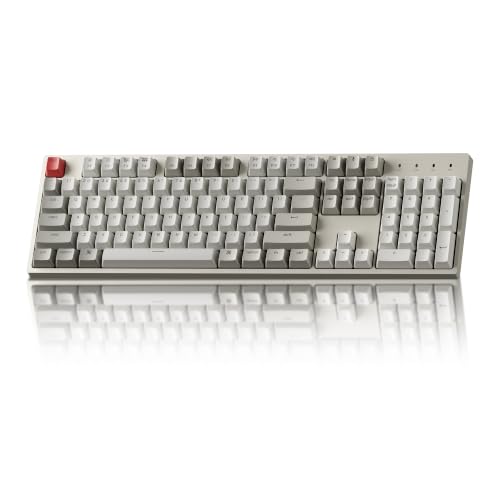
Keychron C2 Full Size Wired Mechanical Keyboard, Brown Switch, Retro

Kailh Box Summer Mechanical Keyboard Switches,5-Pin 50gf Clicky/Speed Typing/Gaming/Waterproof Switches(Summer,108Pcs)
outemu Brown Switches for Mechanical Keyboard, 20-Pack, 3-Pin Tactile

Merdia Wireless Mechanical Keyboard, Triple Mode 2.4G/USB-C/BT Gaming Keyboards 100 Keys RGB Backlit, Brown Switch Recha
More Details On Our Top Picks
For a board that needs a lighter, cleaner press, this GATERON pack leans into smooth travel instead of drama. The 35-switch count suits a partial repair or a compact layout swap, not a full-size rebuild, so it fits a targeted project better than a whole-desktop overhaul.
Compared with the tactile OUTEMU options later in this list, this one stays focused on linear feel, which makes it a better match for fast gaming or anyone who dislikes a bump under the finger. The trade-off is simple: you give up tactile feedback, but you get a quieter, more straightforward stroke.
Strong Points
- Light actuation supports quick repeated presses.
- Linear travel keeps each keypress predictable.
- 35-pack size fits small repair jobs.
- Works well in a gaming-first board.
Things To Consider
- No tactile bump, so feedback stays minimal.
- Thirty-five switches will not cover a full keyboard.
Who It Suits Best
You’re a good match for this pack if you want a lighter linear feel for a small build, a repair batch, or a spare set for a low-profile project.
A Better Fit Elsewhere
Keychron C2 Full Size Wired Mechanical Keyboard, Brown Switch, Retro suits you better when you want a complete desktop keyboard instead of loose switches.
This white version keeps the same linear character as the silver pack, but it adds a clearer compatibility note and a stronger lighting story. That matters in a custom build with RGB, where the stem housing and guide design can shape how evenly the light spreads across each key.
The 38gf actuation force sits a little higher than the silver set, so it should feel slightly more deliberate under the finger. For most desk setups, that makes it a sensible middle point between feather-light movement and a firmer press, though it still skips any tactile bump.
What We Like
- Compatible with most standard MX-style boards.
- Light force supports quick typing sessions.
- Lighting-focused design helps RGB appear more even.
- 35-pack works for targeted replacements.
Points To Note
- Not suited to low-profile, optical, or magnetic keyboards.
- No tactile event for typists who want a bump.
- Smaller pack size limits large projects.
Who Will Love This
You’ll get the most from this pack in a custom standard mechanical keyboard where RGB matters and you want a smooth, light press.
Where A Sibling Pick Shines
OUTEMU Brown Switches,3 Pin Tactile DIY Replacement Switches for Mechanical Gaming Keyboard- Pack 32 fits better for you when tactile feedback matters more than lighting detail.
Feature Rundown
OUTEMU takes the classic brown-switch idea and keeps the profile friendly for mixed work and play. The 3-pin stem format matters because many standard MX boards accept it cleanly, so you can use this kind of pack for replacement jobs without overcomplicating the build.
The feel is tactile, not clicky, which suits office desks and shared spaces better than loud gaming rooms. Compared with the GATERON linear packs above, this one gives you a clearer press point, so long typing stretches feel more anchored, though the pack size is still modest.
Positives
- Tactile bump gives clear key confirmation.
- Quiet enough for shared workspaces.
- Fits many standard MX boards.
- Pack size works for repair or sampling.
Honest Caveats
- Three-pin fit rules out some hot-swap layouts.
- Pack of 32 leaves larger boards unfinished.
Core Details
Made For
You’re the right match for this pack if you want tactile feedback on a standard MX board without moving into a loud clicky profile.
Another Choice May Suit
outemu Brown Switches for Mechanical Keyboard, 20-Pack, 3-Pin Tactile fits better for office users who want the same brown-style feel in a smaller quantity.
This is the full keyboard in the group, so it serves a very different job from the switch packs above. The 104-key layout keeps the number pad, function row, and navigation cluster in play, which makes it practical for spreadsheets, admin work, and anyone who prefers a traditional desktop footprint.
Because it’s wired, you skip battery checks and keep the connection simple, which suits a fixed desk more than a couch setup. The retro color theme gives it some personality without going flashy, and the brown switches bring a middle-ground typing feel that many office setups can live with.
Highlights
- Full-size layout supports data entry and shortcuts.
- Brown switches fit long typing sessions well.
- Wired connection keeps desk use straightforward.
- Retro styling looks calmer than gamer-heavy designs.
Minor Gripes
- Large footprint takes more desk space.
- Wired design limits flexible positioning.
Details At A Glance
The Right Fit
You’re the best match for this board if you work at a permanent desk and want the familiarity of a full layout with tactile brown switches.
Skip It When
Merdia Wireless Mechanical Keyboard, Triple Mode 2.4G/USB-C/BT Gaming Keyboards 100 Keys RGB Backlit, Brown Switch Recha fits better when you need wireless flexibility across more than one device.
Among these picks, this one goes the farthest from the quiet brown-switch center because it’s built around a clicky feel and a firmer 50gf press. The 5-pin format suits boards that accept more stabilizing legs, and the 108-piece count makes it the only option here that reads like a full rebuild kit rather than a partial batch.
That makes it a strong match for people who type fast and like clear feedback, though the click will not suit every desk or every roommate. The box-style structure adds an extra layer of protection against dust and moisture, which is useful in a busy workspace, but the trade-off is a louder, more assertive sound.
Bright Spots
- 108-pack covers a full keyboard.
- Clicky feel gives strong audible feedback.
- 5-pin format supports more board types.
- Box design adds practical protection.
- 50gf press feels deliberate for fast typing.
Softer Spots
- Sound level is much less discreet than brown tactile switches.
- Five-pin fit narrows compatibility with some boards.
- Not the quietest choice for shared rooms.
Feature Snapshot
Built With In Mind
You fit this switch set best if you want a full-board swap with loud feedback and a firmer keypress for fast typing or gaming.
Where Another Pick Suits Better
OUTEMU Brown Switches,3 Pin Tactile DIY Replacement Switches for Mechanical Gaming Keyboard- Pack 32 makes more sense for a quieter tactile setup in a shared room.
This smaller OUTEMU pack stays close to the classic brown-switch brief, with tactile feedback that doesn’t turn loud. In an office, a dorm, or a shared gaming desk, that kind of middle-ground feel is often easier to live with than a clicky alternative like Kailh Box Summer.
The 20-switch count is the main filter here, because it suits replacements, sampling, or a tiny repair job rather than a full board. That’s the honest read, and it’s not a flaw so much as a narrow use case.
Best Bits
- Quiet tactile response keeps noise down.
- 20-pack works for spot repairs.
- Fits many standard MX keyboards.
- Comfortable press suits long typing sessions.
Areas To Watch
- Small pack leaves most full-size boards incomplete.
- Three-pin support limits some socket layouts.
Whose Shelf It Belongs On
You’re the right fit for this pack if you need a quiet tactile replacement set for a standard board and only plan to swap a few switches.
Look Elsewhere When
Keychron C2 Full Size Wired Mechanical Keyboard, Brown Switch, Retro makes more sense when you want a complete keyboard instead of spare switches.
Core Details
This Merdia board is the most flexible setup in the list, because it covers 2.4G wireless, USB-C, and Bluetooth in one frame. That kind of triple-mode support matters for someone who moves between a laptop, a desktop, and a spare device, especially when desk space is tight.
The 100-key layout keeps the number pad, so it still behaves like a serious workstation board rather than a stripped-down travel piece. Brown switches make sense here because they split the difference between gaming and office work, though the wireless format adds one more thing to manage compared with a wired board like the Keychron C2.
Upsides
- Three connection modes cover more setups.
- 100-key layout keeps full-size utility.
- Brown switches suit mixed typing and gaming.
- RGB backlighting helps in dim rooms.
Small Caveats
- Wireless use adds charging or battery attention.
- Full-size layout still needs a roomy desk.
Perfect Match For
You’re the right fit for this keyboard if you want one board that can move between several devices without giving up a full layout.
Reach For A Different Pick When
Keychron C2 Full Size Wired Mechanical Keyboard, Brown Switch, Retro suits you better when a simple wired desk setup matters more than wireless flexibility.
Technical Sheet
What Matters Most Before Choosing Brown Keyboard Switches
Compatibility Comes First
Brown switches are not universal in practice, even when the shape looks familiar. Three-pin, five-pin, low-profile, optical, and magnetic systems do different jobs, so matching the socket type matters more than color or marketing copy.
Feel Beats Spec Sheets
Actuation force and tactile bump shape the day-to-day experience. Lighter switches suit fast repetition, while firmer brown options can feel steadier for long typing sessions.
Pack Size Should Match the Job
A 20- or 35-pack works for repairs, sampling, or a partial rebuild. Full keyboard swaps need a much larger count, so the wrong pack size leaves you short before the project ends.
Before You Click Buy
Common Shopping Slip Ups
Many people focus on switch color and miss pin count or board type. That mistake can turn a simple swap into a mismatch, especially on hot-swap or specialty keyboards.
Why The Higher Tier Costs More
More refined housings, better consistency, and larger packs usually push the price up in this category. The upgrade makes sense when you want a whole-board build or a cleaner long-term typing feel.
Frequently Asked Questions
Are brown switches better for typing or gaming?
Brown switches usually sit between both tasks, with tactile feedback that helps typing stay controlled. They also work well for gaming when you want response without a loud click.
How do you know whether a switch will fit your board?
Check pin style and the keyboard’s switch type before you order. MX-standard boards are the broadest match, while low-profile, optical, and magnetic designs need separate parts.
Do brown switches make much noise?
They are typically quieter than clicky switches. The sound still depends on the keycap set, the board case, and how hard you type.
Why do some packs contain fewer switches?
Smaller packs are meant for repairs, samples, or partial replacements. Full keyboards need much larger quantities, so the pack count tells you a lot about the intended use.
Can you use these switches in an office?
Brown tactile switches are a practical fit for shared desks because they give feedback without a sharp click. Loud clicky models and wireless boards with bright RGB are less discreet in that setting.
