


Budget capture cards are for you when a console, camera, or PC feed needs to reach a stream or recording setup without adding clutter or complexity. The right pick depends on input resolution, output resolution, USB version, and whether you value simple setup or a cleaner pass-through path for play on a second screen.
That trade-off matters in a home office, a dorm room, or a gaming desk where every cable has a job. Some models keep things lean for first-time streamers, while others make more sense for frequent gaming sessions, camera work, or a setup that needs lower delay and broader compatibility.
Quick Look At The Shortlist
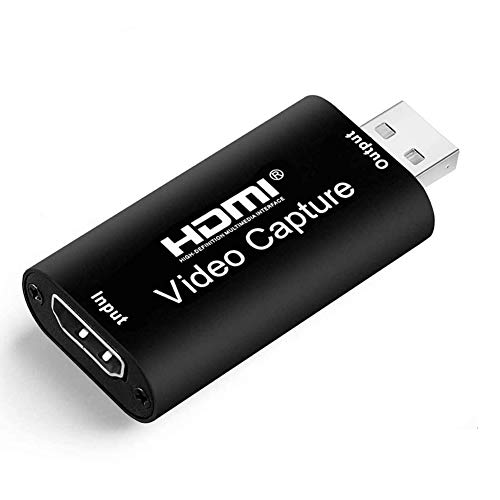
PDAPTMAG HDMI Video Capture Card

HeavenBird 4K HD Video Capture Card

Newhope USB 3.0 HDMI Capture Card

Fifine AmpliGame Video Capture Card V3

CENMATE Aluminum HDMI Capture Card

AVerMedia StreamLine MINI+ GC311G2
More Details On Our Top Picks
PDAPTMAG keeps the spec sheet straightforward, and that helps you more than a flashy extras list would. With 4K input support and 1080P output at 30fps, it suits a basic streaming or recording chain where you care more about a clean signal path than cinematic frame rates.
The USB 2.0 connection also tells you what kind of setup this fits, namely a lighter desktop or a casual console rig. Compared with HeavenBird and Newhope, this one is the more modest route, but that simplicity can be a relief in a cramped desk corner.
Strengths
- Supports common HDMI sources such as consoles, cameras, and PC output.
- 1080P recording keeps file handling lighter for everyday captures.
- USB 2.0 is easy to slot into older or simpler setups.
- Works well for occasional streaming sessions without a complex buildout.
Things To Consider
- 30fps output is the main limit for fast gameplay.
- USB 2.0 leaves less headroom than the USB 3.0 models here.
- You may want a second-screen play setup for smoother game feel.
Feature Card
Who It Suits Best
You get the most from this pick in a casual gaming room, starter stream setup, or secondary recording station.
A Better Fit Elsewhere
HeavenBird 4K HD Video Capture Card fits you better once you want a quicker USB 3.0 path for regular desktop use.
HeavenBird is the no-drama option in this group. USB 3.0 and driver-free setup make it appealing for you when the priority is getting a camera, console, or laptop feed into a stream with minimal fuss.
The spec emphasis here points toward speed and convenience more than deep customization. Compared with PDAPTMAG’s USB 2.0 setup, this one feels better suited to everyday desktop use, though you still need to keep expectations grounded around the listed capture path rather than any oversized promise.
Highlights
- USB 3.0 offers a better fit for modern desktops and laptops.
- Driver-free setup saves time during first connection.
- Good match for quick swaps between streaming and screen capture.
- Simple hardware profile lowers the learning curve for beginners.
Worth Noting
- Source details stay light, so you get fewer clues about extras.
- Setup speed is the main draw, not a long feature list.
- A tidy cable arrangement helps keep the desk from feeling crowded.
Who Will Love This
You should look here for a first capture card or a straightforward backup unit for regular desktop use.
Look Elsewhere When
Newhope USB 3.0 HDMI Capture Card suits you better once 60fps capture and 4K pass-through matter more than barebones convenience.
Newhope lands in the sweet spot for people who want smoother motion without jumping into a more expensive class of gear. The 1080P 60fps capture spec matters most during gaming, live teaching, or any screen-share setup where motion should stay crisp.
The 4K pass-through adds a practical perk: you can keep playing on a higher-resolution display while the stream or recording runs at Full HD. That makes it a stronger fit than HeavenBird for active gaming, though the honest read is that cable routing still needs a little care to keep the desk clean.
Reasons To Buy
- 60fps capture gives motion a smoother, more natural look.
- 4K pass-through helps preserve a better play screen.
- USB 3.0 suits live use more comfortably than USB 2.0 cards.
- Good match for gaming, conferencing, and online lessons.
- Offers a stronger middle ground for mixed-use setups.
Small Caveats
- Pass-through only helps once your monitor and source chain support it.
- You still need a sensible audio plan for voice commentary.
At A Glance
Best Suited To
You get the most from this model as a gaming capture card for a desk that doubles as a work or study station.
Where A Sibling Pick Shines
AVerMedia StreamLine MINI+ GC311G2 suits you better once premium passthrough and a more polished streaming stack move to the front.
Fifine’s V3 version feels aimed at mixed setups where compatibility matters as much as capture quality. You get 1080P 60fps capture with 4K HDMI to USB support, which gives you a solid baseline for streaming, recording, and camera work without making the desk feel overbuilt.
Compared with Newhope, the appeal here is less about a single spec and more about a broader use profile across PS4, Windows, Mac OS, Switch, and Xbox. That breadth suits you well in a shared room or a creator desk that changes source devices often, though the source data leaves less room for discussing physical build details.
Upsides
- 1080P 60fps capture is a strong fit for smooth live video.
- Broad platform support helps in mixed device households.
- Useful for gaming, audio-video work, and live streaming.
- 4K HDMI to USB framing gives the setup flexibility.
Areas To Watch
- Compatibility breadth matters most if you actually switch devices often.
- The listing gives fewer physical design clues than some rivals.
- Keeping the original cable and a tidy port layout usually helps routine use.
Right Fit For
You should lean here for a multi-platform streaming desk or a family setup that sees different consoles through the week.
Another Choice May Suit
CENMATE Aluminum HDMI Capture Card is the cleaner pick for you once a metal shell and 4K@30Hz input path matter more.
CENMATE stands out first for the aluminum shell, which gives the card a more substantial feel than the plastic-heavy look common in this category. In a desk setup that stays plugged in, that kind of housing tends to matter as much as the spec line, because it suggests a sturdier daily touchpoint.
USB 3.0, 1080P 60fps capture, and 4K@30Hz input and pass-through make it a capable all-rounder for gaming, streaming, or video calls. Compared with Fifine’s broader platform emphasis, this one leans more on physical build and the practical value of using one card across Nintendo Switch, PS5, Xbox, camera sources, and PC.
Bright Spots
- Aluminum housing gives the unit a more durable desk presence.
- 1080P 60fps suits live play and smoother screen capture.
- 4K@30Hz input and pass-through widen source compatibility.
- Works across gaming, conferencing, and camera-based workflows.
Softer Spots
- Metal housing can feel less discreet on a minimal desk.
- 4K pass-through is capped at 30Hz, not higher refresh behavior.
- You may want a neat port layout, especially with multiple source devices.
Technical Sheet
Whose Shelf It Belongs On
You get the best fit here in a permanent desktop setup where build feel matters and one card needs to handle several devices.
Skip It When
Newhope USB 3.0 HDMI Capture Card makes more sense for you once the simpler pass-through and compact focus matter more than the metal shell.
AVerMedia is the most polished path in this lineup for a setup that already has serious gaming hardware behind it. The 4K60 HDR passthrough and 1080p60 recording split the job neatly, so you can keep a high-quality play screen while sending a more manageable feed to your stream or recorder.
That balance makes sense for Switch 2, Xbox, PS5, PC, and a creator desk that already lives in OBS or similar software. Compared with CENMATE, the appeal here is less about shell material and more about the broader premium feature mix, though the higher-end feel usually only pays off once the rest of the setup can keep pace.
Best Bits
- 4K60 HDR passthrough keeps gameplay visuals strong on the main display.
- 1080p60 recording suits smoother captured footage.
- Ultra-low latency behavior matters in play-heavy setups.
- Works across several major consoles and PC use cases.
Minor Gripes
- Most of the value shows up in more advanced setups.
- The feature set can be more than a casual streamer needs.
- A tidy software and cable routine helps keep the experience predictable.
Core Details
Built With In Mind
You should reach for this one in a higher-end streaming station where your monitor, console, and software setup already justify the extra capability.
Where A Sibling Pick Shines
Newhope USB 3.0 HDMI Capture Card fits you better once you want a simpler 60fps card without moving into this premium bracket.
What Matters Before You Choose A Budget Capture Card
Signal Path Comes First
Match the card to the source and the display, not just the headline resolution. USB 3.0, 4K pass-through, and 60fps capture matter most when you want smoother motion or a play screen that stays separate from the recording feed.
Use Case Decides The Tier
Casual console recording can live with simpler hardware, while live gaming and camera work tend to benefit from faster capture and better passthrough. Desk space, cable count, and how often you change devices all shape the right fit.
Software And Setup Matter
Driver-free operation saves time, but app compatibility still matters for streaming and screen recording. A cleaner setup usually starts with the card, then the USB port, then the software stack that handles the final output.
A Quick Reality Check Before You Click
Common Shopping Slip Ups
Many people focus on 4K input and ignore the actual recording resolution. The safer move is to match the card’s output to the way you stream or save clips.
The Upgrade Payoff
Higher-tier models usually add stronger passthrough, smoother motion, and broader software support. That matters most in a dedicated streaming desk or a gaming rig you use often.
Frequently Asked Questions
Do budget capture cards work with consoles?
Yes, several of the picks here are suited to console use such as Nintendo Switch, PS4, PS5, and Xbox. Always match the source device to the card’s listed input and output behavior.
Is 60fps worth it for streaming?
60fps helps motion look smoother, especially in gameplay and fast camera movement. For slower video, 30fps can still be workable.
Do you need 4K pass-through?
No, but it helps when you want to play on a higher-resolution display while recording a lighter stream feed. That matters most in a desk setup with a separate monitor.
Is driver-free setup better for beginners?
It usually is, because fewer install steps means fewer early headaches. You still need the right software for recording or streaming.
Which pick is best for mixed devices?
Fifine AmpliGame Video Capture Card V3 has the broadest platform spread in this list. It fits shared rooms and desks that swap between consoles and computers often.
