


Budget desktop towers still do a lot of heavy lifting in home offices, school setups, and everyday workstations. You want enough speed for browser tabs, documents, video calls, and light creative work, without paying for extras you won’t use. That’s where compact business towers and value-oriented prebuilt systems make sense.
The eight picks below lean on practical specs such as SSD storage, memory size, and tower footprint. You’ll also see where older business desktops still make sense, where a newer processor helps, and where style extras like RGB lighting matter more than raw productivity. The right choice depends on your desk space, your workload, and how much multitasking you expect.
Quick Shortlist For Busy Desks

Dell Optiplex 7040 SFF Intel Core i5-6500 16GB RAM 256GB SSD

Fastest hp Desktop Business Tower Computer PC 16GB RAM 2TB HDD 120GB SSD

Dell Optiplex 7050 SFF Desktop PC Intel i7-7700 32GB DDR4 1TB SSD

Dell Windows 11 Desktop Computer OptiPlex 5060 Intel Core i5-8500 16GB DDR4 RAM 500GB SSD 1TB HDD

Dell Optiplex 3050 SFF Desktop Computer PC Intel Quad Core i5-6500 16GB DDR4 256GB SSD

Desktop Tower Computer Intel i7 up to 3.4GHz 16GB RAM 512GB SSD

Pre-Built PC i5 CPU Up to 3.6GHz 256 GB M.2 8 GB RAM
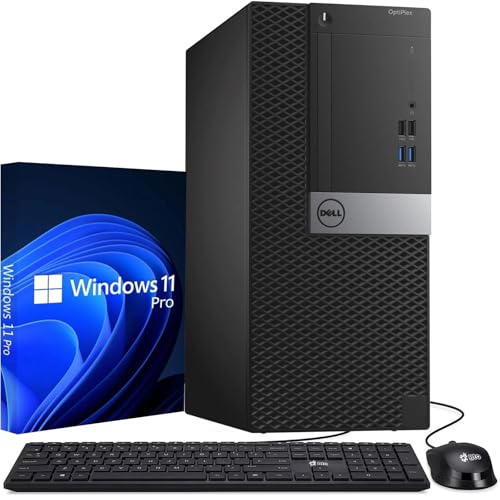
Dell Tower Desktop PC Intel Core i7-7700 16GB DDR4 RAM 512GB SSD Keyboard and Mouse
More Details On Our Top Picks
That small-form-factor chassis matters more than the model year suggests, because it’s easier to place beside a monitor arm or under a narrow desk. With 16GB of memory and a 256GB SSD, it fits everyday office work, web tabs, and local files without feeling stripped to the bone.
The i5-6500 is older silicon, so you should treat this as a practical office box rather than a heavy creative machine. For home admin, schoolwork, and light spreadsheet use, the honest read is that it gives you the essentials in a tidy footprint.
Strong Points
- Small case helps in cramped work areas.
- SSD storage keeps boot and launch times brisk.
- 16GB RAM supports daily multitasking without much fuss.
- DVD-RW still helps with older discs and installs.
Things To Consider
- 256GB storage can feel tight once media files pile up.
- Older CPU hardware is better for basics than heavier editing.
Core Details
Who It Suits Best
Office users, students, and home managers who want a compact desktop for routine tasks will get the most from this Dell Optiplex 7040.
A Better Fit Elsewhere
Dell Optiplex 7050 SFF Desktop PC Intel i7-7700 32GB DDR4 1TB SSD suits heavier multitaskers who want more headroom for many apps and larger local files.
This HP tower leans hard into storage rather than flash, and that trade makes sense for anyone with lots of local documents, downloads, or archived files. The 2TB hard drive gives you capacity, while the 120GB SSD handles the system side more quickly than a drive-only setup.
The i5-4570 is an older quad-core chip, so you’ll feel most at home with office software, browsing, and file handling. In a busy home office, the mix of DisplayPort, VGA, USB 3.0, and legacy USB 2.0 is handy, though the overall platform is still clearly a value-first build.
Upsides
- Large hard drive suits bulky file libraries.
- SSD adds a faster path for booting and core apps.
- Useful port mix helps with older monitors and accessories.
- 16GB RAM keeps everyday multitasking steady.
Small Caveats
- Storage speed outside the SSD portion stays modest.
- Older processor design limits how far this machine stretches.
- Some desks may need extra room for the tower shape.
Who Should Grab It
File-heavy households, office admins, and people replacing an aging desktop will appreciate the roomy storage and familiar port layout.
Where A Sibling Pick Shines
Dell Optiplex 5060 Intel Core i5-8500 16GB DDR4 RAM 500GB SSD 1TB HDD fits better for a shopper who wants a newer CPU feel with similar storage balance.
Compared with the first two picks, this one clearly aims higher on multitasking. The i7-7700, 32GB of DDR4 memory, and 1TB SSD give you more breathing room for stacked browser tabs, office suites, and data-heavy routines.
The small form factor keeps the footprint tidy, and HDMI plus dual-monitor support make it easier to spread out work across two screens. For power users in a home office, that combination is the main attraction, though the older platform still means you’re shopping a renewed desktop rather than a current-gen tower.
Highlights
- 32GB memory helps with heavier multitasking.
- 1TB SSD leaves space for larger local libraries.
- Dual-monitor support suits focused office layouts.
- Compact chassis keeps desk clutter in check.
- WiFi and Bluetooth reduce accessory friction.
Worth Noting
- Older processor generation is the main trade-off.
- The renewed route may not appeal to everyone.
Feature Card
Built With In Mind
Power users, spreadsheet-heavy office workers, and anyone running multiple displays at once will get the most from this Dell Optiplex 7050.
Look Elsewhere When
Dell Optiplex 7040 SFF Intel Core i5-6500 16GB RAM 256GB SSD is the more restrained choice for straightforward home or school use.
Here the storage split does the useful work: a 500GB SSD for quick access, plus a 1TB hard drive for bulkier files. That mix suits a desk where documents, media folders, and regular app use all share the same machine.
The six-core i5-8500 gives this tower a fresher feel than the older i5 models earlier in the list, so it’s a sensible middle ground. For home offices and shared family rooms, WiFi and Bluetooth make the setup easier to live with, though the tower still rewards a tidy cable plan.
Best Bits
- SSD plus hard drive gives both speed and capacity.
- Six-core processor handles everyday multitasking well.
- WiFi and Bluetooth help reduce desk clutter.
- Good fit for mixed home and office tasks.
Points To Note
- The hard drive adds capacity, not SSD-level speed.
- Larger storage mix usually means more internal upkeep later.
Technical Sheet
Right Fit For
Households and office workers who want a single desktop for documents, browsing, media, and light productivity will find this a straightforward match.
Another Choice May Suit
Desktop Tower Computer Intel i7 up to 3.4GHz 16GB RAM 512GB SSD is a cleaner fit for someone who prefers a simpler, all-SSD setup in one box.
The 3050 keeps the same useful small-footprint logic as the first OptiPlex, but it adds 4K support and the usual Dell business-desktop practicality. That matters on a tight desk, especially where a single monitor, keyboard, and a stack of paperwork already compete for space.
You get 16GB of DDR4 memory and a 256GB SSD, so everyday speed is there even though storage stays modest. For office apps, homework, and browsing, this one fits neatly, though the limited drive size means you’ll want to keep large media archives elsewhere.
Positives
- Small chassis suits tight desk layouts.
- 4K support helps with modern display use.
- DDR4 memory is a sensible daily-work base.
- SSD makes startup and loading feel quicker.
Areas To Watch
- 256GB storage fills up fast with photos and video.
- Older CPU class keeps the focus on routine tasks.
Whose Shelf It Belongs On
Students, home administrators, and anyone who wants a neat desktop for basic productivity should feel comfortable with this OptiPlex.
Skip It When
Dell Optiplex 7050 SFF Desktop PC Intel i7-7700 32GB DDR4 1TB SSD is the stronger call for heavier multitasking and larger local storage needs.
This tower takes the opposite route from the storage-heavy HP pick earlier, keeping the setup simpler with a single 512GB SSD. That makes it easier to live with in a home office, because boot speed and app access stay consistent and there’s less juggling between drives.
The i7 CPU and 16GB of RAM give it a balanced feel for study, business tasks, and light editing work. You may find the lack of extra storage details limiting for media libraries, but for normal desk use, the clean spec mix is appealing.
Bright Spots
- Single SSD setup keeps the system straightforward.
- i7 processor suits a wide range of daily jobs.
- 16GB RAM handles common multitasking patterns well.
- Good fit for work, study, and browsing.
Room For Improvement
- Storage detail is sparse compared with some rivals.
- Users with huge archives may want more capacity.
The Right Fit
Home office users and students who want a simple desktop with enough speed for common tasks will get the most from this Kroteaup tower.
Reach For A Different Pick When
Fastest hp Desktop Business Tower Computer PC 16GB RAM 2TB HDD 120GB SSD suits you better when local storage volume matters more than a tidy single-drive setup.
This one is aimed less at plain office duty and more at a desk that still wants some personality. The three RGB fans and the 400W power supply give it a more styled look than the business towers above, while the i5 chip, 8GB of RAM, and 256GB M.2 storage keep it in budget territory.
Integrated graphics means this is better for lighter gaming and everyday use than for demanding graphics work. The honest read is that it suits someone who wants a starter tower with WiFi 6 and Bluetooth 5.3, but it won’t replace a proper graphics-focused desktop.
Reasons To Buy
- RGB fans add visual interest to a plain desk.
- M.2 storage supports fast system response.
- WiFi 6 and Bluetooth 5.3 improve modern connectivity.
- 400W power supply leaves room for modest system needs.
Honest Caveats
- Integrated graphics set clear limits for heavier gaming.
- 8GB RAM is workable, though not roomy.
- 256GB storage may require careful file management.
Who Will Love This
Casual gamers, students who want some style, and first-time desktop setups with light workloads will appreciate this OKAMUS build.
Swap It Out When
Dell Optiplex 7050 SFF Desktop PC Intel i7-7700 32GB DDR4 1TB SSD is the smarter move for serious office multitasking and bigger storage demands.
The included keyboard and mouse make this the easiest setup in the group for someone starting from scratch. That’s a real advantage for a spare room, dorm desk, or home office where you want the tower ready to work without hunting for add-ons.
With an i7-7700, 16GB of DDR4 memory, and a 512GB SSD, it lands in a very usable middle zone, faster and roomier than the more basic OptiPlex 7040 or 3050 choices. The trade-off is straightforward: you get convenience and a sensible spec mix, not the extra headroom of the 32GB OptiPlex 7050.
Best Bits
- Keyboard and mouse reduce setup friction.
- 512GB SSD gives responsive day-to-day storage.
- i7-7700 and 16GB RAM suit mixed workloads.
- Wi-Fi support helps with flexible placement.
Minor Gripes
- Accessory bundle is useful, though it adds little performance.
- More demanding multitaskers may want the Optiplex 7050 instead.
Perfect Match For
First-time desktop owners, students, and home workers who want a ready-to-use tower with sensible specs will find this Dell easy to live with.
A Better Fit Elsewhere
Dell Optiplex 7050 SFF Desktop PC Intel i7-7700 32GB DDR4 1TB SSD suits a heavier workload where more memory and storage matter more than the accessory bundle.
What Matters Most Before Choosing Budget Computer Towers
Processor And Memory First
Start with the CPU and RAM, because those two parts shape how a desktop feels during a workday. Older quad-core chips handle email, documents, and browsing, while newer six-core or i7 options cope better with busy multitasking and more open windows.
Storage Type Changes Daily Use
An SSD, or solid-state drive, gives faster startup and app loading than a hard drive. Mixed storage setups help with bulk files, but an SSD-only tower is usually calmer to live with for routine use.
Size, Ports, And Setup Fit
Small form factor towers suit tight desks and shared rooms, while full towers usually leave more room inside for add-ons. Check for the monitor ports, wireless support, and accessories you need so the desktop works with your space from day one.
A Quick Reality Check Before You Commit
Common Shopping Slip Ups
Don’t focus only on storage size, because a large drive with a slow processor can still feel sluggish. Also pay attention to case size and ports, since a desk crowded with cables makes daily use more annoying.
The Case For Spending Up
Higher-tier towers usually spend the extra budget on newer processors, more memory, larger SSDs, and dual-monitor support. That upgrade makes sense for heavier office workloads, side-by-side apps, and anyone who wants a desktop that stays comfortable longer.
Frequently Asked Questions
What Makes A Budget Tower Good For Home Office Work?
You want enough RAM for several tabs, a fast SSD, and a case that fits the desk without crowding it. That mix keeps everyday tasks moving without wasting space.
Is A Renewed Desktop A Sensible Option?
Renewed models can be a practical route when the specs are strong and the form factor fits your setup. The trade-off is that the parts are usually from an earlier generation, so you’re choosing value over the newest platform.
How Much Storage Should You Aim For?
256GB works for light use and cloud-heavy routines, while 512GB or more feels better for local files and apps. Larger libraries, photos, and offline work tend to crowd smaller drives quickly.
Do Small Form Factor Towers Limit You?
They save desk space and often suit office use very well. The trade-off is less internal room for upgrades than a larger tower shell.
Which Pick Fits Shared Family Use Best?
Dell Windows 11 Desktop Computer OptiPlex 5060 Intel Core i5-8500 16GB DDR4 RAM 500GB SSD 1TB HDD is a practical middle ground for mixed household tasks. It balances speed, storage, and wireless convenience without leaning too far in one direction.
