


Budget Computers should still cover the basics without making you compromise on every task. For office work, school assignments, streaming, light gaming, or a compact home setup, the real question is how much speed, storage, and screen space you need before the desk gets crowded or the budget stretches thin.
The eight picks below lean into different use cases, from small-form-factor desktops that disappear beside a monitor to laptops built for classes and travel. You also get a clear read on where each one fits best, and where a different model in this list makes more sense.
Quick Look At The Shortlist

Dell Optiplex 7050 SFF Desktop PC i7-7700 32GB 1TB SSD

Dell Optiplex 3050 SFF Desktop PC i5-6500 16GB 256GB SSD

GEEKOM Air12 Budget Mini PC Office Intel 7505 8GB 256GB SSD
HP Laptop for Everyday Use 2026 Edition 4GB 128GB SSD

YAWYORE Gaming PC Desktop Computer R5 5600GT 16GB 1TB NVMe
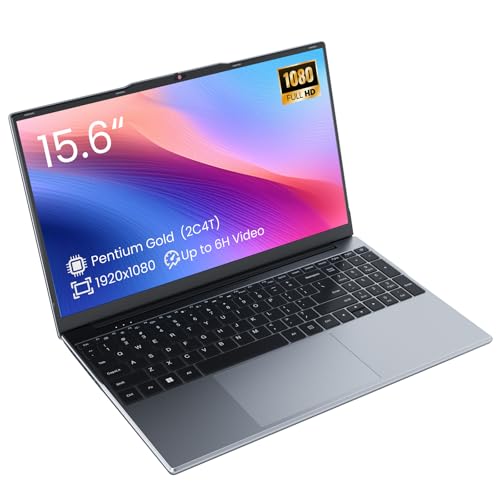
Phatom 15.6 FHD Laptop Computers Pentium Gold 4GB 128GB SSD
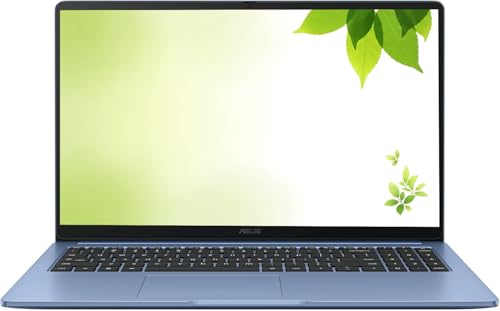
ASUS 2026 15 FHD IPS Chromebook 4GB 128GB Storage Pastel Blue

Pre-Built PC i5 CPU 256 GB M.2 8 GB RAM RGB Fans
More Details On Our Top Picks
For a desk that handles spreadsheets, browser tabs, and background apps at the same time, this OptiPlex leans on its Intel i7-7700, 32GB of DDR4 memory, and 1TB solid-state drive. A solid-state drive, or SSD, loads files faster than a spinning hard drive and usually keeps a used desktop feeling responsive for everyday work.
The small-form-factor case matters too, because it fits where a tower would feel clumsy. Compared with the lighter Dell Optiplex 3050 below, this one gives you far more memory and storage headroom, which is the part that matters when you keep a machine open all day.
Strong Points
- 32GB RAM supports heavier multitasking without feeling cramped.
- 1TB SSD gives you room for local files and faster access to them.
- Small-form-factor design suits a tight home office or study nook.
- Dual-monitor support helps you split work across screens.
Things To Consider
- The 7th-gen platform is older, so you are shopping for capacity more than newness.
- The renewed condition makes seller handling and cosmetic state worth checking closely.
Core Details
Who It Suits Best
Office users, home administrators, and multitaskers with multiple windows open all day will get the most from this desktop.
Where A Sibling Pick Shines
Dell Optiplex 3050 SFF Desktop PC i5-6500 16GB 256GB SSD suits lighter workstations where you want a smaller spend and simpler workload.
This one keeps the same small Dell footprint as the 7050, but trims the spec sheet to a more modest i5-6500, 16GB of DDR4, and 256GB of SSD storage. That balance makes sense for daily office work, email, web apps, and a monitor-driven setup where desk space matters more than raw horsepower.
The 4K support and video outputs are useful details for home offices with a modern display, and WiFi keeps cabling simple. The honest read is that the storage is the first thing you may outgrow, so cloud storage or an external drive will help once your files pile up.
What We Like
- Small case keeps the desktop easy to place beside a monitor.
- 16GB RAM handles common productivity work without feeling barebones.
- 4K support adds flexibility for sharper external displays.
- SSD storage makes boot and app loading feel brisk.
Points To Note
- 256GB storage is serviceable, but not generous for big media libraries.
- The older CPU is fine for basics, not for heavy creative workloads.
Who Should Grab It
Home office users and students who want a compact desktop for everyday tasks will find the fit straightforward.
A Better Fit Elsewhere
Dell Optiplex 7050 SFF Desktop PC i7-7700 32GB 1TB SSD suits you better when you keep many apps, documents, and tabs open all at once.
A mini PC like this makes sense on a crowded desk, under a counter, or beside a reception screen where size matters as much as speed. The Intel 7505 and 8GB of RAM keep it in the practical zone for office apps, web tools, and shared workstations, while the 256GB SSD gives you a clean base to start from.
You also get room to grow, since the memory ceiling reaches 64GB. Compared with the Dell desktops above, this is the more discreet option, and that smaller chassis is exactly why some offices prefer it.
Bright Spots
- Very small footprint suits tight desks and multi-unit deployments.
- Memory can scale much higher than the starting spec.
- SSD storage keeps the daily feel snappy for basic office use.
- Good fit for kiosks, front desks, and simple workstation roles.
Areas To Watch
- 8GB RAM is the starting point, so heavier multitasking may call for an upgrade.
- The compact chassis can be less forgiving for internal tinkering than a full tower.
Feature Rundown
Built With In Mind
Offices, shared desks, and space-tight work areas are the best match for this mini PC.
Swap It Out When
Dell Optiplex 7050 SFF Desktop PC i7-7700 32GB 1TB SSD makes more sense for heavier multitasking and larger local storage needs.
For students who carry a laptop from class to library to home, the appeal here is the simple formula: 4GB of RAM, 128GB of SSD storage, WiFi 6, and a battery claim that reaches up to 11 hours. The Copilot key adds a modern shortcut for Windows 11 users, which makes the keyboard feel a little more current than the specs alone suggest.
The trade-off is obvious, though, because 4GB memory is lean for busy tab stacks and heavier multitasking. That puts this HP closer to a light-duty daily machine than a full all-day workstation, and that honesty matters more than a glossy feature list.
Upsides
- Light spec set keeps it easy to carry and simple to use.
- WiFi 6 helps in homes or campuses with newer wireless gear.
- SSD storage improves boot and app loading over older drive types.
- The Copilot key is handy for Windows 11 shortcuts.
Small Caveats
- 4GB RAM is tight for heavier browser use.
- 128GB storage asks you to manage files carefully.
- The dual-core processor suits basics more than demanding work.
Details At A Glance
Who It Suits Best
Students, casual streamers, and light home users who need a portable Windows machine will get the most from it.
Look Elsewhere When
ASUS 2026 15 FHD IPS Chromebook 4GB 128GB Storage Pastel Blue suits you better for browser-first work and a simpler cloud-centered setup.
This desktop aims higher than the office boxes above, thanks to the Ryzen 5 5600GT, 16GB of DDR4 at 3200MHz, and a 1TB M.2 NVMe drive. M.2 NVMe storage is a fast internal drive format, and that matters when you want games and large projects to open without much wait.
The MSI A520M-A PRO motherboard and 550W power supply point to a more standard gaming-tower setup, while WiFi and Bluetooth keep it flexible for a modern desk. For most home setups, the integrated graphics still shape expectations, so this is better for lighter gaming, creative work, and general speed than for chasing every graphics setting.
Highlights
- Ryzen 5 5600GT gives you a stronger base for multitasking.
- 1TB NVMe storage is generous for games and projects.
- 16GB RAM at 3200MHz fits a smoother everyday feel.
- WiFi and Bluetooth make desk placement easier.
Honest Caveats
- Integrated graphics set the ceiling for demanding gaming.
- The tower makes more sense on a dedicated floor or desk space than in a tiny nook.
Feature Snapshot
The Right Fit
Home gamers, hobby creators, and multitaskers who want a stronger all-purpose tower fit this machine well.
Another Choice May Suit
OKAMUS Pre-Built PC i5 CPU 256 GB M.2 8 GB RAM RGB Fans works better for style-first setups that stay closer to a basic entry point.
This Phatom laptop keeps the pitch straightforward, with a 15.6-inch Full HD display, Pentium Gold processor, 4GB of RAM, and 128GB of SSD storage. A Full HD panel means 1920 by 1080 resolution, which gives text and streaming video a cleaner look than lower-resolution screens in the same price lane.
For schoolwork, browsing, and document editing, that combination is sensible. Compared with the HP laptop, this one leans more clearly into the bare essentials, so it fits a shopper who wants a wide screen first and a heavier spec sheet second.
Best Bits
- 15.6-inch Full HD screen gives you more working space.
- SSD storage helps the laptop feel quicker than older budget designs.
- Cooling fan is a useful detail for longer work sessions.
- Windows 11 compatibility keeps it in the current software lane.
Room For Improvement
- 4GB RAM leaves little cushion for multitasking.
- 128GB storage can fill quickly with downloads and class files.
- The Pentium Gold class is fine for basics, not heavier workloads.
Made For
Students and home users who want a large screen for basic daily work will get the most from it.
Reach For A Different Pick When
HP Laptop for Everyday Use 2026 Edition 4GB 128GB SSD suits you better when battery life and a lighter carry matter more.
The Chromebook format keeps this ASUS simple: a 15-inch FHD IPS panel, 4GB of DDR4 memory, 128GB of storage, HDMI, fast WiFi, and Chrome OS. IPS, or in-plane switching, usually means better viewing angles, which helps on a kitchen table or in a classroom where you’re not always centered in front of the screen.
That browser-first approach fits schoolwork, email, streaming, and web apps neatly. Compared with the Phatom laptop, this one feels more streamlined for cloud-based work, though the trade-off is the same old story with 4GB memory: heavy tab stacks will ask for discipline.
Positives
- Chrome OS keeps the interface simple and focused on web tasks.
- FHD IPS display supports clearer viewing from off angles.
- HDMI and fast WiFi add useful everyday flexibility.
- Pastel Blue finish gives it a softer look than plain black budget laptops.
Softer Spots
- 4GB RAM stays a constraint for heavier multitasking.
- 128GB storage fits browser-first use more comfortably than large local libraries.
- Chrome OS works best for cloud-centered habits, not desktop app dependence.
Core Details
Whose Shelf It Belongs On
Students and light travelers who live in the browser will appreciate this Chromebook most.
Skip It When
HP Laptop for Everyday Use 2026 Edition 4GB 128GB SSD suits you better for Windows-only software or a more familiar desktop-style setup.
Some budget towers try to look serious and disappear into the room, but this one goes the other direction with three RGB fans and a visible gaming-first stance. Under the lights, the useful parts are still plain enough: an i5 CPU up to 3.6GHz, 8GB of RAM, a 256GB M.2 drive, WiFi 6, Bluetooth 5.3, and a 400W power supply.
That mix makes it a starter desktop for 1080p-friendly play, general use, or a setup where appearance matters as much as desk presence. The integrated graphics limit how far the gaming side can stretch, so this is a shape-first choice more than a heavy-duty performance rig.
Reasons To Buy
- Three RGB fans give the case a more animated look.
- WiFi 6 and Bluetooth 5.3 help with modern accessories and networks.
- 256GB M.2 storage keeps startup and loading times brisk.
- The pre-built format saves assembly time.
Minor Gripes
- 8GB RAM is enough for basics, but not generous for heavier multitasking.
- Integrated graphics cap gaming ambition.
- The 256GB drive leaves less room for large game libraries.
Who Will Love This
Entry-level gamers and style-focused desk setups are the best match here.
Where Shoppers Go Wrong
YAWYORE Gaming PC Desktop Computer R5 5600GT 16GB 1TB NVMe suits you better when you want more storage and a stronger all-purpose gaming base.
What Matters Most Before Choosing Budget Computers
Pick The Right Form Factor
Small-form-factor desktops and mini PCs save space, but they usually trade away easy expansion. Laptops bring portability, though you’ll want to pay attention to screen size, battery claims, and memory because those parts shape everyday comfort more than flashy wording does.
Match Memory And Storage To Real Use
4GB RAM is fine for light browsing and email, while 8GB or 16GB starts making sense once you keep many tabs, apps, or game launchers open. SSD size matters too, since 128GB fills fast and 1TB gives you breathing room for files, media, and installs.
Don’t Overpay For Specs You Won’t Use
An office desktop with integrated graphics can be a smart value move for spreadsheets and meetings. A gaming tower earns its higher cost through the processor, cooling, memory, storage, and power supply rather than just RGB lighting.
Before You Click Amazon
Common Shopping Slip Ups
Shoppers often focus on processor names and miss the memory ceiling or storage size. Another common miss is buying a laptop for desk-bound work, or a desktop for frequent travel.
The Upgrade Payoff
Higher-tier models cost more because they usually bring better multitasking headroom, larger SSDs, stronger graphics support, or a sturdier chassis. Paying up makes the most sense for heavier work, gaming, or a machine you plan to keep in service longer.
Frequently Asked Questions
Are budget desktops good for everyday office work?
Yes, plenty of them handle email, web apps, and documents without trouble. The smoother choices in this list pair at least 8GB of RAM with an SSD.
How much storage do you really need?
128GB works for light cloud-first use, but it fills quickly. 256GB is a safer floor for general home use, and 1TB feels much easier for local files or games.
Is a mini PC harder to upgrade?
Often, yes, because the compact chassis leaves less room than a small desktop tower. Memory expandability varies by model, so the GEEKOM pick deserves a close look before you commit.
Can a budget laptop handle schoolwork?
Yes, especially for browsing, writing, and streaming classes. For heavier multitasking, 4GB RAM feels tight and 8GB is a more relaxed starting point.
What matters more, processor or RAM?
For basic Budget Computers, RAM usually feels more obvious day to day because it affects multitasking. The processor matters more once your work leans into gaming, video work, or many background tasks.
