


You want a desktop that handles browsing, documents, streaming, and video calls without turning your desk into a science project. That usually means the right balance of processor class, memory, storage type, and case size, not just the biggest spec sheet on the page.
The eight options below cover compact towers, small-form-factor systems, and a full bundle with monitor and peripherals. Some lean toward newer parts, while others make sense as cost-conscious renewals for a spare room, study corner, or family workstation.
Quick Shortlist For Home Desks

HP OmniDesk Desktop PC, Intel Core i3-14100, 8 GB RAM, 512 GB SSD
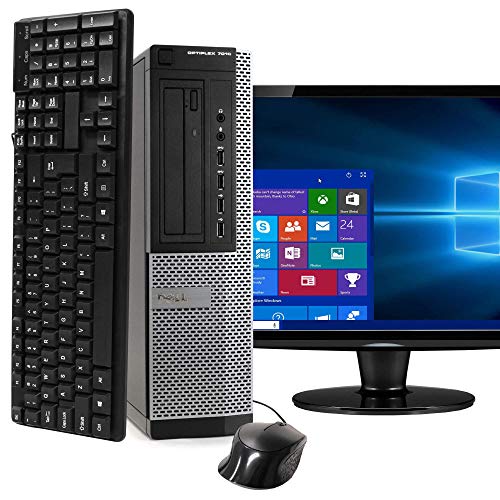
Dell Optiplex 7010 Desktop Package
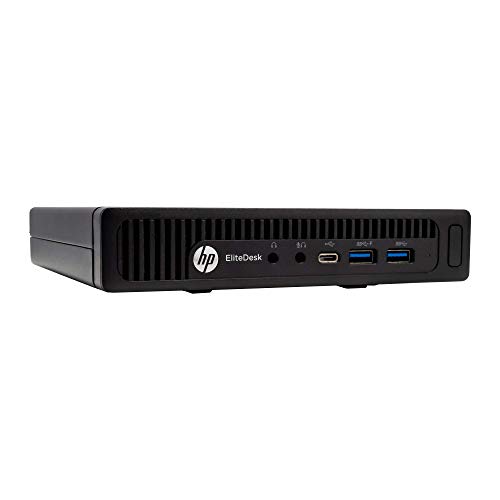
HP EliteDesk 800 G2 Desktop Mini Business PC

Dell Optiplex 7050 SFF Desktop PC

Dell OptiPlex 5060 Desktop Computer

Dell Optiplex 3050 SFF Desktop Computer PC

Dell OptiPlex 7050 Desktop Computer PC

Dell Optiplex 5050 Small Form Factor Business Desktop PC
More Details On Our Top Picks
The OmniDesk leans into newer entry-level hardware rather than recycled excess. An Intel Core i3-14100 paired with 8 GB of memory and a 512 GB SSD gives you a sensible starting point for web work, streaming, school tasks, and the usual pile of tabs.
That SSD, or solid-state drive, matters because it keeps startup and file access snappier than a spinning disk. The trade-off is straightforward: 8 GB RAM is fine for lighter home use, but a heavy multitasker will outgrow it sooner than the stronger Dell renewals below.
Bright Spots
- Newer Core i3 platform suits everyday browsing and office work.
- 512 GB SSD gives you room for documents, photos, and several apps.
- Windows 11 Home keeps the setup familiar for family use.
- Meteor Silver finish looks calmer than many plain black towers.
Small Caveats
- 8 GB RAM can feel tight once you stack many browser tabs.
- Integrated graphics fit basic media use, not demanding creative work.
Feature Snapshot
Who It Suits Best
Home users who want a current-feeling starter desktop for browsing, email, video calls, and schoolwork get the most from this one.
A Better Fit Elsewhere
Dell OptiPlex 7050 SFF Desktop PC suits you better once spreadsheets, multiple apps, and heavier multitasking start piling up.
This package stands out because it bundles the essentials around a Dell OptiPlex 7010, including a 19-inch LCD, keyboard, mouse, DVD drive, and WiFi. For a spare room, student desk, or first-time setup, that convenience can matter more than chasing a newer case.
The 500 GB hard drive is the catch. A hard disk drive, or HDD, gives you capacity but not the speed of an SSD, so this pick feels more old-school than the HP OmniDesk and the later Dell systems with solid-state storage.
Reasons To Buy
- Complete bundle reduces the hunt for extra desk gear.
- Quad-core Core i5 still handles typical home tasks well.
- 19-inch display helps keep a compact setup simple.
- DVD drive still suits anyone with older media or discs.
Points To Note
- 500 GB HDD loads slower than SSD-based desktops.
- The included monitor is modest, so sharpness and size are basic.
- Accessory-heavy bundles can mean more cables to arrange at the desk.
Who Should Grab It
Space-conscious home users who want a complete desktop package without sorting through separate parts will get the most out of it.
Swap It Out When
HP OmniDesk Desktop PC makes more sense for you once faster storage and a newer processor matter more than the included extras.
Small desks and media cabinets suit this mini tower better than the full-sized Dell package above. The 16 GB of DDR4 memory gives it more breathing room than the OmniDesk, while the 240 GB SSD keeps the system feeling lighter than any HDD-based bargain box.
You also get VGA and DisplayPort, which helps with older monitors and office displays. The honest read is that 240 GB is a modest storage ceiling, so you will want cloud storage or an external drive if your photo library or downloads tend to grow.
What We Like
- Mini form factor saves desk space and hides easily behind a monitor.
- 16 GB RAM helps with multitasking and heavier browser sessions.
- SSD storage keeps common tasks responsive.
- DisplayPort and VGA broaden monitor compatibility.
Softer Spots
- 240 GB storage fills sooner than larger SSD options.
- Mini cases can be less convenient for later hardware changes.
Feature Rundown
Built With In Mind
Compact home offices, dorm desks, and monitor-mounted work areas suit this mini PC especially well.
Another Choice May Suit
Dell Optiplex 5050 Small Form Factor Business Desktop PC gives you more storage and a stronger core for mixed home tasks.
This is the most muscular spec sheet in the group, and it shows up in the parts that matter day to day. A Core i7-7700, 32 GB of DDR4 memory, and a 1 TB SSD give you a desktop that feels far less pinched than the starter models.
Dual-monitor support, WiFi, Bluetooth, and HDMI make it easier to build a tidy home office that can handle work tabs, media, and several apps at once. The trade-off is size and cost posture, because this level of headroom is more than casual users truly need.
Highlights
- 32 GB RAM gives you generous multitasking room.
- 1 TB SSD supports large file libraries and faster app loading.
- Dual-monitor support works well for split-screen home productivity.
- WiFi and Bluetooth reduce cable clutter around the desk.
- Small form factor keeps it manageable beside a monitor.
Areas To Watch
- More power than basic users usually require.
- Renewed hardware benefits from a quick check of ports and accessories after arrival.
Core Details
Whose Shelf It Belongs On
Home office users who keep many windows open and want room to grow will feel at home with this one.
Skip It When
HP OmniDesk Desktop PC is the smarter choice for lighter use and a friendlier entry point.
The 5060 lands in a sweet spot between basic and overbuilt. Its six-core Core i5-8500, 16 GB of DDR4, and a mixed 500 GB SSD plus 1 TB HDD setup give you quick access for current work and extra room for archives.
That split storage layout matters in a family room or shared office, because you can keep active apps on the SSD and larger files on the HDD. Compare it with the HP EliteDesk mini, and you get much more room without jumping to the larger 7050 with 32 GB RAM.
Upsides
- Six-core processor suits multitasking and everyday productivity.
- SSD plus HDD combination balances speed and capacity.
- WiFi and Bluetooth reduce accessory clutter.
- Good middle ground for mixed home and office use.
Worth Noting
- Two drive types mean a little more folder management.
- Renewed desktops are worth a quick cable and port check during setup.
Right Fit For
Households that keep documents, media, and a few work apps on one machine will find this balanced setup useful.
Reach For A Different Pick When
Dell OptiPlex 7050 SFF Desktop PC gives you more RAM and storage if your day regularly stretches across many apps.
The 3050 is the compact workhorse in the middle of the lineup. You get 16 GB of DDR4 memory, a 256 GB SSD, WiFi, and support for 4K output, which makes it a neat fit for a desk that also serves as a media station.
The storage size is the main trade-off. It’s enough for normal school or office files, but you will probably need external storage sooner than you would with the HP OmniDesk or the two larger Dell choices above.
Best Bits
- Small form factor keeps the footprint easy to manage.
- 16 GB RAM supports everyday multitasking with less friction.
- 4K support expands display flexibility.
- WiFi simplifies placement in rooms without a wired drop.
Minor Gripes
- 256 GB storage is modest for media-heavy households.
- Small cases can be less forgiving for later upgrades.
Made For
Students, light home-office users, and anyone who wants a compact desktop for a tighter room will get solid value here.
A Better Fit Elsewhere
Dell OptiPlex 5060 Desktop Computer is the smarter move for you once you want the same general shape with more storage breathing room.
This 7050 keeps the formula simple: a Core i5-7500, 16 GB of DDR4 memory, and a 512 GB SSD, plus built-in WiFi and Bluetooth. For a tidy home desk, that combination avoids the clutter that often comes with add-on adapters and external wireless dongles.
Compared with the 5060, it gives up some core count and the dual-drive layout, but it stays clean and easy to live with. The 4K support and HD Graphics 630 also make it a reasonable choice for everyday media and a second monitor.
Positives
- Built-in WiFi and Bluetooth keep the desk uncluttered.
- 512 GB SSD gives you quick access and decent room.
- 16 GB RAM is comfortable for home productivity.
- Compact desktop shape suits shelves and tighter desks.
Trade Offs
- No separate high-capacity secondary drive in the listed setup.
- Renewed units are worth checking for included accessories on arrival.
Perfect Match For
Home users who want a straightforward desktop with wireless convenience and a clean setup will appreciate this one.
Look Elsewhere When
Dell OptiPlex 5060 Desktop Computer fits better for families that want more storage layers and a touch more flexibility.
The 5050 ends the list with a strong all-round shape: Core i7-7700 power, 16 GB of DDR4, and a 512 GB NVMe SSD. NVMe is a faster SSD format, so everyday launches and file access should feel brisk for home office routines.
It also ships as a slim SFF tower with a wired keyboard and mouse, which helps when you want a complete desktop without piecing together the basics yourself. Compared with the 7050 at the top of the list, this one trades some workspace luxury for a simpler, more self-contained setup.
Strengths
- NVMe storage usually feels quicker than standard SSD setups.
- Core i7 class is a strong match for mixed home use.
- Keyboard and mouse inclusion helps with first-day setup.
- SFF cabinet stays compact beside a monitor or under a desk.
Honest Caveats
- Wired peripherals suit some desks better than others.
- Compact business towers leave less room for later changes.
Who Will Love This
Home office users who want a strong, tidy desktop with fast storage and no extra accessory shopping will get the most from it.
Where A Sibling Pick Shines
Dell OptiPlex 7050 SFF Desktop PC is the better fit for you if you want the same general shape with more RAM and a larger SSD.
What Matters Most Before Choosing Budget Desktop Computers For Home Use
Wrong Turns To Avoid
Matching storage type to your habits matters more than chasing the highest processor number. A roomy HDD can still feel sluggish for daily opening and saving, while an undersized SSD fills up faster than you expect.
The Upgrade Payoff
More money usually buys a better CPU, more RAM, faster storage, and cleaner wireless support. That upgrade makes sense for multitaskers, shared home offices, and anyone who wants a desktop that stays comfortable for longer.
A Quick Reality Check
Common Shopping Slip Ups
Shoppers sometimes ignore case size, then regret a tower that eats desk space or blocks airflow. Port mix matters too, because older monitors and printers still show up in real homes.
Where The Extra Money Goes
Higher-tier desktops often bring faster storage, more memory, and stronger multitasking headroom. You feel that most when several apps stay open all day or one machine serves both work and family use.
Frequently Asked Questions
What processor level works best for basic home use?
A modern Core i3 or a solid older Core i5 usually covers browsing, streaming, and office work. Move up to a Core i7 when multiple apps stay open at once.
Is 8 GB of RAM enough for a home desktop?
Yes, for lighter everyday use and simple multitasking. More memory makes a clear difference once you keep many tabs, photos, or apps open together.
Which storage type feels fastest for daily use?
An SSD feels much quicker than an HDD in startup and app loading. NVMe SSDs are faster still and fit well in a busy home office.
Are renewed desktops a sensible choice?
They can be, especially for home setups that value value over brand-new parts. The trade-off is that you should pay attention to included accessories and case condition.
What form factor works best in a small room?
Mini and small-form-factor desktops save the most desk space. Larger towers make sense only when you need more room for future changes or expansion.
