


Budget desktops still make sense in 2026 because you get a fixed workspace, steady wired connections, and parts that are easier to live with than a crowded laptop setup. The sweet spot is a machine that can handle spreadsheets, streaming, schoolwork, light editing, or a shared family desk without taking over the room.
This roundup focuses on compact towers and small-form-factor PCs, many of them renewed business machines with practical upgrades like SSD storage, extra memory, WiFi, and modern Windows support. You get the useful middle ground, not flashy excess.
Quick Look at the Shortlist

Dell Optiplex 7040 SFF i5-6500 16GB 256GB SSD

Dell Optiplex 7050 SFF i7-7700 32GB 1TB SSD

Dell OptiPlex 5060 i5-8500 16GB 500GB SSD 1TB HDD

DELL Optiplex 7060 SFF i7-8700 32GB 512GB NVMe
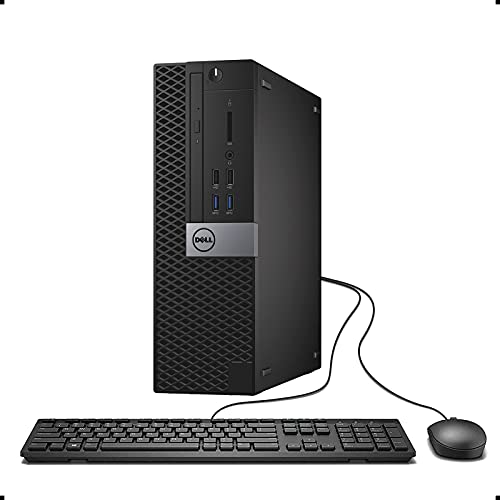
Dell OptiPlex 7040 SFF i7-6700 16GB 512GB SSD

Dell Optiplex 3050 SFF i5-6500 16GB 256GB SSD

Dell Optiplex 5050 SFF i7-7700 16GB 512GB NVMe

YAWYORE Gaming PC AMD R5 5600GT 16GB 1TB NVMe
More Details On Our Top Picks
The Dell OptiPlex 7040 SFF lands in the practical middle, with a quad-core i5-6500, 16GB of memory, and a 256GB SSD that keeps boot times and app launches brisk. The small-form-factor case matters more than the spec sheet suggests, because it fits under a monitor or beside a printer without eating the whole desk.
You also get WiFi and a DVD-RW drive, which still helps in offices that handle older discs or offline installs. The trade-off is age, so this fits best as a dependable work station, not a machine for heavy creative loads or a stacked multitasking setup.
Strong Points
- 16GB RAM supports everyday multitasking without feeling cramped.
- SSD storage gives you faster startup and quicker file access.
- SFF case saves room in a small office or dorm.
- WiFi keeps setup simple on a crowded desk.
Things To Consider
- Older processor generation limits headroom for demanding workloads.
- The 256GB drive fills sooner than larger SSD options.
- DVD-RW helps some offices, but it adds little for many homes.
Feature Card
Who It Suits Best
Home office users who want a compact, no-fuss desktop with enough memory for everyday work will get the most from it.
Where A Sibling Pick Shines
Dell Optiplex 7050 SFF Desktop PC Intel i7-7700 4-Cores 3.60GHz 32GB DDR4 1TB SSD WiFi BT HDMI Duel Monitor Support Wind suits you better when multitasking and larger local storage matter more.
Compared with the 7040 above, this 7050 steps up where it counts, with a Core i7-7700, 32GB of DDR4 memory, and a 1TB SSD. That combination makes sense for busy office days, multiple browser windows, and large local files that would clutter a smaller drive.
HDMI and dual-monitor support add real desk value, especially in a spreadsheet-heavy setup or a home office with a separate communication screen. The honest read is that it’s a stronger workhorse than a casual pick, and the compact case still keeps it manageable.
Upsides
- 32GB RAM gives you plenty of multitasking room.
- 1TB SSD leaves far more breathing room for files.
- Dual-monitor support suits split-screen office work.
- WiFi and Bluetooth reduce cable clutter.
Worth Noting
- More power also means you’re paying for capability you may not need.
- The compact chassis still limits future expansion compared with a full tower.
Core Details
Who Will Love This
Office-heavy users who keep many tabs, documents, and tools open at once will appreciate the extra memory and storage.
Look Elsewhere When
Dell Optiplex 7040 SFF i5-6500 16GB 256GB SSD is the simpler fit for light daily tasks and a tighter budget ceiling.
The 5060 stands out because it splits storage duties between a 500GB SSD and a 1TB hard drive, so you get fast startup plus room for archives. That mix works well in a home office where documents, downloads, and media pile up over time.
Its six-core i5-8500 gives you a cleaner step up from the earlier i5-6500 model, and the 16GB of DDR4 keeps it in the practical range for daily multitasking. The trade-off is simple, hard drives are slower than SSDs, so very large files won’t feel as snappy as they do on the 7050 or 7060.
Highlights
- SSD plus hard drive gives you speed and capacity.
- Six-core processor suits routine multitasking and streaming.
- 16GB memory keeps everyday workflows comfortable.
- Good fit for mixed personal and office storage.
Points To Note
- The hard drive can feel slower for heavy file access.
- Storage split adds a little more file management.
Made For
Home or office setups that need room for documents and media alongside normal work apps will get the most out of it.
A Better Fit Elsewhere
Dell Optiplex 7050 SFF Desktop PC Intel i7-7700 4-Cores 3.60GHz 32GB DDR4 1TB SSD WiFi BT HDMI Duel Monitor Support Wind suits you better when pure SSD speed matters more than mixed storage.
The 7060 is the cleanest all-in package in this group, because it pairs an i7-8700 with 32GB of DDR4 and a 512GB NVMe M.2 SSD. NVMe, short for non-volatile memory express, means faster storage access than a standard hard drive, and that helps the system feel responsive in daily use.
Built-in WiFi, Bluetooth, and the included wireless keyboard and mouse make it easier to place on a clean desk without extra accessory shopping. You may find it especially sensible for a first office setup or a shared home workspace, though the stronger spec mix also pushes it beyond the simplest budget tier.
Positives
- NVMe storage speeds up booting and app loading.
- 32GB RAM handles busy multitasking with ease.
- Wireless keyboard and mouse reduce desk clutter.
- WiFi and Bluetooth help with flexible placement.
- 8th Gen i7 offers a newer platform than the 7040 and 7050.
Room For Improvement
- The stronger hardware lifts it above the most basic budget lane.
- Accessory bundles are handy, though some desks already have their own peripherals.
Technical Sheet
Best Suited To
Desk users who want a tidy, ready-to-go tower with modern storage speed and strong memory headroom will get the most from it.
Reach For A Different Pick When
Dell Optiplex 3050 SFF Desktop Computer PC, Intel Quad Core i5-6500 up to 3.6GHz, 16GB DDR4, 256GB SSD, WiFi, 4K Support is the simpler choice for light work and a lower hardware ceiling.
This 7040 trades up to an i7-6700 and a 512GB SSD, which makes it feel noticeably more relaxed than the i5 version earlier in the list. For a small office or a daily home station, that extra storage space takes some pressure off file cleanup.
It still keeps the same compact footprint, so you get the business-desktop look without a full tower beside the desk. The catch is age, and that matters most for shoppers who want the latest platform rather than a strong, sensible reused work PC.
Best Bits
- 512GB SSD offers more room for documents and apps.
- i7-6700 gives you a nicer performance cushion than the i5-6500 model.
- Small chassis suits tight office corners.
- 16GB RAM remains solid for daily multitasking.
Softer Spots
- Older platform means less future-facing appeal.
- No wireless extras are called out in the source details.
Feature Rundown
Perfect Match For
Practical shoppers who want compact dimensions and a better SSD size than entry-level budget boxes will be comfortable here.
Where A Sibling Pick Shines
Dell Optiplex 7060 SFF Desktop Computer PC, Intel 8th Gen i7-8700 (6 Core), 32GB DDR4 Ram 512GB NVMe M.2 SSD, Built-in WiFi and Bluetooth suits you better when wireless features and newer hardware matter more.
The 3050 is the easiest machine here to tuck into a tight desk setup, and the 4K support through DP and HDMI gives you more flexibility on monitor choice. That matters for small apartments, classrooms, or side tables where every inch counts.
Its i5-6500 and 16GB of DDR4 keep it in the right zone for browsing, office apps, and streaming. The 256GB SSD is quick enough for normal use, though it asks you to stay disciplined with storage, especially once downloads and local media start to build up.
What We Like
- Very small footprint suits crowded work areas.
- 4K display support adds useful monitor flexibility.
- WiFi helps keep the setup simple.
- 16GB memory covers everyday work without strain.
Areas To Watch
- 256GB storage fills faster than larger options in this roundup.
- Older processor class keeps it in the basics-first category.
The 5050 sits in a comfortable middle lane, with an i7-7700, 16GB of memory, and a 512GB NVMe SSD that helps it feel quicker than older mechanical-drive desktops. For everyday business use, that balance often matters more than chasing the biggest numbers on a page.
It also keeps the small-form-factor footprint, so it works well in a front office, bedroom desk, or shared family station. The storage is fast and reasonably roomy, though the setup is still best suited to standard productivity rather than a stack of demanding creative apps.
Bright Spots
- NVMe SSD supports quicker loading and response.
- i7-7700 offers a solid step above entry-level chips.
- 512GB storage feels practical for work files.
- Small chassis keeps desktop clutter under control.
Minor Gripes
- It’s still a reused business desktop, so age is part of the equation.
- Memory and storage are balanced, not oversized.
The YAWYORE breaks away from the older Dell business boxes with a newer Ryzen 5 5600GT, 16GB of DDR4 at 3200MHz, and a 1TB M.2 NVMe drive. That mix makes more sense for a shopper who wants a little gaming headroom, light design work, or a fresher all-purpose tower.
Its integrated Radeon Vega graphics mean you don’t need a separate graphics card for everyday use, and the 550W 80PLUS PSU gives the build more breathing room than the smallest office desktops in this list. The trade-off is that this is a tower-focused setup, so it asks for more space than the SFF options above.
Reasons To Buy
- Ryzen 5 5600GT gives you newer everyday performance.
- 1TB NVMe storage leaves generous room for games and files.
- Integrated graphics keep the setup simpler.
- 550W power supply supports a broader upgrade path.
- WiFi and Bluetooth help it fit modern desks.
Honest Caveats
- The tower shape takes more desk or floor space than the small Dell units.
- Integrated graphics are fine for entry-level gaming, not a stand-in for a discrete card.
Feature Card
Who Should Grab It
Shoppers who want a budget desktop with newer silicon, built-in wireless, and room for casual gaming or design tools will get the best fit here.
Swap It Out When
Dell Optiplex 7060 SFF Desktop Computer PC, Intel 8th Gen i7-8700 (6 Core), 32GB DDR4 Ram 512GB NVMe M.2 SSD, Built-in WiFi and Bluetooth is the better match for a smaller workspace and a cleaner office look.
What Matters Most Before Choosing Budget Desktops
Storage And Speed
SSD storage matters more than it first looks, because it changes how fast the machine starts and how quickly apps open. A small SSD is fine for basic work, but a larger SSD or a mixed SSD plus hard-drive setup gives you more breathing room.
Case Size And Desk Fit
Small-form-factor desktops suit cramped desks, dorm corners, and shared workspaces. Full towers bring more expansion room, but they also ask for more floor space and usually feel less discreet.
Memory For Multitasking
16GB is the practical baseline in this group. 32GB makes sense for lots of tabs, spreadsheets, and communication apps running together.
Ports, Wireless, And Displays
HDMI, WiFi, Bluetooth, and dual-monitor support matter most in real desks, not spec sheets. These details decide how easily the desktop fits into the rest of your setup.
A Quick Reality Check Before You Choose
Common Shopping Slip Ups
Shoppers often focus on the processor and ignore storage size or case dimensions. That usually leads to a desktop that feels cramped after the first few weeks.
When Paying More Pays Off
Higher-tier models cost more because they carry newer chips, larger memory pools, faster SSDs, and more convenient extras. That upgrade is worth it for heavier multitasking, dual monitors, or a cleaner plug-and-go setup.
Frequently Asked Questions
What size desktop works best for a small desk?
A small-form-factor desktop usually fits best when desk space is tight. You still need room for airflow and cables.
How much memory is enough for everyday use?
16GB covers browsing, office apps, and light media work well. 32GB helps once you keep many apps and tabs open at once.
Is an SSD really worth it in a budget desktop?
Yes, because it improves startup speed and file access in a way you notice daily. A hard drive still works for bulk storage, but it feels slower.
Should you choose a renewed desktop or a newer tower?
A renewed business desktop makes sense for office tasks, schoolwork, and general home use. A newer tower suits you better when you want more upgrade room or gaming headroom.
What ports matter most for a home office?
HDMI, DisplayPort, WiFi, and Bluetooth cover most modern desk setups. Dual-monitor support also helps when you split research, email, and documents across screens.
