


You want a gaming laptop that handles modern titles, schoolwork, and everyday use without turning into a space heater on your desk. The sweet spot under 1000 usually means balancing GPU class, display speed, memory, and storage, then deciding where you can live with a compromise.
That balance looks different for commuters, dorm setups, and home desks. Some of these picks lean hard into frame-rate headroom, while others trade raw graphics power for better all-around usefulness.
Quick Look At The Shortlist

ASUS ROG Strix G16 (2025) Gaming Laptop 16” FHD+ 165Hz/3ms, RTX 5060, i7, 16GB, 1TB SSD, Wi-Fi 7

Acer Nitro 5 AN515-58-525P Gaming Laptop i5-12500H, RTX 3050, 15.6″ FHD 144Hz IPS, 8GB, 512GB SSD

HP Victus 15 Gaming Laptop RTX 3050, i5-12500H, 8GB RAM, 512GB SSD, Full HD, Windows 11 Home
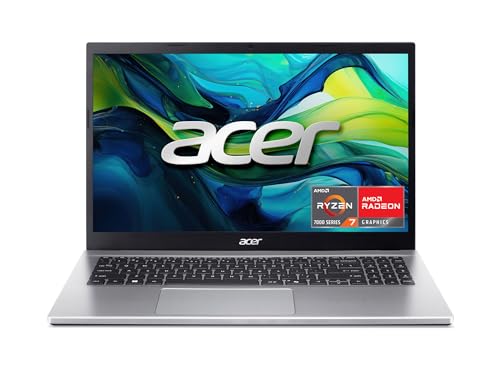
Acer Aspire Go 15 AI Ready Laptop 15.6″ FHD IPS, Ryzen 7 7730U, Radeon Graphics, 16GB, 512GB SSD

acer Nitro V 15.6” FHD IPS 165Hz Gaming Laptop i5-13420H, RTX 5050, 16GB, 512GB SSD

HP Victus 15.6″ Full HD 144Hz Gaming Laptop i5-12450H, RTX 3050, 16GB RAM, 512GB SSD, Windows 11 Pro

Lenovo Gaming Laptop Ryzen 5 7535HS, 8GB DDR5, 256GB SSD, Radeon 660M, 15″ FHD IPS
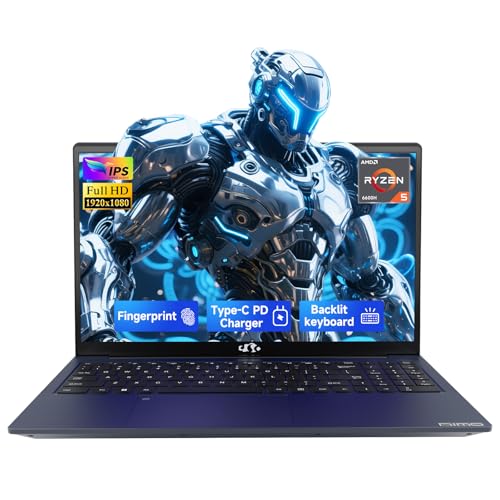
NIMO 15.6″ IPS FHD-Light Gaming-Laptop Ryzen 5 6600H
More Details On Our Top Picks
The Strix G16 pushes hardest on display speed and raw system headroom. A 165Hz panel with a 3ms response time suits fast shooters and motion-heavy games, while the Intel Core i7-14650HX and RTX 5060 give you more breathing room than the RTX 3050 machines lower in this list.
The 1TB Gen 4 SSD matters in real use, because it gives you room for a large game library without leaning on external storage. The trade-off is straightforward, it’s the least modest machine here, so you’re paying for performance that makes the most sense for serious gaming sessions, not just basic weekend play.
Strong Points
- 165Hz refresh rate and 3ms response help fast titles feel cleaner and less smeared.
- RTX 5060 class graphics give you more headroom than the RTX 3050 and RTX 5050 options below it.
- The 16:10 screen shape adds a little extra vertical room for maps, menus, and multitasking.
- 1TB of Gen 4 storage suits a bigger game library and cuts down on constant uninstalling.
- Wi-Fi 7 is a forward-looking touch for crowded home networks and long-term use.
Things To Consider
- The stronger parts make this a better fit for you when gaming sits near the top of your priorities.
- It brings more machine than a casual player usually needs, so the value case depends on your habits.
- The fuller feature set also tends to mean a larger chassis and a less grab-and-go feel.
Feature Card
Who It Suits Best
Serious gamers who care about display speed, storage room, and stronger graphics will get the most from this one.
A Better Fit Elsewhere
Acer Nitro 5 AN515-58-525P Gaming Laptop suits you better for a more restrained gaming setup that still keeps the basics in line.
The Nitro 5 stays easy to understand, which is part of its appeal. You get an Intel Core i5-12500H, RTX 3050 graphics, a 144Hz IPS panel, and the familiar Nitro styling that fits a dorm desk or shared room without feeling oversized.
Compared with the ASUS ROG Strix G16, it gives up a tier of performance and a lot of display ambition, but it also asks for less. For standard gaming, school tasks, and everyday streaming, that simpler parts mix is often enough, though 8GB of memory leaves less room for heavy multitasking.
What We Like
- 144Hz refresh helps competitive games feel more responsive than a standard 60Hz panel.
- The Core i5-12500H and RTX 3050 combo handles entry-level gaming and routine creative work.
- 512GB SSD storage keeps load times sensible for a starter gaming setup.
- The 15.6-inch size stays practical for desks, backpacks, and smaller rooms.
Softer Spots
- 8GB of memory can feel tight once you stack games, browsers, and chat apps together.
- The RTX 3050 sits below newer graphics options in this roundup, so expectations should stay grounded.
- Storage is usable, but a larger library will still require some organization.
Whose Shelf It Belongs On
It suits first-time gaming laptop shoppers who want a clear step up from basic notebooks without overcomplicating the decision.
Swap It Out When
Lenovo Gaming Laptop Ryzen 5 7535HS, 8GB DDR5, 256GB SSD, Radeon 660M, 15″ FHD IPS makes more sense for lighter use and a simpler portable setup.
The Victus 15 takes a familiar route, and that’s useful. The RTX 3050, Core i5-12500H, and 512GB SSD line it up close to the Nitro 5, while the Windows 11 Home setup keeps the experience straightforward for general use.
Enhanced thermals are the detail worth noticing here, because sustained gaming sessions and busy desktop use tend to expose weak cooling quickly. You still have 8GB of RAM, so the machine is better matched to focused play and schoolwork than to open-ended multitasking.
Highlights
- RTX 3050 graphics are still a practical entry point for lighter modern gaming.
- The 512GB SSD gives you decent room for a few large installs and everyday files.
- Windows 11 Home keeps setup familiar and easy to live with.
- Enhanced thermals should help the chassis stay more composed during longer sessions.
Areas To Watch
- 8GB of memory is the main constraint, especially with many apps open at once.
- The display is Full HD, but no faster refresh figure is listed here.
- It leans more toward sensible basics than flashy extras, which suits some desks better than others.
Built With In Mind
Students and casual gamers who want a clean, familiar setup with decent gaming basics will find the Victus easy to live with.
Look Elsewhere When
HP Victus 15.6″ Full HD 144Hz Gaming Laptop i5-12450H, RTX 3050, 16GB RAM, 512GB SSD, Windows 11 Pro is the better fit for anyone who values more memory and a faster refresh panel.
This pick stands out by being less obviously a gaming machine and more of a practical all-rounder. The Ryzen 7 7730U, Radeon graphics, 16GB of memory, and 512GB PCIe Gen4 SSD make it comfortable for work, study, and lighter gaming, especially in a setup where the laptop spends most of its life on a desk.
Compared with the Nitro and Victus models, it gives up dedicated graphics muscle, so demanding game settings are not the point. The upside is a cleaner fit for someone who wants one laptop for classes, documents, streaming, and occasional play without carrying a heavy gaming identity everywhere.
Bright Spots
- 16GB RAM gives you more breathing room for multitasking than the 8GB models in this list.
- The 15.6-inch IPS display offers wide viewing angles, which helps in shared spaces and group viewing.
- Ryzen 7 class processing suits everyday productivity and moderate workloads.
- Wi-Fi 6 keeps it sensible for home and campus networks.
Points To Note
- Radeon graphics are fine for lighter gaming, but they sit below the dedicated RTX choices here.
- The machine makes more sense for general use than for chasing high frame rates.
- Its value depends on whether you want one laptop to do many jobs instead of a pure gaming focus.
Who Should Grab It
Students and home users who want a tidy, capable laptop with enough memory for daily multitasking will feel at home with it.
Reach For A Different Pick When
ASUS ROG Strix G16 (2025) Gaming Laptop 16” FHD+ 165Hz/3ms, RTX 5060, i7, 16GB, 1TB SSD, Wi-Fi 7 is the stronger move for anyone who cares more about game performance than mixed-use convenience.
The Nitro V is the clearest step up in this roundup for someone who wants newer graphics hardware without jumping to the more expensive Strix G16. The 165Hz IPS display, Core i5-13420H, RTX 5050 with 8GB GDDR7 memory, and included mouse pad suggest a package built for a desk-first gaming setup.
GDDR7 is the newer graphics memory standard here, and that matters because it points to a more current platform than the older RTX 3050 machines. The catch is that the rest of the system still sits in a mainstream range, so the extra GPU headroom matters most for play sessions, not for transforming it into a premium workstation.
Reasons To Buy
- RTX 5050 with 8GB GDDR7 gives you a newer graphics foundation than the RTX 3050 laptops.
- 165Hz refresh suits fast-moving competitive games and general motion smoothness.
- 16GB RAM is a better everyday starting point than the 8GB entries in this list.
- 512GB SSD keeps startup and loading times sensible for everyday use.
Minor Gripes
- The stronger GPU is the main reason to choose it, so casual users may not need the extra push.
- Storage is adequate, but large libraries will still need some cleanup now and then.
- The included mouse pad is a nice touch, though it doesn’t change the core hardware balance.
Perfect Match For
Gamers who want a more current midrange GPU and a high-refresh screen will get the clearest fit from this model.
Skip It When
HP Victus 15 Gaming Laptop RTX 3050, i5-12500H, 8GB RAM, 512GB SSD, Full HD, Windows 11 Home makes more sense for someone trying to keep the setup simpler and less focused on frame-rate headroom.
Core Details
This Victus model feels like the tidiest middle ground in the HP pair. You get the same RTX 3050 class graphics as the earlier Victus, but here the 16GB RAM and 144Hz display make it better prepared for gaming plus everyday multitasking.
The Windows 11 Pro install may matter to you more than it sounds, especially on a laptop that might also handle work files or a small home-office routine. The trade-off is that the RTX 3050 still keeps it in mainstream territory, so it’s more about steady use than chasing the newest graphics features.
Positives
- 16GB RAM gives you more flexibility with game launchers, browsers, and background apps.
- 144Hz refresh is a good fit for smoother motion in esports-style titles.
- Windows 11 Pro gives it a more work-friendly angle than the Home editions in this roundup.
- 512GB SSD keeps the laptop responsive for daily starts and game installs.
Room For Improvement
- The RTX 3050 is still a sensible entry-level GPU, not a leap into high-end gaming.
- The 512GB drive can fill up quickly once a few large games land on it.
- It’s a practical machine, but not the most exciting one in the group.
The Right Fit
Work-from-home users who also want a credible gaming laptop will appreciate the mix of 16GB RAM and a faster panel.
Where A Sibling Pick Shines
Acer Nitro 5 AN515-58-525P Gaming Laptop i5-12500H, RTX 3050, 15.6″ FHD 144Hz IPS, 8GB, 512GB SSD is the simpler option for someone who wants the same general class of graphics with fewer moving parts.
The Lenovo keeps things lean, and that’s the point. A Ryzen 5 7535HS, 8GB DDR5 memory, 256GB SSD, and Radeon 660M graphics make this a modest gaming notebook that also stays friendly for travel, classes, or a small desk.
Compared with the heavier Acer and HP gaming picks, this one gives up storage room and dedicated graphics muscle, but it returns a simpler footprint and a less complicated setup. The Copilot AI Assistant label is more of a platform note than a gaming advantage, yet the Bluetooth 5.3 and Wi-Fi 6 details fit the rest of the no-drama package.
What We Like
- DDR5 memory gives it a more current baseline than older DDR4-only budget machines.
- Ryzen 5 7535HS is a sensible match for everyday tasks and light gaming.
- The 15-inch FHD IPS display should feel easy on the eyes for long school or work sessions.
- Wi-Fi 6 and Bluetooth 5.3 suit modern wireless accessories and home networks.
Honest Caveats
- 256GB SSD storage is tight once you start installing larger game files.
- Radeon 660M graphics fit lighter play better than demanding modern titles.
- 8GB RAM is workable, but it leaves less cushion for heavy multitasking.
Made For
Students and casual gamers who want a lighter, simpler laptop for travel and basic play will get the most from it.
A Better Fit Elsewhere
HP Victus 15.6″ Full HD 144Hz Gaming Laptop i5-12450H, RTX 3050, 16GB RAM, 512GB SSD, Windows 11 Pro makes more sense once you want a larger storage buffer and a stronger gaming lean.
The NIMO is the most stripped-back entry here, but that can work in its favor. A Ryzen 5 6600H base points to a capable everyday processor for light gaming and general use, and the 15.6-inch IPS format keeps the screen size sensible for a desk or carry bag.
The honest read is that this model makes the most sense as an entry point, not a power play. The source data hints at upgrade flexibility, which matters to tinkerers, yet the limited public detail means you should value the core hardware more than any broad promises about future use.
Upsides
- The Ryzen 5 6600H gives it a stronger starting point than many plain everyday notebooks.
- 15.6-inch IPS styling keeps the display size practical for mixed home and travel use.
- It fits well as a base machine for someone who plans to build around the laptop over time.
- The simpler hardware profile can feel easier to manage for basic ownership and routine maintenance.
Small Caveats
- The public detail set is light, so the exact gaming balance is harder to judge from specs alone.
- It belongs more in the entry-level lane than in the stronger-performance lane.
- You may want a clearer storage and memory picture before treating it as a long-term gaming hub.
Right Fit For
Budget-minded shoppers who want a basic gaming laptop to grow into will find the NIMO easy to approach.
Another Choice May Suit
Acer Aspire Go 15 AI Ready Laptop 15.6″ FHD IPS, Ryzen 7 7730U, Radeon Graphics, 16GB, 512GB SSD is the better pick for anyone who wants a clearer all-purpose productivity angle.
What Matters Before You Choose A Budget Gaming Laptop
Wrong Turns To Avoid
Do not judge these machines by GPU name alone. A fast processor, enough RAM, and a screen with a higher refresh rate matter just as much once you start gaming, streaming, or keeping chat and browser tabs open.
The Upgrade Payoff
Higher-tier models usually spend more on the graphics chip, display quality, cooling design, and storage capacity. That extra cost starts to make sense when you want smoother motion, fewer compromises, and less waiting around for load screens.
A Quick Reality Check
Common Shopping Slip Ups
8GB RAM and a small SSD look fine on paper, then fill up quickly in a real setup. A compact machine can also feel cramped for long sessions, so check the screen size and keyboard layout against your desk space.
What The Higher Tier Buys
Moving up usually buys you more graphical headroom and a more comfortable buffer for multitasking. That upgrade matters most for competitive play, heavy multitasking, or anyone who wants a laptop that stays relevant longer.
Frequently Asked Questions
Are Budget Gaming Laptops Under 1000 good for school too?
Yes, several of these models can handle classwork, streaming, and standard productivity with no trouble. The ones with 16GB RAM feel the most comfortable for mixed use.
How much RAM should you look for?
16GB is the safer choice for gaming and multitasking. 8GB can still work for lighter use, but it leaves less breathing room once multiple apps are open.
Is a dedicated GPU necessary?
For modern gaming, a dedicated GPU makes a clear difference. Integrated graphics can suit light play, but RTX-class options give you a better path for current games.
Does a 144Hz display matter?
It helps motion look smoother in fast-paced games. You’ll notice the benefit most in esports titles and other games where quick visual response matters.
Which storage size is most practical?
512GB is the most comfortable baseline in this group. 256GB works only when you keep the game library small and manage installs carefully.
