


Budget gaming laptops live in that tricky middle ground where you want enough graphics muscle for modern games without paying for luxury extras you’ll barely notice. You also need enough memory, storage, and cooling headroom for long evenings, campus carry, or a desk that doubles as a work station.
This roundup focuses on practical fit, not glossy promises. You’ll see where a 17-inch screen helps, where 8GB of RAM feels tight, and which models make the most sense for casual play, multitasking, or a longer upgrade path.
The Shortlist At A Glance

ASUS TUF Gaming F16 (2025) Gaming Laptop 16” FHD+ 165Hz

HP Victus 15 Gaming Laptop RTX 3050

HP Victus 15.6″ Full HD 144Hz Gaming Laptop
msi Cyborg 17 17.3″ FHD 144Hz Gaming Laptop

Lenovo Gaming Laptop Ryzen 5 7535HS
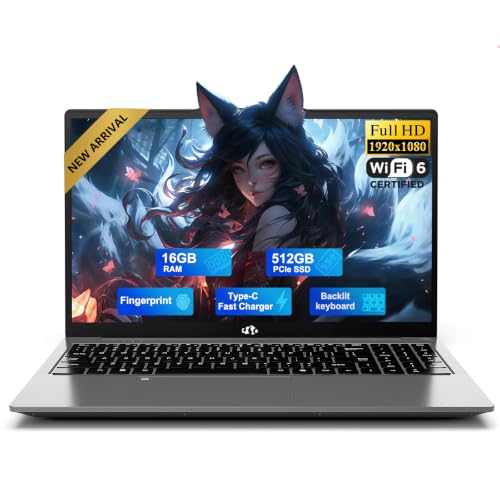
NIMO 15.6″ AI Creator Gaming Laptop 2026 Edition
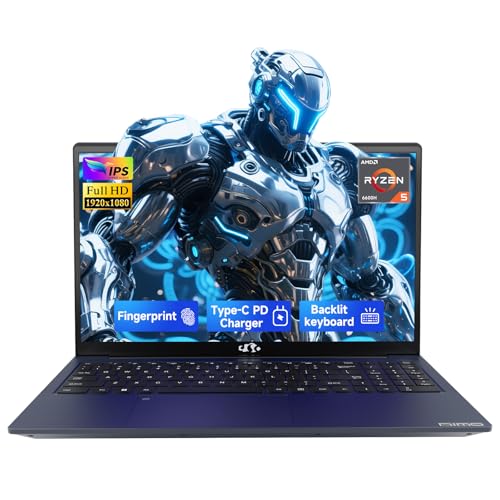
NIMO 15.6″ IPS FHD-Light Gaming Laptop Ryzen 5 6600H
More Details On Our Top Picks
The F16 stands out because it pairs a 16-inch, 16:10 panel with a 165Hz refresh rate, so motion has more room to breathe than on the more basic 15.6-inch options here. Add the Intel Core i5-13450HX, a higher-wattage HX-class chip, and the RTX 5050, and you get a machine that makes sense for players who split time between games, schoolwork, and heavier multitasking.
16GB of DDR5 memory and a 512GB PCIe Gen4 SSD give you a sensible starting point, though the storage ceiling will feel tight sooner than the 1TB MSI Cyborg 17. The honest read is that this ASUS looks strongest for a desk setup with occasional carry, not for someone who wants the lightest bag in the room.
Strong Points
- The 165Hz panel keeps fast movement looking smoother in shooters and racing games.
- The 16:10 aspect ratio gives you extra vertical space for work, browsing, and maps.
- DDR5 memory helps the system feel more responsive under heavier multitasking.
- The RTX 5050 gives this pick more graphics headroom than the RTX 3050 models below it.
Things To Consider
- 512GB of storage fills up quickly once a few large games sit on the drive.
- The HX processor class usually favors performance over quiet, featherweight portability.
- Cleaning the keyboard and vents matters more here, since a hotter gaming chassis rewards regular upkeep.
Feature Card
Who It Suits Best
Gamers who want a stronger screen and better graphics balance for desk use will get the most from this one.
Where Another Pick Shines
HP Victus 15.6″ Full HD 144Hz Gaming Laptop makes more sense for a shopper who wants a simpler 15.6-inch layout and can live with lower graphical ambition.
This Victus keeps the formula simple, and that’s the point. You get an RTX 3050, a 12th Gen Core i5-12500H, and a 512GB SSD in a familiar 15.6-inch body, which makes it easy to picture on a dorm desk or in a shared room where space is already spoken for.
The trade-off shows up in the 8GB of RAM, because modern games and background apps can crowd that limit faster than you’d like. Still, the backlit keyboard and the brand’s enhanced thermal design make it a sensible entry point for casual players who want a recognizable Windows gaming laptop without stretching into a more expensive tier.
What We Like
- The Core i5-12500H gives you a better foundation than basic U-series chips.
- The 512GB SSD is enough room for a starter library and school files.
- The backlit keyboard helps in dim rooms and late-night study sessions.
- It keeps the overall design familiar, which lowers the learning curve for first-time gaming laptop shoppers.
Room For Improvement
- 8GB of RAM is the first spec you’re likely to outgrow.
- The RTX 3050 sits below the ASUS TUF F16’s RTX 5050, so graphics settings need more compromise.
- Keeping a smaller SSD tidy matters, especially once launchers and game updates pile up.
Who Will Love This
It suits casual gamers, students, and anyone who wants a straightforward 15.6-inch machine with enough core performance for everyday play.
Another Choice May Suit
Lenovo Gaming Laptop Ryzen 5 7535HS fits better for a shopper who wants a lighter entry point and can trade gaming graphics for a simpler package.
This Victus is the cleaner-balanced sibling in HP’s lineup, mainly because it steps up to 16GB of RAM while keeping the same RTX 3050 graphics tier. That extra memory helps in the real world, where a game, a browser, and a launcher all want a turn at the same time.
The 144Hz display is a welcome fit for fast mouse movement and competitive play, and Windows 11 Pro gives you a more business-friendly software base than the Home edition on the model above. The compromise is simple: you are still looking at the older RTX 3050, so it makes more sense for sensible 1080p gaming than for chasing higher graphical settings.
Upsides
- 16GB of RAM gives you more breathing room for multitasking.
- The 144Hz screen suits quick-motion games better than a basic 60Hz panel.
- Windows 11 Pro can suit school or work environments that want extra management features.
- Its 512GB SSD keeps load times brisk without adding much bulk.
Softer Spots
- The RTX 3050 is serviceable, though it sits behind newer graphics options in this list.
- Roughly full-size gaming laptops like this usually need routine dust cleanup around vents.
- You’ll still want to manage game installs carefully, since 512GB goes faster than it looks.
Core Details
Made For
It suits students and home gamers who want a better memory balance without jumping to a higher-priced GPU tier.
Look Elsewhere When
ASUS TUF Gaming F16 (2025) Gaming Laptop 16” FHD+ 165Hz makes more sense for someone who wants the stronger RTX 5050 path and a larger 16:10 display.
The Cyborg 17 feels like the roomy option in this group, and the 17.3-inch 144Hz panel makes that easy to see the moment you picture it on a desk. Compared with the 15.6-inch Victus machines, it gives you more screen space for games, timelines, and streaming windows, which matters more than people expect during long sessions.
The Core 7-240H, RTX 5060, 16GB of DDR5 memory, and 1TB NVMe SSD put it in a higher-performance lane than the budget RTX 3050 laptops. The catch is simple, though, because a larger gaming laptop tends to feel less handy in a backpack, so this one fits best where size is a feature, not a nuisance.
Reasons To Buy
- The 17.3-inch panel gives you a broader workspace for games and multitasking.
- The RTX 5060 pushes this class beyond the entry-level options here.
- 1TB of NVMe storage is far more forgiving for big installs and media files.
- USB-C and Wi-Fi 6E add modern connection flexibility for a desk-first setup.
Areas To Watch
- The larger chassis can feel bulky for regular commuting.
- That much screen works best where you have a stable desk or table.
- Keeping a 1TB library organized still takes a little discipline, even with more room.
Details At A Glance
Best Suited To
Desk-bound gamers and multitaskers who want more screen real estate will get the most out of this MSI.
Reach For A Different Pick When
HP Victus 15 Gaming Laptop RTX 3050 is the easier carry for someone who values a smaller 15.6-inch footprint over sheer screen size.
This Lenovo is the lightest-feeling starter in the group from a spec standpoint, because it keeps things tight with 8GB of DDR5 memory, 256GB of SSD storage, and integrated Radeon 660M graphics. That combination works for lighter gaming, school tasks, and a bag that already has too much in it.
Compared with the RTX 3050 models, this one asks for more compromise in game settings, but the Ryzen 5 7535HS gives it a more modern processor base than you might expect at this level. The small SSD is the real trade-off, so the practical move is to treat this as a lean everyday machine rather than a library-heavy install hub.
Highlights
- The Ryzen 5 7535HS gives you six cores for general responsiveness.
- DDR5 memory is a welcome step up from older entry-level memory types.
- The 15-inch IPS screen suits students and commuters who want a straightforward layout.
- Bluetooth 5.3 and Wi-Fi 6 keep the wireless side current.
Points To Note
- 256GB of storage leaves less room for large game installs.
- Radeon 660M graphics are better viewed as light-gaming territory.
- Regular file cleanup matters more on a smaller SSD like this.
Perfect Match For
Commuters, students, and casual gamers who want a simpler, lighter gaming laptop will appreciate this Lenovo.
Swap It Out When
HP Victus 15.6″ Full HD 144Hz Gaming Laptop fits better for someone who wants a discrete RTX 3050 and more breathing room in memory.
NIMO leans into the long-game angle, and the source details point to a metal top cover, a 100W USB-C charger, a 2-year warranty, and 90-day hassle-free returns. That makes it feel more complete on paper than some bare-bones budget picks, especially for someone who wants a sturdier-feeling lid and a better support story around the purchase.
The Ryzen 5 6600H gives it a familiar six-core foundation, so it sits close to the other Ryzen-based picks without the same level of storage detail being shared here. You may find the “creator” angle more useful than the gaming label, because it suggests a machine meant to juggle work and play rather than focus only on frame rates.
Best Bits
- The metal top cover adds a more solid feel than plain plastic lids.
- The 100W USB-C charger is a practical touch for travel and desk use.
- The longer warranty window and return period stand out on paper.
- The Ryzen 5 6600H gives you enough core count for broad everyday use.
Small Caveats
- The creator branding can blur the line between gaming focus and general productivity focus.
- Without a fuller published spec sheet here, you need to read the listing closely for the rest of the configuration.
- A coated metal lid still benefits from routine wiping to keep fingerprints down.
Feature Rundown
Who Should Grab It
Shoppers who value support terms and a more finished chassis over raw gaming specs will get the most out of this NIMO.
Where Shoppers Go Wrong
Lenovo Gaming Laptop Ryzen 5 7535HS is the safer choice for someone who wants a simpler spec sheet and a smaller gaming commitment.
This NIMO keeps the footprint modest with a 15.6-inch IPS FHD panel and the Ryzen 5 6600H, so it sits comfortably in the everyday side of the category. IPS, or in-plane switching, matters because it usually gives you steadier viewing angles than a basic TN panel, which helps when you’re sharing the screen or leaning back at a desk.
Compared with the feature-heavy NIMO above, this one reads as the cleaner, less fussy option. You may appreciate that simplicity in a student bag or a small apartment, though the low-detail spec sheet means you should check the listing carefully for the rest of the configuration before you commit.
Positives
- The 15.6-inch size keeps the chassis practical for desk and travel use.
- The IPS screen is a sensible fit for shared viewing and long sessions.
- The Ryzen 5 6600H gives you a familiar six-core base.
- The light-gaming angle makes it easier to treat as an everyday machine first.
Worth Noting
- The listing leaves out several key configuration details, so exact fit depends on the version you land on.
- It looks better suited to modest gaming than to pushing demanding settings.
- A simple chassis still needs routine upkeep, especially around the keyboard and vents.
Built With In Mind
It suits casual gamers who want a straightforward 15.6-inch machine for school, browsing, and lighter play.
A Better Fit Elsewhere
msi Cyborg 17 17.3″ FHD 144Hz Gaming Laptop fits better for a desk-bound gamer who values a larger screen and stronger graphics headroom.
What Matters Most Before Choosing Budget Gaming Laptops
Common Shopping Slip Ups
Memory and storage are the two specs people skim past, then regret later. A machine with 8GB RAM and a 256GB SSD can run games, but it also fills up fast once launchers, updates, and school files stack up.
Where The Extra Money Goes
Higher-tier models usually pay for a stronger GPU, a faster display, more RAM, and a bigger SSD. That upgrade makes sense when you want smoother visuals, fewer compromises in settings, or a laptop that stays useful longer without a rushed swap.
Frequently Asked Questions
How much RAM makes sense for a budget gaming laptop?
16GB is the cleaner target for most gaming and multitasking setups. 8GB works for lighter use, but it leaves less room once games and browser tabs pile up.
Is a 144Hz screen worth paying for?
Yes, especially for fast-moving games where smoother motion matters. It also makes everyday cursor movement and scrolling feel more fluid.
Do you need a dedicated graphics card?
For modern gaming, a discrete GPU usually matters more than a flashy design badge. Integrated graphics can handle lighter play, but they sit in a much lower tier.
How much storage is enough?
512GB is the workable baseline for many people, though a larger library benefits from 1TB. Smaller drives force more cleanup and more installer juggling.
Which size works best for travel?
15.6-inch laptops are the easiest middle ground for carry and comfort. A 17.3-inch model is better when desk space matters more than bag weight.
