


Budget Pc Builds make sense when you want a desktop that handles school work, game nights, streaming, or light creative work without turning the desk into a project. The right pick depends on the mix of graphics power, storage, memory, and how much room you have under or beside the monitor.
That’s why this roundup leans on spec matchups, not hype. You’ll see compact mini towers, value-focused older-platform machines, and a few stronger step-up options for people who want more headroom.
Quick Look At The Shortlist
ACEMAGIC X3 Mini Gaming PC Ryzen 7 H 255 Radeon 780M 16GB 1TB Windows11 Pro

STGAubron Gaming PC Desktop R5 2600 RTX 2060 6G 16G DDR4 512G SSD
iBUYPOWER Element SE Gaming PC Desktop Computer AMD Ryzen 5 5500 CPU AMD Radeon RX 6500XT 4GB 16GB DDR4 3200MHz RAM 512GB NVMe SSD

iBUYPOWER Element SE Gaming PC Desktop Computer AMD Ryzen 5 8400F CPU NVIDIA GeForce RTX 3050 6GB GPU 16GB DDR5 RAM 1TB NVMe SSD
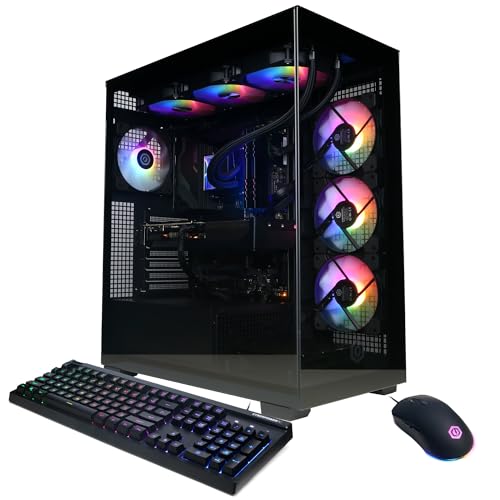
CyberPowerPC Gamer Xtreme VR Gaming PC Intel Core i9-14900KF 3.2GHz GeForce RTX 5070 12GB 32GB DDR5 2TB PCIe 4.0 SSD

YAWYORE Gaming PC Desktop Computer AMD R5 5600GT 16GB 1TB NVMe Towers WiFi

HP RGB Gaming Desktop Computer Intel Quad Core I5-6500 up to 3.6GHz GeForce GTX 750 Ti 4G 16GB DDR4 512G SSD
Gaming Desktop PC Computer 12-Core Processor GeForce RTX 4060 GDDR6 64GB RAM 512GB NVMe SSD 1TB HDD
More Details On Our Top Picks
The small chassis suits a desk that already has a monitor arm, speakers, and not much else. Ryzen 7 H 255 gives you 8 cores and 16 threads, so everyday multitasking should feel far more comfortable than the usual bare-minimum mini desktop.
The integrated Radeon 780M graphics keep the footprint tidy, which helps in a dorm, studio corner, or home office where a full tower feels excessive. You give up discrete GPU headroom, but the 1TB SSD and 16GB memory make the rest of the package feel well matched.
Strong Points
- Mini format keeps the desk uncluttered.
- 8-core, 16-thread CPU fits mixed workloads.
- 1TB SSD gives roomy local storage.
- Windows 11 Pro suits work and home use.
Things To Consider
- Integrated graphics set the ceiling lower than add-in GPU builds.
- Mini chassis leaves less room for future expansion.
- Thin case layouts can make cable routing tighter.
Core Details
Who It Suits Best
Students, home-office users, and space-conscious shoppers get the cleanest fit here.
A Better Fit Elsewhere
CyberPowerPC Gamer Xtreme VR Gaming PC Intel Core i9-14900KF 3.2GHz GeForce RTX 5070 12GB 32GB DDR5 2TB PCIe 4.0 SSD suits you better for heavier gaming and larger creative workloads.
This one looks aimed at straight-ahead utility, not flash. The Ryzen 5 2600, RTX 2060 6G, 16GB DDR4, and 512GB SSD line up as a sensible entry point for people who want playable 1080p gaming and general desktop speed without a sprawling parts list.
The ARGB fan, WiFi, Bluetooth 5.0, HDMI, and 4K DisplayPort add day-to-day convenience, especially in a shared room or starter office. Compare that to the ACEMAGIC mini system, and you get more obvious graphics hardware here, at the cost of a larger tower footprint.
Upsides
- RTX 2060 gives more graphics breathing room than integrated options.
- WiFi and Bluetooth cut accessory clutter.
- DisplayPort and HDMI cover flexible monitor hookups.
- Works for gaming, study, and routine media tasks.
Minor Gripes
- 512GB storage can feel tight once games stack up.
- Ryzen 5 2600 is an older platform choice.
- The tower form takes more desk or floor space.
Who Will Love This
Casual gamers and multitaskers with modest storage needs get the cleanest value here.
Another Choice May Suit
iBUYPOWER Element SE Gaming PC Desktop Computer AMD Ryzen 5 8400F CPU NVIDIA GeForce RTX 3050 6GB GPU 16GB DDR5 RAM 1TB NVMe SSD makes more sense for you if you want a newer platform with larger local storage.
The mix here leans toward reliable mainstream use rather than flashy extras. Ryzen 5 5500, Radeon RX 6500XT 4GB, 16GB of DDR4 at 3200MHz, and a 512GB NVMe SSD form a familiar budget gaming recipe that suits a bedroom desk or family room setup.
You also get a keyboard and mouse bundle, which trims the number of separate purchases. Compared with the STGAubron tower, this iBUYPOWER feels a touch more current on the platform side, though the 512GB drive still asks you to manage storage carefully.
Highlights
- Ryzen 5 5500 handles everyday multitasking smoothly.
- RX 6500XT gives entry-level gaming graphics.
- 3200MHz memory helps the system feel responsive.
- Keyboard and mouse reduce setup hassle.
- NVMe SSD supports quicker boot and load times.
Room For Improvement
- 4GB graphics memory sets a tighter ceiling for heavier games.
- 512GB storage can fill quickly with a few large installs.
- Bundled peripherals are basic, not specialty gear.
Feature Card
Made For
You get the best fit here for casual gaming, homework, and everyday home use.
Where A Sibling Pick Shines
iBUYPOWER Element SE Gaming PC Desktop Computer AMD Ryzen 5 8400F CPU NVIDIA GeForce RTX 3050 6GB GPU 16GB DDR5 RAM 1TB NVMe SSD is the better route for you if newer memory and extra storage matter more.
Newer DDR5 memory gives this model a cleaner upgrade path than the DDR4-based iBUYPOWER above. Pair that with the Ryzen 5 8400F, RTX 3050 6GB, and 1TB NVMe SSD, and you get a desktop that feels more prepared for current-day gaming habits and regular multitasking.
The included keyboard and mouse make first setup straightforward, which is useful for a dorm, first apartment, or family computer corner. The catch is simple, though, the RTX 3050 class card is still a midrange starter part, so you should expect sensible settings rather than the heaviest graphics presets.
What We Like
- DDR5 memory gives a newer platform foundation.
- 1TB SSD leaves more room for games and files.
- RTX 3050 adds more graphics reach than entry cards.
- Keyboard and mouse help with a cleaner first setup.
Points To Note
- Graphics power fits practical use better than maxed-out play.
- Desktop size still takes standard tower space.
- Bundle accessories are useful, though not premium accessories.
Details At A Glance
Built With In Mind
Home gamers and upgrading desktop users get the cleanest match here.
Look Elsewhere When
CyberPowerPC Gamer Xtreme VR Gaming PC Intel Core i9-14900KF 3.2GHz GeForce RTX 5070 12GB 32GB DDR5 2TB PCIe 4.0 SSD fits you better for heavier creation work or a stronger graphics ceiling.
This is the shelf above the rest of the list, and the parts show it clearly. The Core i9-14900KF, RTX 5070 12GB, 32GB DDR5, and 2TB PCIe 4.0 SSD point toward serious gaming, large projects, and heavier multitasking in one chassis.
The liquid-cooled CPU, tempered glass side panel, custom RGB lighting, and included keyboard and mouse give it a more finished presentation too. In a home studio or a room where one tower has to do everything, that combination makes sense, though the 24-core CPU and higher-end graphics are more machine than a casual desk really needs.
Best Bits
- High-core CPU suits demanding multitasking.
- RTX 5070 12GB gives a strong graphics ceiling.
- 32GB memory and 2TB SSD support larger workloads.
- Liquid cooling helps with sustained performance use.
- Rear I/O includes USB-C, USB-A, LAN, and multiple video outputs.
Areas To Watch
- Higher-end hardware pushes this outside strict budget territory.
- WiFi 5 and Bluetooth 4.2 are older connectivity standards.
- Large parts list can make placement and cable routing more involved.
Feature Rundown
Who Should Grab It
You’ll appreciate this most for high-load gaming, streaming, and creator work in one machine.
Skip It When
iBUYPOWER Element SE Gaming PC Desktop Computer AMD Ryzen 5 8400F CPU NVIDIA GeForce RTX 3050 6GB GPU 16GB DDR5 RAM 1TB NVMe SSD makes more sense for lighter use and a tighter budget target.
YAWYORE keeps the formula plain in a good way. The Ryzen 5 5600GT, 16GB DDR4 3200MHz, 1TB M.2 NVMe PCIe storage, WiFi, Bluetooth, and 550W PSU line up for straightforward home use, schoolwork, and general desktop life.
Because the graphics are integrated into the CPU, the appeal sits more in simplicity than in big game settings. That makes it a cleaner fit than the STGAubron tower for office tasks and lighter play, while still avoiding the ultra-basic feel of older refurb desktops.
Reasons To Buy
- 1TB NVMe storage gives good everyday breathing room.
- WiFi and Bluetooth reduce setup friction.
- 550W power supply supports a sensible desktop build.
- Integrated graphics keep the system uncomplicated.
Softer Spots
- Integrated graphics will not suit heavy modern gaming.
- Plain styling may feel quiet beside RGB-heavy towers.
- Desk users wanting future graphics upgrades may want more headroom.
Best Suited To
You get the best fit here for school, office use, and lighter entertainment at home.
Where A Sibling Pick Shines
iBUYPOWER Element SE Gaming PC Desktop Computer AMD Ryzen 5 5500 CPU AMD Radeon RX 6500XT 4GB 16GB DDR4 3200MHz RAM 512GB NVMe SSD makes more sense if you want discrete graphics in the same spending lane.
The renewed label matters here because it frames the whole machine as a value play, not a modern gaming tower. Intel’s quad-core i5-6500, GTX 750 Ti 4G, 16GB DDR4, and 512G SSD cover basic computing, older games, and casual use without demanding much desk space.
The RGB keyboard and mouse bundle adds some visual flair, and the 600M WiFi plus Bluetooth 5.0 make peripheral hookup easier. The honest read is that this belongs with simpler workloads, since the hardware is far behind the newer cards used in the ACEMAGIC or iBUYPOWER picks above.
Positives
- Renewed pricing structure suits tight spending plans.
- 16GB memory is still comfortable for basic multitasking.
- RGB keyboard and mouse help complete the setup.
- WiFi and Bluetooth support easy desk placement.
Small Caveats
- GTX 750 Ti is an older graphics card.
- 512G storage is modest for large game libraries.
- Refurbished gear can vary in cosmetic condition.
The Right Fit
You’ll get the most out of this as a starter desktop, study PC, or light-duty gaming setup.
Another Choice May Suit
STGAubron Gaming PC Desktop R5 2600 RTX 2060 6G 16G DDR4 512G SSD is the cleaner move for you if graphics performance matters more than the absolute minimum spend.
This build goes heavy on capacity, and that’s the whole point. A 12-core processor, RTX 4060 GDDR6 graphics, 64GB RAM, a 512GB NVMe SSD, and a 1TB hard drive make it feel aimed at busy multitasking, content work, and gaming that benefits from extra memory.
The seven ARGB fans, liquid cooling, WiFi 6, Bluetooth 5.4, and 650W PSU create a more fully equipped tower than the leaner picks in this list. You may find the memory amount excessive for basic browsing, but that same headroom helps when several apps stay open all day.
What We Like
- 64GB memory gives huge multitasking room.
- RTX 4060 supports modern gaming use.
- SSD plus HDD offers speed and volume together.
- WiFi 6 and Bluetooth 5.4 add newer connectivity.
- Liquid cooling fits sustained, busy desktop sessions.
Honest Caveats
- High memory capacity is more than many home setups need.
- Two-drive storage can mean more file organization.
- Seven-fan styling may feel busy on a simple desk.
Whose Shelf It Belongs On
You’ll get the best fit here for power users, streamers, and work-from-home setups with multiple heavy apps.
Reach For A Different Pick When
YAWYORE Gaming PC Desktop Computer AMD R5 5600GT 16GB 1TB NVMe Towers WiFi is the cleaner match for lighter home use and a simpler parts list.
What Matters Before You Choose A Budget Pc Build
Processor And Graphics Balance
The CPU sets responsiveness for multitasking, while the graphics card governs game settings and visual workloads. A mini desktop with integrated graphics fits office work, but a tower with an RTX or RX card is the better lane for gaming or editing.
Storage And Memory Headroom
16GB memory is the practical floor for a lot of current desktop use, and 32GB or more makes heavier multitasking calmer. Storage matters just as much, since 512GB can fill quickly once games, photos, and project files pile up.
Case Size And Desk Fit
Mini PCs save space and usually run quietly, while full towers leave more room for upgrades and cooling. The trade-off is simple, compact builds are easier to place, but larger cases tend to age better as your needs grow.
A Few Reality Checks Before You Click
Common Shopping Slip Ups
One common mistake is chasing a strong graphics card while ignoring storage, memory, or the age of the CPU platform. Another is buying a tower that looks impressive but doesn’t suit your desk or monitor setup.
Where The Extra Money Goes
Higher-tier desktops usually pay for newer processors, stronger graphics, faster memory, larger SSDs, and better cooling. That upgrade starts to matter once you stream, edit, or keep several heavy apps open at once.
Frequently Asked Questions
What makes a good Budget Pc Build for everyday use?
You want a balanced CPU, at least 16GB memory, and storage that won’t feel cramped after a few installs. Quiet operation and a case that fits your desk also matter more than flashy extras.
Is integrated graphics enough for Budget Pc Builds?
Integrated graphics work for office tasks, media, and light play. Discrete graphics help once you want steadier frame rates or more demanding visual work.
How much storage makes sense for a budget desktop?
512GB works for light use, but 1TB is a safer starting point for most gaming setups. Larger libraries and project files make that extra room feel worthwhile fast.
Should you choose a mini PC or a tower?
Mini PCs suit small desks and simpler workloads. Towers are easier to expand and usually make more sense for gaming or longer-term use.
Do renewed desktops make sense in this category?
They can, especially for basic tasks or lighter gaming at a lower entry point. The trade-off is older hardware and more variation in cosmetic condition.
