


Building on a tight budget usually means making each part carry its weight. The cases, coolers, power supply, and cable accents here cover the most common pressure points, whether you’re assembling a first tower, refreshing an older rig, or trying to clean up a cluttered setup without overspending on the wrong piece.
Some picks focus on airflow and room for larger hardware, while others bring stability, easier cable routing, or a cleaner finish inside the case. You’ll see where it makes sense to spend a little more, and where a simpler part gets the job done just fine.
The Shortlist At A Glance

FOIFKIN F1 PC Case 6 PWM ARGB Fans
MOROVOL PC Case 4 RGB Fans 621

KEDIERS PC CASE ATX K4(MAX)

CORSAIR RM750e ATX 3.1 750W Power Supply
TECWARE Flex RGB Cable Cover Kit White

RUIX OV303 ATX Mid-Tower PC Case

Thermalright Frozen Prism 240 Black ARGB

ID-COOLING SE-903-XT V2 Black CPU Air Cooler
More Details On Our Top Picks
FOIFKIN goes hard on cooling hardware, not on restraint. A dual-chamber layout keeps the main components separated from the power supply area, which helps with cable routing and gives the interior a cleaner working space for a full ATX build.
Six 120mm ARGB fans already in place make this a strong fit for a gaming tower that needs airflow from day one. The tempered glass side shows the build clearly, though that also means cable routing and dust care matter more than they would in a plain steel box.
Strong Points
- Six pre-installed fans reduce the need for early fan shopping.
- Dual-chamber layout helps keep wiring less cramped.
- 360mm radiator support gives you room for a large cooler later.
- Tempered glass suits a showcase-style build.
Things To Consider
- Glass-heavy cases show fingerprints and interior dust more quickly.
- The lighting focus adds visual flair, but not every build needs it.
Core Details
Who It Suits Best
It suits you best as a first-tower showcase case or a gaming build where airflow and visual presentation both matter.
A Better Fit Elsewhere
RUIX OV303 ATX Mid-Tower PC Case fits you better for a more restrained look with modern front-panel ports and less emphasis on a full-glass presentation.
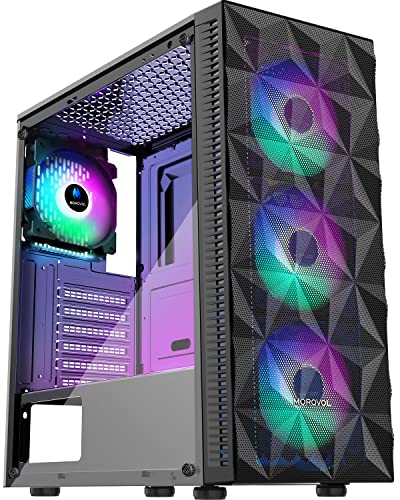
This MOROVOL case leans into a practical mid-tower formula: mesh in front, glass on the side, and four RGB fans already installed. The mesh front matters in a budget build because it gives the front intake less resistance, which is helpful in a warm room or a desk setup with tight airflow around the case.
The lighting is fixed rather than addressable, so the look stays simple instead of highly customizable. That keeps it easy to live with, although the styling is less flexible than what you get from the FOIFKIN and KEDIERS cases farther up the list.
What We Like
- Four included fans get you moving quickly on a modest build.
- Mesh front design supports straightforward airflow.
- Tempered glass side panel adds a cleaner visual finish.
- USB 3.0 is useful for everyday storage and accessory access.
Small Caveats
- Fixed lighting gives less control than addressable RGB.
- Glass and mesh both benefit from regular dusting.
Who Will Love This
It suits a starter gaming tower or a basic family PC where decent airflow and a tidy look matter more than flashy lighting control.
Another Choice May Suit
TECWARE Flex RGB Cable Cover Kit fits you better for a case that already looks complete and only needs cleaner cable presentation.
KEDIERS pushes the visual side harder than MOROVOL, with dual tempered glass and a wide panoramic front-to-side view. That makes it a better fit for a room where the case sits in plain sight, since the build becomes part of the furniture instead of something you hide under a desk.
Five pre-installed fans and support for a 420mm radiator give you more headroom than the FOIFKIN case on paper. The trade-off is obvious, though, glass-heavy cases tend to reward careful cable work and regular cleaning, or the whole display starts to look busy instead of polished.
Upsides
- Wide glass coverage creates a clear hardware view.
- Five fans already installed help with a new build.
- Type-C on the front is handy for newer peripherals.
- 420mm radiator support leaves room for large cooling plans.
Areas To Watch
- The all-glass look asks for more dust care.
- Style-first cases can feel crowded if cables are left loose.
Feature Rundown
Best Suited To
It suits you best as a display-heavy gaming tower where looks and larger cooling plans sit high on the checklist.
Where A Sibling Pick Shines
FOIFKIN F1 PC Case 6 PWM ARGB Fans fits you better for a similarly flashy build that puts more weight on a ready-made fan setup.
A power supply is the part you notice least when it’s right, and this CORSAIR unit is built around that idea. Fully modular cabling means you connect only the leads your system actually needs, which keeps a compact case cleaner than a fixed-cable unit and makes future upgrades less annoying.
The ATX 3.1 and PCIe 5.1 support, plus the included 12V-2×6 cable, make it a sensible match for newer graphics cards without awkward adapter chains. That’s the honest appeal here, it’s not showy, but it helps a budget build feel more sorted and less improvised.
Bright Spots
- Fully modular cables reduce clutter inside the case.
- 750W capacity suits many midrange gaming builds.
- Native modern GPU support helps with current hardware layouts.
- Gold-rated efficiency is a practical plus for everyday use.
Points To Note
- It does not add visual flair like RGB-focused parts do.
- Builders who only need a basic system may find 750W more than necessary.
Feature Card
Who Should Grab It
It suits you best for a midrange gaming build that needs tidy wiring and room to grow without swapping the power supply again soon.
A Better Fit Elsewhere
ID-COOLING SE-903-XT V2 Black CPU Air Cooler fits you better for a simpler office or entry-level build where the budget should stay centered on cooling, not power headroom.
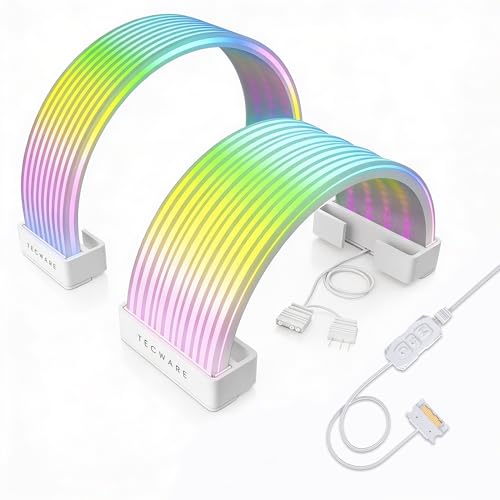
This TECWARE kit is for the build that already works and just needs a cleaner face. It covers the chunky 24-pin motherboard lead and the 8-pin or 16-pin GPU cable, so the visual line inside the case looks more intentional, especially next to the FOIFKIN and KEDIERS glass-heavy towers.
The flexible covers are the point here, not raw power delivery. In a showcase rig, that matters because messy cabling can undo the look of an otherwise careful build, though the trade-off is that this is a visual accessory, not a performance part.
Best Bits
- Works on both motherboard and GPU cable runs.
- White finish suits bright or all-white builds.
- ARGB sync support helps the lighting match the rest of the system.
- Flexible construction suits tidy routing in tighter cases.
Room For Improvement
- It adds appearance value, not hardware performance.
- Clean installation still depends on your cable layout.
- Showpiece parts like this need occasional dusting to keep the effect sharp.
Made For
It suits you best when the PC sits in view and the goal is a cleaner, more polished cable presentation.
Skip It When
RUIX OV303 ATX Mid-Tower PC Case is the better call for a build that needs practical case features before visual extras.
RUIX splits the difference between flashy and sensible. Four pre-installed ARGB PWM fans give you a solid start, and the front USB 3.0 plus Type-C ports make day-to-day use easier than on a stripped-down budget tower.
The case also leans into airflow and dust control, which matters in a desktop that runs for long sessions or sits on a carpeted floor. Compared with MOROVOL’s simpler lighting approach, this one feels a bit more current without pushing into overdecorated territory.
Highlights
- Four installed fans help the build start with a usable airflow base.
- USB 3.0 and Type-C improve front-panel convenience.
- High-airflow layout suits gaming parts that run warm.
- ARGB lighting gives visual interest without swallowing the whole design.
Honest Caveats
- ARGB adds wiring, so setup takes a little more care.
- Case fans and filters need routine dust attention.
Right Fit For
It suits you best for a practical gaming PC where airflow, front I/O, and a neat-looking interior all matter.
Reach For A Different Pick When
KEDIERS PC CASE ATX K4(MAX) fits you better for a more dramatic glass-first presentation and a larger radiator plan.
Thermalright’s 240mm liquid cooler makes more sense once a build starts running warmer or the case has room for a larger radiator. The included pair of PWM fans gives you control over speed, and PWM, short for pulse-width modulation, means the fans can adjust more precisely to load instead of staying locked at one pace.
The 3300RPM pump spec is the headline here, paired with wide platform support for AMD AM4, AM5, and several Intel sockets. That broad fit matters for upgrades, though liquid cooling still brings more installation steps and more parts to keep an eye on than a simple air tower.
Positives
- 240mm radiator size suits stronger cooling needs.
- PWM control helps the fans respond to system load.
- Broad CPU socket support makes it useful across many mainstream builds.
- ARGB lighting adds a clean visual finish inside a glass case.
Minor Gripes
- Liquid coolers ask for more installation care than air coolers.
- It takes more planning around case space and tubing route.
- Dust on the radiator fins can affect routine upkeep.
Details At A Glance
The Right Fit
It suits you best for a midrange gaming or content build that needs stronger heat handling than a compact air cooler can usually provide.
Another Choice May Suit
ID-COOLING SE-903-XT V2 Black CPU Air Cooler fits you better for a simpler, quieter, small-case setup with less installation complexity.
This ID-COOLING tower is the sensible answer for a smaller case or a basic build that doesn’t need liquid cooling complexity. The 100mm PWM fan and direct-touch heatpipes are the core of it, and direct-touch means the heatpipes meet the base more directly, which helps move heat away from the CPU more efficiently in a compact cooler design.
Compared with the Thermalright liquid unit, this one is easier to live with and usually simpler to fit around tight RAM clearance or a modest chassis. The honest trade-off is ceiling room, a compact air cooler won’t suit a hotter chip as comfortably as a 240mm liquid setup.
Standout Traits
- Compact size works well in smaller cases.
- PWM fan helps keep noise and speed more controlled.
- Direct-touch heatpipes suit budget-friendly thermal management.
- Intel and AMD support gives it wide compatibility.
Softer Spots
- It leaves less thermal headroom than a larger liquid cooler.
- Compact coolers can feel cramped around taller memory modules.
Whose Shelf It Belongs On
It suits you best for an entry-level PC, a compact workstation, or any build where space is tight and simplicity matters.
Swap It Out When
Thermalright Frozen Prism 240 Black ARGB fits you better for a hotter gaming rig that needs more cooling capacity.
What Matters Most Before Choosing Budget Pc Parts
Common Shopping Slip Ups
Case shoppers often focus on glass and lighting while ignoring front intake, radiator space, and cable room. Cooler shoppers make the opposite mistake, choosing a part that fits the case on paper but crowds memory or leaves too little clearance for a sensible build.
Where The Extra Money Goes
Higher-tier parts usually pay for stronger materials, better cable layout, more fan control, or broader platform support. In a power supply or cooler, that extra spend often buys easier installation and more room for later upgrades, which matters once the system stops being entry level.
Things Worth Knowing First
Wrong Turns To Avoid
Skip parts that look impressive but don’t match the real job, like a glass-heavy case for a dusty floor setup or a large liquid cooler for a modest chip. Match the part to the room, the heat load, and the hardware you plan to keep.
The Upgrade Payoff
Spending more starts to make sense when you want quieter operation, cleaner wiring, or extra thermal headroom for a stronger graphics card or processor. That’s the point where a better case, a modular power supply, or a larger cooler stops being cosmetic and starts saving hassle.
Frequently Asked Questions
What matters most in a budget PC case?
Airflow, fan layout, and enough space for your parts matter first. Lighting comes second.
Do you need a modular power supply?
No, but modular cabling makes assembly cleaner. It also helps inside smaller cases.
Is liquid cooling necessary for a gaming PC?
Not for every build. A good air cooler handles many mainstream systems just fine.
What’s the benefit of PWM fans?
PWM fans adjust speed more precisely than basic fixed-speed designs. That usually helps balance noise and cooling.
Why buy cable covers at all?
They improve the visual finish of a build with glass panels. They do not change hardware performance.
