


Build A Desktop Computers often means choosing between compact business boxes, gaming towers, and barebones systems that leave room for your own parts. You need the right balance of size, speed, ports, and upgrade headroom, not just a tall spec sheet.
This roundup focuses on the kinds of desktops that make sense for home offices, gaming desks, small workspaces, and first-time builders. You’ll see where each one fits, where it compromises, and which model leaves the cleanest path for later upgrades.
Quick Look At The Shortlist

Dell Optiplex 7050 SFF Desktop PC Intel i7-7700 32GB DDR4 1TB SSD

Dell Optiplex 3050 SFF Desktop Computer PC Intel i5-6500 16GB DDR4 256GB SSD

GEEKOM IT12 Mini PC Intel i3-12300HE 16GB RAM 512GB SSD
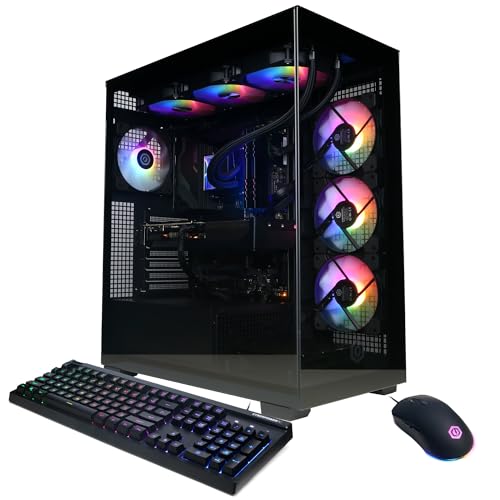
CyberPowerPC Gamer Xtreme VR Gaming PC Intel Core i9-14900KF RTX 5070 32GB DDR5 2TB SSD

YAWYORE Gaming PC Desktop Computer AMD R5 5600GT 16GB 1TB NVMe

Build Your Ultimate Gaming PC 2025/2026 Edition

ASRock DESKMINI 310W Black Intel 8th Processor 32GB DDR4 RAM

KOTIN Prebuilt Gaming PC RTX 5070 12GB Ryzen 7 9700X 32GB DDR5 1TB SSD
More Details On Our Top Picks
The Optiplex 7050 SFF leans into practical power, with a quad-core i7, 32GB of DDR4 memory, and a 1TB solid-state drive. That mix suits you well in a busy home office, where multiple browser tabs, spreadsheets, and video calls stack up quickly.
Small Form Factor means the case stays compact, so it slips into tighter desks without feeling like a tower in the way. Compared with the Optiplex 3050 below, this one gives you more memory and storage breathing room, which matters once everyday work starts to pile up.
Strong Points
- 32GB of memory helps with heavy multitasking and keeps app switching calmer.
- 1TB SSD storage gives you room for files, project folders, and local media.
- Small chassis fits easily on crowded desks or under a monitor arm setup.
- HDMI and dual-monitor support help you spread work across more than one screen.
Small Caveats
- Renewed hardware can vary more in cosmetic condition than new retail stock.
- The older i7-7700 platform is fine for office work, but it is not a modern workstation chip.
Feature Card
Who It Suits Best
You get the most from this pick in a home office or small business setup that values compact size and multitasking room.
A Better Fit Elsewhere
The GEEKOM IT12 Mini PC suits you better for a smaller desk or a cleaner cable layout, especially where footprint matters more than internal storage.
The 3050 keeps things simple, and that’s its appeal. You get an i5-class quad-core processor, 16GB of DDR4 memory, and a 256GB SSD, which is enough for email, web apps, documents, and a steady office routine.
Its small chassis helps in a tight workspace, and the 4K support over DisplayPort or HDMI gives you modern monitor flexibility without crowding the desk. Compared with the 7050, it asks less of your budget mindset and less of your expectations, which is fine for lighter workloads.
What We Like
- Compact SFF design keeps the footprint modest on a desk or shelf.
- 16GB of memory is comfortable for standard office multitasking.
- HDMI and DisplayPort broaden monitor pairing options.
- WiFi support helps reduce cable clutter in a basic setup.
Areas To Watch
- 256GB storage fills up faster once you add large files or many apps.
- The older i5-6500 platform suits routine work better than heavier multitasking.
- Renewed units can show more variation in exterior wear.
At A Glance
Right Fit For
You’ll appreciate this desktop for light office duty, home admin tasks, and a smaller setup that still wants modern display output.
Look Elsewhere When
The Dell Optiplex 7050 SFF Desktop PC Intel i7-7700 32GB DDR4 1TB SSD makes more sense for heavier multitasking and larger local storage needs.
This mini PC looks built for desks that already feel full. The full-metal chassis, preinstalled operating system, and USB4 port give it a business-first profile, while the 16GB memory and 512GB SSD keep daily work moving without much fuss.
For a small office, reception counter, or compact home desk, the appeal is obvious: low bulk, broad connectivity, and less visible clutter. The trade-off is just as clear, though, because mini systems usually give you less internal room than a small form factor tower like the Optiplex pair above.
Highlights
- Metal chassis adds a sturdier feel for shared or frequently moved setups.
- USB4 is useful for fast accessory links and flexible docking paths.
- 512GB SSD gives you more breathing room than entry-level compact machines.
- Preinstalled software shortens setup time in a work environment.
- Low-heat positioning suits offices that want a quieter desk presence.
Points To Note
- Mini form factor means less internal expansion than a larger tower.
- One thing worth considering, cable access can feel tighter behind a very shallow desk.
Core Details
Built With In Mind
You’re looking at a smart fit for compact workstations, reception desks, and low-clutter setups that still need real desktop output.
Where A Sibling Pick Shines
The ASRock DESKMINI 310W Black Intel 8th Processor 32GB DDR4 RAM suits you better when you want a more modular barebones route with extra build control.
This is the loudest spec stack in the roundup, and it’s aimed squarely at demanding gaming desks. You get a 24-core i9, RTX 5070 graphics, 32GB of DDR5 memory, and a 2TB PCIe 4.0 SSD, so the system has room for large game installs and heavy multitasking.
The liquid-cooled CPU, tempered side panel, RGB lighting, and included keyboard and mouse make it feel ready to drop into a gaming setup. Compared with the KOTIN build later in the list, this one is less about the display gimmick and more about straight performance plus a broader port layout.
What We Like
- RTX 5070 graphics supports current high-demand games at strong settings.
- 2TB SSD gives you generous room for a large game library.
- DDR5 memory helps the system stay responsive under load.
- USB-C, USB-A, Ethernet, WiFi, and Bluetooth cover many desk setups.
- Included keyboard and mouse make first setup less complicated.
Honest Caveats
- This much power makes more sense at a gaming desk than in a quiet office.
- Liquid cooling adds another part set to keep an eye on during long ownership.
- WiFi 5 and Bluetooth 4.2 are serviceable, but not the freshest wireless stack.
Feature Rundown
Who Should Grab It
You’re the right fit for this desktop if gaming, streaming, and occasional editing all share the same machine.
Swap It Out When
The YAWYORE Gaming PC Desktop Computer AMD R5 5600GT 16GB 1TB NVMe is a calmer choice for a starter setup that doesn’t need this much graphics muscle.
This YAWYORE tower sits in the practical middle ground. The Ryzen 5 5600GT gives you a six-core, twelve-thread base, while 16GB of DDR4 memory and a 1TB NVMe SSD keep startup and everyday loading quick enough for work and lighter gaming.
The MSI A520M-A PRO motherboard and 550W 80 Plus power supply make the build feel less fragile than a bare entry box, though it still stays firmly in mainstream territory. Compared with the CyberPowerPC above, it’s a simpler and less expensive-feeling path for someone who wants a gaming-shaped desktop without jumping into higher-end graphics.
Upsides
- Six-core, twelve-thread processor gives the system decent multitasking room.
- 1TB NVMe storage offers a healthy balance of speed and capacity.
- 550W power supply leaves room for sensible parts planning.
- WiFi and Bluetooth reduce the need for extra adapters.
Room For Improvement
- Integrated graphics keep it closer to casual gaming than heavy AAA play.
- The tower format takes more desk or floor space than a mini PC.
Feature Snapshot
Perfect Match For
You’ll get the most from this desktop as a starter gaming machine, a school-and-work hybrid, or a simple do-it-all tower.
Another Choice May Suit
The Dell Optiplex 7050 SFF Desktop PC Intel i7-7700 32GB DDR4 1TB SSD is a cleaner fit for office-first use and a smaller footprint.
This guide belongs in the roundup because a lot of desktop plans start with confusion, not parts. You get a structured path for building a custom rig, and that matters whether you care most about gaming, streaming, editing, or a flexible everyday machine.
The real value is in the planning layer, since a good build book helps you match parts instead of collecting mismatched components. Compared with a prebuilt tower like the CyberPowerPC or KOTIN, this is for you when hands-on control matters more than plug-and-play convenience.
Best Bits
- Useful for first-time custom builders who want a guided path.
- Fits several use cases, from gaming to content work.
- Helps you think about parts compatibility before money is committed.
Things To Consider
- This is a guide, so you still need to source every component separately.
- It does not give you a finished computer in the box.
Who Will Love This
You’ll get the most from this title if you want to build your own desktop and prefer clear, step-by-step planning.
Reach For A Different Pick When
The ASRock DESKMINI 310W Black Intel 8th Processor 32GB DDR4 RAM is better for a compact barebones route with hardware in hand.
The DESKMINI 310W is the barebones choice in the list, which means you’re shaping more of the final system yourself. It accepts Intel 8th Gen processors, supports up to 32GB of DDR4 SO-DIMM memory, and includes triple video outputs, so it has more build flexibility than a fixed small desktop.
That flexibility helps in a workshop, a compact media station, or a DIY desk where size matters more than easy expansion. Compared with the prebuilt Optiplex models, this one asks more of you during assembly, but it gives you a cleaner path for part selection and layout control.
Positives
- Barebones format lets you choose more of the final hardware mix.
- Triple video outputs help with multi-display planning.
- Compact footprint suits tighter desks and small media stations.
- Up to 32GB memory support gives practical headroom for a small build.
Minor Gripes
- You need to source and install more parts than with a prebuilt desktop.
- Setup takes more care than a ready-to-run system.
- Space for 2.5-inch drives and M.2 storage still depends on your part plan.
Who Should Grab It
You’re the right match for this if you want a compact barebones base and don’t mind building around it.
Skip It When
The Dell Optiplex 3050 SFF Desktop Computer PC Intel i5-6500 16GB DDR4 256GB SSD is easier if you want a ready-made office desktop.
The KOTIN desktop is built for people who want their gaming rig to look as deliberate as it performs. The RTX 5070, Ryzen 7 9700X, 32GB of DDR5 memory, and 1TB SSD give you the expected high-end foundation, while the 11.3-inch smart display makes this one feel more like a showpiece than a plain tower.
The 360mm liquid cooler, 850W 80 Plus Gold power supply, and WiFi 7 round out a build that aims at modern gaming desks with room for future changes. Compared with the CyberPowerPC, this model trades some of the no-nonsense layout for a more distinctive front-panel experience.
Bright Spots
- Built-in display adds live system info without extra accessories.
- RTX 5070 and Ryzen 7 9700X give you strong current-generation hardware.
- 32GB DDR5 and a 1TB NVMe SSD support quick everyday responsiveness.
- 850W Gold-rated power supply leaves useful room for later upgrades.
- WiFi 7 gives the networking side a newer foundation than older wireless stacks.
Worth Noting
- The smart display is useful, but it also adds one more component to live with.
- A 1TB SSD can feel modest once your game library starts growing.
- Liquid cooling asks for a little more ownership attention than a plain air cooler.
Feature Card
The Right Fit
You’ll like this desktop most if you want a gaming system that doubles as a visual centerpiece on your desk.
A Better Fit Elsewhere
The CyberPowerPC Gamer Xtreme VR Gaming PC Intel Core i9-14900KF RTX 5070 32GB DDR5 2TB SSD is the cleaner choice if storage capacity and a plainer layout matter more than the built-in display.
What Matters Before You Choose A Desktop Build
Common Shopping Slip Ups
It’s easy to overspend on graphics while underbuying storage, especially in gaming towers. Match the CPU, memory, and SSD size to the actual workload, not the flashiest part in the listing.
Desk space matters too, because a compact SFF box and a mid-tower gaming PC solve very different problems.
When The Higher Tier Pays Off
Higher-tier desktops usually cost more because of stronger processors, faster memory, larger SSDs, and better cooling. That extra spend makes sense for heavy gaming, streaming, editing, or long work sessions where slowdowns are hard to ignore.
For light office use, a simpler Optiplex or mini PC often covers the need with less bulk.
Things Worth Knowing First
Wrong Turns To Avoid
Do not pick a barebones system expecting a finished desktop, because you still need compatible parts and assembly time. Also watch wireless standards and port selection, since older connectivity can shape your setup more than the CPU name does.
The Upgrade Payoff
Spending up buys more headroom, better multitasking, and a longer runway before the machine feels cramped. That matters most on gaming desks, creator stations, and shared family computers that see constant use.
Frequently Asked Questions
What does SFF mean in a desktop listing?
SFF means Small Form Factor. You get a compact case that saves desk space, though internal expansion is usually tighter than in a tower.
Is a mini PC a good desktop choice for work?
Yes, for office apps, web tools, and light multitasking, a mini PC can fit well. You trade away some upgrade room for a smaller footprint.
Do renewed desktops make sense for everyday use?
They can, especially for office work and general home tasks. The main trade-off is that cosmetic condition and part age may vary more than with new hardware.
How much RAM should a desktop have for multitasking?
16GB covers many standard tasks, while 32GB gives you more breathing room. More memory helps most when you keep several apps and browser tabs open at once.
Is a barebones desktop hard to finish?
It takes more planning because you choose the processor, memory, storage, and sometimes wireless parts separately. That route suits you best when you want control over the final build instead of a ready-made box.
