


Build Your Own Computer Kits serve very different needs, from simple repair tools to full coding builds and display-driven classroom projects. You’re likely here because you want something that matches the age, skill level, and patience of the person using it, not just a box full of parts.
The seven picks below cover repairs, electronics, coding, and computer-style builds. That mix matters, because the right kit can feel like a clear path forward, while the wrong one turns into a half-finished project gathering dust.
Quick Look At Our Shortlist
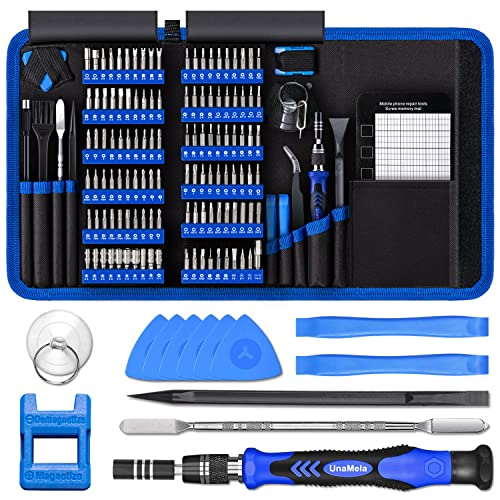
UnaMela PC Building Tool Kit 140-IN-1

choopheme Bluetooth Speaker & FM Radio Science Kit

BRICKKK PANTASY Desktop PC Computer Building Set
VLGOEM Science STEM Kits for Kids Electronics Exploration Kit

Piper Computer Kit Raspberry Pi
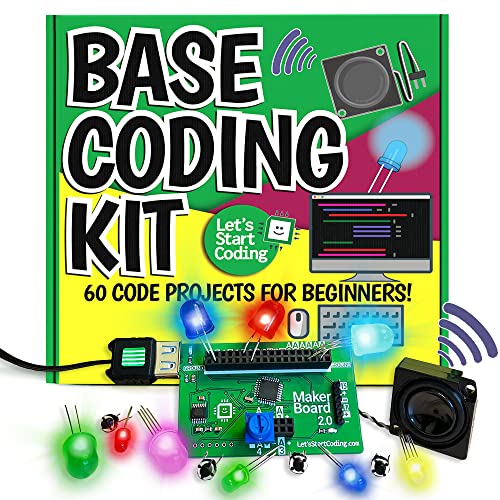
Let’s Start Coding Base Kit Computer Coding Game

TinkRworks Tech-A-Sketch Digital Drawing Device
More Details On Our Top Picks
UnaMela leans into breadth, not flash. The 120 precision bits and 19 accessories cover the kind of small fixes that come up around laptops, game consoles, phones, and SSD installs, so you’re not stuck hunting for one extra driver mid-project.
The Oxford storage bags and Velcro-secured drill holder make the kit easier to keep together than loose drawer hardware. In a busy garage or shared workspace, that matters more than flashy extras, though the huge bit count also means you’ll want to stay organized.
Strong Points
- Wide bit selection handles many fastener types.
- Accessory mix suits everyday electronics repair.
- Oxford bag storage helps keep parts sorted.
- Good fit for home bench work and travel bags.
Things To Consider
- Large kits can take more time to sort.
- The value depends on how often you repair devices.
Feature Snapshot
Who It Suits Best
Home tinkerers who repair several device types will get the most from this kit.
A Better Fit Elsewhere
TinkRworks Tech-A-Sketch makes more sense for a child who wants a guided coding-and-art project rather than repair tools.
This kit is built around two visible outcomes, a Bluetooth speaker and an FM radio, so the project feels more tangible than abstract circuit work. The instructions are described as clear, and that lowers the usual friction for a first electronics build.
It also fits well in a family setting, especially when an adult wants a project that doesn’t spiral into a bench full of mystery parts. The honest trade-off is focus, since the appeal here is learning and assembly rather than deep customization.
Highlights
- Two projects give the kit real replay value.
- Clear instructions help younger builders stay on track.
- Good for kids who like music-related projects.
- Hands-on assembly supports confidence and patience.
Worth Noting
- Works best as a guided build, not a loose parts bin.
- A small screwdriver is still needed.
- Older teens may outgrow the basic scope quickly.
Details At A Glance
Who Should Grab It
Kids who like music, gadgets, and step-by-step assembly will get the most out of it.
Skip It When
Let’s Start Coding Base Kit suits teens better when the goal is more code time and less craft-style assembly.
Compared with the more teaching-focused kits above, BRICKKK goes for a desktop PC model that looks like a display piece first and a puzzle second. The build includes a graphics card, power supply unit, dual SSD docking station, motherboard, and two DDR memory modules, so it borrows the language of real hardware in miniature.
That makes it a strong desk project for tech fans who enjoy assembly detail and reassembly without needing a working computer at the end. The trade-off is that the appeal is visual and mechanical, so it’s less about lessons and more about the build process itself.
Upsides
- Computer-hardware look feels familiar to PC fans.
- Multiple internal parts make the build feel layered.
- Good display value for shelves and workspaces.
- Disassembly and rebuild add another round of play.
Small Caveats
- More of a model than a learning system.
- Best for careful desk assembly, not quick play.
- Adults and older teens will appreciate it more than younger kids.
Built With In Mind
Tech hobbyists who like PC-themed display builds will get the most from it.
Where A Sibling Pick Shines
Piper Computer Kit is the stronger match for a child who wants a fuller learning path around code and electronics.
VLGOEM is the sprawling option in this lineup. The 66 circuit parts and color project manual support a very large library of builds, so a child can keep moving from one small circuit to the next without running out of ideas quickly.
That kind of variety works well in a home classroom or a rainy weekend project bin. The catch is that a kit with this many paths asks for a bit more supervision and storage discipline, especially once tiny parts start moving between rooms.
Bright Spots
- Huge project count gives long-term variety.
- Color manual should help visual learners follow along.
- Good fit for repeated STEM sessions at home.
- Can grow with a child over several age bands.
Areas To Watch
- Small parts need careful storage after each build.
- Younger children may need adult help.
- The many projects can feel scattered without a routine.
Core Details
The Right Fit
Home STEM setups with space for repeated project work will benefit most here.
Swap It Out When
choopheme’s speaker-and-radio kit is the easier starting point for a child who wants fewer pieces and a shorter build.
Piper reads like the most complete learning path in the group. The source details point to a Raspberry Pi, a 7-inch screen, a DIY speaker, and a rechargeable battery, so the finished build aims for a real computer-like experience rather than a single-craft outcome.
That setup makes sense for families who want coding, screen time, and project structure in one box. The price of that depth is complexity, so it suits a child who can stick with a longer sequence instead of hopping between unrelated mini builds.
Reasons To Buy
- Includes major parts for a complete build path.
- StoryMode and coding tools add teaching value.
- Games and Python make the kit feel layered.
- Good choice for serious STEAM learning at home.
Points To Note
- More involved than the simpler science kits here.
- Works best with patience and regular follow-through.
- Better suited to a dedicated project space.
Technical Sheet
Whose Shelf It Belongs On
Kids and teens who want a deeper computer-and-code experience will get the most out of it.
Look Elsewhere When
VLGOEM makes more sense for a younger child who wants a larger pile of quick circuit projects.
This kit sits in the sweet spot between toy and curriculum. With 55-plus online projects and 3.5 hours of video walkthroughs, it gives you a steady path through coding concepts instead of leaving everything to trial and error.
The hands-on circuit board adds immediate feedback, which helps a lot for kids who get restless staring at theory alone. In a home learning setup, that mix of guided video and visible outcomes feels especially useful for teens who need structure without feeling boxed in.
What We Like
- Video walkthroughs help keep momentum going.
- Project count offers long-term practice.
- Hands-on circuit work makes code feel concrete.
- Good bridge from curiosity to structured learning.
Honest Caveats
- Online guidance works best with a reliable device nearby.
- Teens who already code heavily may want something deeper.
At A Glance
Perfect Match For
Kids and teens who want structured code lessons with real circuit feedback will fit this kit well.
Where A Sibling Pick Shines
Piper Computer Kit is the deeper choice for families who want a full computer build with screen and battery included.
Tech-A-Sketch blends coding with art in a way that feels unusually complete for a kid-facing project. The included LCD screen, microcontroller, knobs, buttons, PCB, wiring, USB cable, and build materials point to a device you assemble and then reprogram rather than just decorate.
That reprogrammable setup matters in a home with a child who likes to tinker after the first build is done. The guided lessons and video support lower the friction, though the real payoff comes for kids who are happy to explore loops, variables, and debugging without rushing.
Positives
- Mixes art, electronics, and block-based coding.
- Reusable controls keep the kit useful after the first session.
- Good hands-on lesson flow for beginners.
- Built-in materials reduce the need to source extras.
- Strong fit for classroom-style learning at home.
Softer Spots
- Kids need patience for the coding steps.
- The learning portal adds dependence on online access.
- Art-first households may care less about the technical side.
Core Details
Who Will Love This
Kids who like art projects but also want real code and electronics will get the most from it.
Another Choice May Suit
choopheme’s Bluetooth speaker and radio kit is easier for a child whose first priority is a simpler assembly win.
What Matters Most Before Choosing
Common Shopping Slip Ups
The biggest mistake is matching the kit to the topic instead of the skill level. A repair tool set, a coding board, and a full computer-style build each ask for very different patience and setup space.
What The Higher Tier Buys
More expensive kits usually add screens, guided software, richer parts lists, or a more complete final build. That extra depth suits families who want a longer project path and less guesswork.
Skill Path Matters Most
For younger kids, a simple speaker, radio, or circuit kit usually lands better than a deeper computer build. Older teens often get more value from a kit that includes coding, reprogrammable parts, or a fuller device at the end.
Workspace And Storage Count Too
Small parts, boards, and tools need a place to live between sessions. Kits with organized storage or a clearer project flow are easier to finish in real homes.
Things Worth Knowing First
Mistakes Worth Dodging
Don’t pair a complex project with a tight schedule. These kits work best when the person building has room for pauses, retries, and a few quiet minutes to sort parts.
The Upgrade Payoff
Higher-tier kits often justify the step up through better guidance, stronger part variety, or a more complete final device. That matters most for kids who stay interested after the first successful build.
Frequently Asked Questions
What age range fits Build Your Own Computer Kits?
The range varies a lot by kit, from younger kids with adult help to teens and adults who want more technical depth. The safest match comes from the project style, not the headline age on the box.
Do these kits require extra tools?
Some do, though the tool list can be small, like a Phillips screwdriver. More complete kits often include most of the parts, but the right setup space still helps.
Which kit works best for a first-time builder?
A guided speaker, radio, or basic circuit kit is usually the easiest start. Those builds show quick progress without demanding much prior knowledge.
Are these more like toys or learning tools?
Some sit closer to toys, while others are clearly learning systems with coding and electronics. The deeper the software and hardware layer, the more educational the kit tends to feel.
What should you compare before choosing one?
Check the parts list, the kind of guidance included, and the final project you’ll end up with. That trio tells you far more than the title on the listing.
