


Build Your Own Pc Kits For Beginners can mean very different things, from a microcontroller learning set to a desk-friendly test bench. That spread matters, because the right pick depends on whether you want hands-on coding, repair work, or a cleaner way to assemble parts. You’ll also want to match the kit to the amount of patience on hand, since some options are more educational than plug-and-play. The six picks below keep the focus on practical first builds, useful tools, and fewer dead-end extras.
The Shortlist At A Glance

SunFounder Raspberry Pi Pico W Ultimate Starter Kit

507Pcs Professional Computer Screws Assortment Kit

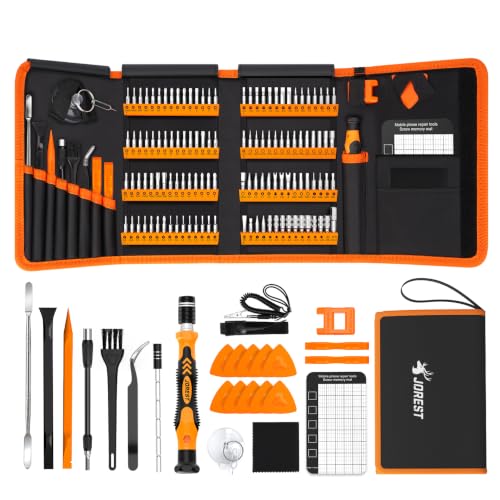
JOREST 145 in 1 Electronics Precision Screwdriver Set

Mould King 10181 Boxer Engine Model Kit

DIY Computer Case PC Frame Desktop Open Chassis Case
More Details On Our Top Picks
For a first step into microcontroller work, this kit gives you room to grow without feeling stripped down. The 450-plus parts and 117 projects point to long shelf life, not a one-week novelty. You also get MicroPython and C/C++ support, plus Arduino IDE compatibility, so the learning path can stay flexible as your skills move forward.
The honest read is that this suits a desk, not a toolbox drawer, because the point is guided exploration rather than simple repair work. In a home setup, that makes it a strong match for beginners who want sensors, code, and real projects in one box. Compared with the Piper kit below, it feels more electronics-focused and less game-like.
What We Like
- Large parts count keeps the kit useful well past the first few builds.
- 117 projects help you move from basics to more involved exercises.
- MicroPython and C/C++ support give you room to switch coding style later.
- Arduino IDE compatibility matters for you if you already know that environment.
- The learning format works well for a spare-room desk or classroom bench.
Things To Consider
- The learning curve is real, so this suits patience more than impatience.
- It leans educational, which means it is not the shortest route to a finished computer.
- Small components need organized storage once the box is opened.
Feature Snapshot
Who It Suits Best
Beginners who want coding, circuitry, and IoT-style projects in one place will get the most from it.
A Better Fit Elsewhere
Kernmax 507Pcs Professional Computer Screws Assortment Kit suits repair-focused shoppers who need hardware for actual PC assembly rather than lessons.
Some starter bundles skip the smallest parts and leave you hunting later, which is where this screw kit earns its place. It covers motherboard screws, standoffs, SSD hardware, hard drive screws, case screws, fan screws, and CD-ROM screws, so you’re not stuck mid-build with the wrong fastener.
That breadth matters most in a garage build, a used-parts refresh, or a first-time repair session where nothing feels perfectly standardized. Compared with SunFounder’s learning-heavy box, this is the more direct answer for actual PC hardware. One small trade-off, though, is that screw assortments only stay useful when you keep the bins organized.
Bright Spots
- Broad screw coverage reduces the odds of missing one small but important part.
- The assortment is useful for fresh builds and maintenance jobs alike.
- It fits the kind of work that happens on a cluttered workbench.
- You can keep it around as a backup kit for future repairs.
Worth Noting
- You are buying hardware, not a learning system or guided build experience.
- Small parts are easy to misplace, so storage matters.
- The value depends on how often you assemble or service PCs.
Who Should Grab It
PC builders and home repair tinkerers who want the right fasteners close at hand will benefit most.
Another Choice May Suit
JOREST 145 in 1 Electronics Precision Screwdriver Set suits detailed electronics work better, especially for delicate screw heads and mixed device repairs.
This one leans into the full build experience, not just the finished machine. The bundle includes the core parts needed to assemble a working computer, and the StoryMode approach gives the process a guided path that feels more like an interactive course than a loose parts pile. In a family room or homeschool setting, that structure can make a big difference.
You should expect a stronger education angle than with the Kernmax screw assortment or the DALAIBUKESI test bench. That is the trade-off, and it’s a fair one for households that want coding, projects, and computer basics in a single guided package. For younger learners, the playful structure matters as much as the hardware.
Upsides
- Gives you a guided route into building a functional computer.
- StoryMode keeps the experience structured for younger learners.
- Raspberry Pi support gives the kit a strong educational backbone.
- Game and project elements help sustain attention over time.
Points To Note
- The experience is more curriculum-like than a barebones parts kit.
- It makes less sense for pure repair work or fast hardware swaps.
- Added pieces can mean more setup time on the front end.
Who Will Love This
Families, homeschool setups, and young learners who want a guided computer build will get the most out of it.
Look Elsewhere When
SunFounder Raspberry Pi Pico W Ultimate Starter Kit suits older beginners who want more coding depth and a wider project pool.
Fine electronics work needs the right bit shape and a handle that does not fight your hand. This set answers that with 120 bits, an ergonomic non-slip grip, and an extension rod for deeper screws, so it fits repairs that get awkward fast. Compared with the Piper kit, this is a tool-first choice, not a learning system.
The 60HRC chromium-vanadium steel is the sort of detail that matters over time, since harder bits tend to hold their shape better under repeated use. For phones, handhelds, game consoles, and small PC parts, that makes the kit feel especially useful. The only real catch is simple: the bit count helps most when you keep the case sorted.
Highlights
- 120 bits cover a wide spread of screw heads.
- The extension rod helps with recessed fasteners.
- Ergonomic grip supports longer repair sessions.
- Hardened steel bits suit repeated use better than soft, generic tools.
Small Caveats
- The broad set can feel excessive for very simple household fixes.
- Bit organization matters, especially in a shared drawer.
- It solves access and fastening, not build planning.
Details At A Glance
The Right Fit
Shoppers who repair small electronics, consoles, or mixed gadgets will get the most value from it.
Where A Sibling Pick Shines
Kernmax 507Pcs Professional Computer Screws Assortment Kit fits PC assembly work better, since it supplies the fasteners rather than the driver.
This kit is less about utility and more about understanding motion through assembly. The horizontally opposed engine layout, moving pistons, turbocharger detail, and exhaust design give you a mechanical model that feels closer to a teaching display than a generic block build. For hobby shelves, that makes it a visually strong choice.
Because it uses a battery box and motor, the finished model has more life than a static display, which helps it stand apart from the more tool-based options above. The trade-off is obvious, though, since it suits builders who enjoy structure and patience more than quick results. For race car fans and future engineers, that’s part of the appeal.
Best Bits
- Moving engine parts make the model feel active, not static.
- The opposed-cylinder layout gives the build a clear mechanical identity.
- Battery box and motor add motion to the finished display.
- It works well as a desk piece after assembly.
Areas To Watch
- The build suits patient hands more than quick weekend assembly.
- It is a model, so it does not replace a real computer kit.
- Display builds need space after completion.
Best Suited To
Older hobby builders, gearheads, and anyone who likes mechanical displays will enjoy this more than a pure starter computer kit.
Swap It Out When
DALAIBUKESI DIY Computer Case PC Frame Desktop Open Chassis Case fits actual PC assembly better, especially for anyone setting up real hardware.
An open-frame case makes sense in a workspace where you expect to swap parts, inspect hardware, or keep a test build moving. This one supports ATX and MATX motherboards, so it covers a broad slice of standard desktop builds without forcing you into a narrow layout. Compared with the Mould King model, this is real hardware support rather than a display project.
The open chassis design also keeps access simple, which is helpful during troubleshooting or first assembly. That convenience comes with the usual open-frame trade-off, though, since your parts stay exposed and cable discipline matters more. For tinkerers, that’s not a flaw so much as part of the job.
Strong Points
- Open access makes part swaps and cable routing easier.
- ATX and MATX support gives you broad build flexibility.
- It fits testing setups where fast component changes matter.
- The frame style helps keep a bench build visually clear.
Room For Improvement
- Open frames expose components, so dust management matters more.
- It is a utility shell, not a polished tower case.
- You’ll want tidy cables for the cleanest long-term setup.
Whose Shelf It Belongs On
PC hobbyists, test-bench users, and builders who swap hardware often will get the most value from it.
Consider Something Else When
JOREST 145 in 1 Electronics Precision Screwdriver Set is the smarter add-on for delicate screw work, while SunFounder Raspberry Pi Pico W Ultimate Starter Kit suits learning-focused newcomers.
What Matters Most Before Choosing Build Your Own Pc Kits For Beginners
Where Shoppers Go Wrong
Most trouble starts with mismatched expectations. A screw assortment, a teaching kit, and an open-frame case solve different problems, so you want the one that matches the build stage you’re actually at.
The Upgrade Payoff
Higher-tier kits usually add more parts, clearer guidance, or better tool materials. That matters most when you plan to build often, troubleshoot often, or keep the kit in use for years rather than a single project.
Things Worth Knowing First
Common Shopping Slip Ups
Many first-timers focus on part count and miss the real use case. A large kit feels impressive, but it helps only when the included pieces match your build path.
What The Higher Tier Buys
More money often goes into better materials, broader compatibility, and more complete support. In this category, that usually means fewer missing pieces and less frustration during assembly.
Frequently Asked Questions
What should you choose for a first computer project?
A guided learning kit makes the cleanest start for most beginners. SunFounder and Piper both fit that lane, depending on whether you want code depth or a more structured path.
Is a screw assortment actually useful?
Yes, especially for rebuilds and repairs. Small fasteners can stop a project cold, so having the right set nearby saves time.
Which option fits repair work best?
The Kernmax screw kit and the JOREST screwdriver set solve different parts of repair work. Kernmax supplies the hardware, while JOREST gives you the precision tool set.
What makes an open-frame case worth considering?
An open-frame case helps with easy access during assembly and troubleshooting. It suits bench builds better than a sealed desktop tower.
Which pick is most useful for a display shelf?
The Mould King boxer engine model has the strongest display appeal. Its moving engine details give it more presence than the utilitarian picks.
