


A solid build starts long before the first screw goes in. For desktop builders, repair-minded tinkerers, and anyone setting up a compact workstation, the right kit saves time, cuts guesswork, and keeps small parts from vanishing into the desk drawer void.
Some of these picks are about tools and hardware, others are about learning the process or building confidence before you touch a motherboard. That mix matters, because a first-time PC project has different needs than a quick upgrade in a busy home office.
Quick Look At Our Shortlist
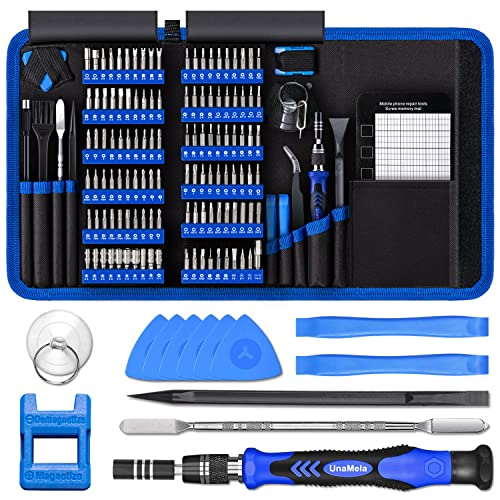
UnaMela PC Building Tool Kit 140-IN-1

BRICKKK PANTASY Desktop PC Computer Building Set

Kernmax 507Pcs Professional Computer Screws Assortment Kit

Piper Computer Kit

Building Your Own Computer Made Easy

ECKDZMY Desktop PC DIY Assembly Screwdriver Kit

ASRock DESKMINI H470W Barebone System
More Details On Our Top Picks
For general desktop work, this kit leans hard into coverage. The 120 precision bits and 19 accessories, including spudgers, magnetizers, ESD tweezers, and magnetic pads, give you the sort of small-tool range that matters during upgrades in a crowded home office.
The Oxford bag storage keeps the pieces grouped instead of rattling around loose, which is a real plus for anyone who opens cases more than once a year. It suits hobby builders, repair-minded households, and anyone who wants one case to handle phones, laptops, and PCs without juggling separate kits.
Strong Points
- Bit variety covers common fasteners found in desktop and device work.
- Magnetic helpers make small screws less annoying to track.
- Organized storage helps you keep the kit ready between jobs.
- Useful beyond PCs, which stretches its usefulness around the house.
Points To Note
- Tool-first kits like this still rely on your patience during delicate work.
- The broad scope helps, though it does not replace purpose-built parts.
Who It Suits Best
Desktop tinkerers who want a single repair kit for routine assembly, maintenance, and mixed electronics work will get the most from it.
Another Choice May Suit
Kernmax 507Pcs Professional Computer Screws Assortment Kit fits better for builders who already have tools and need a deep hardware stock.
This is less about repair and more about understanding how a desktop is laid out. The build set lets you assemble pieces that echo a graphics card, power supply unit, dual SSD docking area, motherboard, and two DDR RAM modules, so the structure feels familiar before you ever open a real case.
For a tech shelf, it has a clean display appeal, almost like a miniature blueprint you can hold. That makes it a good match for adults, students, and hobbyists who like hands-on models, while practical upgraders may want a more tool-centered kit such as the UnaMela set.
Upsides
- Turns PC layout into a hands-on model.
- Shows major desktop components in a memorable way.
- Supports repeat assembly and disassembly without the stress of real hardware.
Small Caveats
- It teaches structure, not actual PC part selection.
- Display focus makes it less useful for urgent repair jobs.
Built With In Mind
Adults and tech enthusiasts who like learning through model building will get the most out of it.
Where A Sibling Pick Shines
UnaMela PC Building Tool Kit 140-IN-1 suits hands-on repair work better, especially for anyone who needs actual drivers and small tools.
Hardware kits live or die on coverage, and this one is built around that idea. With screws, standoffs, and mounting hardware for motherboards, SSDs, hard drives, fans, cases, and optical drives, it covers the small fasteners that often stop a build in its tracks.
In a parts bin beside a workbench, it makes more sense than a random mixed drawer. The trade-off is obvious, though, because it solves fastening needs rather than tool handling, so it pairs best with a screwdriver kit like ECKDZMY when you want the full job covered.
Highlights
- Broad screw assortment handles most desktop fastening jobs.
- Good fit for repair stock, spares, and replacement work.
- Helps prevent delays caused by missing the right standoff or screw.
Trade Offs
- Hardware only, so you still need tools nearby.
- Best kept organized in its own container to avoid sorting headaches later.
Right Fit For
Desktop builders and repair techs who need a deep tray of mounting hardware will appreciate it most.
A Better Fit Elsewhere
ECKDZMY Desktop PC DIY Assembly Screwdriver Kit is the smarter match for anyone who also needs a precision driver and cable ties.
Some kits teach screws, while this one teaches structure and logic together. It includes the parts needed to build a functioning computer around a Raspberry Pi, plus a 7-inch screen, a DIY speaker, and a rechargeable battery, so the finished project feels like a real learning machine rather than a toy shell.
The drag-and-drop coding side, StoryMode projects, and Python path make it especially useful in a home where hands-on learning matters. Younger builders, guided classrooms, and parents who want a project with a clear payoff will get more from this than from the hardware-only sets above.
Bright Spots
- Combines computer assembly with coding practice.
- Includes core parts needed for a functioning build.
- Story-led projects give the learning a clear sequence.
- Good bridge between play and real tech skills.
Areas To Watch
- Learning focus makes it less direct for simple repair tasks.
- The setup will suit guided use more than rushed weekend tinkering.
Feature Rundown
Whose Shelf It Belongs On
Families, young coders, and guided learners who want a build that teaches more than assembly will benefit most.
Look Elsewhere When
UnaMela PC Building Tool Kit 140-IN-1 suits straightforward repair work better because it focuses on real tools instead of lessons.
This guide is the planning-minded option in the group. It walks through part selection, including CPU, GPU, RAM, storage, and motherboard choices, then ties those decisions to performance goals, budget, and future upgrades.
That makes it especially useful before you order anything, which is where many first builds go sideways. For a first-time desktop planner, the step-by-step assembly sections with diagrams can keep the process grounded, while seasoned hobbyists may prefer a more hands-on kit like Kernmax or ECKDZMY.
Reasons To Buy
- Useful before parts are chosen, not just during assembly.
- Explains the core component decisions that shape a build.
- Diagrams make the sequence easier to follow.
- Helps match the machine to a real budget and upgrade path.
Points To Note
- It teaches process, so it does not include physical tools or hardware.
- Hands-on builders may want a companion kit for the actual install.
Perfect Match For
First-time desktop planners and careful upgrader types will get the most from it.
Swap It Out When
Piper Computer Kit fits better for families and younger learners who want a build that leads into coding.
This is the most complete hardware-and-tool bundle in the list, and that matters during a full desktop build. Along with the precision screwdriver, it includes brass hex standoffs, insulating washers, thermal grease, cable ties, and a wide spread of screws for motherboards, SSDs, hard drives, fans, PSU, and GPU mounting.
For a crowded bench or a small apartment desk, having the matching fasteners and the tool in one place cuts down on backtracking. It suits builders who want to finish a new tower or a parts refresh without hunting for a missing standoff halfway through.
Positives
- Tool plus hardware in one package.
- Thermal grease and cable ties help the job feel more complete.
- Coverage spans many common desktop mounting points.
- Good fit for tidy cable management during a fresh install.
Minor Gripes
- More capable than a basic screw kit, so the parts spread may be more than casual users need.
- Best kept organized after use, because small hardware always benefits from careful storage.
The Right Fit
Full desktop builders and upgrade-focused hobbyists will get the clearest value from it.
Reach For A Different Pick When
Building Your Own Computer Made Easy suits you better if you want planning help before the hardware stage begins.
For small desks, the barebone route can be the smartest starting point. This mini/booksize system uses Intel H470 and LGA1200 support, and the source details point to support for 10th and 11th Gen Intel Core processors, dual DDR4-2933 SO-DIMMs up to 64GB, plus multiple display outputs and M.2 expansion.
That mix makes it a strong base for a tight workstation or a compact home office machine. The trade-off is straightforward, because barebone systems still leave part selection and assembly on your shoulders, so it fits experienced builders or careful upgraders more than casual first-timers.
What We Like
- Compact footprint helps on desks with little room to spare.
- Processor and memory support give you real build flexibility.
- Multiple video outputs suit varied monitor setups.
- M.2 support keeps storage expansion cleaner than older layouts.
Worth Noting
- You still need to source the rest of the system parts.
- Best for builders who are comfortable making compatibility checks.
Who Should Grab It
Space-conscious desktop builders who want a small but capable base will appreciate it most.
Where Shoppers Go Wrong
Piper Computer Kit suits learning-focused setups better, while this ASRock barebone is built for a real desktop path.
What Matters Most Before Choosing Build Your Own Pc Kits
Mistakes Worth Dodging
Mismatch is the common trap. A hardware kit can be tidy on paper and still miss the screws, standoffs, or tool types your case needs, while a learning kit can be useless for a same-day upgrade.
Where The Extra Money Goes
Higher-tier kits usually pay for broader hardware coverage, better organization, or more complete learning materials. That extra spend makes sense when you build often, work in tight spaces, or want one package that covers more of the job.
Things Worth Knowing First
Common Shopping Slip Ups
Many shoppers grab a tool set when they really need parts, or the reverse. Match the kit to the job, then check the fastener types, storage style, and whether you want help learning or help assembling.
The Upgrade Payoff
Spending more often buys completeness, not hype. In this category, that usually means fewer missing pieces, better case organization, and a smoother first build.
Frequently Asked Questions
What counts as a Build Your Own Pc Kit?
A kit can mean tools, screws, a barebone base, or a learning system. The shared thread is that it supports the process of assembling a desktop in some way.
Do you need a full hardware kit for a first build?
Not always, but it helps a lot when screws, standoffs, and drivers are missing from your desk. A planning guide can also make the first parts list much easier to handle.
Are educational kits useful for real PC skills?
Yes, especially for learning component names and assembly order. They are less helpful for direct repair work than a tool-and-hardware set.
What should you check before choosing a screw kit?
Look for coverage across motherboard, SSD, hard drive, fan, and case hardware. Storage matters too, because tiny parts get messy fast.
Is a barebone system the same as a finished desktop?
No, a barebone gives you the base, not the full machine. You still need compatible parts and the confidence to install them.
