


Business desktops still make sense when you need stable performance, wired peripherals, and enough ports to keep a desk moving without drama. You’re looking at the right category for office suites, remote admin stations, front-desk setups, and home offices that have outgrown a laptop dock.
The seven picks below cover small-form-factor builds, slimmer towers, and a mini PC for tight spaces. Some lean older but heavily specced, while others are newer and better suited to multi-monitor work or day-long office use.
The Shortlist At A Glance

Dell Optiplex 7050 SFF Desktop PC, i7-7700, 32GB DDR4, 1TB SSD

Dell Tower Desktop, Core Ultra 7-265, 32GB RAM, 1TB PCIe NVMe SSD

HP EliteDesk 800 G2 Business Desktop, i7-6700, 32GB DDR4, 1TB SSD
HP ProDesk 400 G9 SFF Business Desktop Computer, 32GB RAM, 1TB PCIe SSD
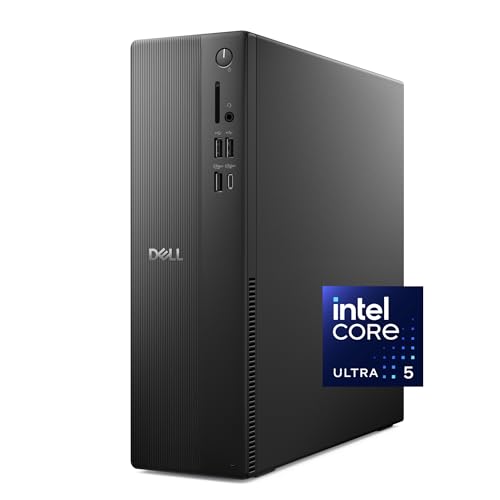
Dell Slim Desktop, Core Ultra 5-225, 16GB DDR5, 512GB SSD

BOSGAME E5 11 Pro Mini PC, Ryzen 5300U, Business Home Office PC
Dell Tower Desktop, Core Ultra 7-265, 16GB DDR5 RAM, Windows 11 Pro
More Details On Our Top Picks
The Dell Optiplex 7050 SFF makes sense in a back office that needs a compact chassis and enough memory to keep spreadsheets, browser tabs, and cloud tools open at once. Its Intel i7-7700 is older silicon, so this is less about cutting-edge speed and more about steady everyday work.
You also get 32GB of DDR4 memory, which helps the system stay calmer under multitasking, plus a 1TB SSD for faster startup and file access than a spinning hard drive. The honest read is that this fits best as a dependable workstation for admin staff, home offices, or small teams that value a small footprint over a flashy tower.
Strong Points
- Small-form-factor case leaves more room under or beside a desk.
- 32GB RAM supports heavier multitasking without feeling cramped.
- 1TB SSD gives you generous local storage for office files.
- HDMI and dual-monitor support help a two-screen setup.
Things To Consider
- That i7-7700 platform is older, so it suits routine office work better than demanding creative apps.
- Renewed machines can vary in cosmetic condition, which is worth checking on the listing.
Core Details
Who It Suits Best
You should look here for admin work, light accounting, and everyday office duties where size matters as much as speed.
Where A Sibling Pick Shines
The Dell Tower Desktop, Core Ultra 7-265, 32GB RAM, 1TB PCIe NVMe SSD suits heavier multitaskers who want a newer platform and stronger expansion headroom.
This Dell tower is the clearest step up in raw platform strength from the Optiplex 7050, mostly because the Core Ultra 7-265 is a newer desktop chip class. That matters in busy offices where you keep video calls, browser windows, and spreadsheet work open at the same time.
The included wired keyboard and mouse make setup straightforward, and Wi-Fi 6 plus Bluetooth give you flexible desk placement. DisplayPort support for up to one 4K display or four FHD screens, with the right daisy-chain capable monitors, is the detail that gives it real workstation appeal.
What We Like
- Newer Core Ultra platform suits heavier day-to-day workloads.
- 32GB RAM gives you breathing room for multitasking.
- 1TB PCIe NVMe SSD keeps boot and file access brisk.
- Wi-Fi 6 and Bluetooth reduce cable clutter.
- Wired keyboard and mouse help you get started quickly.
Points To Note
- Intel UHD Graphics is fine for office output, but it is not aimed at graphics-heavy work.
- The full tower shape needs more desk or floor space than the mini PC in this list.
Feature Card
Who Should Grab It
You’ll get the most from this in a busy office, a consultant’s desk, or a home setup that regularly juggles several apps and monitors.
Look Elsewhere When
The Dell Slim Desktop, Core Ultra 5-225, 16GB DDR5, 512GB SSD makes more sense for smaller workspaces and lighter daily workloads.
HP’s EliteDesk 800 G2 sits in the same practical lane as the Optiplex 7050, but it leans even harder into the familiar small-office formula. The i7-6700 is another older quad-core chip, yet the pairing with 32GB DDR4 and a 1TB SSD gives it enough muscle for routine office apps, remote work, and local file storage.
That mix makes sense for places that want a desktop to stay out of the way and still handle daily loads without fuss. The trade-off is simple: you get a proven platform rather than a modern one, so this is best for dependable office use, not feature chasing.
Highlights
- 32GB memory helps with heavier browser and office multitasking.
- 1TB solid-state storage gives you fast access and plenty of room.
- Small business footprint keeps the desk uncluttered.
- Windows 11 Pro suits work environments that need pro-level controls.
Room For Improvement
- Processor generation is older, so demanding workloads belong elsewhere.
- Renewed hardware can bring cosmetic wear, which is worth checking before you decide.
Who Will Love This
You’ll appreciate this most in a practical office, reception area, or home workstation that mainly handles email, documents, and web tools.
A Better Fit Elsewhere
The HP ProDesk 400 G9 SFF Business Desktop Computer suits shoppers who want a newer connectivity set and dual 4K display support.
The ProDesk 400 G9 looks built for a desk that does more than one thing at a time. Dual 4K display support is the headline detail here, and that’s the sort of spec that matters in an accounting office, a front desk, or any setup where one screen never feels like enough.
USB-C, HDMI, RJ-45 Ethernet, Wi-Fi, and a wired keyboard and mouse round out a very practical package. Compared with the HP EliteDesk 800 G2, this one feels better suited to a modern office stack, even though the source does not spell out the exact processor model.
Best Bits
- Dual 4K display support suits multi-window work.
- USB-C, HDMI, Ethernet, and Wi-Fi cover a wide range of setups.
- 32GB RAM supports busy workdays with lots of tabs open.
- 1TB PCIe SSD helps with fast launches and file access.
Small Caveats
- The listing does not name the CPU model, so performance expectations stay tied to the overall configuration.
- SFF towers can be clean-looking, but rear cable management still takes a little planning.
Details At A Glance
Built With In Mind
You should look at this for office desks that need modern monitor support and a broad port mix without moving into a full workstation tower.
Skip It When
The Dell Slim Desktop, Core Ultra 5-225, 16GB DDR5, 512GB SSD fits better for smaller stations that need less desk space.
The Slim Desktop keeps the newer Core Ultra platform but trims the footprint, which is exactly the kind of balance that helps on a crowded desk. Compared with the Dell Tower Desktop above, you give up some expansion-looking bulk and land in a cleaner, simpler shape.
16GB of DDR5 memory is enough for everyday business use, and DDR5 means the memory standard is newer than DDR4, with the usual benefit of quicker responsiveness in current systems. The 512GB SSD is a more modest storage ceiling, so this works best when most files live in cloud storage or shared drives.
Positives
- Thin footprint suits compact office setups.
- Core Ultra 5-225 gives you a newer processor generation.
- DDR5 memory pairs well with modern work software.
- Wi-Fi 6 and Bluetooth keep cable runs down.
Softer Spots
- 512GB storage is fine for lighter local file loads, but large archives may feel tight.
- Intel UHD Graphics is suited to office output rather than visual-heavy work.
Who Should Grab It
You’ll get the best fit in a small office, shared desk, or home workspace where neat cable routing and modest storage are priorities.
Another Choice May Suit
The BOSGAME E5 11 Pro Mini PC makes more sense for the smallest setups, especially where the case itself needs to disappear behind a monitor.
The BOSGAME mini PC is the clearest space-saver in the group, and that makes it useful in reception counters, behind-monitor mounts, or desks where a full tower would feel oversized. Its Ryzen 5300U is a 4-core, 8-thread chip, so it’s built more for efficient everyday work than for brute-force processing.
The source also points to 16GB of memory and a 1TB M.2 2280 PCIe SSD, plus room to expand storage up to 4TB. You may find that ideal for a home office or light business station, though the compact format naturally asks you to think more carefully about ports, airflow, and cable placement.
Upsides
- Very small chassis saves desk space.
- 4-core, 8-thread Ryzen chip handles daily office tasks efficiently.
- 16GB RAM and 1TB SSD give a useful starting point.
- Storage expansion support adds long-term flexibility.
Areas To Watch
- Mini PC styling can mean tighter attention to ventilation and cable layout.
- It suits routine work best, so heavy multi-app workloads belong on a larger tower.
Perfect Match For
You should look here for a very tight desk, a hidden mounting setup, or a small office that values a minimal footprint above all else.
A Better Fit Elsewhere
The Dell Tower Desktop, Core Ultra 7-265, 32GB RAM, 1TB PCIe NVMe SSD is the safer choice for heavier multitasking and more ambitious office setups.
This tower lands in the same newer family as the higher-specced Dell model, but with 16GB DDR5 instead of 32GB. That makes it a cleaner match for professionals who want the newer Core Ultra 7-265 platform without stepping into a larger memory tier they may not use.
Compared with the Slim Desktop, this version gives you the roomier tower format and Windows 11 Pro, which matters in offices that prefer a more business-oriented setup. The trade-off is obvious, though, because 16GB is fine for most admin work but less forgiving once workloads stack up.
Bright Spots
- Core Ultra 7-265 gives you a modern desktop platform.
- DDR5 memory keeps the system aligned with current hardware trends.
- Windows 11 Pro suits work environments that want pro features.
- Tower form leaves more breathing room than a mini PC.
Worth Noting
- 16GB RAM is adequate for office use, but larger multitasking loads may call for more.
- The larger case still needs real desk or floor space.
Whose Shelf It Belongs On
This is a good fit for office staff, managers, and home professionals who want a current platform without jumping to the heaviest configuration.
Reach For A Different Pick When
The Dell Tower Desktop, Core Ultra 7-265, 32GB RAM, 1TB PCIe NVMe SSD suits you better when several apps stay open all day.
What Matters Most Before Choosing Business Desktop Computers
Wrong Turns To Avoid
Match the processor generation to the job, not just the label on the box. A compact office station can run beautifully with modest power, but a dated chip can feel stretched once you stack video calls, spreadsheets, and browser tabs.
The Upgrade Payoff
Higher-tier models usually cost more because of newer processors, faster memory like DDR5, and stronger display or port support. That upgrade earns its keep in offices that run multiple monitors, heavier multitasking, or tighter device integration.
A Quick Reality Check
Hidden Buying Traps
Port counts matter more than most people expect, especially around dual-monitor desks and wired peripherals. Also watch chassis size, because a mini PC and a tower solve very different space problems.
Where The Extra Money Goes
Premium configurations buy newer platforms, more memory headroom, and cleaner connection options. That extra spend makes sense for shared offices, more active multitaskers, and setups that need to stay useful longer.
Frequently Asked Questions
What makes a business desktop better than a laptop dock setup?
A desktop gives you more ports, more upgrade flexibility, and a steadier home for wired accessories. It also tends to stay put better in shared work areas.
Do you need 32GB RAM for office work?
Not for every desk, but 32GB helps when several apps stay open together. It’s especially useful for browser-heavy workflows and multitaskers.
Is a mini PC strong enough for business use?
Yes, for email, documents, scheduling, and light admin work. It becomes less attractive once you push into heavier multitasking or more demanding software.
Why does storage type matter so much?
An SSD starts and opens files faster than a mechanical drive. That speed shows up every workday, not just on paper.
Should you choose Windows 11 Home or Windows 11 Pro?
Home works for many everyday setups, especially smaller offices and households. Pro fits better in work environments that want extra business controls.
