


Business desks ask a lot from a keyboard and mouse set. You want quiet keys, steady wireless pairing, comfortable palm support, and a layout that won’t slow you down during long stretches of email, spreadsheets, or video calls.
This roundup focuses on office-friendly comboes that suit solo setups, shared workstations, and IT rollouts. You’ll see slim desk-first designs, fuller performance sets, and a few enterprise-leaning options with stronger connection features.
Quick Look At The Shortlist

SABLUTE MA41 Quiet Ergonomic Wave Keyboard Set
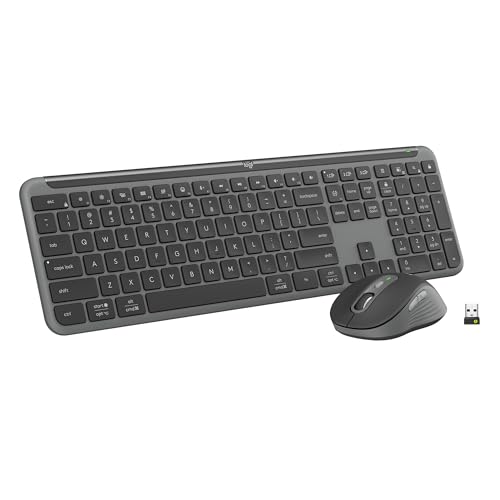
Logitech MK955 Signature Slim Wireless Keyboard Mouse Combo

Logitech MK850 Performance Wireless Keyboard and Mouse Combo

Logitech Signature MK650 Combo for Business Keyboard and Mouse

Logitech Signature MK650 Combo for Business Keyboard and Mouse

Logitech MK370 for Business Wireless Keyboard and Mouse Combo

Logitech MX Keys Combo for Business Keyboard and Mouse

Logitech Signature Slim MK955 for Business Keyboard Mouse Combo
More Details On Our Top Picks
The SABLUTE MA41 leans into comfort first, with a wave-style layout and a soft leather palm rest that matter most during long stretches at a desk. The 30 dB quiet claim points to subdued key noise, which suits shared offices and late-night work at home.
The dual-system switch for Windows and Mac also makes it easier to move between work machines without juggling separate peripherals. That flexibility helps teams and home-office setups, though the design still feels more about comfort than compact travel.
Strong Points
- Wave-shaped key layout supports a more natural hand position.
- Leather palm rest adds softer contact than hard plastic.
- Quiet key action suits open offices and video calls.
- Windows and Mac switching helps mixed-device desks.
Things To Consider
- The ergonomic shape takes more desk space than a flat slab.
- Leather-touch surfaces usually need a quick wipe to stay clean.
- The comfort-first build favors desk use over travel bags.
Feature Snapshot
Who Will Feel Right At Home
Office staff, home-office professionals, and anyone spending hours on email or documents will get the most from this set.
Where A Sibling Pick Shines
Logitech MK955 Signature Slim Wireless Keyboard Mouse Combo suits you better when you want a slimmer footprint and a more modern desk profile.
Slim desks benefit from the MK955 immediately. The low-profile keyboard keeps the layout visually light, while the mouse and shortcut support lean into day-to-day office control without adding bulk.
You’ll likely appreciate the recycled-plastic construction if sustainability matters in your procurement notes, but the bigger appeal is the laptop-style typing feel and the customizable workflow. It suits modern workstations where the keyboard needs to disappear into the setup rather than dominate it.
Highlights
- Thin profile keeps crowded desks from feeling busy.
- Laptop-style key feel suits users who prefer shallow travel.
- Shortcut and customization support help trim routine tasks.
- Fast, precise scrolling suits spreadsheet and browser work.
- Recycled-plastic build adds a material story worth noting.
Worth Noting
- The slim shape may feel less cushioned than bulkier office sets.
- Shallow typing often suits laptop converts more than deep-key traditionalists.
Who Should Grab It
Desk-focused professionals who want a cleaner look and a light typing touch will feel at home here.
Another Choice May Suit
SABLUTE MA41 Quiet Ergonomic Wave Keyboard Set is the better fit for long typing sessions that call for a softer wrist landing.
The MK850 pushes harder on comfort and multitasking than the slimmer picks above it. A full-size keyboard, curved keyframe, cushioned palm rest, and contoured mouse make sense for desks that see long document days and constant tab switching.
Hyper-fast scrolling is the detail that stands out for spreadsheet-heavy work, and multi-device switching fits anyone moving between a computer, tablet, and phone. The trade-off is size, because this set is built for a proper desk rather than a cramped corner.
Upsides
- Full-size layout gives you room for data entry and shortcuts.
- Cushioned palm rest helps longer sessions feel less rigid.
- Curved keyframe and contoured mouse support a steadier hand position.
- Multi-device switching suits mixed-device workdays.
Room For Improvement
- The footprint is larger than the slimmer MK955 and MK650 options.
- Its desk-first shape is less handy for frequent carry-around use.
Best Suited To
Analysts, admins, and desk-bound multitaskers will get the most from this set’s full-size layout.
Look Elsewhere When
Logitech MK370 for Business Wireless Keyboard and Mouse Combo fits better for simpler office rollouts that value ease over extra comfort shaping.
The MK650 is the kind of office combo that makes sense once deployment matters as much as comfort. Logi Bolt support gives IT teams a stronger wireless story, and the combo is aimed at long workdays without asking staff to relearn a fresh layout.
It also gives you connection flexibility, since the product is built around both receiver-based use and Bluetooth Low Energy support. That mix helps in mixed-device offices, though the small-mouse format may feel compact if you prefer a fuller grip.
Best Bits
- Logi Bolt support suits managed office environments.
- Multiple connection paths improve day-to-day compatibility.
- The small mouse keeps the desk layout tidy.
- Comfort-first positioning suits longer work sessions.
Points To Note
- The compact mouse may not suit larger hands as well as a bigger shell.
- Business-focused features matter more than flashy design.
Core Details
Built With In Mind
IT teams and office staff who need reliable deployment features will benefit most here.
Where Shoppers Go Wrong
Logitech MX Keys Combo for Business Keyboard and Mouse suits you better when the mouse sensor detail and premium input feel matter more than rollout simplicity.
The off-white MK650 keeps the same business-first structure as the graphite version, but the lighter finish changes the visual tone of the desk. In bright offices or home setups with lighter furniture, that can look cleaner without changing the core work experience.
You still get the enterprise-leaning Logi Bolt story and the same small-mouse format, so this pick is more about appearance than function. That makes it a sensible match for teams that want consistency across stations without a dark hardware stack.
Bright Spots
- Lighter finish blends well with pale desks and shared spaces.
- Logi Bolt support keeps the business focus intact.
- Small mouse design helps keep the footprint neat.
Softer Spots
- The color choice changes style more than daily performance.
- As with the graphite version, the mouse size stays compact.
Whose Shelf It Belongs On
Style-conscious offices and home workstations with light décor will get the most from this version.
A Better Fit Elsewhere
Logitech Signature MK650 Combo for Business Keyboard and Mouse – Graphite is the cleaner choice for darker desks and more neutral fleet standardization.
The MK370 is aimed squarely at office deployment, and that plain purpose is part of its appeal. A full-size spill-resistant keyboard, silent-touch mouse, eight shortcut keys, and a pre-paired Logi Bolt receiver make it easy to place across workstations with less fuss.
Compared with the MK650 pair, this combo feels more straightforward and less focused on premium comfort shaping. For support teams, classroom-like office areas, or shared desks, that simplicity is often the point.
Reasons To Buy
- Full-size layout works well for general office tasks.
- Spill-resistant keyboard adds a practical layer for busy desks.
- Silent-touch mouse keeps nearby work areas calmer.
- Eight shortcut keys help cut common routine steps.
Small Caveats
- The straightforward design skips the more sculpted feel of the MK850.
- Shared-office gear like this still needs basic cleaning and upkeep.
Made For
IT-managed offices and teams that need simple, repeatable rollouts will get the most from this combo.
Where Another Pick Shines
Logitech MK850 Performance Wireless Keyboard and Mouse Combo suits you better when comfort shaping and multi-device movement matter more than deployment simplicity.
The MX Keys Combo sits at the premium end of this roundup, and the mouse details explain why. Quiet Click technology lowers switch noise, while the 8000 DPI optical sensor is built for precise tracking, even on glass, which matters on mixed desk surfaces.
That level of input control suits power users, design-heavy workflows, and anyone who bounces between demanding apps all day. The trade-off is cost and complexity, so this is the set to reach for only when the extra control really earns its keep.
Standout Traits
- Quiet Click mouse action keeps desk noise low.
- 8000 DPI tracking supports precise cursor control.
- Glass-tracking ability helps on less predictable surfaces.
- Premium feel suits dense workdays and frequent switching.
Areas To Watch
- The premium tier makes more sense for heavier daily use.
- Its feature set is richer than many basic office desks need.
Details At A Glance
The Right Fit
Power users who want quieter clicks and finer pointer control will feel the premium logic here.
Skip It When
Logitech MK370 for Business Wireless Keyboard and Mouse Combo is the more sensible choice for simple office deployment and lower-fuss general use.
The MK955 blends the slim look of the MK955 line with a contoured mouse and laptop-style typing, so it lands between visual polish and practical office use. Precise scrolling and fast scrolling both matter here, especially for desk work that moves between documents and browser tabs.
Multi-device switching and customizable shortcuts help it fit a modern workstation, and that makes it a neat match for people who hop between several screens or apps. It feels a little like a tailored jacket, clean and composed, though the real value is in the layout rather than decoration.
Positives
- Slim shape keeps the desk looking open.
- Contoured mouse gives a more natural hand fit.
- Laptop-style typing suits users who prefer shallow key travel.
- Precise and fast scrolling help with everyday navigation.
- Multi-device switching supports modern office workflows.
Honest Caveats
- The slim form is less plush than fuller comfort-focused sets.
- Shallow typing will suit some hands better than others.
Perfect Match For
Professionals who want a cleaner desk look without giving up shortcut flexibility will benefit most.
Where Shoppers Go Wrong
Logitech MK850 Performance Wireless Keyboard and Mouse Combo is the stronger match for anyone who wants more cushioned desk comfort.
What Matters Before You Choose A Business Keyboard And Mouse Combo
Wrong Turns To Avoid
Don’t focus only on wireless pairing and ignore key shape, mouse size, and desk footprint. A compact set can feel neat, then become cramped during long spreadsheet days.
The Upgrade Payoff
Higher-tier comboes usually spend more on comfort shaping, quieter switches, better sensors, and stronger connection options. That extra cost tends to make sense for heavy daily use, shared offices, or desks that run several devices.
Things Worth Knowing First
Common Shopping Slip Ups
Shortlists often miss the real work pattern. A full-size set helps data entry, while a slim set fits smaller desks and cleaner layouts.
When Paying More Pays Off
Spending up makes sense for long hours, mixed-device workflows, and office rollouts that need easier deployment. The added value is usually in comfort, software control, and stronger connection features.
Frequently Asked Questions
What makes a business combo different from a basic home set?
Business-focused comboes usually lean into deployment ease, steadier wireless options, and office-friendly durability cues. They also tend to give more thought to comfort over full workdays.
Does a slim keyboard work well for long typing sessions?
It can, especially for people who already like laptop-style keys. Writers and admins who want deeper travel often prefer a fuller board.
Why do some comboes use Logi Bolt?
Logi Bolt is built around office-minded wireless connections and managed environments. It matters most in workplaces that want easier rollouts and tighter device control.
Is a larger mouse always better?
No, because hand size and desk space change the answer. A smaller mouse works well for tidy workstations, while a fuller shell can feel better during long sessions.
Which combo makes sense for mixed Mac and Windows desks?
The SABLUTE MA41 is the clearest fit here because it explicitly supports both systems. It suits shared spaces where the keyboard may move between platforms.
