


You need a scanner that fits the pace of your day, not one that adds another chore. The right pick keeps receipts, contracts, and stack after stack of forms moving into digital files without turning setup into a second job.
This roundup leans toward office scanners and one barcode option for point-of-sale use, so you can match the tool to the task. Some models favor speed and large feeders, others focus on small desks, simple setup, or tighter Windows compatibility.
The Shortlist At A Glance

Epson RapidReceipt RR-620W Wireless & USB Desktop Color Duplex Scanner
Plustek PS186 Desktop Document Scanner 50-Page ADF

ScanSnap iX2500 Wireless or USB High-Speed Document Scanner, Black
Canon imageFORMULA R30 Office Document Scanner

Epson Workforce ES-C220 Compact Document Scanner Duplex 20-pg ADF

NETUM CS7501 QR Code Scanner Bluetooth Barcode Scanner

ScanSnap iX2500 Wireless or USB High-Speed Document Scanner, White

ScanSnap iX2500 Premium Wireless or USB High-Speed Document Scanner
More Details On Our Top Picks
The RR-620W is built for desks that see receipts, invoices, and forms every day. The 4.3-inch color touchscreen gives you a direct control point, while the 100-page auto document feeder keeps larger stacks from becoming a manual slog.
Wireless and USB connectivity cover two common office setups, and duplex scanning means both sides of a page move through in one pass. For Mac and PC households, that flexibility matters, though the denser feature set makes it better suited to organized workstations than a bare-bones home corner.
Strong Points
- Color touchscreen makes common tasks easier to reach.
- 100-page feeder helps with longer filing sessions.
- Duplex scanning cuts down on page handling.
- Wireless and USB support fits different desk layouts.
- Works across Mac and PC setups.
Things To Consider
- The feature set is more involved than a plain entry scanner.
- The larger footprint suits a dedicated workspace better than a tight shelf.
Feature Card
Who It Suits Best
You benefit most from this scanner in a small office that handles frequent receipts and mixed paperwork.
Where A Sibling Pick Shines
Canon imageFORMULA R30 suits you better when you want a simpler plug-and-scan routine with less menu work.
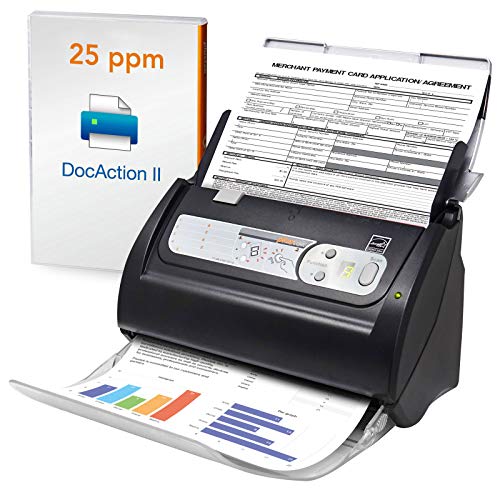
The PS186 keeps the focus on document handling rather than showroom polish. A 50-page auto document feeder is enough for routine office batches, and the Windows 7 through 11 compatibility makes it feel aimed at established PC workstations.
The useful part here is the software side, because the source points to searchable PDF output, OCR, barcode handling, and one-touch favorites for repeat jobs. That mix is handy for filing departments and admin desks, though the Intel and AMD limit means mixed computer fleets need a closer look.
What We Like
- 50-page feeder handles everyday document runs.
- OCR support helps turn scans into searchable files.
- Barcode handling can speed document sorting.
- One-touch favorites reduce repeat setup work.
Worth Noting
- Windows-only support narrows where you can place it.
- Intel and AMD mention means platform checking matters before setup.
- Best kept where the scanner can stay connected full-time.
Who Should Grab It
You fit this scanner best when your office runs on Windows desktops and you want dependable paper-to-file conversion.
Look Elsewhere When
ScanSnap iX2500 suits you better if you want faster-feeling controls and a larger feeder for heavier daily loads.
The black iX2500 has the kind of presence that fits a serious desk without looking severe. Its 100-sheet feeder and 45-pages-per-minute throughput put it in a different lane from the smaller Epson ES-C220, and the large touchscreen points to a smoother daily workflow.
Wireless or USB connection gives you placement flexibility, which matters in a shared office or a busy home office. The trade-off is simple, this is a more substantial scanner than a starter model, so it earns its desk space best when you scan in batches instead of once in a while.
Upsides
- 100-sheet feeder suits longer document runs.
- 45 pages per minute supports brisk throughput.
- Large touchscreen keeps control close at hand.
- Wireless and USB options cover different setups.
- Black finish looks restrained on an office desk.
Small Caveats
- Its size makes more sense on a dedicated work surface.
- The feature set feels fuller than some casual users need.
At A Glance
Made For
You get the most from this model in a fast-moving office where scanning is part of the daily routine.
Another Choice May Suit
Canon imageFORMULA R30 is the easier match for you if simple plug-and-scan setup matters more than speed and screen size.
The R30 is the least fussy option in this group, and that matters more than flashy extras for many small offices. Plug-and-scan behavior means you can get moving without software installation, which saves time during setup and makes the scanner easier to hand off to someone else.
Duplex scanning and the auto document feeder cover the day-to-day paper load, from forms to multi-page packets. Compared with the richer screens on the Epson RR-620W and ScanSnap iX2500 models, the R30 is more about straightforward utility than menu depth, and that is a fair trade for many desks.
Highlights
- No software installation keeps setup lean.
- Duplex scanning handles both sides in one pass.
- Auto feeder helps with multipage documents.
- Simple operation suits shared office use.
Areas To Watch
- Less screen-driven control than the more advanced picks.
- Best for straightforward scanning, not deep customization.
Best Suited To
You suit this scanner best in a small office that wants dependable document capture with minimal setup friction.
Swap It Out When
Plustek PS186 makes more sense if searchable PDFs, OCR, and barcode handling matter more to your filing process.
The ES-C220 is the sort of scanner that makes a cramped desk feel more usable. Epson’s compact design claim is the key story here, and the duplex function plus 20-page feeder keep it focused on everyday paper capture rather than marathon jobs.
That smaller feeder is the trade-off, so this model fits home offices and light business use better than document-heavy front desks. It is a tidy choice for anyone who wants a scanner that does its work and then gets out of the way.
Bright Spots
- Compact footprint suits tight work surfaces.
- Duplex scanning saves page flipping.
- 20-page feeder handles regular small batches.
- Simple shape makes placement easier.
Points To Note
- The feeder size is modest for large backlogs.
- Light cleanup and careful stacking help it stay convenient over time.
Whose Shelf It Belongs On
You fit this model best in a home office or side desk where space matters as much as scan quality.
Where A Sibling Pick Shines
Epson RapidReceipt RR-620W is the better match if you need a larger feeder and more control for frequent receipt sorting.
The CS7501 shifts the roundup from document scanning into barcode work, which is useful for checkout counters and inventory tasks. The physical power switch and battery indicator are small but practical touches, especially for a counter setup that sees constant starts and stops.
Bluetooth mode and 2.4G wireless mode give it placement flexibility, while the CMOS sensor supports higher-detail barcode capture. That said, it’s not a document scanner, so the fit is narrower than the office-focused picks above, and that’s fine as long as your use case is point of sale.
Reasons To Buy
- Bluetooth and 2.4G modes support different connections.
- Battery indicator helps you track remaining power.
- Physical switch makes mode changes straightforward.
- Portable form suits mobile counter work.
Trade Offs
- It serves barcode tasks, not paper archiving.
- Best kept close to the register or inventory station.
Right Fit For
You fit this scanner best in retail, stockroom, or other barcode-heavy settings where portability matters.
Where Shoppers Go Wrong
ScanSnap iX2500 or Epson RapidReceipt RR-620W make more sense for paperwork-heavy offices that need document feeders and duplex scanning.
The white iX2500 follows the same high-capacity formula as the black version, but the finish changes the tone of the desk. In a bright office or a clean home workspace, that lighter color blends in more easily than the black model, while the 100-sheet feeder still gives you serious batch capacity.
The premium feel comes from the same large touchscreen and 45-pages-per-minute pace, so you are choosing between aesthetics and desk palette rather than different core performance. If the rest of your workspace leans light and tidy, this version looks like it belongs there.
Best Bits
- White finish suits lighter office interiors.
- 100-sheet feeder covers heavy scan sessions.
- 45 pages per minute keeps work moving.
- Large touchscreen supports direct interaction.
Minor Gripes
- The appeal is partly visual, so the case for it depends on your space.
- Its larger body still asks for a fixed home on the desk.
Perfect Match For
You fit this model best in a neat office where the scanner is visible rather than tucked away.
Reach For A Different Pick When
Epson Workforce ES-C220 is the better fit for a very tight desk where compact dimensions matter more than a large feeder.
The Premium iX2500 keeps the same large-feeder, fast-scan foundation as the other iX2500 versions, but its role is a little more elevated in feel. Quality materials and the faceted shell give it a more finished look, which matters in an office where the scanner sits in plain sight.
You still get the 100-sheet feeder, 45-pages-per-minute scan pace, and large touchscreen, so the upgrade story is really about presentation and build feel. That makes it appealing for managers, shared executive spaces, or anyone who wants the scan station to look as deliberate as the rest of the room.
Positives
- Premium materials lend it a more finished presence.
- 100-sheet feeder supports long scan runs.
- 45 pages per minute helps handle heavier workloads.
- Large touchscreen keeps interaction clear and direct.
Honest Caveats
- The premium angle matters most when the scanner stays visible.
- Its size and ambition suit a fixed work area.
Who Will Love This
You fit this scanner best when your office values a polished look as much as document throughput.
Skip It When
Canon imageFORMULA R30 is the cleaner fit for you if the priority is quick setup over premium materials and a larger control surface.
What To Weigh Before Choosing Business Scanners
Document Volume And Feed Capacity
A 20-page feeder suits light home-office work, while a 100-sheet hopper fits recurring office batches with less reloading. Match the feeder to the size of your paper stack, or you’ll spend more time feeding pages than filing them.
Setup Style And Operating System
Some scanners are ready for quick plug-and-scan use, while others lean on software, OCR, or barcode tools. Windows-only support can be a real constraint in mixed-device workplaces, so check platform fit before you commit.
Desk Space And Placement
Compact scanners work well on narrow desks, shared shelves, or front-counter stations. Larger models reward a permanent spot near a computer or dock, where their width and feeder height are less of a nuisance.
Before You Click Through
Common Shopping Slip Ups
People often overbuy speed and underbuy compatibility. A scanner that looks powerful can still be awkward if it does not match the computer setup or the paper volume you handle most.
Where The Extra Money Goes
Higher-tier models usually pay for larger feeders, cleaner controls, stronger build quality, and more polished displays. That extra spend makes sense for daily scanning, not for occasional file cleanup.
Frequently Asked Questions
What makes a business scanner different from a home model?
Business models usually focus on feeder capacity, duplex scanning, and faster document handling. They are built to cope better with repeat office work.
Is a larger feeder always the better choice?
Not always, because a big feeder only helps when you scan larger stacks often. Smaller desks and lighter workloads usually do fine with a compact model.
Do you need OCR in a business scanner?
OCR matters when you want searchable text instead of image-only files. For archiving contracts and invoices, that feature saves time later.
Is wireless connection worth paying for?
Wireless helps when the scanner has to sit away from the main computer or be shared across a workspace. A direct USB link is still the simpler route for many desks.
Which pick suits a very small office best?
Canon imageFORMULA R30 and Epson Workforce ES-C220 are the easiest fits for tight spaces. The better one depends on whether you want simpler setup or a smaller footprint.
