


You need Cad Computers that can handle large assemblies, multiple design tools, and the everyday drag of file sync, browser tabs, and calls without turning sluggish. The right tower or workstation keeps your workflow steady, with enough memory, storage, and expansion room to avoid an early replacement.
This roundup focuses on desktop-class options for offices, home studios, and technical workspaces. You’ll see where a compact business tower makes more sense than a heavier workstation, and where a graphics card alone can be the smarter upgrade.
Quick Look At The Shortlist

Dell OptiPlex 7070 SFF Desktop Computer PC
HP Pro Tower 290 G9 Business Desktop
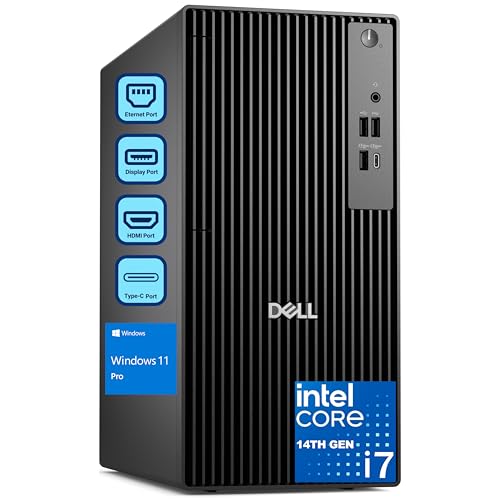
Dell Pro Tower Desktop Computers i7-14700

Dell Precision Tower 5820 Workstation W-2123

Dell Pro Tower Business Desktop QCT1250 2026 Edition

Dell 2025 Slim Business Desktop i9-12900K

HP Z4 G4 Workstation Xeon W-2133

PNY NVIDIA RTX A4500 20GB GDDR6
More Details On Our Top Picks
The OptiPlex 7070 SFF leans into practical desk use, not drama. A small form factor case keeps it easy to park beside a monitor, while the 8-core i7-9700, 32GB of DDR4 memory, and 1TB NVMe solid-state storage give you a broad buffer for CAD files, browser tabs, and office apps.
That mix suits home offices and busy workstations where uptime matters more than flash. Compared with the leaner HP Pro Tower 290 G9, this Dell brings more memory out of the gate, so you may find it more comfortable for heavier multitasking and larger project folders.
What We Like
- Eight CPU cores help with model work and background tasks at the same time.
- 32GB RAM gives you room for large assemblies and multiple open applications.
- 1TB NVMe storage shortens boot and load waits for project files.
- Five USB 3.1 ports and four USB 2.0 ports make peripheral hookup easier.
Things To Consider
- The renewed condition makes cosmetic variation more likely than on a new unit.
- The small chassis is tidy, but expansion room is more limited than on larger towers.
Feature Rundown
Who It Suits Best
Office users and CAD hobbyists with a crowded desk get the most from this one.
Where A Sibling Pick Shines
The Dell Pro Tower Desktop Computers i7-14700 fits heavier multitaskers who want more raw core headroom.
This HP keeps the formula straightforward, which is often the right move for smaller teams. The Core i5-12500, 16GB of memory, and 512GB SSD cover everyday design work, light rendering, and the usual pile of documents without feeling overbuilt.
Wi-Fi 6 and Bluetooth 5.3 make it easier to place on a modern office network with fewer cable headaches. Compared with the Dell OptiPlex 7070 SFF, it starts lighter on memory, but the newer wireless stack and dual-monitor support make it a tidy fit for shared desks.
Highlights
- Core i5-12500 gives you solid midrange performance for daily work.
- Wi-Fi 6 helps keep wireless office setups more predictable.
- Bluetooth 5.3 is useful for headsets and input devices.
- Dual-monitor support suits spreadsheet-heavy and CAD-adjacent work.
Worth Noting
- 16GB RAM is workable, though larger assemblies may want more breathing room.
- 512GB storage can fill sooner once project archives and assets stack up.
At A Glance
Made For
Small office setups and straightforward CAD work suit this tower best.
A Better Fit Elsewhere
The Dell Pro Tower Desktop Computers i7-14700 is the stronger call for heavier multitasking and larger file loads.
The 20-core i7-14700 pushes this tower toward serious multitasking territory. That matters in a CAD environment where rendering, source control, reference docs, and messaging can all sit open at once without the machine feeling pinned down.
It does not lean on flashy extras, and that’s part of the appeal. Compared with the OptiPlex 7070, it offers newer-generation processing muscle, though the memory stays at 16GB, so heavy project stacks may still benefit from a future upgrade.
Strong Points
- 20 cores give you broad parallel-processing headroom.
- 1TB SSD leaves useful space for active projects and libraries.
- The tower format tends to be easier to service than compact builds.
- Good fit for development tools, design apps, and everyday work together.
Small Caveats
- 16GB RAM is the main limiter for very large scenes or assemblies.
- The source data does not list extra connectivity details, so port planning stays important.
Core Details
The Right Fit
Technical users who keep many programs open at once will get the most from this tower.
Where Another Pick Suits Better
The HP Z4 G4 Workstation is the stronger choice for people who want a more workstation-style hardware mix.
This Precision tower has the kind of parts mix that suits technical work without feeling excessive. The Xeon W-2123, 64GB of RAM, 1TB NVMe storage, and Quadro P2000 graphics point toward drawing, visualization, and large working sets rather than casual office duty.
In a drafting room or a home studio with big project archives, that balance starts to matter quickly. Compared with the Dell Pro Tower Desktop Computers i7-14700, this one gives you more memory and workstation graphics, but less modern CPU scale for broad multitasking.
Upsides
- 64GB memory gives you generous breathing room for heavy files.
- Quadro P2000 graphics fit software that benefits from workstation-class GPU support.
- NVMe storage helps active projects open quickly.
- The Precision line usually makes sense for technical desks and studio corners.
Areas To Watch
- The six-year-old CPU platform is less current than newer towers.
- Renewed hardware can vary in exterior wear, so inspection on arrival matters.
- The design is more workstation-heavy than space-saving.
Details At A Glance
Built With In Mind
Design, drafting, and visualization work suit this tower better than everyday office chores.
Look Elsewhere When
The Dell Pro Tower Business Desktop QCT1250 fits a newer office setup that needs a fresher CPU platform.
The QCT1250 reads like a sensible 2026 office tower, not a showpiece. Its Core i5-14500, 16GB of DDR5 memory, and 512GB SSD hit a modern middle ground, and the DDR5 platform should matter to anyone who keeps a desktop for years rather than seasons.
The 5.0GHz peak clock gives it extra snap for bursty tasks, and Windows 11 Pro fits managed work environments better than a home-only setup. Compared with the HP Pro Tower 290 G9, this Dell feels more forward-looking on memory and CPU platform, though the storage is still modest.
Bright Spots
- DDR5 memory gives the tower a more current foundation.
- 14-core, 20-thread CPU handles mixed office workloads smoothly.
- Windows 11 Pro fits business admin and device management needs.
- It should age more gracefully than earlier DDR4-based towers.
Points To Note
- 512GB storage is fine for standard work, though asset-heavy CAD libraries can outgrow it.
- The source data does not list extra ports or expansion details.
Feature Snapshot
Whose Shelf It Belongs On
Office professionals who want a current business tower without overcommitting on size will like this one.
Swap It Out When
The Dell OptiPlex 7070 SFF makes more sense for someone who wants more included storage out of the box.
Quiet desktops matter more than most spec sheets admit, especially beside a microphone or in an open office. This slim Dell pairs an i9-12900K, 32GB of DDR5 memory, and 1TB PCIe SSD storage, so it has the raw muscle to keep up while staying visually restrained.
Dual 4K monitor support makes it easier to spread drawings, code, or reference material across two high-resolution screens. Compared with the Dell Pro Tower Business Desktop QCT1250, this model leans harder into performance and display output, though the source data gives you less clarity on expandability.
Reasons To Buy
- Slim chassis takes up less desk space than a full tower.
- Ultra-quiet design suits shared offices and recording-adjacent rooms.
- 32GB DDR5 memory helps with heavier multitasking loads.
- Dual 4K monitor support benefits wide workspaces and detailed viewing.
- Wired keyboard and mouse are included, so setup feels more complete.
Room For Improvement
- The slim body can mean less breathing room for future internal upgrades.
- No webcam or display port details appear in the source data.
Technical Sheet
Perfect Match For
Desk-bound professionals who want strong performance without a bulky tower will appreciate this design.
Reach For A Different Pick When
The HP Z4 G4 Workstation fits heavier workstation-style loads and larger internal storage mixes better.
The Z4 G4 gives you the sort of storage mix that many workstations use for a reason. A 512GB NVMe SSD can keep current projects responsive, while the 2TB hard drive gives you deeper room for archives, exports, and less urgent files.
That setup pairs well with the Xeon W-2133, 64GB of RAM, and Quadro P400 graphics for users who keep a lot of assets on hand. Compared with the Dell Precision Tower 5820, this HP feels more storage-rich on paper, though the graphics tier stays modest.
Best Bits
- 64GB RAM supports large files and broader multitasking.
- NVMe SSD plus 2TB HDD gives both speed and archive space.
- Quadro P400 suits technical software that values workstation graphics.
- USB 3.1 support helps with faster peripherals and external drives.
Softer Spots
- The six-core Xeon is older than the newest desktop CPUs here.
- A renewed workstation may show signs of prior use on the chassis.
- The 2GB graphics memory is modest for newer visual workloads.
Feature Card
Who Should Grab It
Project-heavy users who need both fast access and deep file storage will benefit most here.
Another Choice May Suit
The Dell 2025 Slim Business Desktop i9-12900K fits people who care more about a quieter, thinner desk footprint.
Sometimes the cleanest Cad Computers upgrade is not a whole new tower, it’s the graphics card. The RTX A4500 brings 20GB of GDDR6 memory and Ampere architecture to a workstation build, which is a serious step for users whose software leans hard on GPU capacity.
That makes it a natural match for people who already have a strong CPU and want more breathing room in visual workloads. Compared with the HP Z4 G4 or Dell Precision 5820, this card is the part to consider when graphics output, viewport fluidity, or render-side headroom is the main pinch point.
Positives
- 20GB of video memory gives complex projects extra room.
- Workstation OEM design suits professional desktop builds.
- Ray tracing support helps with modern visual workflows.
- Best used as a focused upgrade rather than a whole-system replacement.
Minor Gripes
- You need a compatible desktop platform, so installation planning matters.
- Its value depends heavily on whether your software can use the extra GPU capacity.
Core Details
Who Will Love This
GPU-heavy CAD users and 3D workstations with an available expansion slot are the right match here.
Skip It When
The Dell OptiPlex 7070 SFF is the better fit for small desks that cannot accommodate a discrete card upgrade.
What Matters Most Before Choosing Cad Computers
Hidden Buying Traps
Memory gets ignored too often. For CAD work, 16GB can feel fine until project files, browsers, and reference tools stack up, so the safer move is matching RAM to the size of your jobs.
The Upgrade Payoff
Higher-tier models usually cost more because of newer CPUs, larger memory pools, workstation graphics, and more generous storage mixes. That extra spend makes sense for daily design work, not just occasional editing.
A Quick Reality Check
Common Shopping Slip Ups
Desktop footprint is another common miss. A slim tower suits a tight desk, while a full workstation makes more sense when you want easier service and more internal room.
Where The Extra Money Goes
Ports, dual-monitor support, and SSD type matter too. A machine with the wrong mix can slow your setup before the processor even becomes a problem.
Frequently Asked Questions
How Much RAM Makes Sense For Cad Computers?
16GB works for light to moderate projects and general office work. 32GB or more feels safer once assemblies, render tools, or several apps stay open together.
Is A Workstation Always Better Than A Business Tower?
No, because workstation parts pay off most in heavier technical work. A business tower can be the smarter call for everyday drafting and office tasks.
Does Storage Type Matter That Much?
Yes, because an NVMe SSD keeps loads and saves brisk. A second hard drive can still help when you need archive space more than speed.
Should You Prefer Newer CPUs Over More Cores?
Both matter, but the right balance depends on your software. Broad multitasking benefits from more cores, while some design tools respond better to faster single-core behavior.
Is A Graphics Card Necessary?
Not for every setup, especially lighter 2D work. For heavier viewport loads and 3D tasks, a workstation GPU can make a meaningful difference in day-to-day use.
