


Cad work pushes a desktop in ways casual office tasks never do, from large model files to long sessions with multiple monitors and heavy plug-ins. You need enough CPU headroom, enough memory, and the right mix of ports so the machine stays responsive instead of bogging down right when a file gets dense.
This roundup focuses on compact towers, mini workstations, and a few fuller towers that make sense for drafting, 3D work, and daily production. You’ll see where a renewed business desktop is enough, where a newer chip earns its keep, and where a workstation-style port layout matters more than raw speed alone.
The Shortlist At A Glance

Dell Optiplex 7050 SFF Desktop PC Intel i7-7700 32GB DDR4 1TB SSD

Dell OptiPlex 7070 SFF Desktop PC Intel i7-9700 32GB DDR4 1TB NVMe SSD
GEEKOM AX8 Max Silent Mini PC Ryzen 7 8745HS 16GB DDR5 1TB SSD

Dell OptiPlex 7040 SFF i7-6700 32GB DDR4 1TB NVMe SSD
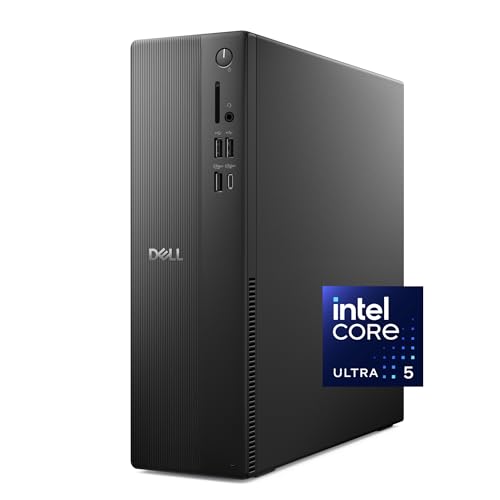
Dell Slim Desktop Intel Core Ultra 5-225 16GB DDR5 512GB SSD

MINISFORUM MS-01 Mini Workstation Intel Core i9-13900H 32GB DDR5 1TB SSD
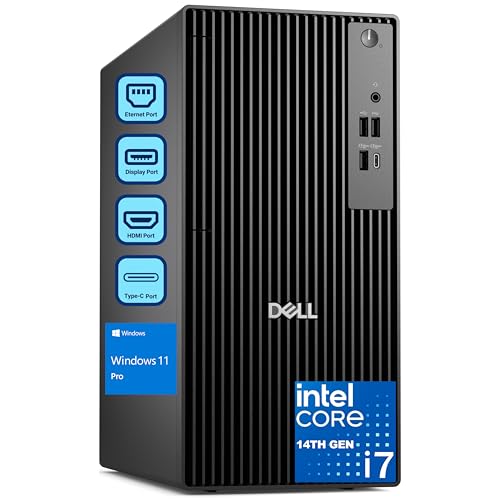
Dell Pro Tower Desktop Computers Intel i7-14700 16GB RAM 1TB SSD

Dell Precision Tower 5820 Workstation W-2123 64GB 1TB NVMe P2000
More Details On Our Top Picks
A renewed OptiPlex like this makes sense for a drafting bench that needs steady behavior more than flashy hardware. The 32GB of DDR4 memory and 1TB SSD give you room for larger projects, cached assets, and quick file access, while the small form factor keeps the case from taking over a crowded desk.
The older i7-7700 is the trade-off, so you should see it as a practical workstation for lighter CAD, office apps, and dual-monitor setups rather than a machine for the newest heaviest assemblies. For studios that value a compact footprint and predictable layout, it’s a sensible place to start.
Strong Points
- 32GB RAM helps with multitasking across CAD, browser tabs, and reference files.
- 1TB SSD keeps project loading and system start-up quick for daily use.
- Small case fits under a monitor arm or beside a tight desk setup.
- Dual-monitor support suits drafting work spread across drawing and tool windows.
Things To Consider
- The i7-7700 is a few generations old, so newer heavy workloads have more room to outrun it.
- Refurbished condition can vary in cosmetics, so a quick inspection on arrival makes sense.
- The compact case leaves less room for future internal expansion than a tower.
Who It Suits Best
Drafting students, home office users, and light CAD workstations benefit most from this balanced parts mix.
Where A Sibling Pick Shines
Dell OptiPlex 7070 SFF Desktop PC Intel i7-9700 32GB DDR4 1TB NVMe SSD suits you better when your drawings are larger and you want a newer processor with faster storage.
Compared with the 7050 above, this 7070 feels better suited to busier desks because the i7-9700 brings a newer eight-core layout and the NVMe drive points to quicker boot and load behavior. That extra responsiveness matters when you move between CAD files, email, and reference documents all day.
The included wireless keyboard and mouse are a nice convenience, and the port mix, including multiple USB ports and dual display outputs, fits a workstation that has to juggle peripherals. The honest read is that it still lives in small form factor territory, so it’s more about compact efficiency than endless upgrade room.
What We Like
- Eight-core i7-9700 handles multitasking better than older quad-core business desktops.
- 1TB NVMe storage helps large files open faster and keeps the system feeling lively.
- Wireless keyboard and mouse reduce desk clutter right out of the box.
- Multiple USB ports make room for drawing tablets, storage, and peripherals.
- Two display outputs suit dual-screen CAD work without extra adapters in many setups.
Room For Improvement
- The small chassis limits internal breathing room compared with a full tower.
- The listing leans heavily on office-friendly features, so very large 3D projects may want more muscle.
Who Should Grab It
You get the most from this desktop when you want a compact workstation for office CAD, design revisions, and general productivity.
A Better Fit Elsewhere
MINISFORUM MS-01 Mini Workstation Intel Core i9-13900H 32GB DDR5 1TB SSD suits network-heavy setups and people who want far denser connectivity in a much smaller shell.
On a cluttered CAD desk, size matters almost as much as speed, and this GEEKOM keeps the footprint extremely restrained. The Ryzen 7 8745HS gives it a newer mobile-class processor profile, while 16GB of DDR5 memory and a 1TB SSD cover everyday project work with a neat, quiet setup.
That said, the smaller memory capacity makes it a better fit for lighter assemblies, design review, and travel-friendly workstations than for heavy multi-layer modeling. Compared with the OptiPlex pairs, it gives you a more modern processor in a much smaller shell, but less headroom for big files.
Highlights
- Mini PC footprint leaves more room for monitors, sketch pads, and tools.
- Ryzen 7 8745HS brings current-generation efficiency for everyday creative work.
- 1TB SSD gives practical local storage for projects and reference folders.
- Quiet design suits shared offices, apartments, and recording-adjacent spaces.
Areas To Watch
- 16GB memory can feel tight for larger models or several heavy apps at once.
- Mini PC layouts usually leave less room for internal changes later.
Best Suited To
You’ll like this most for compact design stations, portable office setups, and lighter CAD tasks.
Another Choice May Suit
Dell Pro Tower Desktop Computers Intel i7-14700 16GB RAM 1TB SSD suits you better when you want a fuller tower with more room to grow.
This 7040 sits in the practical middle ground: enough memory for multitasking, enough SSD space for working files, and a small chassis that won’t dominate a home office. The built-in Wi-Fi 6E card stands out here, because it makes the desktop easier to place where your network signal is strongest rather than where a cable happens to reach.
The i7-6700 is dated next to the 7070 and far behind the newer tower picks, so the value is in usable hardware rather than future-proof ambition. For day-to-day drafting, reviewing drawings, and general business work, that’s often all you really need.
Best Bits
- 32GB RAM gives you breathing room for multitasking and browser-heavy workflows.
- 1TB NVMe storage keeps the machine responsive during routine project work.
- Wi-Fi 6E helps in offices where the desktop must sit away from Ethernet.
- HDMI plus three-monitor support suits broader desktop layouts.
Softer Spots
- The older processor is the main limit, especially for larger design files.
- Refurbished units can arrive with cosmetic variation, so unpacking carefully is wise.
The Right Fit
This suits practical shoppers who want a compact, network-flexible desktop for light CAD and office multitasking.
Look Elsewhere When
Dell OptiPlex 7070 SFF Desktop PC Intel i7-9700 32GB DDR4 1TB NVMe SSD is the stronger step up for heavier everyday workloads.
The slim chassis changes the conversation immediately, because it’s built to disappear visually while still handling daily work cleanly. Core Ultra 5-225, 16GB DDR5, and a 512GB SSD point to a newer desktop class that makes sense for design offices with limited space and a clean-desk preference.
You get Wi-Fi 6, Bluetooth, and a wired keyboard in the box, so setup is straightforward for a workstation that lives on a reception desk, side table, or home office shelf. The trade-off is storage headroom, which is fine for cloud-first habits but tighter for large local libraries of drawings and renders.
Upsides
- Very slim footprint suits compact offices and understated setups.
- Core Ultra platform brings a newer path than older business desktops.
- DDR5 memory supports smoother multitasking than older DDR4 systems in the group.
- Wi-Fi 6 and Bluetooth make placement and accessory pairing easier.
Points To Note
- 512GB storage fills faster once project folders and cached assets pile up.
- Home-oriented setup means you may want to plan your display and accessory mix carefully.
Whose Shelf It Belongs On
This fits you best if desk space is tight and your CAD work leans toward lighter files, reviews, and daily production.
Swap It Out When
MINISFORUM MS-01 Mini Workstation Intel Core i9-13900H 32GB DDR5 1TB SSD is the better pick for denser connectivity and a more workstation-like feel.
This one reads like a small workstation packed with serious connectivity rather than a standard mini PC. Two 10Gbps SFP+ ports, dual 2.5G RJ45 ports, USB4, HDMI, and a PCIe 4.0 x16 slot create an unusually dense platform for CAD users who also care about fast networking, storage expansion, or lab-style setups.
The i9-13900H and 32GB of DDR5 make it a strong fit for demanding multitasking, though the mini format still asks you to think carefully about cooling and cable management. For engineering benches, networked studios, or compact technical desks, the design is unusually flexible.
Positives
- Very dense port selection helps when the desktop sits at the center of a technical setup.
- PCIe slot and multi-drive support give you room for more advanced storage planning.
- 32GB DDR5 suits demanding multitasking and larger working sets.
- Mini footprint saves desk space compared with a full tower.
- vPro support adds a business-focused angle for managed environments.
Small Caveats
- The compact shell can make airflow planning more important than on a tower.
- Its many options are overkill for simple drafting or office-only work.
Built With In Mind
This is for technical CAD setups, network-heavy benches, and power users who want a mini system with unusual expansion depth.
Where A Sibling Pick Shines
Dell Pro Tower Desktop Computers Intel i7-14700 16GB RAM 1TB SSD is the easier choice for a conventional tower that feels simpler to live with.
After the mini and small-form-factor choices, this tower brings a more comfortable upgrade path for CAD work that keeps growing. The i7-14700 has 20 cores, which helps when you juggle modeling, export jobs, browser tabs, and other background tasks at the same time.
It also looks more like a long-term desk anchor than a stopgap, especially for shops that expect storage, memory, or graphics changes later. The trade-off is obvious: you give up some compactness, but you gain a chassis that’s easier to build around.
Reasons To Buy
- 20-core processor suits busier multitasking and heavier workstation habits.
- Tower form leaves more room for future internal changes.
- 1TB SSD gives a practical base for active project files.
- Good fit for desks that may add stronger graphics later.
Worth Noting
- The tower takes more floor or desk space than the SFF picks.
- 16GB RAM is fine to start, though larger CAD projects may soon ask for more.
Perfect Match For
This suits you best if your CAD work is growing and you want a tower that leaves room to expand.
Not Your Match When
GEEKOM AX8 Max Silent Mini PC Ryzen 7 8745HS 16GB DDR5 1TB SSD is better for tiny desks and simpler setups.
This Precision tower is the densest workhorse in the group, and the 64GB of RAM changes the story for larger assemblies, heavier multitasking, and long sessions with many assets open at once. The 1TB NVMe drive helps keep data access snappy, while the P2000 graphics card gives it a more workstation-shaped profile than the business desktops above.
The W-2123 is only four cores, so the balance is unusual, yet the memory and graphics combination still make sense for users who care more about stability and workspace depth than raw core count. Compared with the Pro Tower, it’s the more specialist choice, and that’s exactly where it earns its keep.
Standout Traits
- 64GB RAM is well suited to large multitasking loads and bigger project stacks.
- P2000 graphics puts it closer to a true workstation profile.
- NVMe storage helps projects open and save with less waiting.
- Precision chassis is a strong base for professional bench setups.
Minor Gripes
- The four-core processor is less compelling than the memory amount suggests.
- Renewed condition makes cosmetic variation something to expect and check.
Who Will Love This
This fits experienced CAD users who care most about memory headroom and workstation-style graphics support.
Reach For A Different Pick When
Dell Pro Tower Desktop Computers Intel i7-14700 16GB RAM 1TB SSD is the more balanced tower for users who want a newer CPU-first setup.
What Matters Most Before Choosing Cad Desktop Pcs
Hidden Buying Traps
CPU generation, memory, and storage type matter more than marketing language in this category. A compact desktop with an older chip can still be fine for drawings and office work, but large assemblies ask for newer silicon and more RAM.
Where The Extra Money Goes
Higher-tier systems usually cost more because of newer processors, larger memory pools, faster NVMe storage, and better expansion paths. That upgrade makes sense when your files are large, your toolchain is busy, or you want the machine to stay useful longer.
Things Worth Knowing First
What CPU Class Means Here
Business desktops, mini workstations, and towers all solve different workspace problems. A mini PC saves space, a tower gives you room to grow, and a workstation-style model earns its place through ports and memory capacity.
Why Ports Deserve Attention
Dual monitors, USB accessories, and fast network links can shape daily comfort as much as raw processor speed. For CAD desks, the right back-panel layout often decides whether the machine feels tidy or awkward.
Frequently Asked Questions
What specs matter most for Cad Desktop Pcs?
Start with the processor generation, then look at memory and storage type. After that, check monitor support and the ports you actually use every day.
Is a small form factor desktop enough for CAD work?
It can be, especially for drafting, light modeling, and review work. Bigger assemblies and heavier multitasking usually benefit from more memory and a stronger tower chassis.
How much RAM makes sense for this category?
32GB is a practical target for many design workflows. 16GB can still work for lighter use, but it leaves less room once multiple apps and larger files stack up.
Does a renewed desktop make sense for CAD?
Yes, especially when the specs are solid and the price-to-performance balance looks sensible. The trade-off is cosmetic variation and older platform design.
Why do some workstations cost more than business desktops?
They usually bring stronger expansion, more memory support, and workstation-oriented graphics or network hardware. That difference matters most when your projects are larger or your setup is more specialized.
