


Multicolor printing gets a lot easier once the filament path, color switching, and printer compatibility all line up. That matters most in a home workshop, a small studio, or a garage setup where you want cleaner results without constant hand-finishing.
This roundup focuses on Creality and ELEGOO options built around CFS systems, plus a few printer-and-system combos that make more sense for different spaces and skill levels. You’ll see where each model fits, where the trade-offs show up, and which setup is worth your shelf space.
The Shortlist At A Glance

Creality Official CFS Multicolor Printing System 16 Color

Creality K2 Plus Combo 3D Printer 13.78×13.78×13.78inch

Creality K2 Combo (A) 3D Printer 260*260*260mm
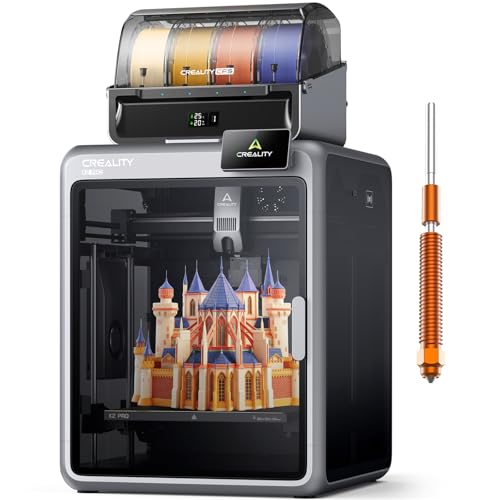
Creality K2 Pro Combo (A) 3D Printer 300×300×300mm

Creality SPARKX i7 Combo 3D Printer 10.24×10.24×10 inch

Creality SPARKX i7 3D Printer 10.24×10.24×10 inch
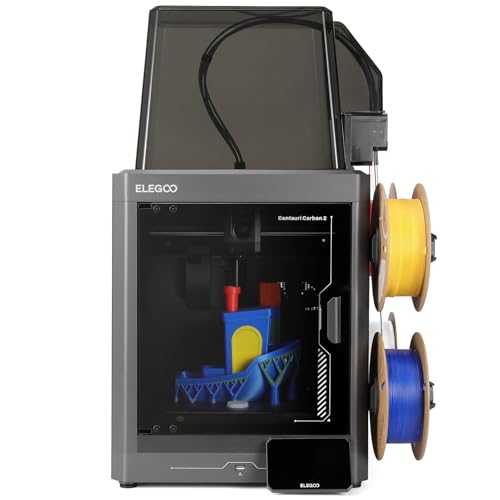
ELEGOO Centauri Carbon 2 Combo 3D Printer

Creality CFS Multi Color 3D Printer Automatically Filament System
More Details On Our Top Picks
This is the add-on that only makes sense when your printer already speaks the same language. The listed compatibility with the K2 Plus matters more than the color count, because a multicolor hub is only useful when the machine can actually coordinate it.
You may find it most appealing in a shop that values cleaner color changes over hand painting. The honest trade-off is simple, it is a system component, not a standalone printer, so the value depends on the rest of your setup.
What We Like
- Supports up to 16-color output with multiple CFS units.
- Reduces post-print painting for multicolor models.
- Fits a K2 Plus-centered workflow neatly.
Small Caveats
- It is only useful inside the right Creality ecosystem.
- The package note suggests you are not getting extra filament rolls with it.
Core Details
Who It Suits Best
You get the most from this as a K2 Plus owner who wants multicolor output without adding manual finishing to every part.
Where A Sibling Pick Shines
Creality K2 Plus Combo 3D Printer suits you better when you want the printer and multicolor system together in one purchase.
Fast, large-format multicolor printing is the whole story here, and that combination is hard to ignore. The 13.78-inch footprint in all three directions gives you room for larger single parts, while the 600mm/s speed claim points toward shorter waits on routine jobs.
The dual AI camera setup and auto-leveling make it feel aimed at busy workbenches rather than tinker-only desks. The catch is size, because a machine this capable asks for real floor or table space, and that’s not a minor detail in a cramped room.
Highlights
- Large cubic build volume suits bigger prints.
- Auto-leveling cuts down on setup friction.
- Dual AI cameras add oversight for long jobs.
- CFS support makes multicolor work more practical.
Points To Note
- The footprint asks for a serious permanent spot.
- Multicolor hardware adds complexity compared with a plain single-extruder machine.
- Its appeal leans toward users who really plan to use the extra capacity.
At A Glance
Who Will Love This
You benefit most here as a serious hobbyist or small-shop operator who wants size, speed, and color capability in one machine.
Swap It Out When
Creality K2 Combo (A) 3D Printer fits better for you when you want a more compact 260mm cube and a lighter starting point.
This model sits in the middle of the pack in a useful way, because it keeps the multicolor CFS setup but trims the footprint to a more manageable 260mm cube. For a desk corner, spare room, or a shared workshop, that size is easier to justify than the larger K2 Plus.
The 95% pre-assembled note points to a friendlier first setup, and the smart camera plus auto-leveling should help you move from unboxing to printing without a lot of friction. It still asks for the same planning around filament storage and system space, so the compactness is relative, not tiny.
Strong Points
- More approachable footprint than the larger K2 Plus.
- Pre-assembly helps shorten the startup process.
- Auto-leveling and smart camera support easier day-to-day use.
- 600mm/s rating keeps it in the fast-print camp.
Areas To Watch
- The build volume is still substantial, so storage planning matters.
- Multicolor operation adds parts to manage and clean.
Feature Snapshot
Built With In Mind
You’re the right fit for this if you want multicolor capability without stepping all the way up to a larger cabinet-sized machine.
A Better Fit Elsewhere
Creality K2 Pro Combo (A) 3D Printer suits you better when larger 300mm parts matter more than keeping the frame compact.
The K2 Pro Combo pushes farther on physical room, and that matters the moment your projects stop fitting the average hobby envelope. A 300mm cube is a meaningful step up for helmets, larger props, and broader multi-part work, while the active chamber heating is the feature that changes the temperature story inside the printer.
That chamber heating can help your workflow stay steadier with materials that benefit from a controlled internal environment, though it also means a more serious machine to house and maintain. The dual AI camera and auto-leveling keep it from feeling purely industrial, but you still need the space and the patience to match.
Upsides
- 300 x 300 x 300 mm volume opens up bigger projects.
- Active chamber heating supports more demanding material behavior.
- Dual AI camera adds monitoring confidence.
- Speed and multicolor support make it more than a size play.
Room For Improvement
- It takes more physical space than the smaller K2 Combo.
- Large-format machines usually ask for more careful maintenance and placement.
Quick Facts
Perfect Match For
You should look here first as a maker who wants room for larger prints and values a more controlled interior environment.
Look Elsewhere When
Creality K2 Plus Combo 3D Printer makes more sense for you if the exact same multicolor setup in a slightly smaller footprint fits your room better.
SPARKX i7 shifts the conversation from raw build size to personalized output, and that makes it unusual in this group. The AI photo-to-3D angle is aimed at portrait-based models and keepsake projects, so you’re looking at a printer that leans into gifts rather than plain utility parts.
The 10.24-inch cube is more compact than the K2 family, which helps in a room where every inch counts. The trade-off is obvious, because you give up large-format flexibility, but you gain a machine that feels easier to place in a home craft setup.
Best Bits
- AI photo-to-3D workflow is built for personal models.
- Compact dimensions fit smaller tables more easily.
- Quick-swap parts can simplify routine upkeep.
- Auto-leveling helps reduce first-layer friction.
Things To Consider
- The smaller build volume limits larger functional parts.
- Photo-to-3D tools suit creative projects more than engineering work.
Technical Sheet
Who Should Grab It
You fit this best as a hobbyist making personalized figurines, keepsakes, or portrait-driven pieces in a small workspace.
Another Choice May Suit
Creality K2 Combo (A) 3D Printer suits you better if general-purpose multicolor printing matters more than portrait conversion.
Compared with the Combo version, this SPARKX i7 leans harder on monitoring and control than on the full portrait-to-model story. The built-in AI camera is the detail that stands out, because it watches for tangled filament and the messy spaghetti-style failures that can waste an evening.
That makes it a good fit for longer prints in a home workshop where you can’t stand beside the machine all day. The low-noise note also helps in shared rooms, though a quieter machine still needs the same attention to placement and cleanup.
Positives
- AI camera supports live monitoring and issue alerts.
- Compact size keeps it easier to place.
- Low-noise operation suits shared living spaces.
- Auto-leveling reduces setup friction.
Softer Spots
- You still need to manage filament loading and routine upkeep.
- The smaller footprint also means a smaller project envelope.
- AI assistance helps, but it does not replace sensible print setup.
Core Details
Whose Shelf It Belongs On
You should look here if you want a compact multicolor-capable machine with added monitoring for everyday home use.
Where A Sibling Pick Shines
Creality SPARKX i7 Combo 3D Printer makes more sense when you want the AI photo-to-3D workflow in the same family.
This ELEGOO combo stands out for material breadth rather than headline speed or huge dimensions. The listing points to support for a wide range of materials, from basic to engineering-grade, and that is the sort of capability that matters once your projects stop being decorative.
The CANVAS system adds instant color switching and filament detection, which should appeal to anyone juggling multicolor jobs with less fuss. The honest read is that this feels aimed at people who care about process control as much as final appearance.
Upsides
- CANVAS support simplifies color changes.
- Filament detection helps reduce avoidable interruptions.
- Material range opens the door to tougher projects.
- Auto refill support is useful during longer runs.
Worth Noting
- Its feature set is broad, so setup habits matter.
- The material-versatility angle may matter less for simple decorative prints.
Feature Rundown
Made For
You fit this best as a maker who wants one printer that can move from colorful display pieces to tougher functional work.
Where Another Pick Suits Better
Creality K2 Pro Combo (A) 3D Printer suits you better if you want a clearly stated larger 300mm build envelope with chamber heating.
This is the accessory to study closely if you already have a compatible printer and want the filament system to do more of the orchestration. The anti-moisture storage and four-device support make it the most infrastructure-like pick in the list, which is useful for longer sessions and more ambitious color work.
Its support for different-material model supports also matters, because that can change how cleanly removable support structures behave in real projects. The limitation is obvious though, since it’s for K2 Plus and Hi Series machines, so the fit is narrow by design.
Reasons To Buy
- Up to four connected units support 16-color output.
- Anti-moisture storage is useful for filament care.
- Support material handling helps with cleaner part removal.
- Best suited to a modular multicolor workflow.
Areas To Watch
- Compatibility is limited to specific Creality printer families.
- It is a system component, so it depends on the rest of your setup.
Details At A Glance
Right Fit For
You’re the best match for this if you already own a compatible Creality printer and want a more capable filament system around it.
Skip It When
Creality K2 Plus Combo 3D Printer is the cleaner path when you want the printer and multicolor system in one purchase.
What Matters Most Before Choosing Cfs 3d Printers
Build Volume And Workspace Fit
The first filter is simple, the machine has to fit your table and your projects. A 260mm cube works better in a spare room, while a 300mm cube gives you more freedom for larger parts and multi-piece builds.
Color System Or Full Combo
Some setups give you the CFS component alone, and others bundle it with the printer. A combo makes more sense for first-time multicolor owners, while a standalone system rewards anyone already inside the same printer family.
Setup Time And Daily Maintenance
Pre-assembly, auto-leveling, and smart cameras matter because they change how much time you spend preparing the machine. More parts also means more cleaning and more storage planning for filament and accessories.
Feature Match To Your Use Case
Portrait-to-model tools help gift makers, while larger chambers and heating matter more for demanding functional parts. The right pick is the one that matches your normal week, not the one with the longest feature list.
A Quick Reality Check
Wrong Turns To Avoid
Don’t overbuy a color system for simple single-color parts. Don’t ignore compatibility, either, because the wrong CFS match turns a promising setup into shelf decor.
The Upgrade Payoff
Higher-tier models usually pay for larger build volume, stronger monitoring, and more controlled printing conditions. That extra spend makes sense for bigger jobs, longer runs, and anyone who wants fewer interruptions.
Frequently Asked Questions
What Does CFS Mean In These Printer Setups?
CFS is the filament system that manages color changes and feeding. In practical terms, it helps multicolor printing feel more automatic.
Do You Need A Combo Model To Start?
No, a standalone CFS unit can make sense with the right compatible printer. A combo is easier when you want a matched setup from the start.
Which Model Fits Smaller Rooms Best?
The Creality SPARKX i7 models are the more compact choices in this list. The 10.24-inch cube is easier to place than the larger K2 family machines.
What Matters Most For Large Prints?
Build volume is the key number, along with a frame that suits long jobs. The Creality K2 Pro Combo gives you a 300mm cube, which is the clearest large-format step here.
Who Should Skip A Standalone CFS Unit?
You should skip it if your printer is not in the supported family. The Creality CFS Multi Color system depends on compatible hardware, so the fit has to come first.
