


Cheap audio interfaces are where home recording stops feeling improvised. You get cleaner mic input, proper headphone monitoring, and a more stable way to connect guitars, vocals, and instruments to a computer or phone.
The right pick depends on your space and workflow, not just channel count. A compact two-input unit suits a desk setup, while a larger interface makes sense for multi-mic sessions, streaming, or a small project studio.
Quick Look At The Shortlist

Motu M4 4×4 USB-C Audio Interface

MAONO AME2 Audio Interface Mixer, Podcast Studio Console
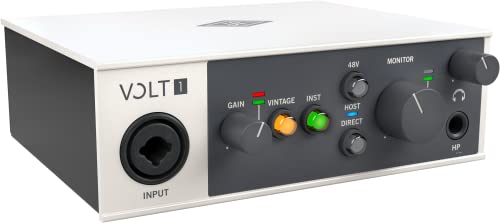
Universal Audio Volt 1 USB Audio Interface

JOYO Guitar Audio Interface for Phone, Direct Monitoring

BOMGE mini 2 Channel USB Audio Interface

XTUGA USB Audio Interface for PC, Q-12

MAONO PS22 Lite USB Audio Interface for PC

Behringer UMC1820 Audiophile 18×20 USB Audio/MIDI Interface
More Details On Our Top Picks
The M4 fits a desk where you need a little more breathing room than a bare-bones solo interface gives you. Four inputs and four outputs make it easier to keep a mic, instrument, and monitor path separated, which matters the moment your sessions stop being one track at a time.
The front display is a practical touch, since level visibility helps you avoid guesswork during long sessions or livestreams. That extra routing flexibility does mean a slightly larger footprint than ultra-compact picks like the JOYO MOMIX CAB, so it suits a permanent setup better than a travel bag.
Strong Points
- 4-in, 4-out layout gives you room to grow.
- USB-C connection suits modern desktops and laptops.
- Front display makes level checks quick at a glance.
- Useful for home studios that juggle vocals and instruments.
Things To Consider
- It takes more desk space than a simple single-input unit.
- The extra routing is useful, but beginners may not need all of it right away.
Feature Card
Who It Suits Best
Home studio users who want a tidy, versatile interface without moving into pro rack gear will get the most from it.
A Better Fit Elsewhere
Universal Audio Volt 1 USB Audio Interface suits solo vocalists or guitarists who want a simpler front-end and do not need multiple I/O paths.
This MAONO leans toward creators who want hands-on control instead of a plain input box. The combo of XLR input, Bluetooth, and eleven custom sound pads gives it a mixer-style feel, which is handy in a podcast corner or a livestream desk where quick changes matter.
48V phantom power supports condenser microphones, while the gain stages help you shape vocal level without riding every syllable by hand. The trade-off is obvious, though, since the extra controls add learning time and take up more room than the slimmer Volt 1.
What We Like
- Sound pads suit live shows and energetic podcast setups.
- Bluetooth adds a convenient source option for mixed media work.
- XLR support and phantom power cover common mic setups.
- More control on the panel means fewer software menu dives.
Room For Improvement
- The control-heavy layout asks for a little setup time.
- It makes more sense on a fixed desk than in a bag.
- Anyone who only needs one mic input may find it more complex than necessary.
Core Details
Who Should Grab It
Streamers, podcasters, and solo hosts who like hardware control will get the best use from it.
Where A Sibling Pick Shines
Behringer UMC1820 Audiophile 18×20 USB Audio/MIDI Interface suits session setups that need far more inputs than a mixer-style desktop unit.
Volt 1 keeps things stripped down in a way that makes sense for a desk with one mic or one instrument at a time. The Vintage mode nods to classic preamp color, while the 24-bit, 192 kHz ceiling gives you plenty of headroom for detailed recording and editing.
The honest read is that this is a good fit for people who value sound quality over routing complexity. Compared with the MOTU M4, you give up expansion headroom, but you also get a simpler front panel that feels less crowded during a late-night session.
Highlights
- Compact size works well on a crowded desk.
- Vintage mode adds a character option for vocals or guitar.
- 24-bit, 192 kHz support suits detailed capture.
- Simple layout keeps daily use straightforward.
Minor Gripes
- Single-channel design limits larger recording setups.
- Less flexible than multi-I/O picks for growing studios.
At A Glance
Who Will Love This
Singer-songwriters and solo creators with a clean desk setup will appreciate the uncluttered workflow.
Swap It Out When
MAONO PS22 Lite USB Audio Interface for PC suits streamers who need loopback and routing tools more than a single-channel focus.
For phone recording, this is the most travel-friendly shape in the group. The 6.35 mm input handles guitar directly, and the 3.5 mm headphone out keeps monitoring local, so you can record in a practice room, hotel corner, or quiet backstage space without a full desk rig.
Direct monitoring is the key term here, meaning the input signal reaches your headphones right away instead of waiting for the app to process it. That makes the MOMIX CAB a strong fit for dry guitar capture, though the tiny format also means you give up the broader routing of the M4 or PS22 Lite.
Best Bits
- Very small body suits travel and quick setup.
- USB-C and Lightning support widen phone compatibility.
- Direct monitoring helps timing feel immediate.
- Good match for guitar practice and sketch recordings.
Softer Spots
- Small hardware usually means fewer routing options.
- Best suited to one instrument at a time.
Built With In Mind
Mobile guitarists and creators who record away from a full studio desk will get the most out of it.
Another Choice May Suit
BOMGE mini 2 Channel USB Audio Interface fits a desktop setup better when you want two inputs and a more traditional recording layout.
BOMGE keeps the design plain, which helps if you want a no-drama desktop interface for vocals, guitar, or podcast capture. The two-channel layout works well for a starter rig, and the XLR input with 48V phantom power covers common microphone setups without forcing you into software workarounds.
Two RCA stereo jacks add another layer of connectivity for playback or simple routing. The trade-off is that it stays firmly in the compact category, so creators who expect lots of live control will probably want something closer to the MAONO AME2.
Positives
- Two-channel layout suits a basic home recording desk.
- XLR support handles a standard vocal mic setup.
- 48V phantom power opens the door to condenser mics.
- RCA stereo jacks add useful playback options.
Small Caveats
- The small shell is practical, but it leaves less room for advanced controls.
- It fits a starter rig better than a growing multi-source studio.
Right Fit For
New podcasters, vocalists, and home musicians who want a simple two-input path will feel right at home with it.
Look Elsewhere When
Behringer UMC1820 Audiophile 18×20 USB Audio/MIDI Interface suits bigger sessions that need far more connectivity.
The Q-12 aims at everyday recording without much fuss. Its dual-input setup and 16-bit, 48 kHz ceiling are enough for basic music capture, and the XLR plus 3.5 mm input mix gives you a simple way to bring different sources into one small box.
One practical strength is the switchable 48V phantom power, since condenser microphones need that extra feed. The catch is that this is a straightforward tool rather than a deep control surface, so it suits a tidy PC corner more than a more ambitious production desk.
Upsides
- Dual inputs keep small sessions easy to manage.
- 16-bit, 48 kHz output is adequate for routine recording.
- Phantom power broadens mic compatibility.
- Plug-and-play setup appeals to first-time desktop users.
Areas To Watch
- The feature set is modest compared with more flexible desktop units.
- PC-focused use makes it a narrower fit than phone-friendly picks.
Who Will Love This
Desk-based hobbyists who want a functional interface for simple recording sessions will get the most from it.
Where A Sibling Pick Shines
MAONO PS22 Lite USB Audio Interface for PC gives streamers more routing tools and higher-resolution capture.
PS22 Lite makes sense for a creator desk that has to serve more than one job. The low-noise preamp helps keep vocals cleaner in ordinary home-studio spaces, while loopback lets you bring computer audio back into a stream or recording without awkward workarounds.
It also includes ASIO driver support, and that matters because ASIO reduces latency, meaning the delay between playing and hearing back stays tighter in compatible software. Compared with the XTUGA Q-12, this MAONO is the more capable choice for streaming and DAW work, though it asks a little more from your setup.
Reasons To Buy
- 24-bit, 192 kHz capture suits detailed vocal and instrument work.
- Loopback is useful for streams, tutorials, and layered audio.
- ASIO support fits serious PC recording workflows.
- Low-noise preamp helps keep home recordings cleaner.
Worth Noting
- Routing tools help most when your software setup is already organized.
- Stream-focused features can be more than a casual recorder needs.
Technical Sheet
Whose Shelf It Belongs On
Streamers, home-studio vocalists, and PC creators who need flexible routing will make the most of it.
Reach For A Different Pick When
JOYO Guitar Audio Interface for Phone, MOMIX CAB suits mobile guitar recording better than a PC-centered interface.
The UMC1820 sits at the far end of this list in channel count and studio ambition. Its 18-by-20 USB layout, MIDI support, and ADAT I/O make it a sensible hub for larger recording rooms, especially where keyboards, drum machines, or extra mic preamps are part of the picture.
That scale is the point, and also the trade-off. Compared with the compact JOYO or XTUGA options, this Behringer asks for a more committed setup, but it rewards that space with the kind of connectivity that growing bands and multi-source sessions actually need.
Positives
- 18-by-20 routing covers large tracking sessions.
- MIDI and ADAT support widen system integration.
- Useful for microphones, guitars, keyboards, and expansion gear.
- Fits a studio that may grow over time.
Honest Caveats
- It is more interface than a casual desk setup usually needs.
- The larger footprint suits a permanent studio better than a portable rig.
Feature Rundown
The Right Fit
Small studios that expect to expand into multi-input recording will get the most from this unit.
Skip It When
BOMGE mini 2 Channel USB Audio Interface is the simpler choice for a first recording desk or a very small room.
What Matters Most Before Choosing Cheap Audio Interfaces
Inputs, Routing, And Workflow Fit
Count your real sources first: one mic and one guitar call for a simpler unit, while podcast desks and band rooms need more inputs and outputs. Loopback, direct monitoring, and mixer controls matter most when you move between recording, streaming, and playback in the same session.
Power, Latency, And Software Support
48V phantom power matters for condenser microphones, while ASIO support helps PC users keep latency tight in compatible apps. A low-noise preamp is useful in quiet rooms, but the room itself still shapes how polished the final track feels.
Size, Portability, And Desk Space
Small interfaces fit phone rigs and crowded desks, but larger units earn their keep with broader control and expansion paths. A travel-friendly shell is handy for practice rooms and temporary setups, yet a fixed studio can justify the extra surface area.
A Quick Reality Check
Common Shopping Slip Ups
Many shoppers focus on channel count and ignore the software path, which is where a PC setup can feel smooth or awkward. It also helps to check whether you need phone support, desktop support, or both.
When Paying More Pays Off
Higher-tier models usually add cleaner preamps, more metal in the shell, deeper routing, and broader connection options. That upgrade makes sense for streamers, bands, and home studios that outgrow one-input recording fast.
Frequently Asked Questions
What Does A Cheap Audio Interface Actually Do?
It converts your microphone or instrument signal into a form your computer or phone can record. It also gives you proper headphone monitoring instead of relying on a noisy built-in jack.
How Many Inputs Do You Need?
Solo vocal or guitar work usually runs fine on one input, while podcasting and duet recording benefit from two or more. Larger sessions need more channels, especially once keyboards or extra microphones enter the picture.
Does 48V Phantom Power Matter?
Yes, because condenser microphones need that external power to operate. Dynamic mics usually do not need it, so you only need the switch when your microphone calls for it.
What Is Loopback Used For?
Loopback sends computer audio back into the recording path. Streamers use it for game sound, video calls, or app audio alongside their microphone.
Is A Bigger Interface Always Better?
No, because bigger units trade portability and simplicity for more routing and expansion. A compact interface can be the smarter choice for a small desk or a phone-based setup.
