


Cheap capture cards make more sense once you know what you need from them, not just what they claim on the box. For console clips, webcam-style live streaming, or DSLR recording into a laptop, the right pick is mostly about resolution support, connection speed, and how much setup friction you can tolerate. You also want the card to fit your system, since a simple USB 2.0 model and a USB 3.0 model do not live in the same lane.
Quick Look At The Shortlist

PDAPTMAG 4K Video Capture Card HDMI to USB

BENFEI Video/Audio Capture Card 1080P 60FPS

VIXLW 4K HDMI Video Capture Card Cam Link Card

HeavenBird 4K HD Video Capture Card USB 3.0

Veeloon Video Capture Card 4K HDMI to USB C
PDAPTMAG HDMI Video Capture Card 4K to USB
4K HDTV Capture Card with Microphone
More Details On Our Top Picks
PDAPTMAG keeps things simple for console owners who want a straight HDMI-to-USB path. USB 2.0 means the setup leans more toward basic recording and casual streaming than heavy-duty creator work, so the trade-off is speed rather than complexity.
That makes sense for a living room desk, a small dorm setup, or a first capture rig tied to a Switch, PS5, or Xbox. The honest read is that you get a restrained tool, not a flashy one, and that can be enough for clipped gameplay or simple live sessions.
Strong Points
- HDMI input keeps the signal path straightforward.
- USB connection fits older laptops and spare PCs.
- Compact format takes little desk space.
- Works well as a starter card for console clips.
Things To Consider
- USB 2.0 is the main ceiling here.
- It suits lighter workloads better than pro-grade capture.
- Cable management matters in tight setups, since extra slack gets messy fast.
Core Details
Who It Suits Best
Console newcomers and casual streamers get the most from this card.
A Better Fit Elsewhere
BENFEI Video/Audio Capture Card 1080P 60FPS suits Mac and Windows users who want a cleaner step up in capture quality.
This BENFEI model pushes harder on smooth output than the entry-level card above. The 1080p 60fps target matters because motion stays cleaner during gameplay, fast camera pans, or on-screen menus, which is exactly where cheaper cards often start to feel loose.
It also makes more sense for mixed computers, since the listing covers Windows and Mac OS as well as consoles like Switch, PS4, PS5, and Xbox. The catch is that this is still a compact capture tool, so you should treat it as a practical desk companion rather than a studio anchor.
Upsides
- 1080p at 60fps is a useful ceiling for smoother movement.
- Broad system support helps you move it between setups.
- Video and audio capture together keep the workflow tidy.
- Fits streamers who want a cleaner jump from basic gear.
Points To Note
- It still lives in the budget-friendly end of the category.
- Serious studio workflows may want more headroom.
- Keep spare adapters organized, since multi-device use can pile up cables quickly.
Feature Card
Right Fit For
Desktop streamers who want a smoother baseline will get the most from this card.
Where A Sibling Pick Shines
HeavenBird 4K HD Video Capture Card USB 3.0 is the better match for you if zero-driver setup matters more than platform breadth.
VIXLW leans into versatility, which is why it reads differently from the simpler BENFEI pick. The listing points to teaching, conferencing, live broadcasting, and gaming, so it fits desks where the same input needs to serve more than one job.
Because it uses USB 2.0, the card is better suited to light-to-moderate capture than demanding multi-track production. Still, for Windows users who want one adapter to cover classes, calls, and gameplay, that broad intent is useful.
What We Like
- Wide use-case range makes it easy to repurpose.
- Cam Link style wording signals camera-friendly workflows.
- Works for classes, calls, and streaming sessions.
- Compact hardware suits temporary desk setups.
Areas To Watch
- Windows-only support narrows the audience.
- USB 2.0 keeps expectations modest.
- Shared-use gear benefits from careful storage, since small dongles disappear easily in a bag or drawer.
Feature Rundown
Whose Shelf It Belongs On
Windows users who split time between streaming and video calls are the strongest match here.
Look Elsewhere When
Veeloon Video Capture Card 4K HDMI to USB C is the smarter choice for multi-OS homes that want USB-C flexibility.
HeavenBird is the cleanest no-drama option in this list. USB 3.0 usually matters more than marketing copy, because it reduces bottlenecks during live capture and gives you a more modern connection point for current laptops and desktops.
The plug-and-play claim also helps here, since fewer setup steps matter a lot for casual streamers and anyone setting up a guest rig. Compared with the USB 2.0 cards above, this one reads like the safer step-up for everyday use, though the trade-off is that broader platform detail is not spelled out.
Positives
- USB 3.0 is the main practical advantage.
- Plug-and-play setup cuts out driver hunting.
- Good fit for quick desk changes and borrowed systems.
- Simple hardware usually keeps day-to-day handling easy.
Softer Spots
- Platform support details are not laid out in depth.
- The card is aimed more at straightforward use than niche workflows.
Built With In Mind
You’ll get the most from this card in a home office or casual streaming corner where quick setup matters.
Another Choice May Suit
PDAPTMAG 4K Video Capture Card HDMI to USB makes more sense for someone who wants a simpler USB 2.0 fallback for very basic capture.
Veeloon is the broadest fit in the group, mostly because it bridges USB-C and USB A with the included adapter. That matters in mixed households, campus rooms, and work desks where one computer is modern and another still leans on standard USB.
The listing also covers an unusually wide set of devices and software, from consoles and cameras to OBS, VLC, and Zoom. The trade-off is that a long compatibility list can sound more universal than any one setup really is, so matching your own gear is worth the extra minute.
Reasons To Buy
- USB-C focus gives it a more current feel.
- USB A adapter adds flexibility for older ports.
- Wide software and device support helps shared households.
- Light 50 g weight makes it easy to travel with.
- Two-year coverage note stands out in a practical way.
Small Caveats
- The compatibility list is broad, so your own setup still deserves a close look.
- Small adapters are easy to misplace during travel or storage.
Details At A Glance
Perfect Match For
Hybrid desks and frequent movers get the most value from this one.
Swap It Out When
HeavenBird 4K HD Video Capture Card USB 3.0 is the better call for someone who wants the simplest possible plug-and-play setup.
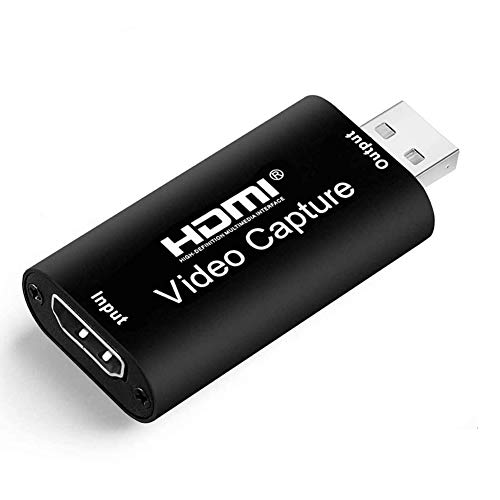
This PDAPTMAG card stays close to the classic budget formula, which is not a bad thing for simple recording jobs. The source details point to 4K input and 1080p 30fps output, so the card is better understood as a basic bridge than as a high-motion streaming tool.
That makes it useful for DSLR, camcorder, and action camera owners who want a straightforward capture path into a PC. Compared with the USB 3.0 HeavenBird model, this one asks you to accept a more modest ceiling in exchange for a very simple setup path.
Bright Spots
- Works with a wide range of HDMI-output gear.
- Simple USB 2.0 setup keeps the hardware familiar.
- Good for basic recording from cameras and game systems.
Points To Note
- 1080p 30fps is the main output target, so fast motion has less headroom.
- USB 2.0 is fine for basics, not for demanding workflows.
- Camera users may want tidy storage, since small capture adapters and short cables are easy to separate from the rest of the kit.
The Right Fit
Camera hobbyists and straightforward PC recorders will appreciate the simple format here.
Where Another Pick Suits Better
BENFEI Video/Audio Capture Card 1080P 60FPS is the smarter move for streamers who want smoother motion and broader desktop compatibility.
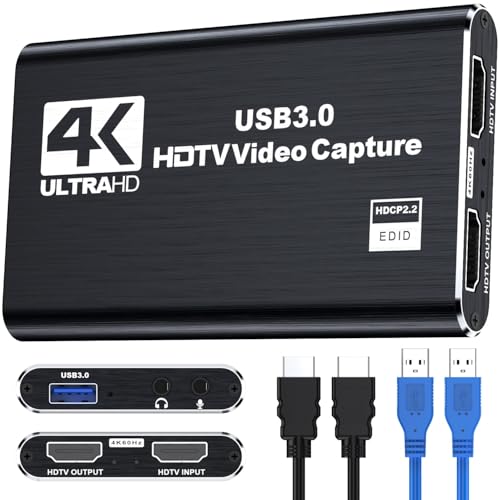
This one stands out because it folds a microphone input into the capture setup, which can save a desk from extra dongles. The listed 4K HDTV loop-out also helps for pass-through style use, while the 1080p 60fps recording target keeps it in a sensible range for gaming and conference work.
That combination fits small streaming corners and chat-heavy setups where audio management matters as much as video. The honest read is that a bundled mic path can simplify life, but you still want to keep the cabling neat, since compact capture gear tends to accumulate clutter fast.
Highlights
- Microphone input reduces the need for extra audio gear.
- Loop-out support is useful for monitoring or pass-through style setups.
- 1080p 60fps target suits smoother everyday recording.
- Good match for gaming desks and meeting stations.
Room For Improvement
- Brand information is less clear than on the other picks.
- Compact capture setups can get messy without labeled cables.
Who Should Grab It
Small desks that need video and microphone handling in one place will get the most value from this card.
Reach For A Different Pick When
HeavenBird 4K HD Video Capture Card USB 3.0 is the better match for anyone who wants the cleanest plug-and-play path without the extra audio focus.
What Matters Most Before Choosing Cheap Capture Cards
Resolution And Frame Rate
1080p 60fps is the sweet spot for most casual stream setups because motion stays smoother without pushing the budget too hard. 4K input can still matter, though, since it gives camera and console owners more flexibility before the signal is reduced for capture.
Connection Speed And Port Type
USB 2.0 works for basic use, but USB 3.0 and USB-C are better fits for cleaner performance and fewer bottlenecks. A mixed home with newer laptops and older desktops benefits from a card that includes more than one connection path.
Device And Software Fit
Console support is only useful when it matches your actual gear, so check the listing against your Switch, PS5, Xbox, camera, or laptop. Stream software support matters too, especially for OBS, Zoom, or camera use on a desk that does more than one job.
A Quick Reality Check
Common Shopping Slip Ups
Many first-time shoppers focus on the 4K headline and miss the actual capture output, which is where the real work happens. Another common miss is buying a USB 2.0 card for fast-paced streaming, then wondering why the setup feels limited.
What The Higher Tier Buys
More expensive cards usually bring better port options, wider software support, or cleaner handling of higher data rates. That upgrade starts to make sense for frequent streamers, mixed-device desks, or anyone moving between camera, console, and laptop use.
Frequently Asked Questions
Do Cheap Capture Cards Work With Consoles?
Yes, several of the cards here list support for common game systems like Switch, PS4, PS5, and Xbox. The catch is matching the console to the card’s output limit and your recording needs.
Is USB 3.0 Worth Paying For?
USB 3.0 makes sense for smoother handling and a more current setup path. USB 2.0 still works for lighter tasks, but it gives you less room to grow.
Can You Use These With A Camera?
Yes, some of these cards suit DSLR, camcorder, and action camera use. You still need the camera’s HDMI output to match the card and your software setup.
Why Does 1080p 60fps Matter?
It keeps movement looking cleaner during gameplay and live video. That matters more than raw 4K wording for most streaming use.
Which Card Is Easiest For A New Setup?
HeavenBird 4K HD Video Capture Card USB 3.0 is the easiest fit for a simple plug-and-play path. PDAPTMAG 4K Video Capture Card HDMI to USB also stays straightforward, but with a more basic USB 2.0 ceiling.
